Understanding Position PnL
Every position box reports a return on capital. Two things decide that number: which costs are charged to the position, and what counts as the capital it consumed. Both are adjustable, and both matter — the same trade can read very differently depending on how they're set.
The PnL breakdown
Click see more on a position to expand two waterfall charts.
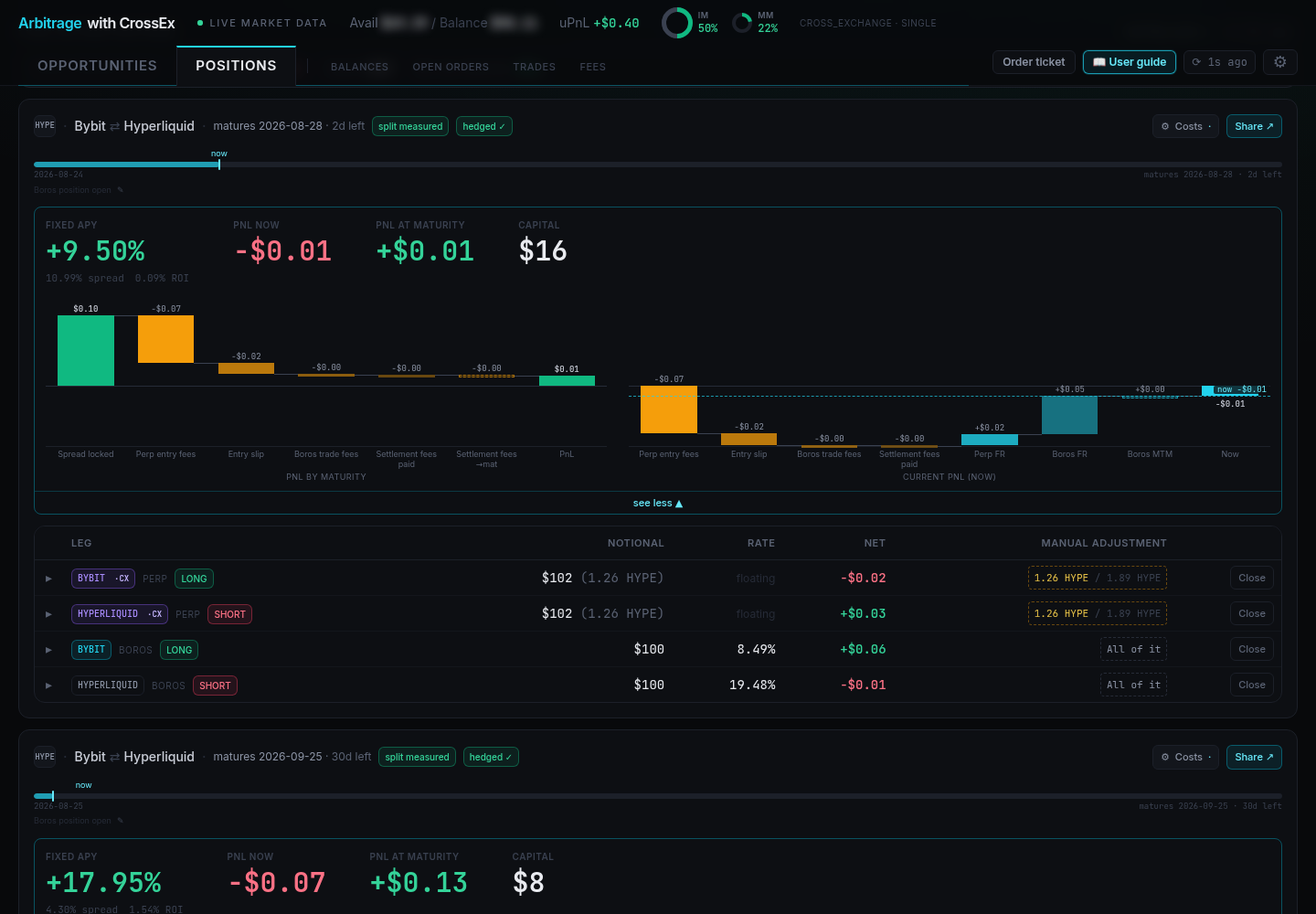
PNL BY MATURITY projects the result of holding to maturity, starting from the spread locked and subtracting perp entry fees, entry slip, Boros trade fees, and settlement fees (both paid so far and still to come).
CURRENT PNL (NOW) shows where the position stands today: the same cost lines, plus the floating components that move day to day — perp funding (Perp FR), Boros funding (Boros FR), and Boros mark-to-market (Boros MTM). On a Spread Market, Boros FR is the floating spread settled on the single Boros position.
Cost assumptions
The Costs button on a position opens its Cost assumptions dialog, which has two toggles. Both move the headline numbers and the waterfall charts.
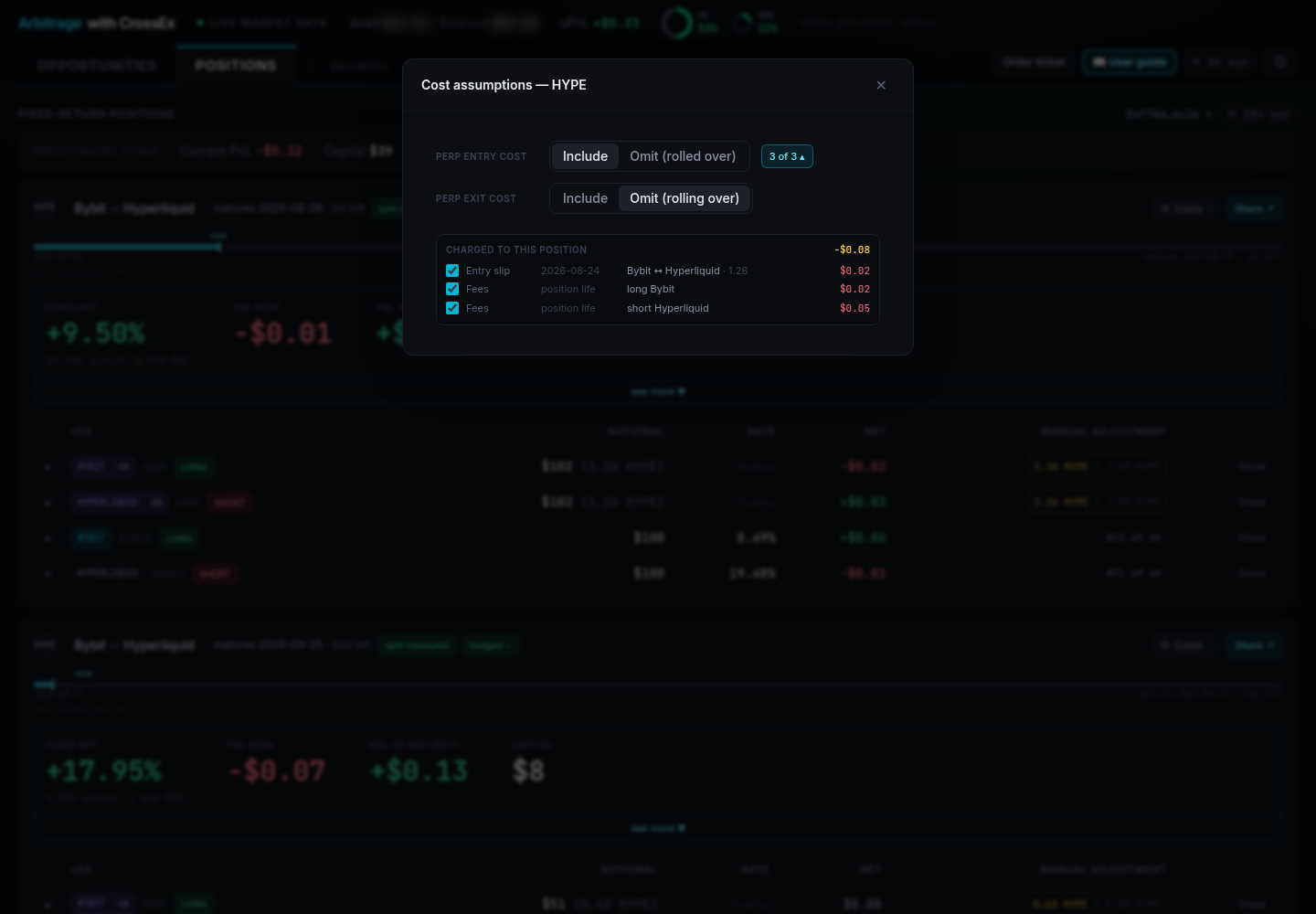
Perp exit cost — what happens to the perp legs at maturity.
- Include (default) — assumes you close them and pay another round of perp fees, modelled with the same fees and slippage as the entry.
- Omit (rolling over) — assumes you keep the perp legs into the next maturity, so no closing fees are charged. Only correct if you can actually lock a new spread on the same pair at the next maturity.
Perp entry cost — whether this position is charged what it cost to open the perp legs.
- Include (default) — correct whenever you opened the perp legs for this position.
- Omit (rolled over) — use when the perp legs were already open and you rolled them into this maturity. They paid their fees during the previous position, but Gate reports fees cumulatively and entry price from the original open, so without this the position is billed for money it never spent. This moves current PnL as well as the projection.
Itemising entry cost
Under Include, the count button beside it (e.g. 3 of 3) expands a CHARGED TO THIS POSITION list, breaking the cost into parts so you can charge only some of it — useful when a book was built across several executions, such as a top-up or legs inherited from a previous maturity. Everything is ticked by default, the button shows how many parts remain charged, and your ticks are remembered per position.
Two kinds of row appear, and they are not equally precise:
- Entry slip rows are per execution, each with its date, the venues crossed, and the size matched. Untick the ones whose fills belonged to an earlier strategy.
- Fees rows are per leg, marked position life. Gate reports a position's trading fees as one cumulative number, so they genuinely cannot be split by date — the terminal shows them per leg rather than inventing a split.
What counts as your capital
Every APR is a return on this number, so it decides whether a position looks good. The perp side is always the initial margin those legs consume. For the Boros side, Settings → Capital counted per position picks between two readings:
- Posted balance (default) — the collateral account's balance, split across the positions it backs. Right when that account exists only for these positions.
- Margin used — only the initial margin the Boros legs post. Use this if you also keep trading money in the same collateral account, since otherwise idle cash is counted as capital these positions needed, inflating capital and dragging every APR down.
The choice is remembered per browser and applies to every position box and the totals strip.
This is why a live position often reads a lower APR than the Opportunities estimate for the same trade: the estimate models the minimum capital required, while a live position divides by what you actually posted.
When one venue leg belongs to two positions
This applies when the Boros side is built from Funding Market legs. A Spread Market position belongs to one venue pair, so its Boros side is never shared. The perp legs can still be.
If you run, say, HL/OKX and HL/Binance at the same time, the Hyperliquid side is a single position everywhere you look — Gate reports one row at a blended entry price, Boros one position at a blended fixed rate. Neither says which part belongs to which strategy.
The terminal splits it back apart and shows each strategy as its own box with its own size, entry prices, and locked rate. It works from the execution record: the local deal journal plus your fill history at the venue, where each fill carries the order tag the terminal writes.
split measured— the record is complete, and the split is a measurement.split unconfirmed— for positions opened elsewhere, or older than the fill history reaches, the terminal pairs legs by how close their prices and open times are. The sizes are still right, since they come from the pairing itself. But the crossing cost is reported as unknown rather than estimated (charging a blended entry price to either strategy would invent a number), and the locked spread falls back to the blended rate.
Adjust split on the box is how you correct it: type the size this position really holds and Pin size, and everything unpinned is re-solved around it. Detach declares the two legs are not a strategy together, after which both are reported as unhedged. Back to automatic hands the pair back to the solver. Pins are remembered per tracked address.
If a venue position later shrinks below a pin, the pin is clamped and reported rather than silently rescaled, and any size belonging to no position gets its own unhedged box instead of disappearing.
Next: Risks & Security