Monitoring & Closing Positions
The Positions tab
Once open, an arbitrage position needs little maintenance — the main decision is what to do at maturity. The Positions tab groups each strategy into its own box, with all of its legs in one table.
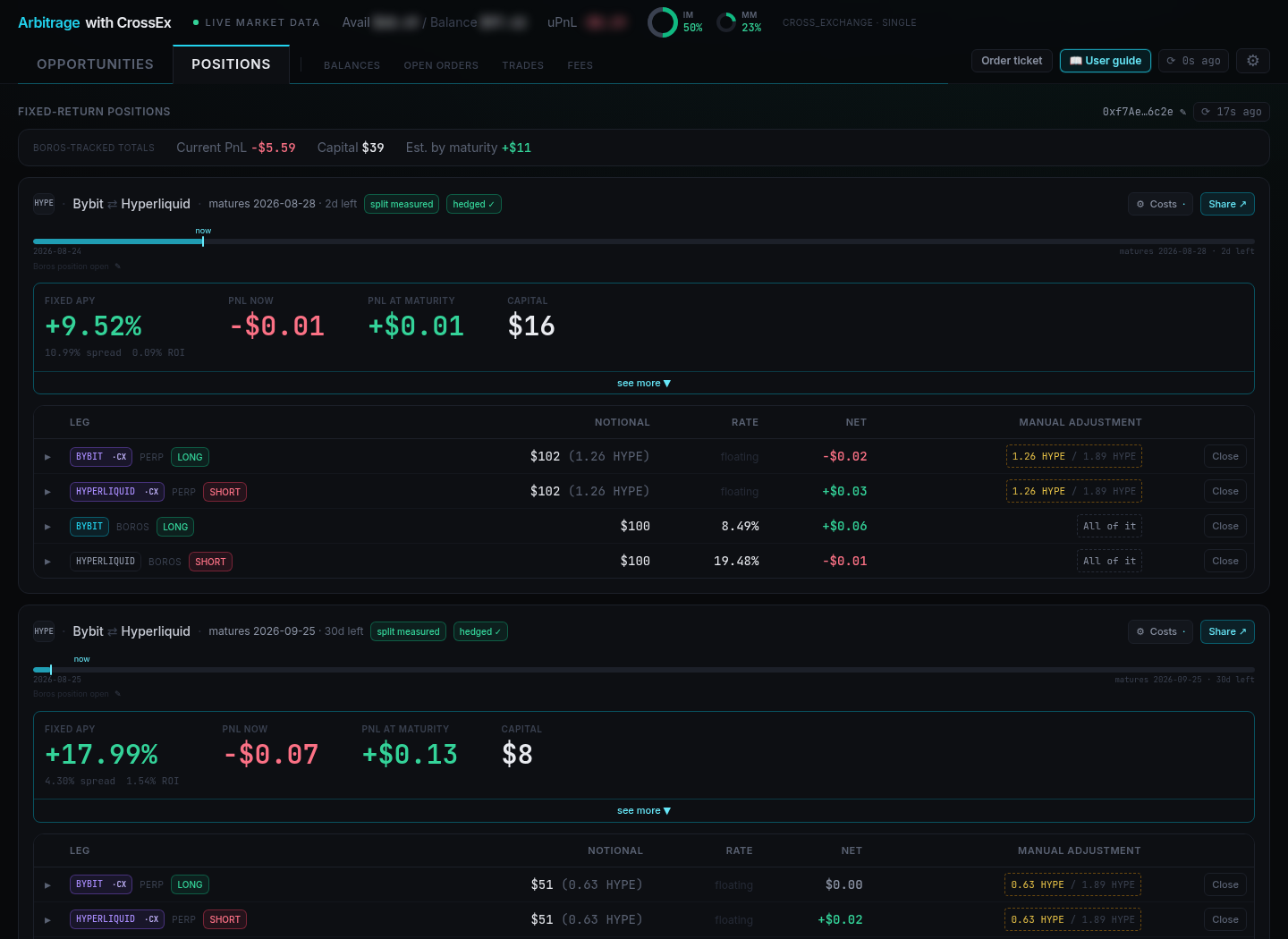
At the top, BOROS-TRACKED TOTALS summarises every tracked position: Current PnL, Capital, and Est. by maturity.
Each position box is headed by the coin, the venue pair (e.g. Gate ⇄ Hyperliquid), the maturity with days remaining, and a status chip — hedged ✓ when every leg is in place, partial hedge when every leg is open in the right direction but the sizes don't match, or unhedged when legs are missing. Below that sit the headline numbers:
- FIXED APY — the locked annualised return, with the underlying spread and ROI beneath it
- PNL NOW — mark-to-market profit or loss today
- PNL AT MATURITY — the projected result if held to maturity
- CAPITAL — what the position consumes
The leg table lists every leg — both ·CX perp legs and the BOROS side (one Spread Market leg, or two Funding Market legs) — with notional, rate (floating for perps, the locked rate for Boros legs), and net PnL.
A position only shows a rate, capital, and ROI once every leg is in place. A partially built one reads Incomplete position, and a mismatched one reads Sizes don't match — every leg is open in the right direction, but only the matched part is hedged. An unhedged box offers Open the perp legs →, which prefills the pair ticket with the opposite floating exposure.
Closing a position
Each side closes on its own venue, using the two buttons at the bottom of the position box:
- Close perp pair — closes both CrossEx perp legs together.
- Close Boros legs — closes the Boros side: the Spread Market position, or both Funding Market legs.
For finer control, the MANUAL ADJUSTMENT column on each leg row lets you close a single leg rather than the whole side. It shows All of it when the whole leg belongs to this position, or the matched size against the venue total (e.g. 1.26 HYPE / 1.89 HYPE) when the leg is shared with another strategy.
On a Spread Market, the Boros side has one margin requirement and one liquidation implied APR, both based on the spread. With two Funding Market legs, each Boros leg has its own, so keep an eye on both.
Because of the leverage on the perp legs, you may receive Initial Margin Ratio (IMR) alert emails from Gate. As the positions are delta-neutral, liquidation risk stays very low barring price dislocation across venues.
Rolling over instead of closing
If you can lock a decent spread on the same perp pair at the next maturity, rolling over is usually better than closing. The existing position escapes its perp closing fees and the new one escapes its perp opening fees — keep rolling and a position pays no perp fees at all, which is one of the largest boosts available to this strategy.
To roll over: close only the Boros side at maturity, open a new one at the next maturity (on the same Spread Market's next maturity, if there is one), and leave the perp legs untouched. Then set the old position's Perp exit cost to Omit (rolling over), and on the new position untick the inherited executions under Perp entry cost. Both live in the Costs dialog — see Understanding Position PnL.
Using the order ticket directly
Click Order ticket in the header to open the side panel and trade either side manually, outside the guided wizard — useful for topping up a leg or unwinding part of a position. See the order ticket for what each tab does.