PT Looping
PT Looping lets you amplify your fixed yield exposure on a PT by borrowing against it and buying more PT with the borrowed funds, repeating this cycle automatically to reach a target leverage, all from a single form.
PT Looping is currently in Beta and is only available for PT markets that Pendle has paired with a supported money market. Not every PT market supports looping.
How It Works
A loop position is built by repeating three steps until your chosen Target Leverage is reached, automatically, within a single transaction flow:
- Supply PT as collateral to a money market (e.g. Aave, Morpho).
- Borrow the market's debt asset against that collateral.
- Buy more PT with the borrowed funds via Pendle, then supply it back as collateral.
Estimates vs. what's guaranteed
Because each iteration borrows against the PT bought in the previous one, the step-by-step breakdown in the trade preview is always an estimate (~), since the exact amounts depend on live prices at execution time.
What the contract guarantees is a minimum PT-per-debt-token exchange rate, fixed the moment you sign. Every swap in the loop, whether opening or withdrawing, must clear this rate or it reverts. If the market moves too much mid-execution, the transaction stops at that step instead of finishing the remaining iterations, so you may end up with fewer iterations (and lower leverage) than projected.
Money markets
PT Looping supports a growing list of whitelisted (PT, money market) pairs. Each pairing has its own:
- LLTV (Liquidation Loan-to-Value) — the loan-to-value at which the position becomes liquidatable
- Max Leverage — the highest leverage the pairing supports, derived from its LLTV
- Max Looping APY — the best looping APY for that pairing at max leverage
Finding a Looping Opportunity
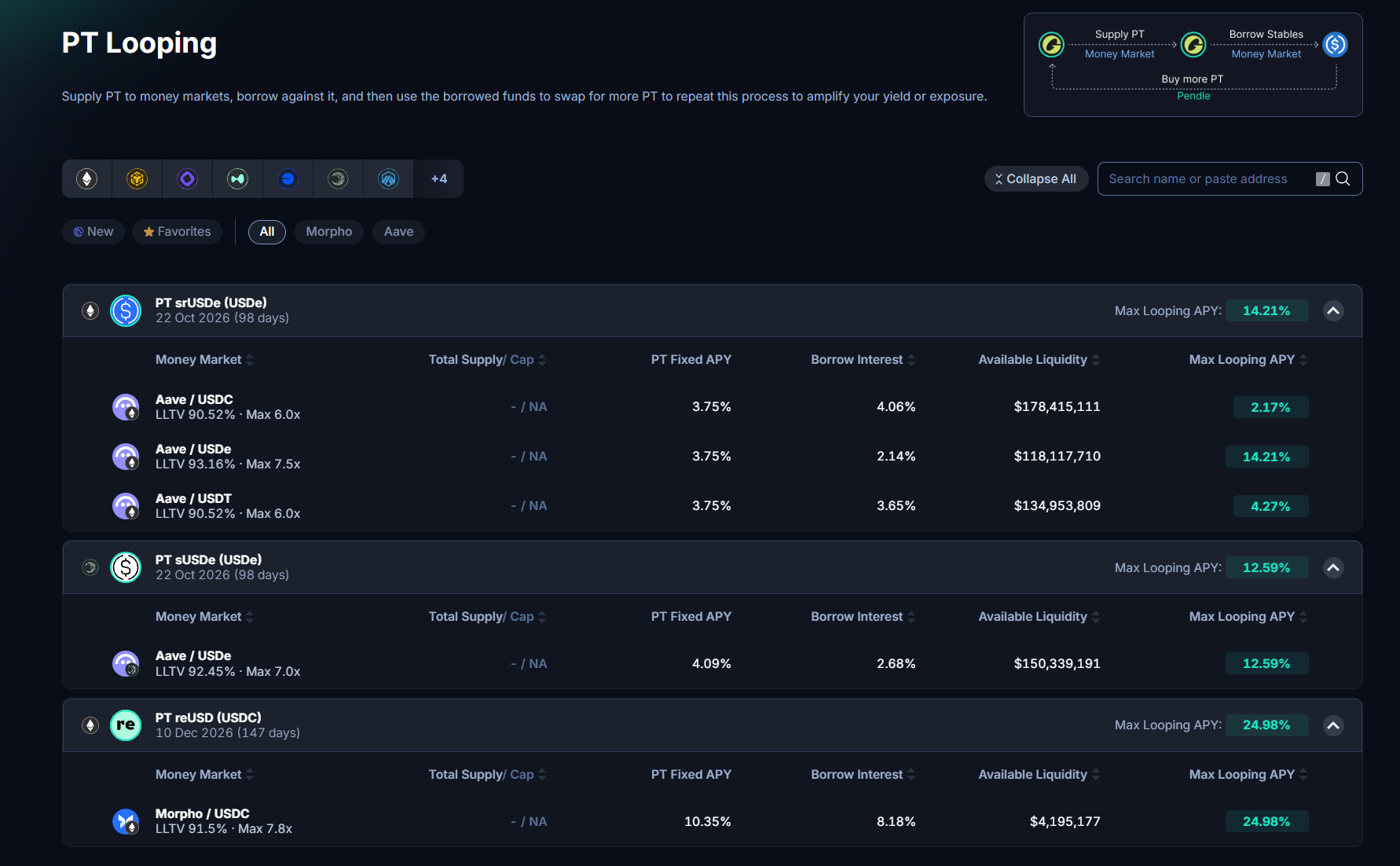
The PT Looping overview page lists every PT eligible for looping. Expand a PT to see its money market pairings side by side, with:
- Money Market — the protocol and debt asset (e.g.
Aave / USDC,Morpho / USDT) - Total Supply / Cap — how much has been supplied to that market, and its supply cap if any
- PT Fixed APY, Borrow APY, and Max Looping APY
- Available Liquidity — how much debt asset is available to borrow
Simulating Returns
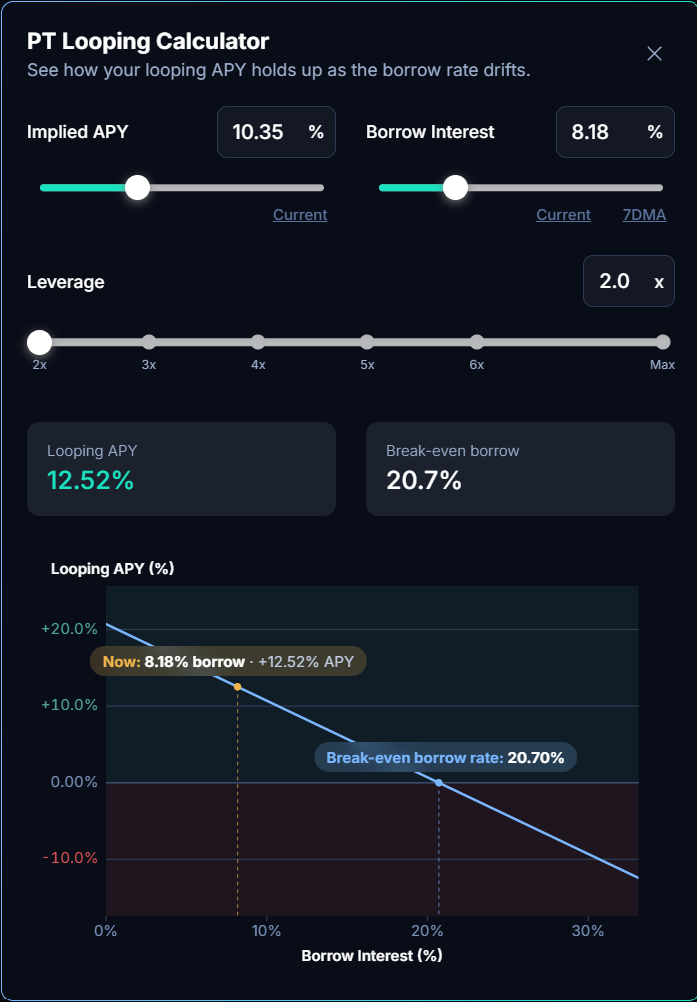
Before committing, use the PT Looping Calculator to see how a position's looping APY responds to different market conditions. Sweep the three inputs that drive returns:
- Implied APY — the PT's fixed yield. Drag or type a value; a Current shortcut snaps back to the live rate.
- Borrow Interest — the money market's borrow rate. Current and 7DMA (7-day moving average) shortcuts test against today's rate or a recent average.
- Leverage — the target leverage for the simulated position.
It then shows two figures:
- Looping APY — your net annualized yield at those inputs (roughly, leveraged PT yield minus borrow cost).
- Break-even borrow — the borrow rate at which looping APY hits 0%. While the actual rate stays below this, the position is net positive.
Opening a Loop Position
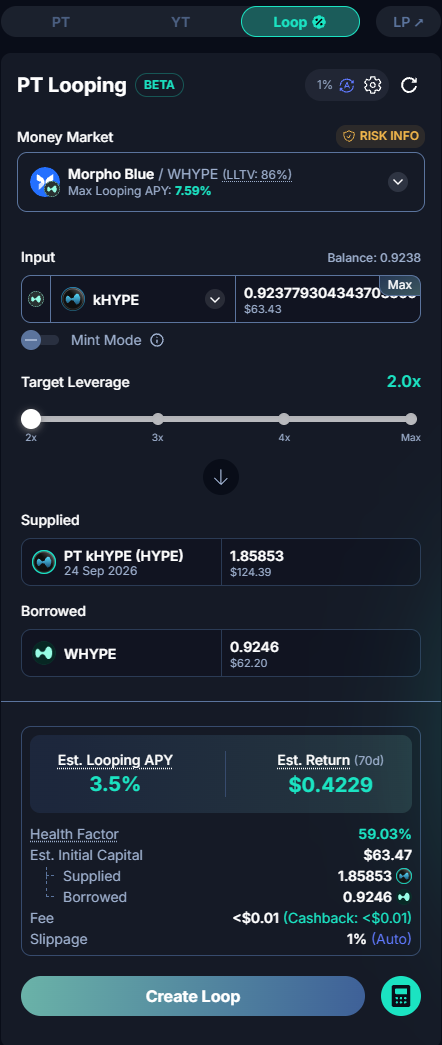
- From the overview page, click a (PT, money market) pairing, or open a market page and select the Loop tab.
- Confirm or change the Money Market using the selector, which shows each option's LLTV and Max Loop APY.
- Choose your input asset and enter the amount to deposit.
- Set your Target Leverage with the slider.
- Review the trading info (Est. Looping APY, Est. Return, and Health Factor), using the tooltips for details.
- Click Create Loop, then approve and confirm in your wallet.
Once submitted, a progress indicator tracks the loop, showing completed iterations and estimated time remaining. You can abort any time before it finishes (e.g. by declining the wallet signature or clicking cancel) without affecting funds beyond what has already executed on-chain.
Managing an Existing Position
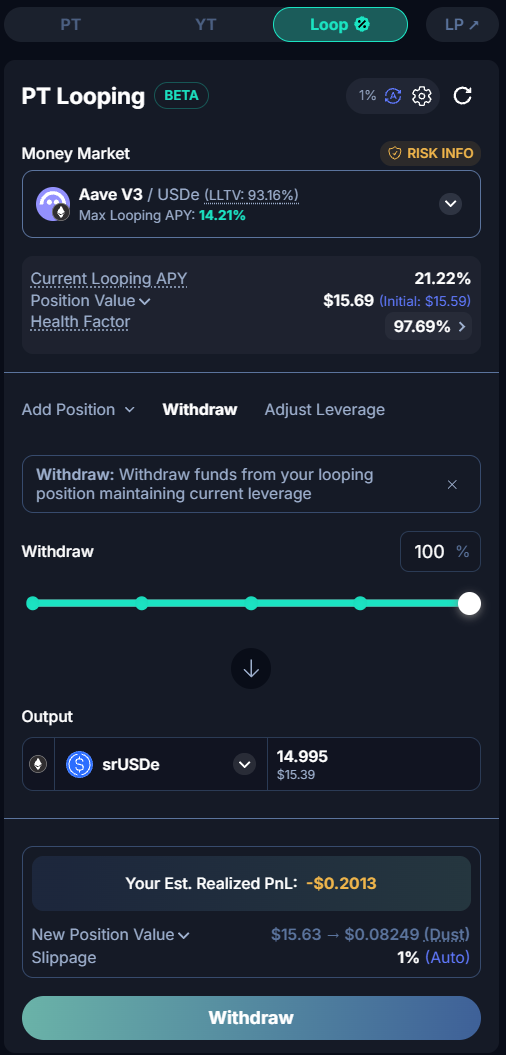
Once you hold a loop position, the action panel switches to three tabs (Add Position, Withdraw, and Adjust Leverage), each showing your current Looping APY, Position Value, and Health Factor.
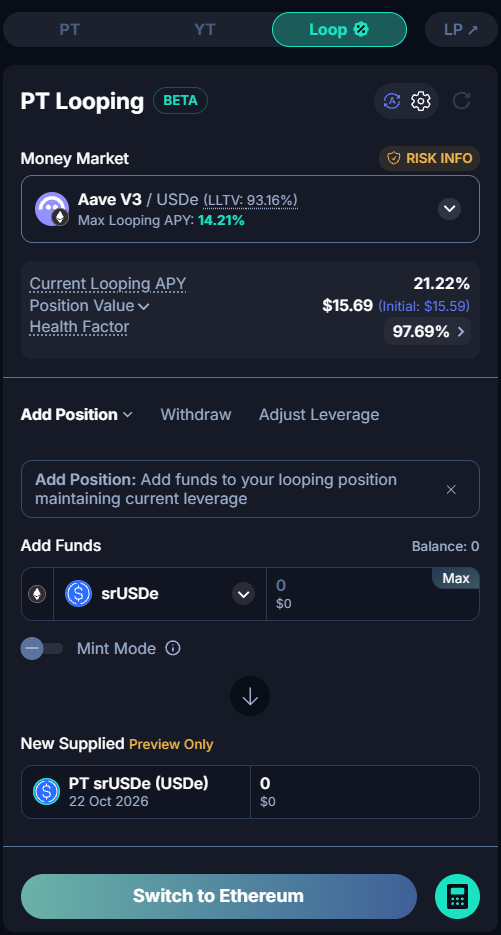
Add Position / Add Collateral
Use the dropdown to choose how to add funds:
- Add Position (default) — deposits more funds and loops them at your target leverage, growing your position while keeping leverage roughly the same.
- Add Collateral — deposits funds as collateral only, without looping. This lowers your leverage and improves your Health Factor.
Withdraw
Use the slider to choose what percentage to withdraw, and select your output asset. The preview shows your expected leverage, Health Factor, and net equity afterward.
Adjust Leverage
Move the slider up to loop further and increase leverage, or down to unwind part of the position, without depositing or withdrawing funds.
Mint Mode
Mint Mode is an optional toggle that changes how the loop acquires PT. Off (the default), the loop buys PT from Pendle's AMM. On, it mints PT and YT from the underlying asset, uses only the PT to continue the loop, and returns the YT to your wallet. The trade form shows a YT Received line for it. Minting can be more efficient than swapping when AMM liquidity is thin or a swap would move the price unfavorably.
Mint Mode is available on the actions that acquire PT: creating a loop position, adding position or collateral, and increasing leverage.
The trade-off: Mint Mode avoids the PT trade fee but builds a smaller looped position. Because minting splits your capital into PT and YT and only the PT is looped, part of its value ends up as YT in your wallet rather than as PT in the position. Buying PT directly converts the full amount into PT for maximum looped exposure, at the cost of the PT trade fee (see Fees).
Fees
Every PT Looping action bundles its costs into a single fee charged when you initiate the trade, made up of up to three parts:
- Service fee — charged on the notional of the loop, at a dynamic rate (see below).
- PT trade fee — the standard Pendle trading fee on each PT swap the loop performs. It applies to every action that goes through a PT swap: creating a position, adding position or collateral, withdrawing, and adjusting leverage in either direction.
- Gas — a loop runs many iterations across multiple on-chain transactions, and the gas for all of them is included in the fee. It applies to every action.
Service fee rate
The service fee is dynamic, not a flat rate. You still pay it once, upfront, when you open or increase a loop — but the rate it's charged at is reset daily for each market.
The rate is set so that the fee comes out to roughly 10% of the yield your loop is projected to earn by maturity, and it is capped at 10bps (0.1%). In practice that means:
- Lower-APY loops pay a lower fee. A loop projected to earn 0.8% by maturity is charged about 2.5bps, not the full 10bps.
- The fee scales down as maturity approaches. Less time left means less yield to earn, so the daily reset lowers the rate.
- 10bps is the ceiling. High-APY loops pay 10bps and no more, even where 10% of the projected yield would be higher.
The exact rate for your trade is shown in the fee breakdown before you confirm.
What the fee is charged on
- Open and Add Position — service fee = rate × (deposit + amount borrowed).
- Add Collateral — service fee = rate × deposit.
- Lever Up (increasing leverage on an existing position) — service fee = rate × the additional borrowed amount only, not the full new notional. This avoids double-charging on positions built up over multiple steps.
- Withdrawing and decreasing leverage — no service fee.
So the total cost to open or increase a loop is service fee + PT trade fee + gas. Unwinding pays only the PT trade fee + gas. You never pay gas separately anywhere in the flow; it's always covered by the fee shown at initiation.
Mint Mode reduces the trading portion of this: buying PT pays the PT trade fee on the swap, whereas minting incurs no PT trade fee. The service fee and gas apply either way.
Health Factor & Liquidation Risk
Your Health Factor reflects how close a position is to liquidation, calculated from your current LTV against the money market's LLTV. It's shown as a percentage with a colored bar wherever your position appears: the trade form, Dashboard, and risk info popup.
Open the Risk Info popup from the Money Market selector for a plain-language explanation of the pairing's oracle mechanics, including its overall risk rating and the per-factor breakdown below.
Understanding the Risks
Because PT Looping pairs a PT (priced via an oracle) with a borrowed debt asset, a position carries three risk factors, and how much each matters depends on the pairing's oracle configuration.
The three risk factors
- PT price risk — the PT is priced by the money market's oracle (see oracle types below). With a live oracle, an implied-yield spike pushes the PT price down and can move you toward liquidation; with a linear-discount oracle the PT price is effectively up only and doesn't react to implied yield. In every case it converges to par value at maturity.
- Underlying price risk — an underlying depeg can lower your collateral value, raise your LTV, and trigger liquidation. When the oracle uses a fixed underlying price, depegs don't affect your Health Factor, but can still affect your PnL.
- Negative Looping APY — if net looping yield (PT fixed yield minus borrow cost) stays negative, borrowing interest accrues faster than PT yield, gradually eroding equity and worsening your Health Factor.
How the oracle type changes your exposure
Each pairing uses one oracle configuration, which determines which risks can actually liquidate you. The Risk Info popup states the exact setup; common cases:
- Live PT price + live underlying price — both affect your Health Factor. Liquidation can come from an implied-yield spike, an underlying depeg, or LTV reaching LLTV. (Highest sensitivity.)
- Static underlying price + live PT price — the underlying is fixed at its peg (no depeg risk), but an implied-yield spike can still cause liquidation.
- Linear-discount PT + static underlying price — the PT price is up only, scaling predictably toward par, and ignores implied-yield changes and depegs. Liquidation can only come from LTV reaching LLTV (accumulated borrowing interest). (Lowest sensitivity.)
Regardless of oracle type, LTV reaching the pairing's LLTV is always a liquidation trigger, and the Negative Looping APY risk always applies since it's driven by yields, not the oracle.
Monitoring Your Positions
Your looping positions appear under My Looped PT on the main Dashboard and each market page's dashboard section.
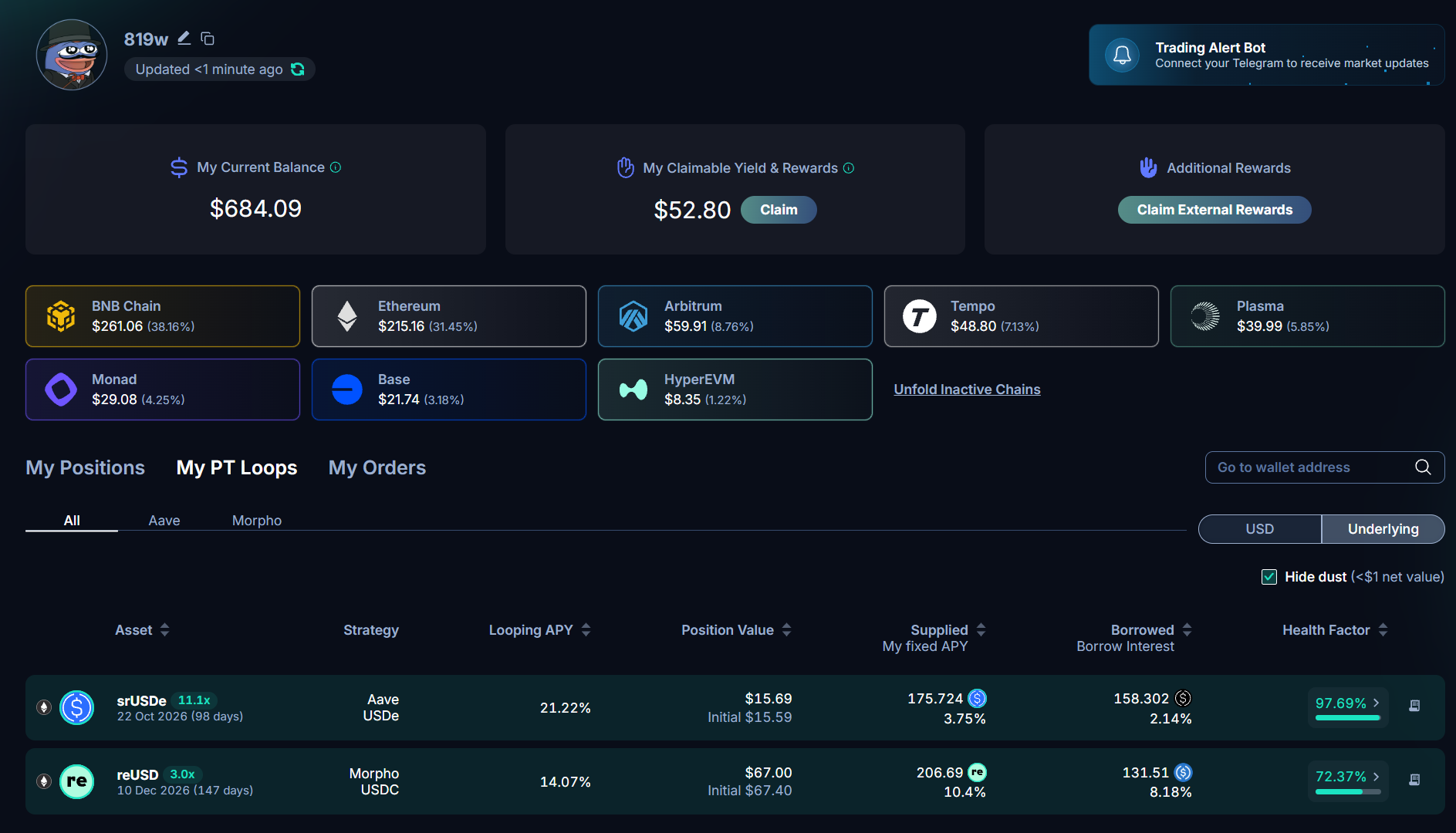
Each row shows the Strategy (PT + money market), Looping APY, Position Value, Supplied/Borrowed amounts with their APYs, and Health Factor. A position can be:
- Active — currently open and accruing.
- Matured — the PT has matured. A banner prompts you to withdraw, since a matured position keeps incurring borrowing costs without further PT upside.
If a position is liquidated after crossing its LLTV, it isn't shown as a separate status; it simply shrinks or disappears as collateral is seized.
Use the My PT Looping History tab to see past transactions, including the individual loop iterations for each.
Dust positions
Positions worth under $1 are grouped under Dust Positions, since they're too small to be worth the gas cost of withdrawing. The Hide dust toggle shows or hides this section; even when hidden, the balance still exists and is never lost.
Minimum Amounts
Because opening or adjusting a loop can involve multiple on-chain iterations, there's a minimum deposit amount to open a position and a minimum withdrawal amount for partial withdrawals, so gas costs don't outweigh the transaction. These are shown in the form and may vary by chain and money market.