Opening a Position
Reading the Opportunities scan
The front page of the dashboard shows currently available fixed-rate spreads, priced at a chosen notional. Click a spread's assumptions window to see and adjust them:
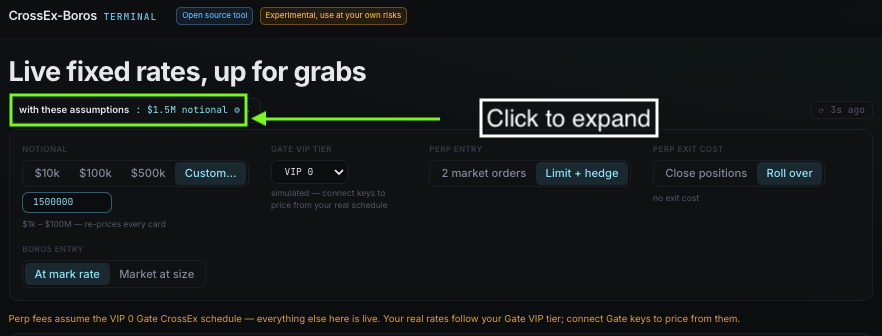
Perp entry
- 2 market orders — enter the position immediately with market orders.
- Limit + hedge — place a limit order on one venue, then hedge with a market order once it fills. Saves on fees (maker vs. taker), at the cost of execution time.
Perp exit cost
- Close positions — close the perp legs at Boros maturity.
- Roll over — keep holding the perp legs past maturity and roll them into the next fixed-rate spread, skipping a round of perp entry/exit fees.
Boros entry
- At mark rate — potential APR assuming the Boros YU legs fill with no price impact.
- Market at size — potential APR assuming the Boros YU legs fill via immediate market order.
Click an opportunity, or its Details button, to see the individual legs of the trade:
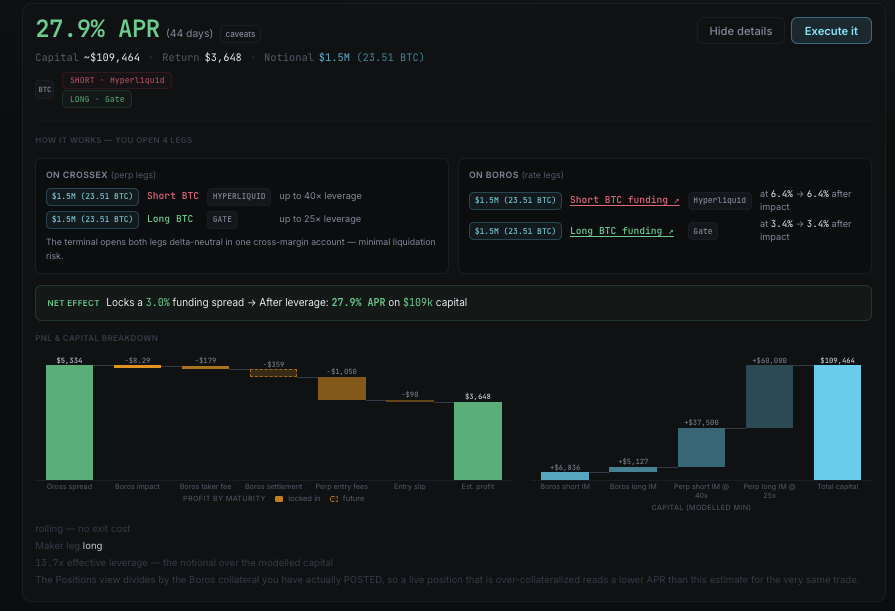
It's recommended to open the Boros legs first, before the perp legs — Boros price impact is higher and less predictable, so lock in the Boros spread before committing to the full 4-leg position. Try a small test size first to get familiar with the flow before executing larger amounts.
Executing the perp legs
Once you've found the right trade, click "Execute it", then adjust the notional amount per leg in the order ticket. Select the order type (market order / limit + hedge), then click and hold "Execute pair" to open the perp spread:
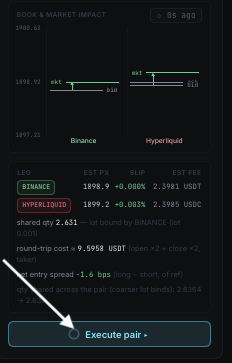
Opening the Boros legs
Navigate to the Positions tab to see which Boros positions you still need to open to lock in the fixed rate. Go to the relevant Boros market maturity for each perp market and open a 1:1 notional long/short position matching the perp legs you just executed.
Once done, return to the terminal — you're now receiving fixed yield until maturity, and the Positions tab shows your estimated returns on capital.