Monitoring & Closing Positions
Closing the 4-leg arbitrage
First, close your YU positions on Boros. Once closed, a "Close both" button appears at the bottom right of the perp leg window — click and hold it to close both perp positions via market order.
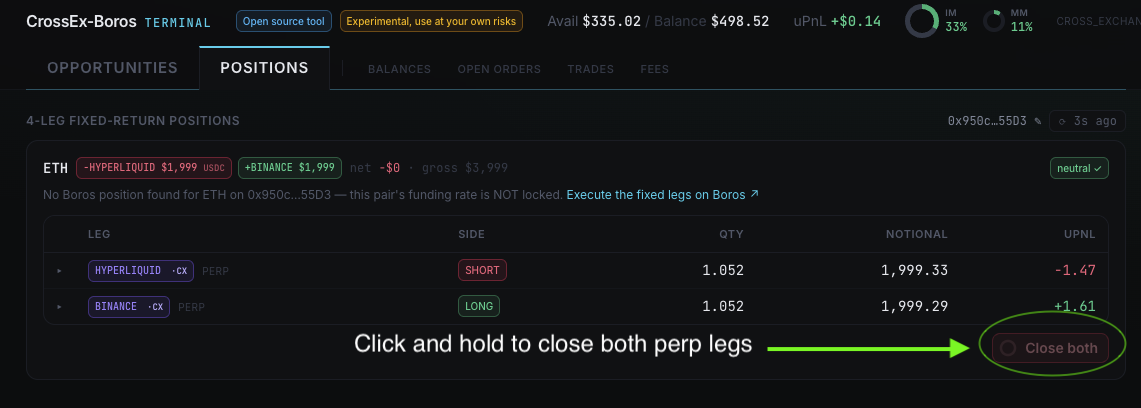
Because of the leverage on the arbitrage's perp legs, you may receive Initial Margin Ratio (IMR) alert emails from Gate. As your positions are delta-neutral, liquidation risk stays very low barring price dislocation across multiple perp platforms.
Using the order ticket (advanced)
To manually open a perp spread outside the guided Opportunities flow, use the Order ticket box:
- Select the ticker you want to open a spread on
- Load the notional amount per leg
- Select order type (market order / limit)
- Click and hold "Execute pair"
Your spread trade is now live. This is intended for traders who want to set up a perp spread before locking in fixed rates with Boros YUs, or who want specific limit orders for more advanced strategies. If you're new to funding rate arbitrage, use the guided terminal flow instead.
Next: Risks & Security