P2P Marketplace
The P2P Marketplace lets you negotiate sized swaps directly with a counterparty instead of trading through the order book.
Because the trade is agreed off-book and executed at a fixed time, you get:
- Any size — no order book depth limits
- Your terms — you negotiate the rate, size, and execution time
- No price impact — the trade does not walk the book
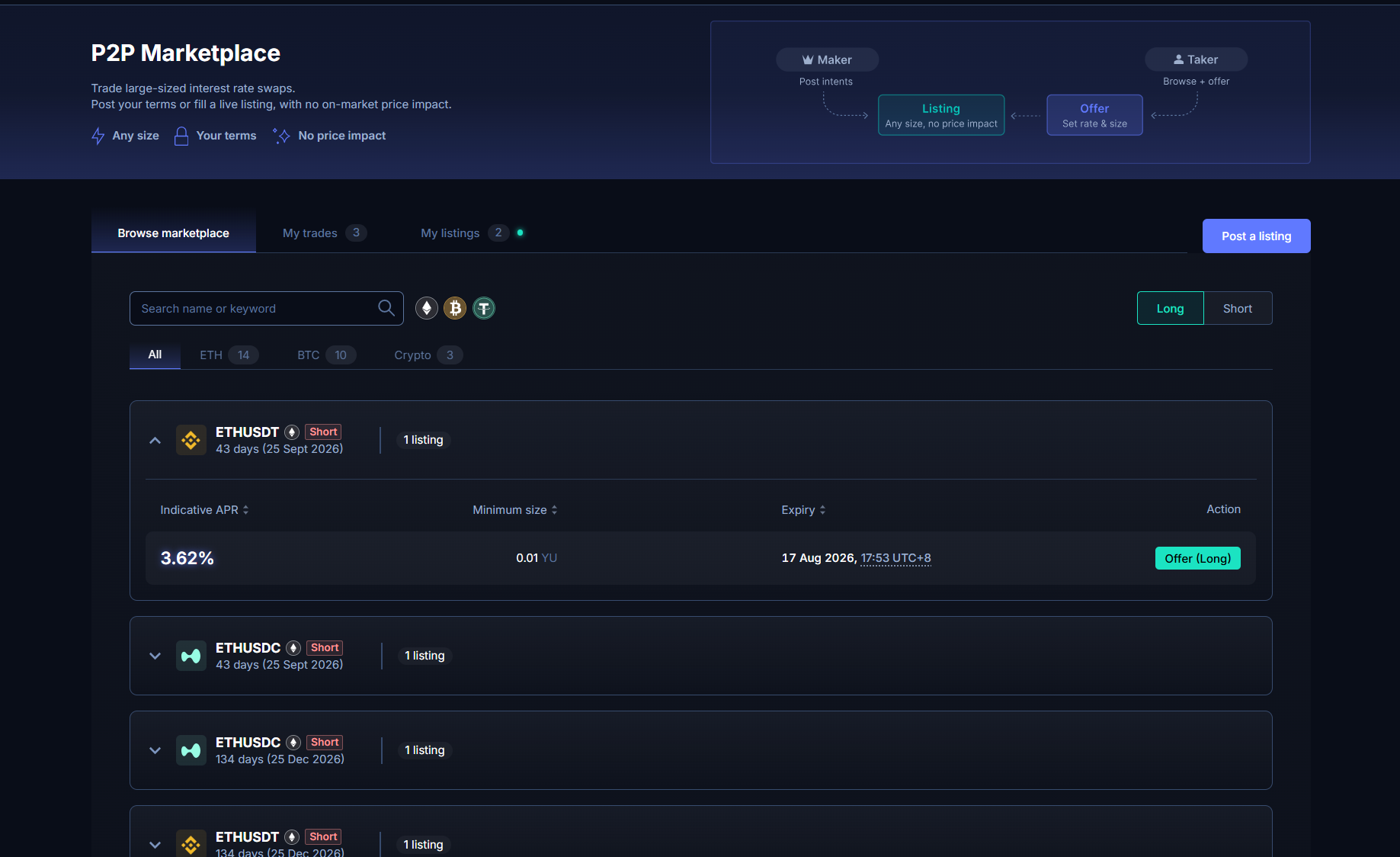
Two Roles
| Role | What they do |
|---|---|
| Maker | Posts a listing, a public intent to trade. |
| Taker | Browses listings and places a firm offer against one. |
You can be either. The Maker posts an intent; the Taker proposes the actual terms.
The Flow at a Glance
- A Maker posts a listing (market, direction, indicative APR, minimum size, expiry).
- A Taker places an offer on it, with a concrete size, APR, and execution time.
- The Maker accepts, counters, or rejects.
- If countered, the ball is simply in the other party's court, they can now accept, counter back, or reject. This continues until someone accepts or rejects.
- On acceptance, both sides are bound. The trade executes automatically at the agreed time.
Whenever you place an offer or counter, a small bond is locked as a good-faith deposit. It's returned once the offer resolves, whether that's execution, rejection, cancellation, or expiry. See Bonds and Penalties.
Countering does not swap your Maker or Taker role. The Maker stays the Maker for the whole negotiation, so the side paying the fee never changes. Countering just means it's now the other party's turn to respond.
Post a Listing
Click Create a listing and set:
| Field | Meaning |
|---|---|
| Market | Which market you want to trade. |
| Direction | Long or short rates. |
| Indicative APR | The APR you'd like to trade around. Non-binding. It's a signal, not a price. Takers can offer at any APR. |
| Minimum size | The smallest offer you're willing to entertain. |
| Listing expiry | How long the listing stays visible. |
| Margin account | Cross or isolated. If you already hold a position in that market at acceptance, that account is used instead. |
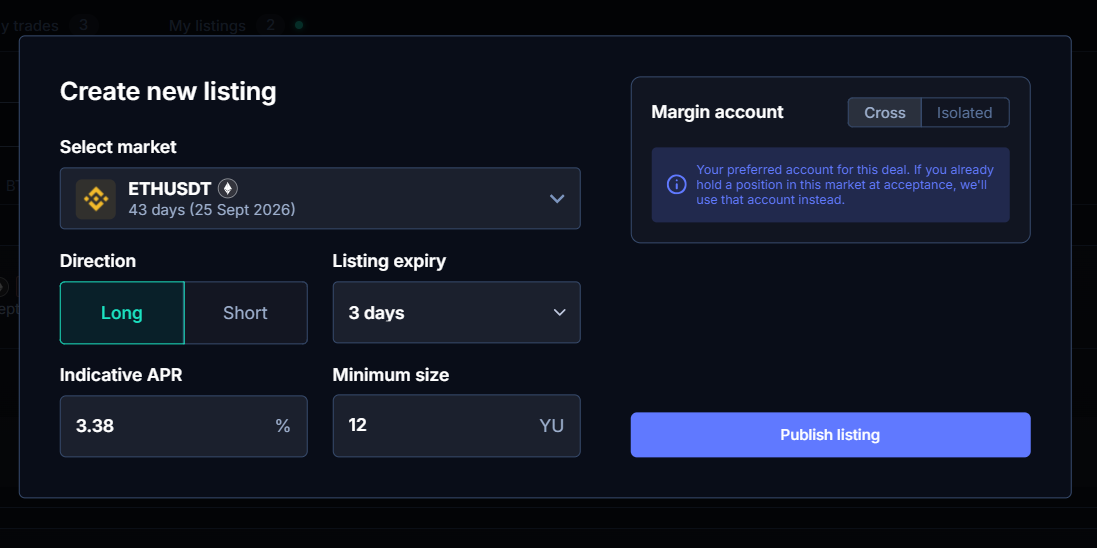
Posting a listing costs you nothing and commits you to nothing. You can cancel an unfilled listing at any time with no penalty.
Placing an Offer
Browse the marketplace, pick a listing, and click through to place an offer. Unlike the listing, an offer is a firm quote:
| Field | Meaning |
|---|---|
| Offer APR | The rate you actually want to trade at. Defaults to the indicative APR, but you can offer anything. |
| Size | How much YU you want to trade. |
| Execution time | The exact time the trade will fire on-chain. Usually set just before a rate settlement. |
| Note to maker | Optional message to accompany your offer. |
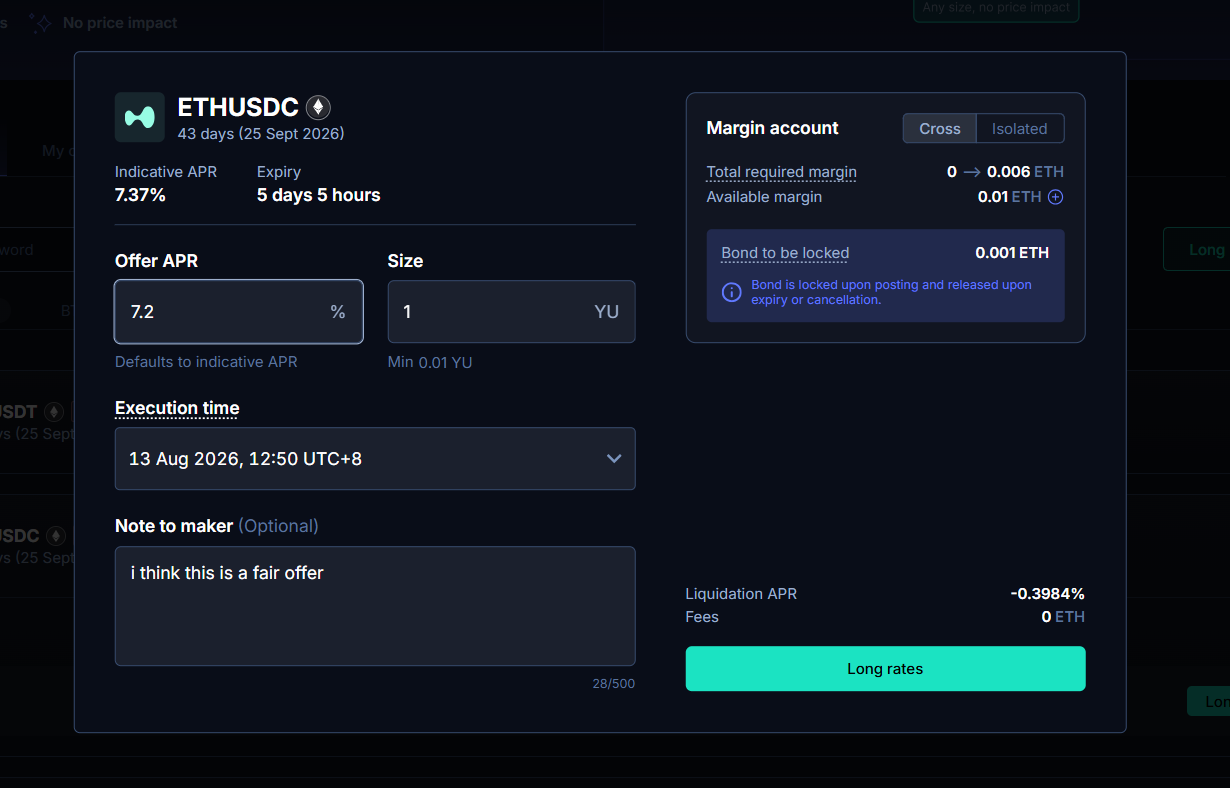
When you submit, a bond is locked from your margin account. The panel shows the bond amount before you confirm.
You can cancel a pending offer at any time before it's accepted, with no penalty. Your bond is returned in full.
Responding to an Offer
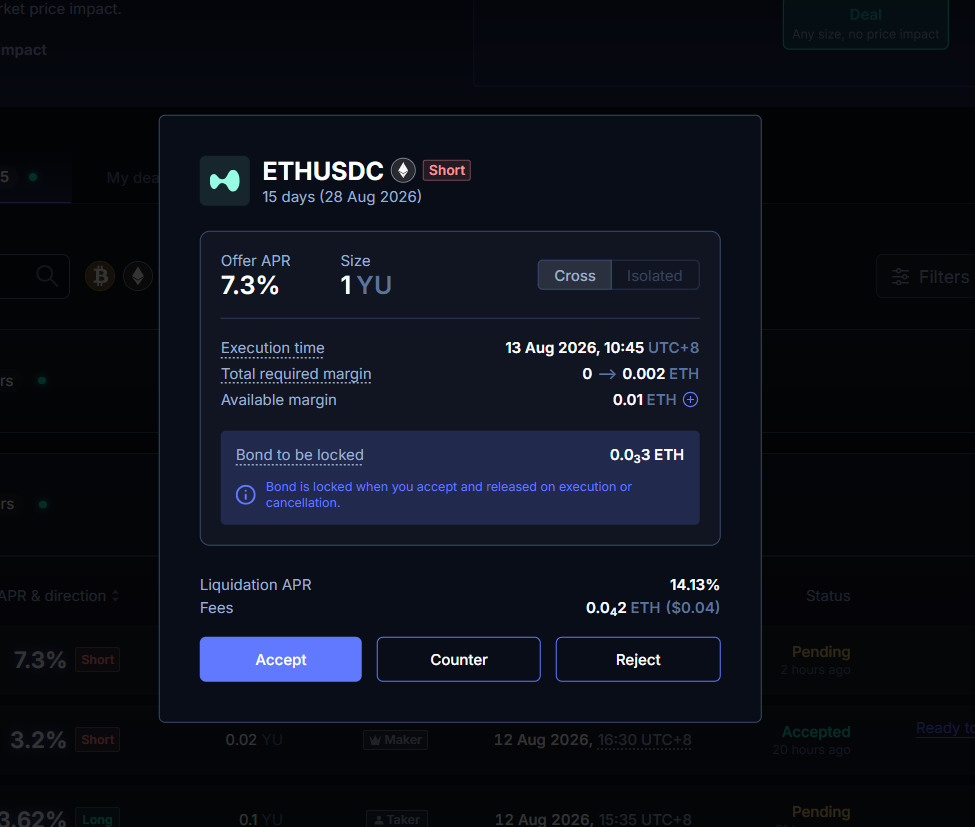
When someone places an offer on your listing, you have three choices:
| Action | What happens |
|---|---|
| Accept | The trade is binding. Terms are locked and it will execute at the agreed time. |
| Counter | You propose your own terms. It's now up to them to accept, counter back, or reject. |
| Reject | The offer dies and their bond is released. |
Doing nothing is also an option. Offers expire on their own if not accepted before the execution time.
Countering
A counter is simply a fresh offer on your own terms. You can change any of the three negotiable terms: APR, size, and execution time.
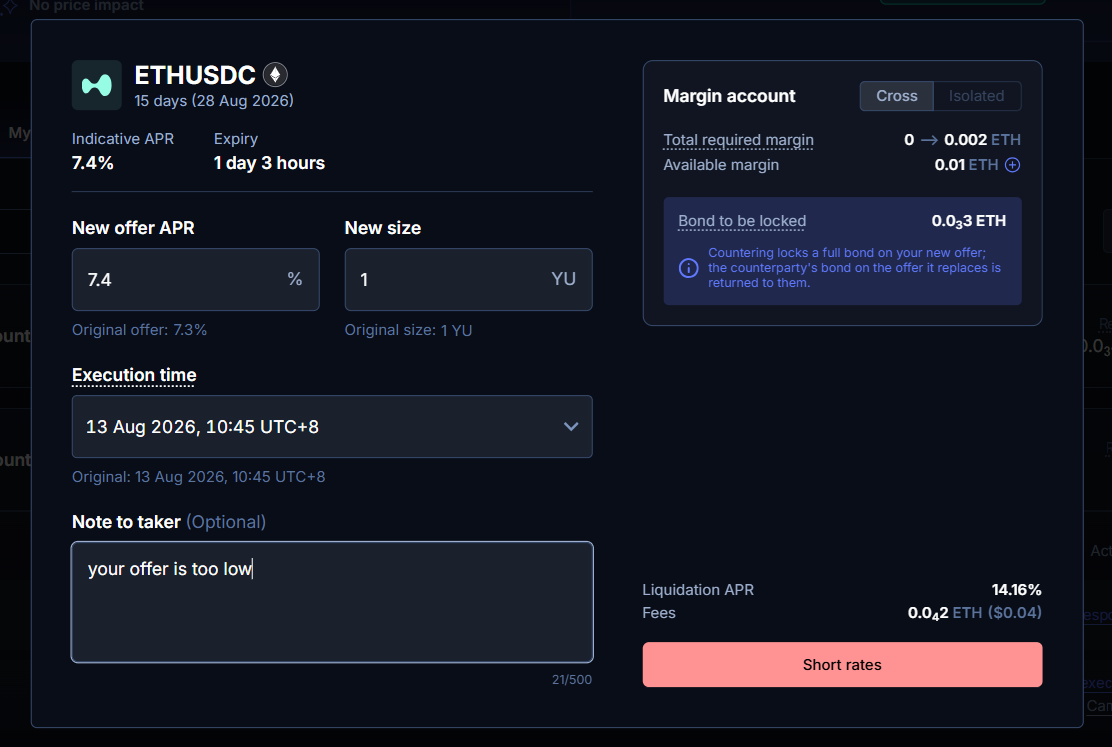
Countering locks a full bond on your new offer, and the bond on the offer you replaced is returned to the other party.
Negotiation can go back and forth as many rounds as you like. It ends when one side accepts (binding) or rejects (dead).
Acceptance is all-or-nothing on the stated size. There's no partial fill, if you only want part of the size, counter at the smaller size.
After Acceptance
Once accepted, the three terms, size, APR, and execution time, are locked in stone. Neither side can back out.
Your job between acceptance and execution is simple: make sure your margin account holds enough collateral.
- The trade executes automatically at the agreed time. You don't need to be online.
- If both sides are funded and ready sooner, either side can hit Ready to execute. When both sides signal ready, the trade fires early.
- Margin is shared across your account, not locked per offer. Top up once, in aggregate, the My Trades tab shows total required vs. available margin per account.
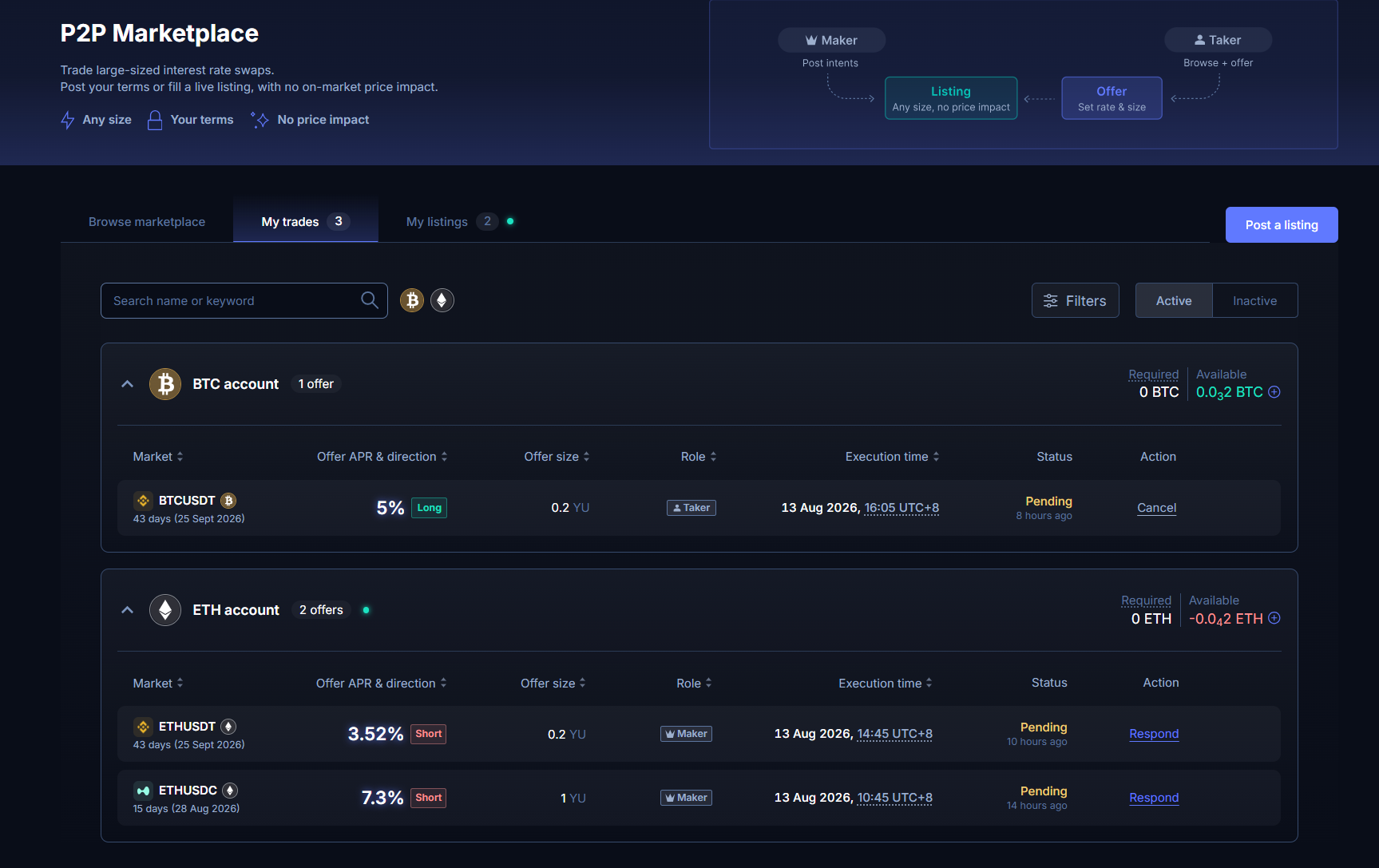
The required margin shown is an estimate. The exact amount depends on the mark APR at execution time. Keep a buffer.
Bonds and Penalties
A bond is collateral locked to keep negotiation honest. It's reserved, not transferred and it's much smaller than the full margin for the position.
Your bond is released when:
- Your offer is rejected, cancelled, countered, or expires
- The trade executes successfully
Your bond is slashed when you accept and then bail, i.e. you're bound to a trade but don't have enough margin to fund it at execution time. The slashed bond is paid to your counterparty as compensation.
That's the only penalised act. There is no penalty for:
- Letting your listing expire
- Cancelling unfilled listing capacity
- Rejecting or ignoring offers
- Cancelling your own offer before it's accepted
- Letting your offer expire before acceptance
Watch for the Margin Warning
If an offer is due to execute soon and your margin doesn't cover it, a warning indicator appears on that offer row and on the account. You'll also get a Telegram notification if you have notifications enabled. Top up before execution time to avoid losing your bond.
Offer/Trade Statuses
| Status | Meaning |
|---|---|
| Pending | Live quote, not yet acted on. Can be cancelled. |
| Countered | The other side proposed different terms. Respond, or let it expire. |
| Accepted | Binding. Execution time is locked. Ensure your margin covers it. |
| Executed | Position opened on-chain. Bonds released. |
| Rejected | Turned down by the other side. Bond released. |
| Cancelled | Withdrawn before acceptance. Bond released. |
| Expired | Not accepted in time. Bond released. |
| Failed | Accepted but did not execute, usually one side was underfunded. The bond of the party at fault is forfeited to the other. |
Your listings live under My Listings, and the offers and trades you're party to live under My Trades. In both tabs, active records show by default; completed ones move to the Inactive tab.
Fees
P2P trades pay the standard taker fee (5 bps). The contract only allows one side to pay, so currently the Maker (the side that posted the listing) pays the fee.
Things to Know
- Execution time matters. It's usually set just before a rate settlement, so pick it deliberately.
- You can hedge at acceptance. Because acceptance is binding and bail is compensated, it's safe to open your hedge as soon as a trade is accepted.
- Offers can't be edited. To change terms, cancel and resubmit or counter.
- YU can't be used as margin. Post fresh collateral for P2P trades.
- Large trades may need risk review. Most accepts are auto-approved, but trades that trip volume or size caps go to manual review, shown in-app as Pending Approval.
- Cancelling a listing ≠ cancelling accepted offers. Already-accepted offers still execute.