# Pendle Developer Documentation — Full Reference
> This file contains all Pendle V2 and Boros documentation concatenated for AI consumption.
> Sources: https://docs.pendle.finance/pendle-v2 | https://docs.pendle.finance/pendle-v2-dev | https://docs.pendle.finance/boros-docs | https://docs.pendle.finance/boros-dev
> Generated: 2026-05-14
---
# Part 1: Pendle V2 — Yield Tokenization Protocol
# Introduction to Pendle
How much will you earn from lending 1,000 USDC on Aave? 1%? 3%? 5%?
Truth is, you can't say for sure. Yield fluctuates just like token prices. It tends to go up in bull markets, and go down in bear markets, and there are further micro-factors that cause fluctuations within those general market trends.
Compound historical yield charts from The Block Crypto
With Pendle, you can always maximise your yield: increase your yield exposure in bull markets and hedge against yield downturns during bear markets.
## What does Pendle do?
We give users the reins to their yield.
[Pendle](https://pendle.finance/) is a permissionless yield-trading protocol where users can execute various yield-management strategies. It acts as a second-order derivative layer, building upon and integrating with existing core yield-generating primitives in the DeFi ecosystem — Liquid Staking Tokens (LSTs), Liquid Restaking Tokens (LRTs), stablecoins, RWAs, and more.
Pendle's smart contract architecture is **permissionless** — any user or protocol can create a new yield-trading market on-chain. While on-chain creation is open to all, the visibility of these markets on the official [Pendle UI](https://app.pendle.finance) is curated through a review process to ensure quality and safety. Community members can also leverage the [Community Listing Portal](https://listing.pendle.finance) for a streamlined listing process.
There are 2 main parts to fully understand Pendle:
1. Yield Tokenization
First, Pendle wrap **yield-bearing tokens** into **SY**(standardized yield tokens), which is a wrapped version of the underlying yield-bearing token that is compatible with the Pendle AMM (e.g. stETH → SY-stETH).
SY is then split into its principal and yield components, **PT** (principal token) and **YT** (yield token) respectively, this process is termed as yield-tokenization, where the yield is tokenized into a separate token.
2. Pendle AMM
Both **PT** and **YT** can be traded via Pendle's **AMM**. Even though this is the core engine of Pendle, understanding of the AMM is not required to trade PT and YT.
As a yield derivative protocol, we are bringing the TradFi interest derivative market ([worth over $400T in notional value](https://www.bis.org/publ/otc_hy2111/intgraphs/graphA3.htm)) into DeFi, making it accessible to all.
By creating a yield market in DeFi, Pendle unlocks the full potential of yield, enabling users to execute advanced yield strategies, such as:
- Fixed yield (e.g. earn fixed yield on stETH)
- Long yield (e.g. bet on stETH yield going up by purchasing more yield)
- Earn more yield without additional risks (e.g. provide liquidity with your stETH)
- A mix of any of the above strategies, learn more on how to execute these strategies at our [Pendle Academy](/pendle-academy/Introduction)
---
# Overview
## Stay Connected
**Important:** Stay up to date with the latest developer updates and get support from our team:
- **Telegram**: Join [t.me/pendledevelopers](https://t.me/pendledevelopers) for all development updates, API changes, and important announcements
- **Telegram bot**: We have a Telegram bot for developers to ask about the API at [t.me/peepo_the_engineer_bot](https://t.me/peepo_the_engineer_bot)
- **Discord**: Get technical support on our [Discord Developer Channel](https://pendle.finance/discord) with responses within 24 hours
## For AI users
- As many of us increasingly rely on AI tools to read and understand project documentation, we’ve added a new folder to the repository: [docs/Developers](https://github.com/pendle-finance/documentation/tree/master/docs/Developers). It contains a list of questions and answers about our system and our API, useful for AI to better understand our system and provide more accurate answers when you query them. Our in-house AI is also using these knowledge bases!
- Follow the instructions in [README.md](https://github.com/pendle-finance/documentation/tree/master?tab=readme-ov-file#ai-knowledge-bases) to index the knowledge bases for your AI.
## What do you want to do?
| Goal | Start here |
|---|---|
| **Build a trading bot or data aggregator** | [Quickstart](./Quickstart.md) → [Backend API Overview](./Backend/ApiOverview.mdx) |
| **Integrate PT/YT into your protocol (on-chain)** | [Router Overview](./Contracts/PendleRouter/PendleRouterOverview.md) → [Integration Guide](./Contracts/PendleRouter/ContractIntegrationGuide.md) |
| **Price PT or LP (oracle / collateral)** | [Oracle Overview](./Oracles/OracleOverview.md) → [How to Integrate](./Oracles/HowToIntegratePtAndLpOracle.md) |
| **Analyze yields & APY composition** | [Market Historical Data API](./Backend/ApiOverview.mdx#market-data-endpoints) |
| **Work with Limit Orders** | [Limit Order Overview](./LimitOrder/Overview.md) |
| **Track sPENDLE rewards** | [sPENDLE API](./Backend/ApiOverview.mdx#spendle-api-endpoints) |
## Core Documentation
- [High Level Architecture](./HighLevelArchitecture.md)
- [StandardizedYield (SY)](./Contracts/StandardizedYield/StandardizedYield.md)
- [Common Questions](./FAQ.md)
## Integration Guides
### On-chain Integration
- **Router**: [Documentation](./Contracts/PendleRouter/PendleRouterOverview.md) | [Integration Guide](./Contracts/PendleRouter/ContractIntegrationGuide.md)
- **Oracles**: [Overview](./Oracles/OracleOverview.md) | [Integration Guide](./Oracles/HowToIntegratePtAndLpOracle.md) | [PT as Collateral](./Oracles/PTAsCollateral.md) | [LP as Collateral](./Oracles/LPAsCollateral.md)
- [Example Repository](https://github.com/pendle-finance/pendle-examples-public) - Various contract interaction examples
### Off-chain Integration
- [Backend API overview](./Backend/ApiOverview.mdx)
- [Market Historical Data & APY Breakdown](./Backend/ApiOverview.mdx#market-data-endpoints) - Time-series data with detailed APY and fee breakdowns
- [RouterStatic](./Backend/RouterStatic.md) - Extensively tested contract for off-chain calculations. Not audited; should not be used for on-chain fund-related operations.
- [sPENDLE API](./Backend/ApiOverview.mdx#spendle-api-endpoints) - Staking stats and per-user reward data
- [Socket.IO Real-time Feeds](./Backend/SocketIO.mdx) - Pushed real-time feeds
### Limit Orders
- [Contract](./LimitOrder/LimitOrderContract.md) | [Create](./LimitOrder/CreateALimitOrder.md) | [Cancel](./LimitOrder/CancelOrders.mdx) | [Fill](./LimitOrder/FillALimitOrder.md)
## Resources
- [Deployed Contract Addresses](./Deployments.md) — Core contracts and market addresses by chain
- [Core Contract Repository](https://github.com/pendle-finance/pendle-core-v2-public)
- [SY Contract Repository](https://github.com/pendle-finance/Pendle-SY-Public)
- [Example Repository](https://github.com/pendle-finance/pendle-examples-public)
- [Whitepapers](https://github.com/pendle-finance/pendle-v2-resources/tree/main/whitepapers)
---
# Quickstart
Pendle V2 is a yield-trading protocol that lets users split yield-bearing assets into Principal Tokens (PT) and Yield Tokens (YT), trade them on AMM markets, and provide liquidity — all on-chain. The fastest way to start is the off-chain Backend API — no wallet required.
## Prerequisites
- `curl` or any HTTP client (browser, `fetch`, `axios`, etc.)
## Step 1 — Browse available markets
**Endpoint:** `GET https://api-v2.pendle.finance/core/v2/markets/all`
Returns all Pendle markets across every supported chain. Supports `skip` and `limit` for pagination (default `limit` is 10, maximum is 100).
```bash
curl "https://api-v2.pendle.finance/core/v2/markets/all?limit=10&skip=0"
```
```js
const res = await fetch(
"https://api-v2.pendle.finance/core/v2/markets/all?limit=10&skip=0"
);
const { markets } = await res.json();
console.log(markets);
```
Key fields in each market object:
| Field | Description |
|-------|-------------|
| `chainId` | Chain the market is deployed on (e.g., `1` for Ethereum, `42161` for Arbitrum) |
| `address` | Market contract address |
| `expiry` | Unix timestamp when the market matures |
| `impliedApy` | Current implied fixed APY of the market |
| `pt.price.usd` | Current PT price in USD |
## Step 2 — Get market data
**Endpoint:** `GET https://api-v2.pendle.finance/core/v2/markets/all`
Use the `address` field from Step 1 to identify markets of interest. For filtering and additional query options (e.g., by chain, by asset category), see the [full API reference](./Backend/ApiOverview.mdx).
The example below fetches all markets on Arbitrum (chainId `42161`) and filters client-side for a known market address:
```bash
curl "https://api-v2.pendle.finance/core/v2/markets/all?limit=100&skip=0" \
| jq '[.markets[] | select(.chainId == 42161 and .address == "{MARKET_ADDRESS}")]'
```
Replace `{MARKET_ADDRESS}` with the address of the market you want to inspect (obtained from Step 1).
## Step 3 — Get sPENDLE staking data (optional)
**Endpoint:** `GET https://api-v2.pendle.finance/core/v1/spendle/data`
```bash
curl "https://api-v2.pendle.finance/core/v1/spendle/data"
```
Returns aggregate sPENDLE staking statistics including total PENDLE staked, historical APRs, per-epoch revenues, and airdrop breakdowns for the last 12 epochs.
## Next steps
:::tip
- **Full API reference** — endpoint details, query parameters, response schemas: [Backend API Overview](./Backend/ApiOverview.mdx)
- **On-chain Router** (swaps, add/remove liquidity, mint/redeem): [Pendle Router Overview](./Contracts/PendleRouter/PendleRouterOverview.md)
- **Deployed contract addresses** — all chains and environments: [Deployments](./Deployments.md)
- **Developer support** — questions, announcements, deprecation notices: [t.me/pendledevelopers](https://t.me/pendledevelopers)
:::
---
# High Level Architecture

## Functions of Contracts
### PendleRouter
PendleRouter is a contract that aggregates callers' actions with various different SYs, PTs, YTs, and Markets. It does not have any special permissions or whitelists on any contracts it interacts with. Therefore, any third-party protocols can freely embed the router's logic into their code for better gas efficiency.
You can read more about the PendleRouter [here](./Contracts/PendleRouter/PendleRouterOverview.md).
### Standardized Yield (SY)
SY is a wrapped version of the interest-bearing token (ibToken) that can also be staked into other protocols to earn even more interest. In the Pendle system, SY is used instead of the ibToken for all operations, including trading on PendleMarket or minting Principal Token & Yield Token.
The following are true:
| SY | ibToken (1 SY = 1 ib Token) | Asset (ibToken appreciates against) |
| :--------------------------: | :-------------------------------------------------------------------: | :---------------------------------: |
| SY GLP | `GLP` | NIL, GLP doesn't appreciate |
| SY wstETH | `wstETH` | stETH |
| SY ETHx | `ETHx` | ETH locked in ETHx contract* |
| SY aUSDC | Not 1-1 to aUSDC since it's rebasing | aUSDC |
| SY rETH-WETH_BalancerLP Aura | `rETH-WETH LP` of Balancer staked into the corresponding Aura's gauge | Liquidity of rETH-WETH pool |
For `*`: ETH locked in ETHx is different from normal ETH due to withdrawal from ETHx has delay. Under normal circumstances it's also normal for ETHx to trade at a market price lower than the amount of ETH it can be withdrawn to.
### Principal Token (PT)
PT is a token that represents the right to redeem for the principal amount at maturity, and is tradable on PendleMarket. While PT represents a claim to a fixed amount of assets, SY wraps an ibToken that increases in value, meaning that `1 PT != 1 SY` is usually true (except in exceptional cases). Instead, `1 PT = 1 Asset`, where "Asset" refers to what SY's ibToken is denominated in.
The following are true:
| PT | Asset (1 PT = 1 Asset) |
| :-------: | :-------------------------: |
| PT GLP | GLP |
| PT wstETH | stETH |
| PT ETHx | ETH locked in ETHx contract |
| PT aUSDC | aUSDC |
At redemption, `1 PT = X SY`, where `X` satisfies the condition that `X SY = 1 Asset`. For example, assuming `1 wstETH = 1.2 stETH` on 1/1/2024, `1 PT-wstETH-01JAN2024` will be redeemable to `0.8928 wstETH` at maturity.
### Yield Token (YT)
YT is a token that represents the rights to redeem the interest generated by the SY until it reaches maturity. It's important to note that the value of YT is zero once it reaches maturity. The yield can be redeemed at any time and it can be traded on PendleMarket using special methods. ibToken generates yield in two forms, which Pendle denotes as:
- **Interest** (compounding yield): The yield is denominated in the same unit as the asset of ibToken. For example, as time goes on, `wstETH` becomes worth more in terms of `stETH`, and `SY-aUSDC` becomes worth more in terms of `USDC`.
- **Rewards** (yield that does not compound): The yield is given out in a different unit than the ibToken. For example, GLP generates ETH.
The following are true:
| YT | Interest | Rewards |
| :--------------------------: | :-------------------------: | :-------: |
| YT GLP | - | ETH |
| YT wstETH | stETH | - |
| YT ETHx | ETH locked in ETHx contract | - |
| YT aUSDC | aUSDC | - |
| YT rETH-WETH_BalancerLP Aura | liquidity of rETH-WETH pool | AURA, BAL |
PT and YT are minted and redeemed using the YT contract. To mint PT and YT, SY is utilized. `1 SY = X PT + X YT` is created where `1 SY = X Asset`. Prior to maturity, both PT and YT must be provided to redeem the underlying SY. After maturity, only PT is required for redemption.
### PendleMarket
PendleMarket (or simply Market) is a contract that enables users to trade between PT and its corresponding SY, while still allowing liquidity provision as usual. Swap fees are directly compounded into the LP. Each Market also has its own built-in geometric-mean oracle, similar to UniswapV3.
Currently, there is no market to trade YT, but it is always tradable by the following algorithms:
- `SY ➝ YT` = flashswap SY, mint PT & YT, payback PT, send YT to users.
- `YT ➝ SY` = flashswap PT, use PT & YT, redeem SY, pay back, send excess to users.
:::info YT Fungibility
All Yield Tokens (YT) of the same underlying asset are **completely fungible**. It is not programmatically possible to distinguish between YT acquired through minting, swapping, or LPing. User balances are queried on the SY contract, which treats all YT of a given type as identical. Any attempt to classify users or distribute rewards based on how they acquired their YT is not feasible on-chain.
:::
## Contract Factories
Pendle uses a factory pattern for deploying new markets, PTs, and YTs. This standardizes the creation process and provides a single source of truth for identifying valid protocol components.
### Factory Versions
| Version | Timeframe | Key Changes |
|---------|-----------|-------------|
| Pre-V3 | Early deployments | Initial factory implementations |
| **V3** | Late 2023 | Standard for all new deployments across all chains |
| **V4/V5** | Mid-2024 | **Removed `Permit` (EIP-2612) from all new PT, YT, and LP tokens** to mitigate phishing attacks |
| **V6** | Late 2025 | Current recommended version for all new market deployments |
:::caution Security Note: Permit Removal
Starting with V4/V5 factories, the `Permit` function (EIP-2612) was **completely removed** from all newly created PT, YT, and LP tokens. The `Permit` function, which allows gasless approvals via off-chain signatures, was identified as a significant phishing attack vector. Tokens created by V4+ factories no longer support `permit()`.
:::
:::warning
Always use the **latest factory version** for new market deployments. Using deprecated factories can lead to issues including improper contract verification.
:::
### Immutability vs. Upgradability
- **Market contracts are immutable** once deployed. Their fundamental parameters (including the concentrated yield range) cannot be changed. If a pool goes "out of range," a brand new market must be deployed and LPs must manually migrate.
- **SY contracts are upgradable proxies** (for newer deployments). This allows adding support for new deposit assets or adjusting mechanisms without requiring a full market migration. When developing an SY externally, it is recommended to deploy it as an upgradeable contract using Pendle's proxy admin and transfer ownership to Pendle's pause controller.
## Cross-Chain Principal Tokens
Cross-chain PTs allow Principal Tokens to be bridged and used on networks where Pendle may not have a full deployment, while concentrating deep trading liquidity on mainnet.
- **Standard:** Uses [LayerZero's Omnichain Fungible Token (OFT)](https://docs.layerzero.network/v2/home/token-standards/oft-standard) standard.
- **Mechanism:** Users can "zap in" to a PT position on a mainnet pool, then bridge the PT to a destination chain (e.g., Avalanche, HyperEVM) for use as collateral in local money markets.
- **Liquidation:** The system handles liquidations without relying on DEX liquidity on the destination chain — the underlying asset is converted and bridged back from mainnet.
- **Initial Pilot:** sUSDe/USDe PTs, with the goal of collateral support on money markets like Morpho.
---
# Glossary
#### Yield-Bearing Token
Yield-bearing Token is an umbrella term that refers to any token that generates yield. Examples include stETH, GLP, gDAI or even liquidity tokens such as Aura rETH-WETH.
#### Accounting Asset
The asset yield bearing token appreciates in value against. It appears in brackets at the end of each market name.
#### SY = Standardized Yield
SY is a token standard written by the Pendle team that wraps any yield-bearing token and provides a standardized interface for interacting with any yield-bearing token’s yield generating mechanism. SY is a purely technical component, the user does not interact directly with SY.
#### PT = Principal Token
PT entitles you to the principal of the underlying yield-bearing token, redeemable after maturity. If you own 1 PT-wstETH (stETH) with 1 year maturity, you will be able to redeem 1 stETH after 1 year.
PT is tradeable anytime, even before maturity.
#### YT = Yield Token
YT entitles you to all the yield generated by the underlying yield-bearing token in real-time, and the yield accrued can be manually claimed *at any time* from the Pendle Dashboard.
If you own 1 YT-wstETH (stETH) and stETH has an average yield of 5% through the year, you will have accrued 0.05 stETH by the end of the year.
YT is tradeable anytime, even before maturity.
#### Maturity
Maturity is the date at which PT becomes fully redeemable for the underlying asset and YT stops accruing yield. One asset can have multiple maturity dates, with an independent market for each maturity date. As such, the implied yield of an asset can also differ across different maturities.
#### Underlying APY
Underlying APY represents the 7-day moving average yield rate of the underlying asset. This approach allows a more accurate indication of the underlying yield over a period of time, which can help traders to better estimate the Future Average Underlying APY.
#### Implied APY
Implied APY is the market consensus of the future APY of an asset. This value is calculated based on the ratio of the price of YT to PT and the formula is shown below.
When used in conjunction with the Underlying APY, Implied APY can be used to establish the relative valuation of an asset such as YT and PT at their current price, and help traders determine their trading strategies.
The value of Implied Yield is numerically equivalent to the to Fixed Yield APY.
$$
\text{Implied APY} = \left[\left(1 + \frac{\text{YT Price}}{\text{PT Price}}\right)^{\frac{365}{\text{Days to expiry}}}\right] - 1
$$
#### Fixed APY
Fixed APY is the guaranteed yield you will receive by holding PT. This value is numerically equivalent to the Implied APY.
#### Long Yield APY
Long Yield APY is the approximated return (annualized) from buying YT at the current price, assuming underlying APY remains constant at its current value.
This value can be negative, meaning that the total value of all the future yield based on the Underlying APY will be less than the cost of buying YT.
#### Exchange Rate
Refers to the exchange rate between the interest-bearing token and its accounting asset
#### LP = Liquidity Provider Token
LP tokens represent a user's share of a Pendle liquidity pool, which is composed of PT and SY. LPs earn returns from multiple sources simultaneously: swap fees, PENDLE incentives, underlying yield from the SY portion, and an implicit fixed yield from the PT portion.
#### LP Wrapper
An ERC-20 token that wraps the underlying LP position on a 1:1 basis, enabling LP tokens to be used as collateral in external money markets while still accruing PENDLE rewards and off-chain points. The wrapper ensures that the original depositor continues to receive all associated rewards.
#### Watermark Rate
The highest recorded exchange rate between the IBT and its accounting asset. When the exchange rate falls below this level, PT will redeem below its actual value at maturity, and YT will stop earning yield.
---
# SY

SY is a token standard that implements a standardized API for wrapped yield-bearing tokens within smart contracts. All yield-bearing tokens can be wrapped into SY, giving them a common interface that can be built upon. SY opens up Pendle’s yield-tokenization mechanism to all yield-bearing tokens in DeFi, creating a permissionless ecosystem.
> For example, stETH, cDAI and yvUSDC can be wrapped into SY-stETH, SY-cDAI and SY-yvUSDC, standardizing their yield-generating mechanics to be supported on Pendle.
As all SYs have the same mechanism, Pendle interacts with SY as the main interface to all yield-bearing tokens. PT and YT are minted from SY and Pendle AMM pools trade PT against SY.
While this might seem daunting, Pendle automatically converts yield-bearing tokens into SY and vice versa. This process happens automatically behind the scenes, making users feel as if they’re interacting directly with their yield-bearing tokens instead of having to manually deal with SY ↔ yield-bearing token conversion.
### Key Characteristics
- **1:1 Wrapping (Typically):** In most cases, 1 SY token represents 1 unit of the underlying yield-bearing asset. For instance, 1 SY-rsETH is equivalent to 1 rsETH. However, there are exceptions (e.g., mPendle, aUSDC) where the ratio is not strictly 1:1. Integrators should verify the specific wrapping mechanism for each SY token.
- **No Maturity Date:** Unlike PT and YT, the SY token does not have an expiry date. It acts as a perpetual wrapper for the underlying asset as long as it is held within the Pendle ecosystem.
- **Source of Yield and Points:** The SY contract holds the deposited underlying asset and is the direct recipient of all accrued yield and points from that asset. All rewards distributed within a Pendle market originate from the SY tokens held within it.
- **Upgradability:** Most newer SY contracts are deployed as upgradable proxies. This allows for future enhancements — such as adding support for new deposit assets or adjusting mechanisms — without requiring a full market migration.
While this standard benefits Pendle, our vision for SY extends beyond just our own protocol. SY aims to create unprecedented composability across all of DeFi, enabling developers to seamlessly build on top of existing contracts without the need for manual integration.
## SY Converter

The SY Converter can be found in the trade form for any of the associated market. For example *SY-sUSDe* wrapper/unwrapper is accessible from sUSDe market of any maturity.
**To use the SY Converter:**

Step 1: Select between “Unwrap” or “Wrap” mode
Step 2: Select the token to wrap from or unwrap to
Step 3: Check the rate and output.
Step 4: Confirm and approve the transaction.
---
# PT
Principal Token (PT) represents the principal portion of an underlying yield-bearing asset — essentially a zero-coupon bond on the underlying asset. Upon maturity, PT can be redeemed at 1:1 for the accounting asset, which appears in brackets at the end of each PT name. This is the base, principal asset deployed in the underlying protocol such as Lido, Renzo, and Aave (e.g. stETH in stETH, ETH in ezETH, USDC in aUSDC).

Since the collective value of its yield component has been separated, PT can be acquired at a discount relative to its accounting asset. Assuming no swaps, the value of PT will approach and ultimately match the value of accounting asset on maturity when redemption is enabled.
This appreciation in value is what establishes its Fixed Yield APY.
:::info Key Properties
- **No Variable Yield or Points:** PT holders forgo all variable yield and points generated by the underlying asset — these are redirected entirely to YT holders.
- **Use as Collateral:** PTs are increasingly used as collateral in money markets (e.g., Morpho, Silo, Euler) due to their predictable value at maturity, which minimizes liquidation risk from market price volatility. See [PT as Collateral](../../Developers/Oracles/PTAsCollateral) for integration details.
:::
# Redemption Value
In general, yield bearing assets can be broadly categorized as:
1. Rebasing assets - tokens that increase in count/number overtime as yield is accrued
*Examples: stETH, aUSDC*
2. Interest-bearing assets - tokens that increase in value overtime as yield is accrued
*Examples: ezETH, wstETH*

In the case of reward-bearing assets, it’s particularly important to note that PT is redeemable 1:1 for the accounting asset, *NOT* the **underlying asset.
For example, the value of Renzo ezETH increases overtime relative to ETH as staking and restaking rewards are accrued. For every 1 PT-ezETH you own, you’ll be able to redeem 1 ETH worth of ezETH upon maturity, *NOT* 1 ezETH which has a higher value**.**
You can refer to the asset in brackets in the market name to identify the accounting asset (e.g. PT-ezETH (ETH) means 1 PT redeems to 1 ETH worth of ezETH).
You can also double-check the redemption value of PT on [Pendle App](https://app.pendle.finance/trade/markets)'s individual asset pages.
# How to Redeem PT
To redeem your PT on maturity:
1. Visit [Pendle Markets](https://app.pendle.finance/trade/markets) and navigate to dashboard
2. Select the position you want to redeem.
3. Select an output asset. Pendle will automatically perform Redemption > Swap (if needed) for you
---
# YT
Yield Token (YT) represents the yield component of an underlying yield-bearing asset.
By holding YT, yield from the underlying asset will be streamed to the users, up until maturity. This rate of yield production is represented as “[Underlying APY](https://docs.pendle.finance/ProtocolMechanics/Glossary)” in the Pendle app.
For example, buying 10 YT-wstETH (stETH) and holding them for 5 days lets you receive all of the yield equivalent to a 10 stETH within the same period of time.
### Leveraged Yield Exposure
Because YTs are purchased for a fraction of the underlying asset's price, they offer **leveraged exposure** to its yield. A small change in the underlying APY can result in a significant percentage change in the YT's return. This makes YT a powerful instrument for yield speculation and points farming.
### Value Decay
The value of YT trends towards $0 as it approaches maturity (*ceteris paribus*), becoming $0 upon maturity. If the implied yield remains constant, the YT's price decreases linearly with the time remaining — a YT with 15 days left to maturity will be worth roughly half the price it was when it had 30 days left. Users profit when the total yield collected up to that point ends up being higher than the cost of YT acquisition.
You can think of [Implied APY](https://docs.pendle.finance/ProtocolMechanics/Glossary) as the “rate” at which YT is priced by the market. If the average Underlying APY ends up being higher than the “rate” or Implied APY that you paid for, you will profit.
As such, buying YT can be treated as “longing the yield” of an asset.
### Points Farming
YTs are a popular instrument for farming points from airdrop campaigns, as they capture all points from the underlying asset, often with significant leverage. Since 1 YT earns the same points as 1 unit of the underlying asset, and YTs cost only a fraction of the underlying, users can achieve multiplied points exposure.
You can learn more about yield trading on Pendle [here](https://app.pendle.finance/trade/education/learn).
Note: YT yields are distributed as SY, which can be unwrapped back into the underlying asset using [SY Unwrapper](https://docs.pendle.finance/ProtocolMechanics/YieldTokenization/SY).
# Claiming YT Yield

You can claim any earned YT (and LP) yield and rewards from the [Pendle Dashboard](https://app.pendle.finance/trade/dashboard/overview?timeframe=allTime&inUsd=false) anytime, even before maturity.
Since YT = $0 upon maturity, no further action (aside from claiming yield) is required.
---
# Minting
Users receive yield-bearing assets when they deposit funds into a yield-source. For example, DAI staked in Compound is represented as *cDAI*. ETH staked in Lido is represented as *stETH*.
*cDAI* and *stETH* are examples of **yield-bearing assets**.
In Pendle, yield-bearing assets are split into two components: Principal Tokens (**PT**) and Yield Tokens (**YT**). PT represents the principal of the underlying yield-bearing token, while YT represents entitlement to all the yield of the asset. YT and PT can be traded on Pendle.

What Pendle does is similar to bond stripping in traditional finance, where the principal and interest of bonds are separated. In this, PTs are equivalent to [zero-coupon bonds](https://www.investopedia.com/terms/z/zero-couponbond.asp), while YTs are the detached [coupon](https://www.investopedia.com/terms/c/coupon.asp) payments.
Users can mint PT and YT by depositing the yield-bearing asset (e.g. stETH) into Pendle. Base assets (e.g. ETH) will be auto-converted into the yield-bearing asset before PT and YT are minted.
e.g. ETH → stETH → SY-stETH → PT-stETH + YT-stETH. This function can be found in the Pendle App after selecting one of the assets.

---
# AMM
Pendle’s V2 AMM is designed specifically for trading yield, and takes advantage of the behaviors of PT and YT. Unlike standard AMMs that concentrate liquidity within a **price range**, Pendle’s AMM concentrates liquidity within a pre-configured **yield range** (or Implied APY range). This makes trading within the expected yield boundaries highly efficient, with lower slippage for larger trades.
The AMM model was adapted from Notional Finance’s AMM. The AMM curve changes to account for yield accrued over time and narrows PT’s price range as it approaches maturity (**dynamic curve tightening**). By concentrating liquidity into a narrow, meaningful range, the capital efficiency to trade yield is increased as PT approaches maturity. This automatic tightening reflects the decreasing uncertainty of future yield and is a key factor in minimizing impermanent loss.
Furthermore, we managed to create a pseudo-AMM that allows us to both facilitate PT and YT swaps using just a single pool of liquidity. With a PT/SY pool, PT can be directly traded with SY, while YT trades are also possible via flash swaps.
### Fee Calculation
Unlike traditional AMMs that charge fees on the swap principal, Pendle’s AMM fee is calculated relative to the **yield** being traded. This means the fee is influenced by the time to maturity — a trade made one year before maturity will incur a significantly higher fee than the same size trade made one month before maturity. See [Fees](../Mechanisms/Fees) for the full formula.
## Liquidity Providers (LP)
Liquidity on Pendle V2 comprises of PT/SY (where SY is simply a wrapped version of the underlying yield bearing asset). This means that LPs earn yields from:
1. PT fixed yield
2. Underlying yield (SY yield)
3. Swap fees (from PT and YT swaps)
4. $PENDLE incentives
## Swaps
Both PT and YT are tradeable anytime on Pendle through a single pool of liquidity. This is made possible by implementing a pseudo-AMM with flash swaps.
Liquidity pools in Pendle V2 are set up as PT/SY, e.g. PT-aUSDC / SY-aUSDC. Swapping PT is a straightforward process of swapping between the 2 assets in the pool, while swapping YT is enabled via flash swaps in the same pool.
> Auto-routing is built in, allowing anyone to trade PTs and YTs with any major asset.
### Flash Swaps
Flash swaps are possible due to the relationship between PT and YT. As PT and YT can be minted from and redeemed to its underlying SY, we can express the price relationship:
$$
P(PT) + P(YT) = P(\text{Underlying})
$$
Knowing that YT price has an inverted correlation against PT price, we use this price relationship to utilise the PT/SY pool for YT swaps.
Buying YT:
1. Buyer sends SY into the swap contract (auto-routed from any major token)
2. Contract withdraws more SY from the pool
3. Mint PTs and YTs from all of the SY
4. Send the YTs to the buyer
5. The PTs are sold for SY to return the amount from step 2

Selling YT:
1. Seller sends YT into the swap contract
2. Contract borrows an equivalent amount of PT from the pool
3. The YTs and PTs are used to redeem SY
4. SY is sent to the seller (or routed to any major tokens, e.g. ETH, USDC, wBTC, etc)
5. A portion of the SY is sold to the pool for PT to return the amount from step 2

## Matured LP
Upon maturity, LPs are able to Zap Out + Redeem PT for Underlying + Claim Rewards in a single transaction:
1. Visit [Pendle Trade](https://app.pendle.finance/trade/pools) and toggle to the “Inactive” pool list
2. Select a pool
3. Toggle “Claim All Pool Rewards”
4. Select an output asset. Pendle will automatically Redeem PT for Underlying > Unwrap SY > Perform Swaps (if needed) here
## Key Features
### Minimal Impermanent Loss (IL)
Pendle V2 design ensures that IL is a negligible concern. Pendle’s AMM accounts for PT’s natural price appreciation by shifting the AMM curve to push PT price towards its underlying value as time passes, mitigating time-dependent IL (No IL at maturity).
On top of that, IL from swaps is also mitigated as both assets LP’ed are very highly correlated against one another (e.g. PT-stETH / SY-stETH). If liquidity is provided until maturity, an LP’s position will be equivalent to fully holding the underlying asset since PT essentially appreciates towards the underlying asset.
In most cases prior to maturity, PT trades within a yield range and does not fluctuate as much as an asset’s spot price. For example, it’s rational to assume that Aave’s USDC lending rate fluctuates between 0%-15% for a reasonable timeframe (and PT accordingly trades within that yield range). This premise ensures a low IL at any given time as PT price will not deviate too far from the time of liquidity provision.
### Customizable AMM

Pendle’s AMM curve can be customised to cater to tokens with varying yield volatilities. Yields are often cyclical in nature and typically swing between highs and lows. Typically, the floor and ceiling for the yield of a liquid asset are much easier to predict than its price.
For example, the annual yield of staked ETH is likely to fluctuate in a band of 0.5-7%. Knowing the rough yield range of an asset enables us to concentrate liquidity within that range, enabling much larger trade sizes at a lower slippage.
However, if the implied yield of the pool trades out of its set range, liquidity will be too thin to further push it in said direction. Using the above example, if the implied yield of the stETH pool goes beyond 7%, buying YT (or selling PT) might no longer be possible.
To check the set yield range of the pool, click on the sign as shown in the screenshot below.

### Greater Capital Efficiency
_For Liquidity Providers_
Since YT trades are routed through the same PT/SY pool, LPs earn fees from both PT and YT swaps from a single liquidity provision, doubling the yield from LPing.
_For Traders_
Rather than having separate pools for YT and PT, concentrating all tokens in a PT/SY pool will result in greater liquidity. This will allow traders to make trades of greater volume without having to worry about much slippage, granting traders greater price certainty.
---
# Fees
Pendle protocol has 2 revenue sources:
- **YT Fees**
Pendle collects a 5% fee from all yield accrued (including points) by all YT in existence, and all yields (including all points negotiated) from the SYs of matured unredeemed PTs.
- **YT Fees on Points**
Fees on points are applied similarly as Pendle treats points as a form of yield. Since points are tracked off-chain, partner protocols deduct the 5% fee when allocating points to user wallets. The deducted points from fees are then re-allocated to the following Pendle-controlled wallets:
:::info
Fee wallets for pools launched BEFORE 8th October 2024
:::
| Chain | Fee Wallet Address |
| :-------: | :------------------------------------------: |
| Ethereum | `0x8270400d528c34e1596EF367eeDEc99080A1b592` |
| Arbitrum | `0xCbcb48e22622a3778b6F14C2f5d258Ba026b05e6` |
| Mantle | `0x5C30d3578A4D07a340650a76B9Ae5dF20D5bdF55` |
| BNB Chain | `0xd77E9062c6DF3F2d1CB5Bf45855fa1E7712A059e` |
:::info
Fee wallet for pools launched AFTER 8th October 2024
:::
All chains: `0xC328dFcD2C8450e2487a91daa9B75629075b7A43`
- **Swap Fees**
Pendle collects a percentage-based swap fee, scaled with maturity, from all PT swaps. Each fee tier will be displayed in the dApp and is decided by the pool deployer (currently only the Pendle team deploys pools on Pendle).
Pendle taxes the yield-receivables of PT when swaps occur. This creates a fair fee for all pools and maturities as it is scaled to a pool’s maturity (less time to maturity -> less yield-receivables -> lower fees in $ terms). Since YT swaps are also routed through the PT AMM, its fees are calculated based on the PT swapped.
- **Fee Distribution**
Pendle has 2 sources of fees **YT fees** and **Swap fees**. 20% of all swap fees are given to LP providers of the pool as yield.
The remaining swap fees and all YT fees are split between PENDLE buyback fund and Pendle protocol in the following ratio
- 80% for PENDLE buyback
- 10% to Protocol Treasury
- 10% to Protocol Operations
- **Trading Fee Calculation**
Trading fees are dynamically adjusted based on time remaining until maturity:
`Trading Fee = (Fee Tier / 365) * Days to Maturity`
The **Fee Tier** is specific to each market and can be found by clicking the "specs" button on the market's trading interface. Redeeming PT for the underlying asset *after* maturity incurs no protocol fee, only standard network gas fees.
- **Post-Maturity Yield Redirection**
If a user does not redeem their PT or LP position after maturity, the underlying asset remains in the SY contract and **continues to accrue yield and points**. However, all yield and points generated by these unredeemed, matured positions are automatically redirected to the **Pendle treasury fee wallet**. This incentivizes users to promptly redeem their matured assets and roll them over into new pools.
---
# Pendle API Overview
Pendle provides a comprehensive API system that enables developers to integrate with the Pendle protocol for trading, analytics, and portfolio management.
## Understanding Pendle's API System
**API Base URL**: [https://api-v2.pendle.finance/core/docs](https://api-v2.pendle.finance/core/docs)
Pendle's API consists of two complementary components:
### 1. Hosted SDK (Transaction Generation)
**Purpose**: Generate transaction payloads to interact with Pendle smart contracts
**Use this when you need to**:
- Swap tokens (buy/sell PT, YT)
- Add or remove liquidity
- Mint or redeem PT/YT tokens
- Transfer liquidity between pools
- Roll over PT positions
- ... or any other transactions that interact with Pendle smart contracts
📖 [View Hosted SDK Documentation](./HostedSdk.mdx)
### 2. Backend API (Data Queries)
**Purpose**: Retrieve offchain data for markets, assets, pricing, user positions, and governance
**Use this when you need to**:
- Get offchain data for analytics
- Get supported markets list with latest data (TVL, volume, underlying APY, swap fee, ...)
- Get PT/YT/LP/SY asset prices
- Get sPENDLE and governance data (staking, rewards, ...)
📖 [View Backend API Documentation](https://api-v2.pendle.finance/core/docs)
## API Entry Points
All public endpoints are served under `https://api-v2.pendle.finance/core` and follow one of two routing patterns:
### Cross-chain endpoints (recommended)
These endpoints return data across all chains in a single request. Preferred for new integrations:
| Endpoint | Description |
|---------|-------------|
| `GET /v2/markets/all` | All markets across all chains — includes pagination, points, and external protocol data |
| `GET /v1/assets/all` | All assets across all chains |
| `GET /v1/prices/assets` | Asset prices across all chains |
:::note Deprecated
`GET /v1/markets/all` and `GET /v1/markets/points-market` are deprecated. Use `GET /v2/markets/all` instead — it returns the same markets with pagination support and points data included in each market object.
:::
#### Markets — Pagination
`GET /v2/markets/all` supports `skip` and `limit` query parameters for pagination:
| Parameter | Default | Maximum | Description |
|-----------|---------|---------|-------------|
| `skip` | `0` | — | Number of records to skip |
| `limit` | `10` | `100` | Maximum number of records to return |
#### Prices — Error Handling
The price response now includes an `errors` array alongside the price map:
```
{ priceMap: Record, errors: Error[] }
```
Non-fatal pricing errors (e.g., assets not found for a given timestamp) are returned in `errors` rather than thrown. Callers should check and handle this field, as a partial result may be returned even when some assets could not be priced.
### Chain-scoped endpoints — `/{version}/{chainId}/...`
Some endpoints are scoped to a specific chain:
| Endpoint | Description |
|---------|-------------|
| `GET /v3/{chainId}/markets/{address}/historical-data` | **Market time-series data** with optional APY breakdown — [see Market Data Endpoints](#market-data-endpoints) |
| ~~`GET /v2/{chainId}/markets/{address}/historical-data`~~ | *(Deprecated)* Use v3 instead for APY breakdown support |
| ~~`GET /v2/{chainId}/markets/{address}/data`~~ | *(Deprecated)* Market data for a specific address |
| ~~`GET /v2/sdk/{chainId}/convert`~~ | *(Deprecated)* Generate transaction payload — use `POST /v3/sdk/{chainId}/convert` instead |
| `GET /v5/{chainId}/transactions/{address}` | Transaction history for an address |
:::note Deprecated
- `GET /v2/{chainId}/markets/{address}/historical-data` is deprecated. Use [`GET /v3/{chainId}/markets/{address}/historical-data`](#market-data-endpoints) instead, which supports `includeApyBreakdown` for detailed APY composition.
- `GET /v2/{chainId}/markets/{address}/data` is deprecated.
- `GET /v2/sdk/{chainId}/convert` (GET) is deprecated. Use `POST /v3/sdk/{chainId}/convert` instead, which accepts a JSON body and supports typed inputs.
:::
For new integrations, prefer cross-chain endpoints where available — they reduce the number of calls needed when working with multiple chains.
### BFF API — `https://api-v2.pendle.finance/bff`
The BFF (Backend for Frontend) API powers the official Pendle web app. It is **not intended for third-party integrations**: endpoints may change or be removed without notice. For third-party use, always use the `/core` API documented here.
## Rate Limiting
All Pendle API endpoints are rate-limited to ensure service stability and fair usage.
### How Rate Limiting Works
Pendle uses a **Computing Unit (CU)** based system. Every endpoint has a CU cost, which may be fixed or dynamic depending on the endpoint.
The rate limit is calculated based on the total CU cost of all endpoints.
Each user (IP) has a rate limit of 100 CU per minute, and 200,000 CU per week.
Both limits apply simultaneously. You must stay within both the per-minute AND weekly limits to avoid rate limiting.
**Example**: If an endpoint costs 5 CU, you can call it:
- 20 times per minute (100 ÷ 5 = 20)
- 40,000 times per week (200,000 ÷ 5 = 40,000)
#### Computing Unit Costs
Most RESTful API endpoints have fixed costs (typically 1-5 CU), whereas the Hosted SDK has dynamic costs depending on the number of aggregators used. Check the [API documentation](https://api-v2.pendle.finance/core/docs) for specific costs — they're displayed in the "CU" box before each endpoint description.
More on computing unit costs for HostedSdk can be found in [HostedSdk.mdx](./HostedSdk.mdx#select-aggregators).
#### Rate Limit Headers
Our endpoints return the following headers to help you monitor your usage:
| Header | Description |
|--------|-------------|
| `X-Computing-Unit` | CU cost of this request |
| `X-RateLimit-Limit` | Maximum CU per minute (e.g., 100 for free tier) |
| `X-RateLimit-Remaining` | CU remaining in current minute window |
| `X-RateLimit-Reset` | Unix timestamp when minute limit resets |
| `X-RateLimit-Weekly-Limit` | Maximum CU per week (e.g., 200,000 for free tier) |
| `X-RateLimit-Weekly-Remaining` | CU remaining in current week window |
| `X-RateLimit-Weekly-Reset` | Unix timestamp when week limit resets |
Example response:
```
x-computing-unit: 25
x-ratelimit-limit: 100
x-ratelimit-remaining: 75
x-ratelimit-reset: 1724206817
x-ratelimit-weekly-limit: 200000
x-ratelimit-weekly-remaining: 175000
x-ratelimit-weekly-reset: 1724206817
```
### Best Practices for Rate Limiting
- **Never hardcode rate limits.** Rate limits have evolved over time and may change in the future. Always handle `429` responses gracefully.
- **Implement exponential backoff.** When you receive a `429 Too Many Requests` response, wait and retry with increasing delays.
- **Use the right endpoint for the job.** For general price monitoring, use `getAllAssetPricesByAddresses` (updates every ~30 seconds). For pre-swap price checks, use `getMarketSpotSwappingPrice` (updates every block).
- **Set generous timeouts.** Some API endpoints, particularly those querying complex data, can be slow. Set a client-side HTTP timeout of at least **120 seconds**.
- **Watch out for RPC rate limits.** A `429` error is most often caused by your **RPC provider**, not the Pendle API — especially when backfilling historical data. Use a private or paid archival RPC (e.g., QuickNode) for intensive operations.
- **Use pagination correctly.** For endpoints returning large lists, include the `resumeToken` from a response in your next request to fetch subsequent pages.
### I get rate limited, what should I do?
Our rate limit was designed so that most users can use the API without facing any rate limiting issues, unless you are calling the API unreasonably fast.
So before requesting increased rate limits, please make sure you are not calling the API at an unreasonable rate. Follow our best practices and examples.
If after all that, you are still getting rate limited, you can consider upgrading your plan, details below.
### API Pricing Plans
If you need higher rate limits, we offer flexible paid plans that scale with your needs.
#### Pricing Structure
Our pricing is simple and scalable: **$10/week = 500 CU/min + 1,000,000 CU/week**
You can purchase multiple units to scale your rate limits based on your application's requirements:
| Weekly Cost | CU per Minute | Weekly CU Limit |
|-------------|---------------|-----------------|
| **$0** (Free) | 100 | 200,000 |
| **$10** | 500 | 1,000,000 |
| **$20** | 1,000 | 2,000,000 |
| **$30** | 1,500 | 3,000,000 |
| **$40** | 2,000 | 4,000,000 |
**Pricing Model:**
- Each **$10/week** adds **+500 CU/min** and **+1,000,000 CU/week** to your limits
- Scale up to **$40/week** (2,000 CU/min, 4M CU/week) through our standard plans
**Example:**
If you want to use 1,000,000 CU per week and you want to use the API for 4 weeks, it would be $10 * 4 = $40.
If you want to use 2,000,000 CU per week and you want to use the API for 8 weeks (about 2 months), it would be $20 * 8 = $160.
### How to get an API key
To get an API key and upgrade your plan:
1. Go to the API dashboard at: [https://api-v2.pendle.finance/dashboard](https://api-v2.pendle.finance/dashboard)
2. Login with your wallet (you will be asked to sign a message to verify your identity)
3. Top-up your account with USDC/USDT/DAI on Arbitrum
4. Choose your plan and create a new API key
Your API key will be generated. Make sure to save it securely as you'll need it to authenticate your requests.
#### How to use your API key
Include the `Bearer ` in the `Authorization` header in your requests:
```
Authorization: Bearer
```
**Example:**
```bash
curl -i -H "Authorization: Bearer your_api_key_here" \
https://api-v2.pendle.finance/core/v1/chains
```
The response will have rate limit headers as described in [Rate Limit Headers](#rate-limit-headers).
:::note
You may occasionally notice `X-Ratelimit-Limit: 100` in responses even when you have a higher rate limit plan.
This happens when the response is served from **Cloudflare's cache** (indicated by the `CF-Cache-Status: HIT` header).
When a cache hit occurs, the request never reaches our backend, so **it does not count against your rate limit quota**.
The `X-Ratelimit-Limit: 100` value in this case is simply a default header from the cached response and does not reflect your actual rate limit.
:::
## API Updates and Deprecation
- **Deprecation Notice**: Breaking changes are announced at least 30 days in advance. Follow the [Telegram Developer Channel](https://t.me/pendledevelopers) for announcements.
### vePENDLE Deprecation
vePENDLE has been deprecated and replaced by **sPENDLE**. All endpoints listed under the **Ve Pendle** tag in the [API documentation](https://api-v2.pendle.finance/core/docs) are deprecated — they remain accessible but will not be updated to reflect the new sPENDLE staking system.
The following endpoints are specifically deprecated:
- `GET /v1/ve-pendle/data` — use [`GET /v1/spendle/data`](#get-v1spendledata) instead
- `GET /v1/ve-pendle/market-fees-chart` — no replacement; fees data is now included in the sPENDLE historical data response
## Market Data Endpoints
### GET /v3/\{chainId\}/markets/\{address\}/historical-data
Returns time-series data for a specific market, with optional detailed APY composition breakdown.
| Property | Value |
|----------|-------|
| Path parameters | `chainId` (number), `address` (string) |
| Query parameters | `time_frame`, `timestamp_start`, `timestamp_end`, `fields`, `includeFeeBreakdown`, `includeApyBreakdown` |
| Cache TTL | Varies by time_frame |
| CU cost | Dynamic: `max(1, ceil(total / 300))` base, `* 1.5 + 1` if `includeApyBreakdown=true`, `* 2 + 1` if `includeFeeBreakdown=true` |
**Key features:**
- **APY Breakdown**: Set `includeApyBreakdown=true` to get detailed yield composition for YT and LP positions, categorized by protocol yield, rewards, fixed yield, and incentives
- **Flexible fields**: Select specific data fields or use `fields=all` for complete data (not recommended for large time ranges)
- **Fee breakdown**: Include swap fee details with `includeFeeBreakdown=true` (daily/weekly timeframes only)
**Response includes:**
- Standard time-series fields: `timestamp`, `impliedApy`, `maxApy`, `tvl`, prices, liquidity metrics
- Optional `ytApyBreakdown`: Structured APY breakdown for YT holders (categories: Protocol Yield, YT Bonus Rewards, YT Extra Rewards)
- Optional `lpApyBreakdown`: Structured APY breakdown for LP providers (categories: Underlying Yield, External Rewards, PT Fixed Yield, LP Rewards)
- Optional fee breakdown: `explicitSwapFee`, `implicitSwapFee`, `limitOrderFee`
For detailed schemas, parameters, examples, and migration guide, see the [API Reference](https://api-v2.pendle.finance/core/docs#/Markets/MarketsController_marketHistoricalData_v3).
:::tip New in v3
The v3 endpoint adds support for detailed APY breakdowns while maintaining full backward compatibility with v2. All existing v2 functionality works identically in v3.
:::
## sPENDLE API Endpoints
These endpoints provide sPENDLE staking statistics and per-user reward data.
### GET /v1/spendle/data
Returns aggregate sPENDLE staking statistics, including total PENDLE staked, historical APRs, revenues, fees, and airdrop breakdowns. Historical data covers the last 12 epochs.
| Property | Value |
|----------|-------|
| Query parameters | None |
| Cache TTL | 5 minutes |
| CU cost | 1 |
**Response fields:**
| Field | Description |
|-------|-------------|
| `totalPendleStaked` | Total PENDLE currently staked |
| `totalStakedInSpendle` | Total staked in the sPENDLE contract |
| `virtualSpendleFromVependle` | Virtual sPENDLE balance derived from vePENDLE positions |
| `sPendleHistoricalData` | Per-epoch historical data: `timestamps`, `revenues`, `aprs`, `fees`, `airdrops`, `buybackAmounts`, `airdropInUSDs`, `airdropBreakdowns`, `allTimeRevenues` |
| `vependleHistoricalData` | Historical data for the legacy vePENDLE system |
### GET /v1/spendle/:address
Returns claimable and historical rewards for a specific sPENDLE holder, including ETH fee rewards, multi-token merkle proofs, and all-time reward totals.
| Property | Value |
|----------|-------|
| Path parameter | `address` — the user's Ethereum address |
| Query parameters | None |
| Caching | Not cached |
| CU cost | 3 |
**Response fields:**
| Field | Description |
|-------|-------------|
| `ethAccruedAmount` | Accrued ETH fee rewards claimable by the address |
| `multiTokenProof` | Merkle proof data — `total` and `results[]` for multi-token rewards |
| `allTimeRewards` | Cumulative rewards keyed by `"chainId-tokenAddress"`, with `lastDistributionAt` timestamp |
| `vePendlePositionData` | *(Optional)* Legacy vePENDLE position data, if applicable |
## Dashboard Endpoints
### GET /v1/dashboard/merkle-rewards/:user
Returns both claimable and claimed merkle-distributed rewards for a user in a single call.
| Property | Value |
|----------|-------|
| Path parameter | `user` — the user's Ethereum address |
| Query parameters | None |
| CU cost | 4 |
**Response:**
```
{
claimableRewards: [...],
claimedRewards: [...]
}
```
Each item in `claimableRewards` and `claimedRewards` contains:
| Field | Description |
|-------|-------------|
| `user` | Ethereum address of the user |
| `token` | Token address |
| `merkleRoot` | Merkle root for the distribution |
| `chainId` | Chain ID of the distribution |
| `assetId` | Asset identifier |
| `amount` | Reward amount |
| `toTimestamp` | *(Optional)* End of the distribution period |
| `fromTimestamp` | *(Optional)* Start of the distribution period |
:::note Deprecated endpoints
The following endpoints are deprecated and will be removed in a future release. Use `GET /v1/dashboard/merkle-rewards/:user` instead:
- `GET /v1/dashboard/merkle-claimable-rewards/:user`
- `GET /v1/dashboard/merkle-claimed-rewards/:user`
:::
## Code Examples and Resources
### Official Examples
- [Hosted SDK Demo](https://github.com/pendle-finance/pendle-examples-public/tree/main/hosted-sdk-demo/src) - Transaction generation examples
- [Backend API Demo](https://github.com/pendle-finance/pendle-examples-public/blob/main/backend-api-demo/src/index.ts) - Data query examples
## Getting Help
1. **Documentation**: Start with [API Overview](./ApiOverview.mdx), [Hosted SDK](./HostedSdk.mdx) or [Backend API](https://api-v2.pendle.finance/core/docs) docs
2. **API Reference**: Explore endpoints at [API Reference](https://api-v2.pendle.finance/core/docs)
3. **Examples**: Check [GitHub examples](https://github.com/pendle-finance/pendle-examples-public)
## Frequently Asked Questions
#### **Q: When should I use Hosted SDK vs RESTful API?**
A: Use Hosted SDK when you need to **send transactions** to the blockchain (swaps, liquidity operations, mints/redeems). Use RESTful API when you need to **get data** (market info, prices, positions). See [Overview](./ApiOverview.mdx#understanding-pendles-api-system).
### Hosted SDK FAQ
#### **Q: How do I know the exact output amount before sending a transaction?**
A: There is no way to know the exact output amount before sending a transaction. All output amounts are calculated based on current market conditions and are subject to change until the transaction is executed. You can control how much the output amount can vary compared to the expected amount by setting the `slippage` parameter.
#### **Q: Why do I get different results each time I call the same endpoint?**
A: Market conditions change constantly. Each call reflects the current state of liquidity pools and aggregator routes.
#### **Q: Do I need to approve tokens before using the Hosted SDK?**
A: Short answer: no. Long answer: yes.
- Short answer: You don't need to approve or have enough token balance to call the Hosted SDK API.
- Long answer: The Hosted SDK tries its best to return the most accurate route by simulating all the routes it generates. However, if you don't have enough tokens or approvals, the SDK can't simulate the call, and the returned route will be a preview route, which could differ from the actual route.
In short: if you have sufficient approval and balance, the SDK will be able to simulate the transaction, resulting in a more accurate route. Otherwise, all routes are preview routes.
Also, the API response includes a `requiredApprovals` field listing tokens that need approval. Approve these tokens to the router contract before sending your transaction.
#### **Q: How do I reduce Computing Unit costs when using aggregators?**
A: Obtain API keys from aggregator partners (KyberSwap, Odos, OKX) and pass them in request headers. This reduces that aggregator's CU cost to 0. See [Reducing Aggregator Costs](./HostedSdk.mdx#reduce-aggregator-computing-units).
#### **Q: What happens if I don't specify which aggregators to use?**
A: If `enableAggregator=true` but no `aggregators` parameter is provided, a preset set of aggregators will be used, which may change over time for optimization.
#### **Q: Can I swap any PT to any other PT?**
A: Not all PT pairs are swappable. Try using the Convert API. If the swap is not supported, the API will return an error.
#### **Q: What does the `needScale` parameter do?**
A: Set `needScale=true` only when your input amounts are updated on-chain (e.g., using contract balance). When enabled, buffer your input amount by ~2% to account for changes during transaction execution. Only applicable to swap actions.
#### **Q: What is `priceImpact` and does it include slippage?**
A: `priceImpact` is the effect your trade size has on the market price - it's included in the output amount. **Slippage** is different - it's caused by market movement between API call and transaction execution. You set `slippage` parameter as maximum tolerance (e.g., 0.01 = 1%). See the Pendle API documentation for more details on the difference between price impact and slippage.
#### **Q: What's the difference between "Add liquidity" and "Add liquidity ZPI"?**
A:
- **Add liquidity**: Adds liquidity and receives only LP tokens
- **Add liquidity ZPI** (Zero Price Impact): Adds liquidity while keeping the generated YT tokens
#### **Q: Can I transfer liquidity between different pools?**
A: Yes! Use the Convert API with your current position (LP + PT + YT) as `tokensIn` and the target market as `tokensOut`.
#### **Q: What contract is the `to` address in the transaction response?**
A: The `to` address is typically the Pendle Router contract. This contract is upgradeable, so the address may change over time. Always use the address returned by the API - never hardcode it.
#### **Q: How do I decode the transaction data to see what function is being called?**
A: The response includes `contractParamInfo` with:
- `method`: Function name (e.g., `"swapExactTokenForPt"`)
- `contractCallParamsName`: Parameter names
- `contractCallParams`: Parameter values
```typescript
console.log('Method:', response.contractParamInfo.method);
console.log('Params:', response.contractParamInfo.contractCallParams);
```
#### **Q: Is the router address guaranteed to stay the same?**
A: No, the router may be updated for protocol improvements. Always use the `tx.to` address from the API response. Changes will be announced publicly via the [Telegram Developer Channel](https://t.me/pendledevelopers).
#### **Q: Can I use the same transaction data multiple times?**
A: No. Transaction data is specific to current market conditions. Always generate fresh transaction data immediately before sending. Reusing old data will likely fail or give suboptimal results.
---
# Pendle Hosted SDK
Pendle accommodates a vast array of assets, each characterized by its unique nuances and complexities. While the Pendle protocol remains immutable, the underlying assets don't share this feature, requiring our app and SDK to be updated frequently to align with changes in these assets.
To address this, Pendle has introduced a hosted version of our SDK. It ensures the output remains consistent with Pendle's UI and keeps up-to-date with the latest protocol changes. The API design prioritizes simplicity and stability, with a high rate limit to meet the needs of most users.
## Getting Started
**Base URL:** `https://api-v2.pendle.finance/core`
Most SDK operations go through a single universal endpoint — the [Convert API](https://api-v2.pendle.finance/core/docs#/SDK/SdkController_convert):
```
GET /v2/sdk/{chainId}/convert?tokensIn=...&tokensOut=...&amountsIn=...&receiver=...&slippage=...
```
The code examples on this page use a `callSDK` helper function that wraps HTTP requests to the base URL. A complete implementation can be found in the [Convert API demo repository](https://github.com/pendle-finance/pendle-examples-public/tree/main/hosted-sdk-demo/src).
For API rate limits and computing unit costs, see [API Overview](./ApiOverview.mdx#rate-limiting).
## Supported functions
- Swap
- Add liquidity
- Add liquidity ZPI
- Remove liquidity
- Mint PT & YT
- Redeem PT & YT
- Transfer liquidity
- Transfer liquidity ZPI
- Roll over PT
- Add liquidity dual
- Remove liquidity dual
- Mint SY
- Redeem SY
All actions above can be accessed via one universal [Convert API](https://api-v2.pendle.finance/core/docs#/SDK/SdkController_convert).
## Examples
### Swap
```
GET https://api-v2.pendle.finance/core/v2/sdk/1/convert?receiver=&slippage=0.01&tokensIn=0xa0b86991c6218b36c1d19d4a2e9eb0ce3606eb48&tokensOut=0xf99985822fb361117fcf3768d34a6353e6022f5f&amountsIn=1000000000&enableAggregator=true&aggregators=kyberswap&additionalData=impliedApy,effectiveApy
```
In code:
```ts
export async function swapTokenToPt() {
const res = await callSDK(`/v2/sdk/${CHAIN_ID}/convert`, {
tokensIn: `${USDC_ADDRESS}`,
amountsIn: 1000000000,
tokensOut: `${PT_ADDRESS}`,
receiver: RECEIVER_ADDRESS,
slippage: 0.01,
enableAggregator: true,
aggregators: "kyberswap",
additionalData: "impliedApy,effectiveApy",
});
}
```
### Add liquidity
```
GET https://api-v2.pendle.finance/core/v2/sdk/1/convert?receiver=&slippage=0.01&tokensIn=0x7f39C581F595B53c5cb19bD0b3f8dA6c935E2Ca0&tokensOut=0xc374f7ec85f8c7de3207a10bb1978ba104bda3b2&amountsIn=1000000000000000000
```
In code:
```ts
export async function addLiquiditySingleToken() {
const res = await callSDK(`/v2/sdk/${CHAIN_ID}/convert`, {
tokensIn: `${WSTETH_ADDRESS}`,
amountsIn: "1000000000000000000",
tokensOut: `${MARKET_ADDRESS}`,
receiver: RECEIVER_ADDRESS,
slippage: 0.01,
});
}
```
### Add liquidity ZPI
```
GET https://api-v2.pendle.finance/core/v2/sdk/1/convert?receiver=&slippage=0.01&tokensIn=0x7f39C581F595B53c5cb19bD0b3f8dA6c935E2Ca0&tokensOut=0xc374f7ec85f8c7de3207a10bb1978ba104bda3b2,0xf3abc972a0f537c1119c990d422463b93227cd83&amountsIn=1000000000000000000
```
In code:
```ts
export async function addLiquiditySingleTokenKeepYt() {
const res = await callSDK(`/v2/sdk/${CHAIN_ID}/convert`, {
tokensIn: `${WSTETH_ADDRESS}`,
amountsIn: "1000000000000000000",
tokensOut: `${MARKET_ADDRESS},${YT_ADDRESS}`,
receiver: RECEIVER_ADDRESS,
slippage: 0.01,
});
}
```
### Remove liquidity
```
GET https://api-v2.pendle.finance/core/v2/sdk/1/convert?receiver=&slippage=0.01&tokensIn=0xc374f7ec85f8c7de3207a10bb1978ba104bda3b2&tokensOut=0x7f39C581F595B53c5cb19bD0b3f8dA6c935E2Ca0&amountsIn=1000000000000000000&enableAggregator=true
```
In code:
```ts
export async function removeLiquiditySingleToken() {
const res = await callSDK(`/v2/sdk/${CHAIN_ID}/convert`, {
tokensIn: `${MARKET_ADDRESS}`,
amountsIn: "1000000000000000000",
tokensOut: `${WSTETH_ADDRESS}`,
receiver: RECEIVER_ADDRESS,
slippage: 0.01,
enableAggregator: true,
});
}
```
### Mint PT & YT
```
GET https://api-v2.pendle.finance/core/v2/sdk/1/convert?receiver=&slippage=0.01&tokensIn=0x7f39C581F595B53c5cb19bD0b3f8dA6c935E2Ca0&tokensOut=0xf99985822fb361117fcf3768d34a6353e6022f5f,0xf3abc972a0f537c1119c990d422463b93227cd83&amountsIn=1000000000000000000
```
In code:
```ts
export async function mintPyFromToken() {
const res = await callSDK(`/v2/sdk/${CHAIN_ID}/convert`, {
tokensIn: `${WSTETH_ADDRESS}`,
amountsIn: "1000000000000000000",
tokensOut: `${PT_ADDRESS},${YT_ADDRESS}`,
receiver: RECEIVER_ADDRESS,
slippage: 0.01,
});
}
```
### Redeem PT & YT
```
GET https://api-v2.pendle.finance/core/v2/sdk/1/convert?receiver=&slippage=0.01&tokensIn=0xf99985822fb361117fcf3768d34a6353e6022f5f,0xf3abc972a0f537c1119c990d422463b93227cd83&tokensOut=0x7f39C581F595B53c5cb19bD0b3f8dA6c935E2Ca0&amountsIn=1000000000000000000,1000000000000000000
```
In code:
```ts
export async function redeemPyToToken() {
const res = await callSDK(`/v2/sdk/${CHAIN_ID}/convert`, {
tokensIn: `${PT_ADDRESS},${YT_ADDRESS}`,
amountsIn: "1000000000000000000,1000000000000000000",
tokensOut: `${WSTETH_ADDRESS}`,
receiver: RECEIVER_ADDRESS,
slippage: 0.01,
});
}
```
### Transfer liquidity
```
GET https://api-v2.pendle.finance/core/v2/sdk/1/convert?receiver=&slippage=0.01&tokensIn=0x9bc2fb257e00468fe921635fe5a73271f385d0eb,0x21aace56a8f21210b7e76d8ef1a77253db85bf0a,0x3787c19c32e727310708c0693aec00fb37a01e7b&tokensOut=0xc374f7ec85f8c7de3207a10bb1978ba104bda3b2&amountsIn=1000000000000000000,1000000000000000000,1000000000000000000&enableAggregator=true&aggregators=kyberswap
```
In code:
```ts
export async function transferLiquidity() {
const res = await callSDK(`/v2/sdk/${CHAIN_ID}/convert`, {
tokensIn: `${FXSAVE_MARKET_ADDRESS},${FXSAVE_PT_ADDRESS},${FXSAVE_YT_ADDRESS}`,
amountsIn: "1000000000000000000,1000000000000000000,1000000000000000000",
tokensOut: `${MARKET_ADDRESS}`,
receiver: RECEIVER_ADDRESS,
slippage: 0.01,
enableAggregator: true,
aggregators: "kyberswap",
});
}
```
### Transfer liquidity ZPI
```
GET https://api-v2.pendle.finance/core/v2/sdk/1/convert?receiver=&slippage=0.01&tokensIn=0x9bc2fb257e00468fe921635fe5a73271f385d0eb,0x21aace56a8f21210b7e76d8ef1a77253db85bf0a,0x3787c19c32e727310708c0693aec00fb37a01e7b&tokensOut=0xc374f7ec85f8c7de3207a10bb1978ba104bda3b2,0xf3abc972a0f537c1119c990d422463b93227cd83&amountsIn=1000000000000000000,1000000000000000000,1000000000000000000&enableAggregator=true&aggregators=kyberswap
```
In code:
```ts
export async function transferLiquidityKeepYt() {
const res = await callSDK(`/v2/sdk/${CHAIN_ID}/convert`, {
tokensIn: `${FXSAVE_MARKET_ADDRESS},${FXSAVE_PT_ADDRESS},${FXSAVE_YT_ADDRESS}`,
amountsIn: "1000000000000000000,1000000000000000000,1000000000000000000",
tokensOut: `${MARKET_ADDRESS},${YT_ADDRESS}`,
receiver: RECEIVER_ADDRESS,
slippage: 0.01,
enableAggregator: true,
aggregators: "kyberswap",
});
}
```
### Roll over PT
```
GET https://api-v2.pendle.finance/core/v2/sdk/1/convert?receiver=&slippage=0.01&tokensIn=0x21aace56a8f21210b7e76d8ef1a77253db85bf0a&tokensOut=0xf99985822fb361117fcf3768d34a6353e6022f5f&amountsIn=1000000000000000000&enableAggregator=true
```
In code:
```ts
export async function rollOverPt() {
const res = await callSDK(`/v2/sdk/${CHAIN_ID}/convert`, {
tokensIn: `${FXSAVE_PT_ADDRESS}`,
amountsIn: "1000000000000000000",
tokensOut: `${PT_ADDRESS}`,
receiver: RECEIVER_ADDRESS,
slippage: 0.01,
enableAggregator: true,
});
}
```
### Add liquidity dual
```
GET https://api-v2.pendle.finance/core/v2/sdk/1/convert?receiver=&slippage=0.01&tokensIn=0xcbc72d92b2dc8187414f6734718563898740c0bc,0xf99985822fb361117fcf3768d34a6353e6022f5f&tokensOut=0xc374f7ec85f8c7de3207a10bb1978ba104bda3b2&amountsIn=1000000000000000000,1000000000000000000
```
In code:
```ts
export async function addLiquidityDualSyAndPt() {
const res = await callSDK(`/v2/sdk/${CHAIN_ID}/convert`, {
tokensIn: `${SY_ADDRESS},${PT_ADDRESS}`,
amountsIn: "1000000000000000000,1000000000000000000",
tokensOut: `${MARKET_ADDRESS}`,
receiver: RECEIVER_ADDRESS,
slippage: 0.01,
});
}
```
### Remove liquidity dual
```
GET https://api-v2.pendle.finance/core/v2/sdk/1/convert?receiver=&slippage=0.01&tokensIn=0xc374f7ec85f8c7de3207a10bb1978ba104bda3b2&tokensOut=0xf99985822fb361117fcf3768d34a6353e6022f5f,0xcbc72d92b2dc8187414f6734718563898740c0bc&amountsIn=1000000000000000000
```
In code:
```ts
export async function removeLiquidityDualSyAndPt() {
const res = await callSDK(`/v2/sdk/${CHAIN_ID}/convert`, {
tokensIn: `${MARKET_ADDRESS}`,
amountsIn: "1000000000000000000",
tokensOut: `${PT_ADDRESS},${SY_ADDRESS}`,
receiver: RECEIVER_ADDRESS,
slippage: 0.01,
});
}
```
### Mint SY
```
GET https://api-v2.pendle.finance/core/v2/sdk/1/convert?receiver=&slippage=0.01&tokensIn=0x7f39C581F595B53c5cb19bD0b3f8dA6c935E2Ca0&tokensOut=0xcbc72d92b2dc8187414f6734718563898740c0bc&amountsIn=1000000000000000000
```
In code:
```ts
export async function mintSyFromToken() {
const res = await callSDK(`/v2/sdk/${CHAIN_ID}/convert`, {
tokensIn: `${WSTETH_ADDRESS}`,
amountsIn: "1000000000000000000",
tokensOut: `${SY_ADDRESS}`,
receiver: RECEIVER_ADDRESS,
slippage: 0.01,
});
}
```
### Redeem SY
```
GET https://api-v2.pendle.finance/core/v2/sdk/1/convert?receiver=&slippage=0.01&tokensIn=0xcbc72d92b2dc8187414f6734718563898740c0bc&tokensOut=0x7f39C581F595B53c5cb19bD0b3f8dA6c935E2Ca0&amountsIn=1000000000000000000
```
In code:
```ts
export async function redeemSyToToken() {
const res = await callSDK(`/v2/sdk/${CHAIN_ID}/convert`, {
tokensIn: `${SY_ADDRESS}`,
amountsIn: "1000000000000000000",
tokensOut: `${WSTETH_ADDRESS}`,
receiver: RECEIVER_ADDRESS,
slippage: 0.01,
});
}
```
## Send Transaction
After calling any of the Convert API functions above, you can inspect the response and send the transaction:
```ts
const res: ConvertResponse;
// Log the action and outputs
console.log("Action: ", res.action);
console.log("Outputs: ", res.routes[0].outputs);
// Send the transaction
getSigner().sendTransaction(res.routes[0].tx);
```
Please visit our [Convert API demo](https://github.com/pendle-finance/pendle-examples-public/tree/main/hosted-sdk-demo/src) to see more detailed examples.
### Inputs
The Convert API accepts the following input parameters:
| Parameter | Type | Required | Default | Description |
|-----------|------|----------|---------|-------------|
| `tokensIn` | string | Yes | - | Array of input token addresses (comma-separated) |
| `amountsIn` | string | Yes | - | Array of input token amounts in wei (comma-separated) |
| `tokensOut` | string | Yes | - | Array of expected output token addresses (comma-separated) |
| `receiver` | string | Yes | - | Address to receive the output tokens |
| `slippage` | number | Yes | - | Maximum slippage tolerance (0-1, where 0.01 = 1%) |
| `enableAggregator` | boolean | No | `false` | Enable swap aggregators for token conversions |
| `aggregators` | string | No | - | Specific aggregators to use (comma-separated), see [Routing](#routing) |
| `redeemRewards` | boolean | No | `false` | Whether to redeem rewards during the action, applicable to actions: `transfer-liquidity` |
| `needScale` | boolean | No | `false` | Aggregator needScale parameter, only set to true when amounts are updated on-chain. When enabled, please make sure to buffer the input amount by about 2%, applicable to actions: `swap` |
| `additionalData` | string | No | - | Additional data to include in response (comma-separated), see [Additional data](#additional-data) |
### Outputs
The Convert API returns the following response structure:
| Field | Type | Required | Description |
|-------|------|----------|-------------|
| `action` | string | Yes | The classified and executed action (e.g., `mint-py`, `swap`, `add-liquidity`) |
| `inputs` | [TokenAmountResponse[]](#tokenamountresponse) | Yes | Input tokens and amounts used in the action |
| `requiredApprovals` | [TokenAmountResponse[]](#tokenamountresponse) | No | Tokens requiring approval before execution |
| `routes` | [ConvertResponse[]](#convertresponse) | Yes | Array of route execution details, sorted by decreasing output amount |
#### TokenAmountResponse
| Field | Type | Required | Description |
|-------|------|----------|-------------|
| `token` | string | Yes | Token contract address (lowercase) |
| `amount` | string | Yes | Token amount in wei (BigInt string) |
#### ConvertResponse
| Field | Type | Required | Description |
|-------|------|----------|-------------|
| `contractParamInfo` | [ContractParamInfo](#contractparaminfo) | Yes | Param info for the contract method called |
| `tx` | [TransactionDto](#transactiondto-tx) | Yes | Complete transaction data for execution |
| `outputs` | [TokenAmountResponse[]](#tokenamountresponse) | Yes | Expected output tokens and amounts |
| `data` | [ConvertData](#convertdata) | Yes | Action-specific data |
#### ContractParamInfo
| Field | Type | Required | Description |
|-------|------|----------|-------------|
| `method` | string | Yes | Contract method name (e.g., `mintPyFromToken`) |
| `contractCallParamsName` | string[] | Yes | Parameter names array |
| `contractCallParams` | any[] | Yes | Parameter values array |
#### TransactionDto {#transactiondto-tx}
| Field | Type | Required | Description |
|-------|------|----------|-------------|
| `data` | string | Yes | Encoded transaction data (hex) |
| `to` | string | Yes | Contract address to call |
| `from` | string | Yes | Sender address |
| `value` | string | Yes | Native token amount to send |
#### ConvertData
| Field | Type | Required | Description |
|-------|------|----------|-------------|
| `aggregatorType` | string | Yes | The aggregator used, or `VOID` if none was used |
| `priceImpact` | number | Yes | Price impact |
| `impliedApy` | [ImpliedApy](#impliedapy) | No | Market APY information for yield actions. (for `swap` actions) |
| `effectiveApy` | number | No | User's effective APY after fees/slippage. (for `swap` actions) |
| `paramsBreakdown` | [ParamsBreakdown](#paramsbreakdown) | No | Multi-step action breakdown (for `transfer-liquidity`) |
#### ImpliedApy
| Field | Type | Required | Description |
|-------|------|----------|-------------|
| `before` | number | Yes | Implied APY before transaction |
| `after` | number | Yes | Implied APY after transaction |
#### ParamsBreakdown
| Field | Type | Required | Description |
|-------|------|----------|-------------|
| `selfCall1` | [ContractParamInfo](#contractparaminfo) | Yes | Params info for selfCall1 |
| `selfCall2` | [ContractParamInfo](#contractparaminfo) | No | Params info for selfCall2 |
| `reflectCall` | [ContractParamInfo](#contractparaminfo) | Yes | Params info for reflectCall |
## Features
### Routing
Routing is a feature of the Pendle SDK that helps users find the most optimal route to interact with the Pendle system. This feature ensures that users can efficiently execute their transactions by identifying the best paths for their specific needs, whether it's swapping assets, adding or removing liquidity, or any other supported function.
To take advantage of the routing feature, users need to set the `enableAggregator` option to `true`. When this option is enabled, the system will automatically perform routing to find the most optimal route for the user's transaction. This ensures that users always get the best possible outcome when interacting with the Pendle system.
#### Select aggregators
When `enableAggregator` is set to `true`, you can control which aggregators are used by specifying the `aggregators` parameter. This parameter accepts a comma-separated list of aggregator names (e.g. "kyberswap,odos"). If not specified, the system will use all available aggregators to find the optimal route.
Using more aggregators generally results in better optimized routes since there are more options to choose from. However, each aggregator adds to the computing unit cost of the request (see [rate limiting](./ApiOverview.mdx#rate-limiting)). You can balance between optimization and cost by selectively enabling only the aggregators you want to use.
Currently supported aggregators (can be fetched from [fetch supported aggregators](https://api-v2.pendle.finance/core/docs#/SDK/SdkController_getSupportedAggregators) endpoint), this list is subject to change:
| Aggregator | Cost (Computing Units) |
| ----------- | ---------------------- |
| `kyberswap` | 1 |
| `odos` | 10 |
| `okx` | 2 |
| `paraswap` | 15 |
For example, this request will use KyberSwap and Odos aggregators to find the optimal route, and it costs 16 computing units (1 from kyberswap, 10 from odos, and 5 from the base computing cost):
```ts
export async function addLiquiditySingleToken() {
// Use 1 ETH to add liquidity to stETH pool with 1% slippage
const res = await callSDK(`/v2/sdk/${CHAIN_ID}/convert`, {
tokensIn: `${ETH_ADDRESS}`,
amountsIn: '1000000000000000000',
tokensOut: `${STETH_LP_ADDRESS}`,
receiver: RECEIVER_ADDRESS,
slippage: 0.01,
enableAggregator: true,
aggregators: "kyberswap,odos",
});
console.log("Action: ", res.action);
console.log("Outputs: ", res.routes[0].outputs);
console.log("Price impact: ", res.routes[0].data.priceImpact);
// Send tx
getSigner().sendTransaction(res.routes[0].tx);
}
```
### Reduce aggregator computing units
By default, when using aggregators, the system will use public API keys for each aggregator. This means that the computing unit cost for each aggregator will be added to the total cost of the request. To reduce the computing unit cost, you can use your own API key for each aggregator. This way, the computing unit cost for that aggregator will be reduced to 0. For example, if you use your own API key for Odos, the total computing unit cost will be 5 (base cost) + 1 (kyberswap cost) + 0 (odos cost with custom API key) = 6 computing units.
Currently, you can use an aggregator with your own API key by specifying the corresponding field in the request headers.
| Aggregator | Header Key | Note |
| ----------- | -------------------- | ------------------------------------ |
| `kyberswap` | `KYBERSWAP-API-KEY` | |
| `odos` | `ODOS-API-KEY` | |
| `okx` | `OKX-ACCESS-KEY`, `OKX-ACCESS-SECRET`, `OKX-PASSPHRASE` | Need all three to return a valid response |
| `paraswap` | `PARASWAP-API-KEY` | |
When using custom aggregator keys, make sure to include the required headers in your request. If the headers are not provided, the system will use the public API key for that aggregator.
### Additional data
When an endpoint has an `additionalData` field, users can pass in some fields to receive more data, but it will cost more computing units.
For example, the **swap** action has `additionalData` with two available fields: `impliedApy` and `effectiveApy`. If the query parameters have `additionalData=impliedApy`, the response will have the implied APY before and after the swap action.
For additional usage, please refer to the [API documentation](https://api-v2.pendle.finance/core/docs) to explore more.
## Migrating from individual endpoints to Convert
The Convert API replaces all of the individual SDK endpoints (`/swap`, `/add-liquidity`, `/mint`, `/redeem`, etc.). The table below maps each old endpoint to the equivalent Convert call.
| Old endpoint | Convert equivalent |
|---|---|
| `GET /v2/sdk/{chainId}/markets/{market}/swap` | `tokensIn=[token/PT/YT]`, `tokensOut=[token/PT/YT]` |
| `GET /v2/sdk/{chainId}/markets/{market}/add-liquidity` | `tokensIn=[token]`, `tokensOut=[LP]` (standard) or `tokensOut=[LP,YT]` (ZPI) |
| `GET /v2/sdk/{chainId}/markets/{market}/add-liquidity-dual` | `tokensIn=[token,PT]`, `tokensOut=[LP]` |
| `GET /v2/sdk/{chainId}/markets/{market}/remove-liquidity` | `tokensIn=[LP]`, `tokensOut=[token]` |
| `GET /v2/sdk/{chainId}/markets/{market}/remove-liquidity-dual` | `tokensIn=[LP]`, `tokensOut=[token,PT]` |
| `GET /v2/sdk/{chainId}/mint` | `tokensIn=[token]`, `tokensOut=[PT,YT]` |
| `GET /v2/sdk/{chainId}/redeem` | `tokensIn=[PT,YT]` (or just `[PT]` after expiry), `tokensOut=[token]` |
| `GET /v2/sdk/{chainId}/mint-sy` | `tokensIn=[token]`, `tokensOut=[SY]` |
| `GET /v2/sdk/{chainId}/redeem-sy` | `tokensIn=[SY]`, `tokensOut=[token]` |
| `GET /v2/sdk/{chainId}/markets/{market}/transfer-liquidity` | `tokensIn=[LP,PT,YT]` (any subset), `tokensOut=[destination LP]` |
| `GET /v2/sdk/{chainId}/markets/{market}/roll-over-pt` | `tokensIn=[source PT]`, `tokensOut=[destination PT]` |
| `GET /v2/sdk/{chainId}/markets/{market}/exit-positions` | `tokensIn=[LP,PT,YT]` (any subset), `tokensOut=[token]` |
### Which version should I use?
Use **v3 (POST `/v3/sdk/{chainId}/convert`)** for new integrations. It accepts a JSON body with a typed `inputs` array instead of comma-separated query strings, which is easier to construct programmatically.
Use **v2 (GET `/v2/sdk/{chainId}/convert`)** if you need a fully query-parameter-based URL (e.g. for simple curl testing or when an HTTP client doesn't support request bodies on GET).
Both variants execute the same logic and return the same response.
---
# RouterStatic
## Overview
:::info
Please note that this RouterStatic should not be used for fund-sensitive/on-chain transactions. If you or your team needs to use any functions on-chain, please let us know.
:::
This docs assume you have read Pendle's [High Level Architecture](../HighLevelArchitecture.md).
The RouterStatic addresses across the different chains can be found under Deployments on the navigation sidebar on the left.
RouterStatic is a contract designed for off-chain computations. It's a multi-facet proxy (ERC2535), so the easiest way to use it is by using the ABI of `contracts/interfaces/IPRouterStatic.sol`. The Router will resolve the call accordingly when any function is called.
Most functions are straightforward to use. Below, we discuss some less straightforward functions:
```solidity
function getLpToSyRate(address market) external view returns (uint256);
function getPtToSyRate(address market) external view returns (uint256);
function getLpToAssetRate(address market) external view returns (uint256);
function getPtToAssetRate(address market) external view returns (uint256);
```
- `getLpToSyRate`: Retrieves the **spot** price of LP in terms of its corresponding SY.
- `getLpToAssetRate`: Serves the same purpose, but in terms of SY's asset.
Let's consider the following example:

The total value of LP is 4.90M USD, and the total supply of LP is 1,373.11.
⇒ The price of one LP is 3568 USD.
By calling **`getLpToSyRate`**, we receive `1817546249542325054`, which is 1.817 SY-wstETH == 1.817 wstETH. At this time, the price of one token is 1,966 USD, so one LP is roughly 3572 USD.
By calling **`getLpToAssetRate`**, we receive `2049787610667181659`, which is 2.049 stETH == one LP is roughly 3567 USD.
---
# Limit Orders
Pendle's Limit Order system enables gasless, off-chain order creation with secure on-chain settlement. It allows users to place orders at specific implied APY rates, which are matched and settled through the Limit Order smart contract.
## How It Works
1. **Makers** create limit orders by either (a) signing off-chain with no gas — the recommended path for EOAs — or (b) pre-signing on-chain via `preSignSingle` / `preSignBatch`, which is intended for smart-contract makers. Orders specify a desired implied APY rate and are stored on Pendle's backend.
2. **Takers** query available orders via the API and fill them on-chain by calling the Limit Order contract. Pre-signed orders (and orders already partially filled) can be filled with an empty signature; ERC-1271 contract signatures are also supported.
3. The **Limit Order contract** settles orders atomically, transferring tokens between makers and takers at the agreed rates.
Limit orders are also integrated into the [Pendle Hosted SDK](../Backend/HostedSdk.mdx) — when enabled, the SDK automatically includes limit order liquidity alongside AMM liquidity to improve execution prices, especially for large trades.
## Order Types
| Order Type | Description |
|------------|-------------|
| `SY_FOR_PT` | Swap SY (or a supported token) for PT |
| `PT_FOR_SY` | Swap PT for SY (or a supported token) |
| `SY_FOR_YT` | Swap SY (or a supported token) for YT |
| `YT_FOR_SY` | Swap YT for SY (or a supported token) |
## Sections
- [**Limit Order Contract**](./LimitOrderContract.md) — Smart contract reference: order struct, method definitions, and callback mechanism
- [**Create a Limit Order**](./CreateALimitOrder.md) — Guide for makers: generate, sign, and submit orders
- [**Cancel Limit Orders**](./CancelOrders.mdx) — Guide for makers: cancel specific orders or invalidate all via nonce
- [**Fill a Limit Order**](./FillALimitOrder.md) — Guide for takers: query and fill orders on-chain
## API Reference
- [Maker APIs](https://api-v2.pendle.finance/limit-order/docs#/Maker) — Generate order data, submit orders, view active orders
- [Taker APIs](https://api-v2.pendle.finance/limit-order/docs#/Taker) — Query available orders for filling
- [Order Book Socket.IO feed](../Backend/SocketIO.mdx#order-book) — Pushed order-book snapshots every 5s instead of polling REST
## Maker Incentives
Certain markets offer token rewards to makers who provide liquidity through limit orders.
### How Incentives Work
- **Epochs**: Incentives are distributed on a weekly basis.
- **Qualifying orders**: To be eligible, an order must be placed within the market's configured APY range and remain active for a minimum period. Orders that are placed and immediately canceled do not qualify.
- **Reward calculation**: Rewards are proportional to your order's effective making amount relative to the total qualifying volume within the epoch.
### Incentive Modes
| Mode | Description |
|------|-------------|
| `RELATIVE` | Rewards apply to orders placed within a configured APY range relative to the current market rate |
| `ABSOLUTE` | Rewards apply to orders placed within a fixed APY range |
### Qualifying for Rewards
1. Check whether the market has an active incentive program.
2. Place an order within the market's configured APY range.
3. Keep the order active — rewards accumulate proportionally to your share of total qualifying making volume within the epoch.
---
# Create a Limit Order
Pendle Limit Order system allows makers to create limit orders without using gas. To achieve this, makers' signed orders are stored off-chain and will be filled by the takers on-chain.
To be able to create a limit order and submit it to the Pendle Limit Order system, you can follow these steps:
1. Generate the limit order data
2. Sign the limit order data
3. Post the limit order data and its signature to the Pendle Limit Order system
Pendle exposes 2 APIs to help makers create orders more easily
1. [Generate limit order data](https://api-v2.pendle.finance/core/docs#tag/limit-orders/post/v1/limit-orders/makers/generate-limit-order-data)
2. [Post limit order](https://api-v2.pendle.finance/core/docs#tag/limit-orders/post/v1/limit-orders/makers/limit-orders)
## TypeScript Example
**Note:** The code examples in the guide below are taken from our demo GitHub repository, which demonstrates the complete end-to-end Limit Order processes in a TypeScript environment.
[Repo](https://github.com/pendle-finance/pendle-examples-public/tree/main/limit-order-api-demo)
### Step 1: Generate limit order data
[Order data definition](./LimitOrderContract.md#order-struct-definition)
To place a limit order, the maker needs to generate this Order struct, which requires several details. Pendle provides a backend API that helps generate this data more easily. By providing the necessary information (`orderType`, `token`, `maker`, `impliedAPY`), the API returns the full limit order data for the maker.
Makers can generate the complete data themselves, but the API simplifies the process by handling complex fields like `salt`, `failSafeRate`, `nonce`, etc.
```ts
const requestBody: GenerateLimitOrderDataRequest = {
chainId: ChainId.ARBITRUM,
YT: aUSDC_MARKET.yt,
maker: signerAddress,
orderType: LimitOrderType.TOKEN_FOR_PT,
token: aUSDC_MARKET.tokenIn.usdc, // Use USDC as token in to swap to PT
makingAmount: '10000000', // 10 USDC
impliedApy: 0.1, // 10% implied APY
expiry: String(Math.floor(Date.now() / 1000) + 20 * 60), // order will be expired in 20 minutes
};
```
Full details of all limit order data can be found via the `GenerateLimitOrderDataResponse` on our [API specification](https://api-v2.pendle.finance/limit-order/docs#/)
Note that you need to ensure you have sufficient balance and allowance to create the limit order; otherwise, the API will return a 400 error.
### Step 2: Sign limit order data
```ts
const signature = await signer.signTypedData(limitOrderDomainArbitrum, typesLimitOrder, data);
```
You can find the full example of signing a limit order using the ethers.js library on our [API demo repository](https://github.com/pendle-finance/pendle-examples-public/tree/main/limit-order-api-demo)
### Step 3: Post the limit order
After signing the limit order data, you can send the limit order data along with the signature to our Backend API
```ts
const requestBody: CreateLimitOrderRequest = {
...generatedLimitOrderData,
yt: generatedLimitOrderData.YT,
type: generatedLimitOrderData.orderType,
signature,
};
```
All the implementation details can be found in the [API demo repository](https://github.com/pendle-finance/pendle-examples-public/tree/main/limit-order-api-demo)
## Alternative: Create an Order On-Chain
In addition to off-chain signing, makers can register an order directly on-chain by calling `preSignSingle` (or `preSignBatch` for multiple orders) on the Limit Router. This is mainly useful for:
- **Smart-contract makers** that cannot produce an ECDSA signature off-chain.
- **ERC-1271 contracts** that prefer to register orders explicitly instead of relying on `isValidSignature` at fill time.
> **ERC-1271 contracts can skip the on-chain pre-sign step entirely.** When the taker passes an empty signature, the Limit Router's ECDSA recovery fails and falls back to `IERC1271(maker).isValidSignature(hash, signature)`. A maker contract can therefore authorize an order simply by whitelisting its hash internally — no transaction to the Limit Router is required. See [Signature Validation](./LimitOrderContract.md#signature-validation) for the full flow.
### Steps
1. Generate the order data (same `Order` struct as the off-chain flow — see [Order Struct Definition](./LimitOrderContract.md#order-struct-definition)). You can still use the [generate-limit-order-data API](https://api-v2.pendle.finance/core/docs#tag/limit-orders/post/v1/limit-orders/makers/generate-limit-order-data) — just skip the signing step.
2. Call `preSignSingle(order)` from the `maker` address.
Once an order is pre-signed, takers fill it the same way as a normally signed order, but they may pass an empty signature (`'0x'`) in `FillOrderParams.signature`. See [Signature Validation](./LimitOrderContract.md#signature-validation) for details.
---
# Fill a Limit Order
Takers can fill any signed limit order from the Pendle Limit Order order books by executing the fill order on the smart contract. By using Pendle Limit Order APIs, takers can access liquidity sources without slippage, ensuring secure on-chain settlements.
Pendle exposes 1 API for takers to view active orders to fill them on-chain
[Get limit orders](https://api-v2.pendle.finance/limit-order/docs#/Taker/TakersController_generateLimitOrderData)
## TypeScript Example
**Note:** The code examples in the guide below are taken from our demo GitHub repository, which demonstrates the complete end-to-end Limit Order processes in a TypeScript environment.
[Repo](https://github.com/pendle-finance/pendle-examples-public/tree/main/limit-order-api-demo)
### Step 1: Fetch the limit orders
Takers can use Pendle's API to fetch the limit orders and use any fetched orders to fill.
```ts
const requestQuery: LimitOrderQuery = {
skip: 0,
limit: 10, // Use skip and limit to fetch the orders, you can fetch up to 100 orders per request
chainId: ChainId.ARBITRUM,
yt: aUSDC_MARKET.yt,
type: LimitOrderType.TOKEN_FOR_PT,
sortBy: 'Implied Rate',
sortOrder: 'asc',
};
```
A single API response can return up to 100 orders. Takers can use the skip and limit parameters to find more orders.
Takers can sort the orders by implied rate (in ascending or descending order) to find the best orders.
For example: If a taker wants to find orders selling tokens for YT, the orders with a lower implied rate will be more profitable than those with a higher implied rate. So takers can fetch the orders sorted by `Implied Rate` and `sortOrder` set to `asc`.
The returned data will include `netFromTaker`, `netToTaker`, indicating the amount the taker will receive and the amount that will be taken from the taker.
### Step 2: Fill the order
```ts
const sumNetFromTaker = limitOrdersInfo.reduce((acc, limitOrderInfo) => {
return acc + BigInt(limitOrderInfo.netFromTaker);
}, 0n);
// Maximum amount to be used to fill the order
// We recommend buffer the returned value from BE by 1% because
// the netFromTaker amount will change by time
const maxTaking = (sumNetFromTaker * 101n) / 100n;
const tx = await contract.fill(
fillParams, // limit of order to fill
signer.getAddress(), // receiver
maxTaking,
'0x',
'0x'
);
```
The `signature` inside each `fillParams` entry may be empty (`"0x"`) when the order was pre-signed on-chain or has already been partially filled — for fresh off-chain orders, pass the maker's signature returned by the API. See [Signature Validation](./LimitOrderContract.md#signature-validation) for details.
There are three main params that you need to fill the limit orders
1. `fillParams`: The list of limit orders and the amount you want to fill (you can partially fill the order)
2. `receiver`: The address that will receive the maker amount from the limit orders.
3. `maxTaking`: The maximum amount the limit order contract can take from the Taker to fill the limit orders.
The maxTaking value indicates the maximum amount the limit order contract can take from the Taker to fill the limit orders.
Because the `netFromTaker` data received from Pendle's backend can change over time, it's recommended to buffer the maxTaking by 1% of the sumNetFromTaker.
You can find more implementation details in our [demo repository](https://github.com/pendle-finance/pendle-examples-public/tree/main/limit-order-api-demo)
---
# Cancel Limit Orders
Makers can send a transaction to the Limit Order contract to cancel their orders. This action prevents those orders from being settled by the contract.
There are two methods for makers to cancel their orders:
1. Cancel specific orders: Target individual orders for cancellation.
2. Increase nonce: Cancel all orders with a nonce less than the current maker's nonce.
3.
Pendle provides an API to help makers find their active orders, allowing them to cancel orders more easily.
[Get maker's active orders](https://api-v2.pendle.finance/limit-order/docs#/Maker/MakersController_getMakerLimitOrder)
## TypeScript Example
Note: The code examples in the guide below are taken from our demo GitHub repository, which demonstrates the complete end-to-end Limit Order processes in a TypeScript environment.
[View Repository →](https://github.com/pendle-finance/pendle-examples-public/tree/main/limit-order-api-demo)
## Cancel specific order
### Step 1: Find the maker's active orders
To cancel specific orders, you need the data for those orders. Makers can use the Pendle API to retrieve their active order data.
```ts
const requestQuery: LimitOrderMakerQuery = {
skip: 0,
limit: 10,
chainId: ChainId.ARBITRUM,
maker: await getSigner().getAddress(),
isActive: true
}
```
You can find a complete example of how to get a maker's active orders in our [API demo repository](https://github.com/pendle-finance/pendle-examples-public/tree/main/limit-order-api-demo)
### Step 2: Cancel the orders
Once you have the limit order data, you can send this data to the Limit Order contract to cancel specific orders.
```ts
const tx = await contract.cancelSingle(order);
```
You can find a complete example of how to cancel an order in our [API demo repository](https://github.com/pendle-finance/pendle-examples-public/tree/main/limit-order-api-demo)
## Increase nonce
Each order has a `nonce` field. When creating a limit order, this field is typically set to the current maker's nonce.
All orders with a nonce lower than the current maker's nonce become invalid. Makers can increase their nonce in the Limit Order contract to cancel all orders with a lower nonce (assuming they were created with the maker's nonce at the time of creation).
```ts
const tx = await contract.increaseNonces();
```
You can find a complete example of how to increase the nonce in our [API demo repository](https://github.com/pendle-finance/pendle-examples-public/tree/main/limit-order-api-demo)
---
# Limit Order Contract
The Limit Order contract is where limit orders are settled, allowing orders to be generated off-chain and settled on-chain.
The Limit Order contract provides methods to support:
1. Makers canceling their orders.
2. Takers filling orders.
3. A callback function to support arbitrageurs arbitraging limit orders.
You can find the contract's implementation [here](https://github.com/pendle-finance/pendle-core-v2/tree/main/contracts/limit).
## Order Struct Definition
```sol
interface IPLimitOrderType {
enum OrderType {
SY_FOR_PT,
PT_FOR_SY,
SY_FOR_YT,
YT_FOR_SY
}
}
struct Order {
uint256 salt;
uint256 expiry;
uint256 nonce;
IPLimitOrderType.OrderType orderType;
address token;
address YT;
address maker;
address receiver;
uint256 makingAmount;
uint256 lnImpliedRate;
uint256 failSafeRate;
bytes permit;
}
```
You can find the contract's implementation [here](https://github.com/pendle-finance/pendle-core-v2/tree/main/contracts/limit).
## Field Explanations
- `salt`: A randomly generated number that differentiates between orders.
- `expiry`: The expiration timestamp of the order. Orders cannot be settled on-chain after this point.
- `nonce`: This field allows makers to cancel all their created orders by simply increasing the nonce. All orders with a nonce less than the current nonce will be invalid. Orders are typically created with a nonce equal to the current nonce at the time of creation.
- `orderType`: Indicates the type of trade. There are four types of limit orders:
1. `SY_FOR_PT`: Swap SY (or another SY's token in) for PT.
2. `PT_FOR_SY`: Swap PT for SY (or another SY's token out).
3. `SY_FOR_YT`: Swap SY (or another SY's token in) for YT.
4. `YT_FOR_SY`: Swap YT for SY (or another SY's token out).
- `token`: Specifies which token to use for the order. If the orderType is SY_FOR_PT or SY_FOR_YT, this is the token-in address. Otherwise, it's the token-out address.
- `YT`: The YT address for this limit order. From this address, you can derive the SY and PT addresses.
- `maker`: The address of the maker who created the order.
- `receiver`: The address of the receiver, who will get the output amount if the order is settled.
- `makingAmount`: The amount of input token used to create the order. If the orderType is SY_FOR_PT or SY_FOR_YT, the makingAmount is the SY amount. If PT_FOR_SY or YT_FOR_SY, it refers to the PT or YT amount, respectively.
- `lnImpliedRate`: The natural logarithm of the implied rate, formatted as a uint256 by multiplying by 10^18 and then rounding to an integer. You can find the actual implied APY with the formula: $exp(lnImpliedRate/10^{18}) - 1$.
- `failSafeRate`: If at the time the limit order is settled, the rate of converting input token to SY or converting from SY to output token (based on the type of order) is lower than this failSafeRate, the order will not be settled.
- `permit`: Reserved for future use.
## Method Definitions
### hashOrder
This function returns a unique hash for a given order, allowing you to get the order's status later.
```sol
function hashOrder(Order memory order) external view returns (bytes32);
```
#### Parameters:
- `order`: The order to be hashed.
#### Returns:
- The unique hash of the order.
### cancelSingle
This method cancels a specific limit order. Once canceled, the order cannot be filled or settled.
```sol
function cancelSingle(Order calldata order) external;
```
#### Parameters:
- `order`: The limit order to be canceled.
### cancelBatch
This method allows you to cancel multiple limit orders in a single transaction.
```sol
function cancelBatch(Order[] calldata orders) external;
```
#### Parameters:
- `orders`: An array of limit orders to be canceled.
### preSignSingle
Registers an order on-chain by setting its remaining amount to `makingAmount`. After pre-signing, takers can fill the order without supplying a signature.
Only the order's `maker` can pre-sign. The order must have a valid `nonce`, an `expiry` strictly between `block.timestamp` and `YT.expiry()`, and must not already exist on-chain.
```sol
function preSignSingle(Order calldata order) external;
```
#### Parameters:
- `order`: The limit order to be pre-signed.
### preSignBatch
Pre-signs multiple orders in a single transaction. Each order is validated and registered the same as `preSignSingle`.
```sol
function preSignBatch(Order[] calldata orders) external;
```
#### Parameters:
- `orders`: An array of limit orders to be pre-signed.
### orderStatusesRaw
This method retrieves raw remaining and filled amounts for specified orders.
```sol
function orderStatusesRaw(
bytes32[] memory orderHashes
) external view returns (uint256[] memory remainingsRaw, uint256[] memory filledAmounts);
```
#### Parameters:
- `orderHashes`: An array of hashes identifying the orders for which statuses are requested.
#### Returns:
- `remainingsRaw`: The raw remaining amounts for each order. If `remainingsRaw` is zero, the order is unknown to the contract. To distinguish between unknown orders and fully filled orders, known orders have `remainingsRaw` increased by one. For example, if an order has a real remaining of `100`, its `remainingsRaw` will be `101`. Fully filled or canceled orders will have `remainingsRaw` set to one.
- `filledAmounts`: The filled amounts for each order.
### fill
The `fill` function allows you to fill one or more limit orders. This is a key operation in a limit order system, where takers fill the orders submitted by makers. It has several parameters and returns multiple values, indicating the outcome of the fill operation.
```sol
function fill(
FillOrderParams[] memory params,
address receiver,
uint256 maxTaking,
bytes calldata optData,
bytes calldata callback
) external returns (uint256 actualMaking, uint256 actualTaking, uint256 totalFee, bytes memory callbackReturn);
```
#### Parameters:
- `params`: An array of `FillOrderParams`, specifying the orders to be filled, including order data, signatures, and the amount the taker intends to fill.
- `receiver`: The address that receives the output tokens when the orders are filled, typically the taker's address.
- `maxTaking`: The maximum amount of tokens that can be taken from the taker.
- `optData`: Reserved for future use. Pass empty bytes (`'0x'`).
- `callback`: Optional callback data for executing additional logic. For most cases, you can pass empty bytes. See the callback part below for more details.
#### Returns:
- `actualMaking`: The total amount of tokens received by the taker from the fill operation.
- `actualTaking`: The total amount of tokens taken from the taker to complete the fill operation.
- `totalFee`: The total fee incurred during the fill operation.
- `callbackReturn`: Data returned from the callback function, if used.
## Signature Validation
When `fill` is called, the contract validates each `FillOrderParams.signature` against the on-chain status of the order:
1. **Order is already known on-chain** — pre-signed via `preSignSingle` / `preSignBatch`, or partially filled in a previous transaction. Signature validation is **skipped**; the `signature` field can be left empty (`"0x"`).
2. **Order is unknown on-chain** — the contract calls [`SignatureChecker.isValidSignatureNow(maker, orderHash, signature)`](https://docs.openzeppelin.com/contracts/4.x/api/utils#SignatureChecker), which validates in this order:
1. **ECDSA recovery** — recovers the signer from `signature` and checks it matches `maker`. Used for EOA makers.
2. **ERC-1271 fallback** — if ECDSA recovery fails (including when `signature` is empty or the wrong length), the contract calls `IERC1271(maker).isValidSignature(orderHash, signature)` on the maker contract. The order is accepted iff the call returns the magic value `0x1626ba7e`.
### Implications for makers
- **EOA makers**: sign the order off-chain via EIP-712; the taker submits that signature with the fill.
- **Smart-contract makers** never need to produce an ECDSA signature. Two patterns are supported:
- **Whitelist via ERC-1271 (no router state changes)**: implement `isValidSignature(hash, signature)` so that it returns `0x1626ba7e` whenever `hash` is in an internal whitelist — the `signature` argument can be ignored entirely. Takers pass `"0x"`, the ECDSA branch fails immediately, and execution falls through to the maker's `isValidSignature`. Authorizing an order is then just a matter of writing the order hash to the maker contract's whitelist (e.g. via a governance vote, multi-sig approval, or any custom logic) — no call to the Limit Router is needed.
- **Pre-sign on the Limit Router**: call `preSignSingle` (or `preSignBatch`) once from the maker. After that the order is "already known", and any subsequent fill works with an empty signature regardless of how the maker implements ERC-1271.
## Callback Mechanism
The `fill` function supports a callback mechanism for executing additional logic during the filling process, making it versatile for arbitrage and other custom operations.
### Callback Interface
The callback mechanism allows additional logic to be executed during the fill operation. Here's the interface for the callback function:
```sol
interface IPLimitRouterCallback {
function limitRouterCallback(
uint256 actualMaking,
uint256 actualTaking,
uint256 totalFee,
bytes memory data
) external returns (bytes memory);
}
```
#### Parameters:
- `actualMaking`: The amount of tokens received by the taker's contract from the fill operation. This amount is in SY if the orderType is `SY_FOR_PT` or `SY_FOR_YT`, in PT if it's `PT_FOR_SY`, and in YT if it's `YT_FOR_SY`.
- `actualTaking`: The amount of tokens the taker's contract must send to the limit order router to complete the fill. This amount is in SY if `PT_FOR_SY` or `YT_FOR_SY`, in PT if it's `SY_FOR_PT`, and in YT if it's `SY_FOR_YT`.
- `totalFee`: The total fee for the operation.
- `data`: Additional data provided during the `fill` operation. This corresponds to the callback parameter in the `fill` function.
#### Returns:
- `bytes`: Optional return data from the callback function.
### Callback Flow and Arbitrage Use Cases
The callback mechanism enables complex interactions and arbitrage opportunities. Here's a simplified flow for using the callback feature:
1. **Taker Contract Calls `fill`**: The `fill` function is called with the specified parameters and the callback data.
2. **Tokens Are Transferred**: The `actualMaking` amount is transferred to the receiver (typically the taker's contract).
3. **Callback Function Is Invoked**: The callback function (`limitRouterCallback`) is called with the `actualMaking`, `actualTaking`, and `totalFee` values, along with the callback parameter in `fill`.
4. **Callback Logic Executes**: The taker's contract can perform additional operations during the callback, such as arbitrage with Pendle's AMM or other limit orders. The goal is to use the `actualMaking` amount to generate more value than the `actualTaking` amount, creating a profit.
5. **Send Tokens to Complete**: The taker's contract must send back the `actualTaking` amount to ensure the fill operation completes successfully.
6. **Limit Order Contract Sends Output**: Once the taker's contract sends the required tokens, the limit order contract transfers the agreed output to the limit order receivers.

This flow allows for flexible and creative use of the `fill` function, providing opportunities for arbitrage and custom contract logic. Arbitrageurs can take advantage of this mechanism to execute strategies that generate profit by finding discrepancies in token values or other market inefficiencies.
---
# Yield Tokenization Smart Contracts
## Overview
This guide explains how Pendle tokenizes yield by splitting assets into PT (Principal Token) and YT (Yield Token), and how the YT contract handles minting and redeeming, index accounting, and the distribution of interest and rewards. This documentation is for developers and partners who want a deep dive into the Pendle yield mechanism and how it works under the hood.
## Key Concepts
Yield tokenization takes a yield-bearing asset, then splits that value into two claims with a fixed expiry:
- [PT (Principal Token)](../../../ProtocolMechanics/YieldTokenization/PT): represents the principal of the underlying yield-bearing token.
- [YT (Yield Token)](../../../ProtocolMechanics/YieldTokenization/YT): represents entitlement to all yield, rewards, and points of the asset until expiry.
Example: A user stakes 100 USDe in Ethena and, via Pendle, tokenizes it into 100 PT-USDe and 100 YT-USDe with a 3-month expiry. They can sell the YT-USDe to someone who wants the next three months of yield and points while keeping the PT-USDe to redeem the principal at maturity; assuming a 12% APY (~3% over three months), the position would accrue about 3 USDe - so at expiry the YT-USDe holder is entitled to ~3 USDe of accrued yield (plus any program points earned during that period), and the PT-USDe holder redeems the 100 USDe principal.
## Technical Details
The Pendle yield-tokenization architecture comprises three core components:
* **Standardized Yield (SY):** A unified wrapper interface for yield-bearing assets; underlying yield and rewards accrue to the SY contract.
* **YT contract:** The core logic that splits SY into PT and YT, maintains index accounting, and accrues/distributes yield and rewards.
* **PT contract:** The ERC-20 representing principal; PT is minted/burned by the YT contract and is redeemable for principal at/after maturity.
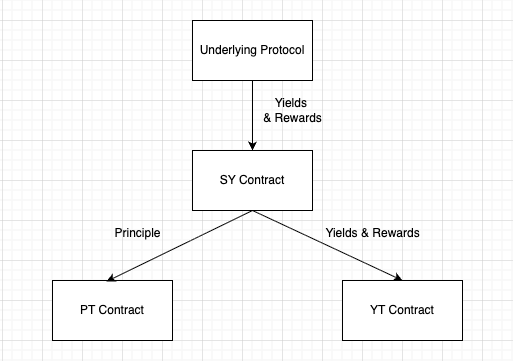
Before splitting, yield-bearing assets are wrapped into SY. To tokenize yield, users deposit SY into the YT contract, which mints PT and YT. The YT contract tracks yield and rewards accrued to the SY and distributes them to YT holders. At maturity, PT holders can redeem their principal from the YT contract.
## Core Logic
### [`mintPY`](https://github.com/pendle-finance/pendle-core-v2-public/blob/ba53685767bc16e070136b9dbfe02a5dd6258c61/contracts/core/YieldContracts/PendleYieldToken.sol#L84-L100)
```solidity
/**
* @notice Tokenize SY into PT + YT of equal qty. Every unit of asset of SY will create 1 PT + 1 YT
* @dev SY must be transferred to this contract prior to calling
*/
function mintPY(address receiverPT, address receiverYT) external returns (uint256 amountPYOut);
```
**Purpose**: Mints equal amounts of PT and YT by depositing SY into the YT contract.
**How it works:**
- The YT contract mints using its current SY balance. Therefore, you must transfer SY into the YT contract before calling the function. The amount of PT and YT minted is calculated as:
$$
PY \; minted = SY \; deposited \times current \; PY \; index
$$
- The YT contract mints equal quantities of PT and YT to the specified recipient addresses.
**Example:**
- If `1 SY-sUSDe = 1.2 USDe` (`PY index = 1.2`) and a user deposits `100 SY-sUSDe`, the contract mints `120 PT-sUSDe` and `120 YT-sUSDe`.
- Since `100 SY-sUSDe` corresponds to `120 USDe` of underlying value, the user receives `120 PT-sUSDe` (principal exposure) and `120 YT-sUSDe` (pre-expiry yield claim).
### [`redeemPY`](https://github.com/pendle-finance/pendle-core-v2-public/blob/ba53685767bc16e070136b9dbfe02a5dd6258c61/contracts/core/YieldContracts/PendleYieldToken.sol#L120-L134)
```solidity
/**
* @notice converts PT(+YT) tokens into SY, but interests & rewards are not redeemed at the
* same time
* @dev PT/YT must be transferred to this contract prior to calling
*/
function redeemPY(address receiver) external returns (uint256 amountSyOut);
```
**Purpose:** Redeem SY by burning PT and YT. Think of this as converting back to the principal accounting unit, while **interest and rewards are claimed separately**.
**How it works:**
- You have to provide equal amounts of PT and YT to the YT contract before calling the function.
- The contract burns the tokens and returns SY according to the current PY index:
$$
SY \; redeemed = PY \; burned \; \div current \; PY \; index
$$
- The redeemed SY is sent to the specified receiver. Note that interest and rewards accrued to YT are not included in this redemption.
**Notes:**
* **Pre-expiry:** both PT and YT are required to redeem SY.
* **Post-expiry:** only PT is required (YT has no value after maturity).
**Example:**
**Pre-expiry**
* Continuing the prior example: if the user holds `120 PT-sUSDe` and `120 YT-sUSDe`, and now the PY index is `1.25`, then
`SY_out = 120 / 1.25 = 96 SY-sUSDe` (which corresponds to **120 USDe**).
Interest and rewards accrued to YT are **not** included in this redemption.
**Post-expiry**
* After maturity, with `120 PT-sUSDe` and PY index `1.25`,
`SY_out = 120 / 1.25 = 96 SY-sUSDe` (again equal to **120 USDe**).
The user receives `96 SY-sUSDe`, which can be unwrapped or swapped back to the underlying **120 USDe** principal.
### [`redeemDueInterestAndRewards`](https://github.com/pendle-finance/pendle-core-v2-public/blob/ba53685767bc16e070136b9dbfe02a5dd6258c61/contracts/core/YieldContracts/PendleYieldToken.sol#L150-L186)
```solidity
/**
* @notice Redeems interests and rewards for `user`
* @param redeemInterest will only transfer out interest for user if true
* @param redeemRewards will only transfer out rewards for user if true
* @dev With YT yielding interest in the form of SY, which is redeemable by users, the reward
* distribution should be based on the amount of SYs that their YT currently represent, plus
* their dueInterest. It has been proven and tested that _rewardSharesUser will not change over
* time, unless users redeem their dueInterest or redeemPY. Due to this, it is required to
* update users' accruedReward STRICTLY BEFORE transferring out their interest.
*/
function redeemDueInterestAndRewards(
address user,
bool redeemInterest,
bool redeemRewards
) external returns (uint256 interestOut, uint256[] memory rewardsOut);
```
**Purpose:** Allows a YT holder to claim accrued earnings: interest (in SY) and any external reward tokens. Interest for YT is **always paid in SY**, but it can be swapped into your preferred token through the [router](../PendleRouter/ApiReference/MiscFunctions#redeemdueinterestandrewardsv2).
**Behavior notes:**
* **Interest unit:** Always **SY**. If you want the underlying/base asset, unwrap or swap through the [router](../PendleRouter/ApiReference/MiscFunctions#redeemdueinterestandrewardsv2).
* **Pre- vs post-expiry:**
* Pre-expiry: interest and rewards continue accruing; this function pays whatever is due up to the call.
* Post-expiry: YT no longer earns new yield. Calling still pays any **remaining** pre-expiry interest/rewards, if any.
* **Zero-flag calls:** If both flags are `false`, the call **reverts** with `YCNothingToRedeem`. At least one flag must be `true`.
* **Token order:** `rewardsOut[i]` corresponds to `getRewardTokens()[i]`. Always read the list first.
**Examples:**
* *Claim both:*
User has accrued `2.5 SY` of interest and `[10 X, 0.3 Y]` rewards. Calling with `(true, true)` returns `(2.5, [10, 0.3])`, transfers those amounts, and resets baselines.
* *Claim rewards only:*
Calling `(false, true)` transfers only rewards. Due interest remains in SY terms and continues to count toward reward-share until it's eventually claimed or the user redeems PY.
### `mintPYMulti`
```solidity
/**
* @notice Tokenize SY into PT + YT for multiple receivers in a single transaction.
* @dev SY must be transferred to this contract prior to calling.
* The sum of `amountSyToMints` must not exceed the floating SY balance.
*/
function mintPYMulti(
address[] calldata receiverPTs,
address[] calldata receiverYTs,
uint256[] calldata amountSyToMints
) external returns (uint256[] memory amountPYOuts);
```
**Purpose:** Batch version of `mintPY`. Mints PT and YT for multiple receivers in a single transaction, saving gas when distributing to many addresses.
**How it works:**
- Transfer the total required SY to the YT contract before calling.
- Pass parallel arrays: each `(receiverPTs[i], receiverYTs[i])` pair receives `amountPYOuts[i]` PT and YT minted from `amountSyToMints[i]` SY.
- The sum of `amountSyToMints` must equal the floating SY balance (total SY transferred in).
### [`pyIndexCurrent`](https://github.com/pendle-finance/pendle-core-v2-public/blob/ba53685767bc16e070136b9dbfe02a5dd6258c61/contracts/core/YieldContracts/PendleYieldToken.sol#L226-L236)
```solidity
/**
* @notice updates and returns the current PY index
* @dev this function maximizes the current PY index with the previous index, guaranteeing
* non-decreasing PY index
* @dev if `doCacheIndexSameBlock` is true, PY index only updates at most once per block,
* and has no state changes on the second call onwards (within the same block).
* @dev see `pyIndexStored()` for view function for cached value.
*/
function pyIndexCurrent() external returns (uint256 currentIndex);
```
* **Purpose:** Returns the **current PY index**, updating it if needed. The PY index tracks the SY exchange rate and is stored **monotonically** (never decreases).
* **Behavior notes:**
* The PY index is **non-decreasing**: `pyIndexCurrent = max(SY.exchangeRate(), pyIndexStored)`.
* If `doCacheIndexSameBlock` is enabled, the index is updated **at most once per block**; subsequent calls in the same block are read-only (no further state changes).
* If `SY.exchangeRate()` falls below the stored index (negative yield), the PY index **does not** move down. Consequences:
* Pre-expiry redemptions return **less SY per PY** until `SY.exchangeRate()` recovers above the stored index.
* YT accrual effectively **pauses** (no new interest) until recovery.
* In sustained drawdowns, even PT's eventual redemption (valued in the accounting asset) can be **less than previously expected** because the SY backing has shrunk. See [Negative Yield](../../../ProtocolMechanics/NegativeYield).
* **Examples:**
* **Up move:** Last stored `SY.exchangeRate()` = `1.20`; it rises to `1.25`. Calling `pyIndexCurrent()` updates the PY index to `1.25`.
* **Down move:** Last stored index = `1.20`; `SY.exchangeRate()` drops to `1.15`. The PY index **stays at `1.20`**.
If a user minted **120 PT** when the index was `1.20`, their claim on SY is `120 / 1.20 = 100 SY`.
At maturity, if each SY equals `1.15 USDe`, they redeem `100 × 1.15 = 115 USDe` (less than 120 USDe), reflecting the underlying negative yield.
### `setPostExpiryData`
```solidity
/**
* @notice Triggers the post-expiry data initialization if the market has expired.
* @dev Has no effect if called pre-expiry.
*/
function setPostExpiryData() external;
```
**Purpose:** Manually triggers the post-expiry settlement. Normally this is called automatically on the first interaction after expiry (via the `updateData` modifier), but this can be called explicitly to ensure the post-expiry index is snapshotted before further redemptions.
### `getPostExpiryData`
```solidity
/**
* @notice Returns the post-expiry data snapshot.
* @dev Reverts if post-expiry data has not been set yet (see `setPostExpiryData()`).
*/
function getPostExpiryData()
external
view
returns (
uint256 firstPYIndex,
uint256 totalSyInterestForTreasury,
uint256[] memory firstRewardIndexes,
uint256[] memory userRewardOwed
);
```
**Purpose:** Returns the post-expiry data snapshot. Useful for understanding what index was locked in at expiry and verifying post-expiry redemption amounts.
**Returns:**
- `firstPYIndex`: The PY index snapshotted at expiry. PT redemptions post-expiry use this index.
- `totalSyInterestForTreasury`: Accumulated SY interest accrued after expiry (goes to treasury, not users).
- `firstRewardIndexes`: Per-reward-token indexes snapshotted at expiry.
- `userRewardOwed`: Total unclaimed user reward balances at time of snapshot.
---
# StandardizedYield (SY)
**Contract:** [`IStandardizedYield`](https://github.com/pendle-finance/pendle-core-v2-public/blob/main/contracts/interfaces/IStandardizedYield.sol)
## Overview
StandardizedYield (SY) is Pendle's **adapter layer** for heterogeneous yield-bearing tokens. Every yield source integrated into Pendle — whether it's Aave aTokens, Lido wstETH, or GMX GLP — is wrapped into an SY contract that exposes a uniform interface for depositing, redeeming, querying exchange rates, and claiming rewards.
SY is the foundational token of the Pendle system. All other Pendle primitives build on top of it:
- **PT and YT** are minted by splitting SY (see [YieldTokenization](/pendle-v2/Developers/Contracts/YieldTokenization))
- **PendleMarket** trades PT against SY
- **PYLpOracle** prices PT, YT, and LP in SY or asset terms
Integrators interact with SY when wrapping/unwrapping yield tokens, querying supported deposit/withdrawal tokens, reading exchange rates for pricing, or claiming external protocol rewards.
## Core Concepts
### Exchange Rate Model
Every SY has an **exchange rate** that represents how much of the underlying asset one unit of SY is worth:
```
value_in_asset = amountSY × exchangeRate / 1e18
```
For appreciating yield tokens (e.g. wstETH, sDAI), the exchange rate increases over time as yield accrues. A 2× increase in exchange rate means 1 SY is now worth double the underlying asset.
The exchange rate is central to:
- **PT/YT pricing** — PT converges to `1 / exchangeRate` at expiry
- **Oracle rates** — `PYLpOracle` uses this to convert between SY and asset denominations
- **Reward share accounting** — YT reward shares are calculated using the SY exchange rate
### Asset Info and Pricing
`assetInfo()` returns metadata about what asset the SY appreciates against:
```solidity
(AssetType assetType, address assetAddress, uint8 assetDecimals) = sy.assetInfo();
```
| Field | Description |
|-------|-------------|
| `assetType` | `0` = TOKEN, `1` = LIQUIDITY |
| `assetAddress` | The reference asset the SY appreciates against. May not exist on the current chain (e.g. stETH address on Ethereum returned for SY-wstETH on Arbitrum). |
| `assetDecimals` | Decimal precision of the asset |
:::note
The asset address is a **best estimation** — it aims to enable rough on-chain valuation. For many SYs, a true 1:1 asset doesn't exist or isn't on the same chain.
:::
## Functions
### `deposit`
Wraps `tokenIn` into SY and sends the minted shares to `receiver`.
```solidity
function deposit(
address receiver,
address tokenIn,
uint256 amountTokenToDeposit,
uint256 minSharesOut
) external payable returns (uint256 amountSharesOut);
```
| Parameter | Type | Description |
|-----------|------|-------------|
| `receiver` | `address` | Address to receive the minted SY |
| `tokenIn` | `address` | Token to deposit (must be in `getTokensIn()`) |
| `amountTokenToDeposit` | `uint256` | Amount of `tokenIn` to deposit |
| `minSharesOut` | `uint256` | Minimum SY to mint (reverts if output is less) |
**Returns:** `amountSharesOut` — the amount of SY minted.
:::note Minting quirks
SY wraps the underlying yield protocol, so minting/redeeming behavior varies by protocol:
- **GLP**: Caps on certain tokens (ETH, USDC) are frequently reached, preventing their use despite being listed in `getTokensIn()`
- **ankrBNB**: Minimum mint of 0.1 BNB — smaller amounts revert. Redemption may fail if the quick-withdrawal pool lacks liquidity
- **wstETH**: ETH is in `getTokensIn()` (stake ETH → wstETH), but not in `getTokensOut()` (no direct unstake)
The most reliable deposit token is the protocol's yield token itself, but hardcoding this is not recommended — always check `getTokensIn()`.
:::
### `redeem`
Burns SY shares and sends the underlying `tokenOut` to `receiver`.
```solidity
function redeem(
address receiver,
uint256 amountSharesToRedeem,
address tokenOut,
uint256 minTokenOut,
bool burnFromInternalBalance
) external returns (uint256 amountTokenOut);
```
| Parameter | Type | Description |
|-----------|------|-------------|
| `receiver` | `address` | Address to receive the redeemed tokens |
| `amountSharesToRedeem` | `uint256` | Amount of SY to burn |
| `tokenOut` | `address` | Token to receive (must be in `getTokensOut()`) |
| `minTokenOut` | `uint256` | Minimum output amount (reverts if less) |
| `burnFromInternalBalance` | `bool` | If `true`, burns from SY transferred to the contract; if `false`, burns from `msg.sender`'s balance |
**Returns:** `amountTokenOut` — the amount of `tokenOut` received.
### `previewDeposit`
Estimates the amount of SY that would be minted for a given deposit. Best-effort approximation — **not audited for on-chain use**.
```solidity
function previewDeposit(
address tokenIn,
uint256 amountTokenToDeposit
) external view returns (uint256 amountSharesOut);
```
| Parameter | Type | Description |
|-----------|------|-------------|
| `tokenIn` | `address` | Token to deposit |
| `amountTokenToDeposit` | `uint256` | Amount to deposit |
### `previewRedeem`
Estimates the amount of `tokenOut` received for burning a given amount of SY. Best-effort approximation — **not audited for on-chain use**.
```solidity
function previewRedeem(
address tokenOut,
uint256 amountSharesToRedeem
) external view returns (uint256 amountTokenOut);
```
| Parameter | Type | Description |
|-----------|------|-------------|
| `tokenOut` | `address` | Token to receive |
| `amountSharesToRedeem` | `uint256` | Amount of SY to burn |
:::warning Preview functions — off-chain only
The underlying protocols often lack explicit preview functions. SY's `previewDeposit` and `previewRedeem` are best-effort approximations by the Pendle team. While verified through testing, they are **not audited** and should not be relied upon on-chain. Use them via `eth_call` / `staticCall` for off-chain estimation only.
:::
### `getTokensIn`
Returns all tokens that can be used to mint this SY.
```solidity
function getTokensIn() external view returns (address[] memory res);
```
### `getTokensOut`
Returns all tokens that can be received when redeeming this SY.
```solidity
function getTokensOut() external view returns (address[] memory res);
```
### `exchangeRate`
Returns the current exchange rate: how much asset 1 SY is worth (scaled by `1e18`). See [Unit and Decimals](/pendle-v2/Developers/Contracts/UnitAndDecimals) for decimal handling details.
```solidity
function exchangeRate() external view returns (uint256 res);
```
### `assetInfo`
Returns the asset type, address, and decimals that the SY appreciates against.
```solidity
function assetInfo()
external
view
returns (AssetType assetType, address assetAddress, uint8 assetDecimals);
```
See [Core Concepts — Asset Info and Pricing](#asset-info-and-pricing) above for field descriptions.
### `claimRewards`
Claims all accrued external protocol rewards for `user` and transfers them.
```solidity
function claimRewards(address user) external returns (uint256[] memory rewardAmounts);
```
### `accruedRewards`
Returns the currently credited reward amounts for `user` **without** triggering a state update. To get the latest results, simulate `claimRewards(user)` via `eth_call` or `staticCall`.
```solidity
function accruedRewards(address user) external view returns (uint256[] memory rewardAmounts);
```
:::note
`accruedRewards` only reflects rewards credited as of the last on-chain interaction. It does **not** include rewards pending since the last block update. For accurate off-chain reads, simulate `claimRewards` instead.
:::
### Extended: `pricingInfo()`
```solidity
function pricingInfo() external view returns (address refToken, bool refStrictlyEqual);
```
This optional function (defined in `IStandardizedYieldExtended`) describes the recommended pricing method for this SY:
| Return Value | Description |
|--------------|-------------|
| `refToken` | The reference token to use when pricing this SY |
| `refStrictlyEqual` | Whether `1 natural unit of SY == 1 natural unit of refToken` |
**How to use for pricing PT & YT:**
- `refStrictlyEqual = true`: use `PYLpOracle.get{Token}ToSyRate()` and multiply by `refToken`'s price. _Note: SY and refToken may have different decimals — see [Unit and Decimals](/pendle-v2/Developers/Contracts/UnitAndDecimals)._
- `refStrictlyEqual = false`: use `PYLpOracle.get{Token}ToAssetRate()` and multiply by `refToken`'s price.
Not all SYs implement `pricingInfo()`. Two common cases where it is overridden:
**Rebasing yield tokens** — Rebasing tokens (e.g. stETH, stHYPE) adjust holder balances on every rebase, so the SY's `exchangeRate` does not track 1:1 with the yield token in raw-unit terms. In this case `refStrictlyEqual = false`.
```solidity
// PendleStakedHYPESY — yieldToken = stHYPE (rebasing)
function pricingInfo() external view override returns (address refToken, bool refStrictlyEqual) {
return (yieldToken, false);
}
```
**Scaled18 SY** — For assets with fewer than 18 decimals (e.g. LBTC at 8 decimals), Pendle deploys a decimal-wrapping contract and a corresponding `Scaled18` SY. Because 1 natural unit of the SY equals 1 natural unit of the original token, `refStrictlyEqual = true`.
```solidity
// PendleLBTCBaseSYScaled18
address public constant LBTC = 0xecAc9C5F704e954931349Da37F60E39f515c11c1;
function pricingInfo() external pure returns (address refToken, bool refStrictlyEqual) {
return (LBTC, true); // original LBTC (8 decimals), not the scaled18 wrapper
}
```
:::tip
If you're building a money market or lending protocol, check whether the SY implements `pricingInfo()` before choosing your oracle path. Contact the Pendle team for discussion when integrating a new token type.
:::
## Pricing Guide
When pricing PT/YT/LP positions, the choice between `getPtToSy` and `getPtToAsset` depends on the SY type.
### Standard SYs
Most SYs are a 1:1 wrap of the yield token. **Value PT/YT/LP by yield token** (`getPtToSy` / `getLpToSy`). If not possible, value by asset but account for the withdrawal risk from yield token to asset (`getPtToAsset` / `getLpToAsset`).
| Market | Recommended way to get price | Unit of price | yieldToken of SY (1-1 wrap) | Note | Asset of SY |
| --------------- | ---------------------------- | ------------- | --------------------------- | -------------------------------- | -------------------------------- |
| LBTC | getPtToSy | LBTC | LBTC | - | BTC staked on Lombard |
| sUSDe | getPtToSy | sUSDe | sUSDe | - | USDe |
| USDe | getPtToSy | USDe | USDe | - | USDe |
| eBTC | getPtToSy | eBTC | eBTC | - | eBTC (constant exchange rate) |
| USD0++ | getPtToSy | USD0++ | USD0++ | - | USD0++ (constant exchange rate) |
| sENA | getPtToSy | sENA | sENA | - | ENA staked on Ethena |
| SolvBTC.BBN | getPtToSy | SolvBTC.BBN | SolvBTC.BBN | - | BTC staked on Solv |
| PumpBTC | getPtToSy | PumpBTC | PumpBTC | - | BTC staked on Pump |
| weETH | getPtToSy | weETH | weETH | - | eETH |
| weETHs | getPtToSy | weETHs | weETHs | limited liquidity to market sell | weETHs (constant exchange rate) |
| weETHk | getPtToSy | weETHk | weETHk | limited liquidity to market sell | weETHk (constant exchange rate) |
| weETH (Karak) | getPtToSy | weETH (Karak) | weETHk (Karak) | can't market sell | eETH |
| pufETH | getPtToSy | pufETH | pufETH | - | ETH staked on Puffer |
| pzETH | getPtToSy | pzETH | pzETH | limited liquidity to market sell | pzETH (constant exchange rate) |
| wstETH | getPtToSy | wstETH | wstETH | - | stETH |
| GLP | getPtToSy | GLP | GLP | - | GLP |
| MUXLP | getPtToSy | MUXLP | MUXLP | can't market sell | MUXLP |
| HLP | getPtToSy | HLP | HLP | can't market sell | HLP |
| ezETH | getPtToSy | ezETH | ezETH | - | ETH staked on Renzo |
| rETH | getPtToSy | rETH | rETH | - | ETH staked on Rocket |
| ezETH (Zircuit) | getPtToSy | ezETH | ezETH | - | ETH staked on Renzo then Zircuit |
| uniETH | getPtToSy | uniETH | uniETH | - | ETH staked on Bedrock |
| rswETH | getPtToSy | rswETH | rswETH | - | ETH staked on Swell |
| rswETH Swell L2 | getPtToSy | rswETH | rswETH | - | ETH staked on Swell |
| swETH | getPtToSy | swETH | swETH | - | ETH staked on Swell |
| ETHx | getPtToSy | ETHx | ETHx | - | ETH staked on Stadler |
| rsETH | getPtToSy | rsETH | rsETH | - | ETH staked on Kelp |
| sDAI | **getPtToAsset** | DAI | sDAI | - | DAI |
| crvUSD Silo | **getPtToAsset** | crvUSD | scrvUSD | - | crvUSD |
| gDAI | **getPtToAsset** | DAI | gDAI | can't market sell | DAI staked in Gains |
**Notes on Assets of SYs:**
- All Liquid Staking Tokens (LRTs) except for weETH have assets listed as "ETH staked in xyz." This is different from ETH, as it takes 7 days or more to withdraw, and these staked ETH are subject to slashing if it occurs. As a result, LRT always trades at a slight depeg compared to the amount of ETH withdrawable from it. Hence, it's not safe to value these markets directly in ETH (which would not account for this depeg). Always value these in the original LRT form.
- sDAI, scrvUSD, and gDAI tokens are not tradable, so they must be valued directly in their underlying asset. Similar to LRT, valuing them directly in the underlying asset will skip the protocol's risk of not being able to withdraw from yieldToken to Asset. Please keep that in mind!
- All in all, it's safe to value tokens in yieldToken, whereas valuing them in assets carries additional conversion risk that you should be aware of.
### Non-standard SYs
Other SYs that are not 1-1 wrap of yieldToken:
| Market | Recommended way to get price | Unit of price | yieldToken of SY (NOT 1-1 Wrap) | Asset of SY |
| ------- | ---------------------------- | ------------- | ------------------------------- | ----------- |
| aUSDT | getPtToAsset | USDT | - | USDT |
| aUSDC | getPtToAsset | USDC | - | USDC |
| ePENDLE | getPtToAsset | ePENDLE | - | ePENDLE |
| mPENDLE | getPtToAsset | mPENDLE | - | mPENDLE |
For aUSDT and aUSDC, similar considerations apply as for sDAI, scrvUSD, and gDAI. Value them directly in their underlying asset.
## FAQ
### What does `exchangeRate()` represent?
It returns the amount of the underlying asset that 1 SY is worth, scaled by `1e18`. For example, if `exchangeRate()` returns `1.05e18`, then 1 SY = 1.05 units of the asset. The rate increases over time as yield accrues.
### Why can't I always deposit with any token listed in `getTokensIn()`?
`getTokensIn()` lists tokens that the SY *can* accept, but the underlying protocol may have dynamic constraints — capacity caps (GLP), minimum amounts (ankrBNB), or liquidity limits — that cause deposits to revert at any given time. Always handle reverts gracefully.
### How do I price PT/YT if my SY is non-standard?
For non-standard SYs (not a 1:1 wrap of the yield token), use `getPtToAsset` / `getLpToAsset` instead of the SY-denominated variants. Check the [Pricing Guide](#pricing-guide) tables above. If the SY implements `pricingInfo()`, follow the `refStrictlyEqual` flag to choose the correct oracle path.
### Should I use `getPtToSy` or `getPtToAsset`?
Prefer `getPtToSy` for maximum trustlessness — the PT→SY rate is natively guaranteed by the Pendle AMM. Use `getPtToAsset` only when your protocol explicitly needs asset-denominated pricing and you understand the additional SY→asset conversion risk (exchange rate dependency, potential depegs). See [PYLpOracle](/pendle-v2/Developers/Contracts/Oracle/PYLpOracle) for details.
## Further Reading
- [CommonSY](/pendle-v2/Developers/Contracts/StandardizedYield/CommonSY) — deployed SY addresses per chain
- [DecimalsWrapper](/pendle-v2/Developers/Contracts/StandardizedYield/DecimalsWrapper) — how Pendle handles tokens with non-18 decimals
- [Unit and Decimals](/pendle-v2/Developers/Contracts/UnitAndDecimals) — decimal handling across PT, YT, SY, and asset
- [YieldTokenization](/pendle-v2/Developers/Contracts/YieldTokenization) — how SY is split into PT and YT
- [PYLpOracle](/pendle-v2/Developers/Contracts/Oracle/PYLpOracle) — TWAP oracle for pricing PT, YT, and LP
- [Rewards](/pendle-v2/Developers/Contracts/LiquidityMining/Rewards) — full reward accounting model for SY, YT, and LP holders
---
# Pendle Market Smart Contracts
**Contract:** [`PendleMarketV7`](https://github.com/pendle-finance/pendle-core-v2-public/blob/main/contracts/core/Market/PendleMarketV7.sol)
## Introduction
Pendle Market is a specialized Automated Market Maker (AMM) pool designed for trading yields. Each market enables efficient trading between:
- **Principal Tokens (PT)** - Tokens that represent the principal component of yield-bearing assets
- **Standardized Yield (SY)** - Wrapped yield-bearing assets that standardize yield mechanics
## Pendle AMM Overview
Traditional AMMs like Uniswap use constant product formulas (`x × y = k`) that do not account for the unique properties of fixed-yield assets. Pendle Markets implement a sophisticated time-aware AMM based on Notional Finance's AMM model that:
- **Recognizes time decay**: PT prices naturally converge to 1 as they approach expiry
- **Optimizes for yield trading**: Pricing curves are tailored for interest rate movements
- **Maximizes capital efficiency**: Concentrates liquidity around expected yield ranges
- **Minimizes Impermanent Loss (IL)**: Pendle's AMM accounts for PT's natural price appreciation by shifting the AMM curve to push PT price towards its underlying value as time passes, mitigating time-dependent IL (No IL at maturity).
> **Deep Dive**: For complete mathematical analysis and comparisons, see the [Pendle V2 AMM Whitepaper](https://github.com/pendle-finance/pendle-v2-resources/blob/main/whitepapers/V2_AMM.pdf)
## Market Parameters
- **Expiry**: The timestamp when PT tokens can be redeemed 1:1 for underlying assets - drives PT price convergence to 1 as expiry approaches.
- **Scalar Root**: Controls the trade-off between capital efficiency and tradeable interest rate range - higher values create tighter, more efficient markets.
- **Initial Anchor**: Sets the interest rate around which trading is most capital efficient at market launch - centers liquidity around expected yield levels.
- **Fee Rate Root**: Dynamic fees based on interest rate impact rather than token amounts - larger market movements incur proportionally higher fees.
## Core Logic
### [`mint`](https://github.com/pendle-finance/pendle-core-v2-public/blob/main/contracts/core/Market/PendleMarketV7.sol#L105-L136)
Adds liquidity using PT & SY; mints LP shares proportional to the amounts used.
```solidity
/**
* @notice PendleMarket allows users to provide in PT & SY in exchange for LPs, which
* will grant LP holders more exchange fee over time
* @dev will mint as much LP as possible such that the corresponding SY and PT used do
* not exceed `netSyDesired` and `netPtDesired`, respectively
* @dev PT and SY should be transferred to this contract prior to calling
* @dev will revert if PT is expired
*/
function mint(
address receiver,
uint256 netSyDesired,
uint256 netPtDesired
) external returns (uint256 netLpOut, uint256 netSyUsed, uint256 netPtUsed);
```
**Note:**
- Caller must transfer PT and SY to the Market before calling. The function mints as many LPs as possible without exceeding `netSyDesired`/`netPtDesired`.
### [`burn`](https://github.com/pendle-finance/pendle-core-v2-public/blob/main/contracts/core/Market/PendleMarketV7.sol#L142-L159)
Removes liquidity by burning LP shares for pro-rata SY and PT.
```solidity
/**
* @notice LP Holders can burn their LP to receive back SY & PT proportionally
* to their share of the market
*/
function burn(
address receiverSy,
address receiverPt,
uint256 netLpToBurn
) external returns (uint256 netSyOut, uint256 netPtOut);
```
**Note:** caller must transfer LP to the Market before calling.
### [`swapExactPtForSy`](https://github.com/pendle-finance/pendle-core-v2-public/blob/main/contracts/core/Market/PendleMarketV7.sol#L172-L202)
Swaps an exact amount of PT for SY.
```solidity
/**
* @notice Pendle Market allows swaps between PT & SY it is holding. This function
* aims to swap an exact amount of PT to SY.
* @dev steps working of this contract
- The outcome amount of SY will be precomputed by MarketMathLib
- Release the calculated amount of SY to receiver
- Callback to msg.sender if data.length > 0
- Ensure exactPtIn amount of PT has been transferred to this address
* @dev will revert if PT is expired
* @param data bytes data to be sent in the callback (if any)
*/
function swapExactPtForSy(
address receiver,
uint256 exactPtIn,
bytes calldata data
) external nonReentrant notExpired returns (uint256 netSyOut, uint256 netSyFee);
```
**Note:** caller must transfer PT to the Market first; the Market then sends out the computed SY and (optionally) invokes a callback if data is non-empty. For a deeper understanding of the math behind it, refer to the [`Pendle V2 AMM Whitepaper`](https://github.com/pendle-finance/pendle-v2-resources/blob/main/whitepapers/V2_AMM.pdf) and [`MarketMathCore Contract`](https://github.com/pendle-finance/pendle-core-v2-public/blob/ba53685767bc16e070136b9dbfe02a5dd6258c61/contracts/core/Market/MarketMathCore.sol#L193-L217).
### [`swapSyForExactPt`](https://github.com/pendle-finance/pendle-core-v2-public/blob/main/contracts/core/Market/PendleMarketV7.sol#L214-L246)
Swaps SY for an exact amount of PT.
```solidity
/**
* @notice Pendle Market allows swaps between PT & SY it is holding. This function
* aims to swap SY for an exact amount of PT.
* @dev steps working of this function
- The exact outcome amount of PT will be transferred to receiver
- Callback to msg.sender if data.length > 0
- Ensure the calculated required amount of SY is transferred to this address
* @dev will revert if PT is expired
* @param data bytes data to be sent in the callback (if any)
*/
function swapSyForExactPt(
address receiver,
uint256 exactPtOut,
bytes calldata data
) external returns (uint256 netSyIn, uint256 netSyFee);
```
**Note:** the Market sends out exactPtOut to receiver, optionally callbacks msg.sender, and then enforces that the required SY has been provided (typically via `transfer` in the callback/Router). For a deeper understanding of the math behind it, refer to the [`Pendle V2 AMM Whitepaper`](https://github.com/pendle-finance/pendle-v2-resources/blob/main/whitepapers/V2_AMM.pdf) and [`MarketMathCore Contract`](https://github.com/pendle-finance/pendle-core-v2-public/blob/ba53685767bc16e070136b9dbfe02a5dd6258c61/contracts/core/Market/MarketMathCore.sol#L193-L217).
### [`redeemRewards`](https://github.com/pendle-finance/pendle-core-v2-public/blob/main/contracts/core/Market/PendleMarketV7.sol#L261-L263)
Claims accumulated swap fees/protocol rewards for user (in the order of `getRewardTokens()`).
```solidity
/**
* @notice redeems the user's reward
* @return amount of reward token redeemed, in the same order as `getRewardTokens()`
*/
function redeemRewards(address user) external returns (uint256[] memory);
```
### [`increaseObservationsCardinalityNext`](https://github.com/pendle-finance/pendle-core-v2-public/blob/main/contracts/core/Market/PendleMarketV7.sol#L284-L291)
Grows the oracle ring buffer to support longer TWAP windows.
```solidity
function increaseObservationsCardinalityNext(uint16 cardinalityNext) external;
```
**Note:** The ring buffer starts with a cardinality of 1. To query TWAP windows longer than the current buffer covers, call this function first to pre-expand the buffer. Anyone can call this; it only increases (never decreases) the cardinality.
### [`skim`](https://github.com/pendle-finance/pendle-core-v2-public/blob/main/contracts/core/Market/PendleMarketV7.sol#L249-L255)
Forces internal reserves to match actual token balances.
```solidity
/// @notice forces balances to match reserves
function skim() external;
```
**Note:** If tokens are accidentally sent directly to the market contract (not via a swap/mint), they accumulate as excess. `skim` transfers this excess to the treasury. This is an emergency recovery function; normal integrations do not need to call it.
### [`readState`](https://github.com/pendle-finance/pendle-core-v2-public/blob/main/contracts/core/Market/PendleMarketV7.sol#L300-L315)
Returns the current market state and pricing metadata.
```solidity
struct MarketState {
int256 totalPt; // total PT in the market
int256 totalSy; // total SY in the market
int256 totalLp; // total LP minted
address treasury; // treasury address to receive protocol fees
int256 scalarRoot; // variable to control the capital efficiency of the market
uint256 expiry; // timestamp when market expires
/// fee data ///
uint256 lnFeeRateRoot; // fee rate in ln
uint256 reserveFeePercent; // reserve fee in base 100
/// last trade data ///
uint256 lastLnImpliedRate; // last ln(implied rate) observed
}
/**
* @notice read the state of the market from storage into memory for gas-efficient manipulation
*/
function readState(address router) external view returns (MarketState memory market);
```
**Note:**
- `lnFeeRateRoot` and `lastLnImpliedRate` are stored/returned as natural-log values in fixed-point form.
- The router parameter allows the function to reflect router-specific settings (e.g., fee discounts if applicable).
### [`readTokens`](https://github.com/pendle-finance/pendle-core-v2-public/blob/main/contracts/core/Market/PendleMarketV7.sol#L348-L352)
Returns the three token addresses of the market.
```solidity
function readTokens() external view returns (
IStandardizedYield SY,
IPPrincipalToken PT,
IPYieldToken YT
);
```
**Note:** Use this as the canonical way to discover the SY, PT, and YT addresses associated with any market address.
### [`isExpired`](https://github.com/pendle-finance/pendle-core-v2-public/blob/main/contracts/core/Market/PendleMarketV7.sol#L354-L356)
Returns whether the market has passed its expiry timestamp.
```solidity
function isExpired() external view returns (bool);
```
**Note:** Swaps and liquidity minting revert after expiry. LP burning and reward claiming remain available post-expiry.
### [`getRewardTokens`](https://github.com/pendle-finance/pendle-core-v2-public/blob/main/contracts/core/Market/PendleMarketV7.sol#L266-L268)
Lists all reward tokens distributed to LP holders.
```solidity
function getRewardTokens() external view returns (address[] memory);
```
**Note:** The list includes both SY external rewards (e.g., AAVE incentives passed through the underlying SY) and PENDLE incentives distributed via the gauge controller. Always call this first to map indices before calling `redeemRewards`.
### [`observe`](https://github.com/pendle-finance/pendle-core-v2-public/blob/main/contracts/core/Market/PendleMarketV7.sol#L274-L282)
Oracle API — reads cumulative implied rates at past time deltas.
```solidity
function observe(uint32[] memory secondsAgos)
external
view
returns (uint216[] memory lnImpliedRateCumulative);
```
**Note:** Each element of `secondsAgos` is a lookback in seconds from the current block (e.g., `[300, 0]` = 5 minutes ago and now). Returns the cumulative `lnImpliedRate` at each point, from which a TWAP can be derived. See the [Oracle section](#oracle) below and [About the PT Oracle](../../Oracles/OracleOverview.md#about-the-pt-oracle) for details.
### [`getNonOverrideLnFeeRateRoot`](https://github.com/pendle-finance/pendle-core-v2-public/blob/main/contracts/core/Market/PendleMarketV7.sol#L340-L342)
Returns the base fee rate before any router-specific override.
```solidity
function getNonOverrideLnFeeRateRoot() external view returns (uint80);
```
**Note:** `readState(router)` may return a lower `lnFeeRateRoot` if an override is set for that router. This function always returns the original fee set at market creation.
## Fee & Rewards
### `reserveFeePercent` (Treasury fee)
A percentage of each swap's fee is sent to Pendle's treasury. The remainder goes to LP providers. `reserveFeePercent` is stored in `MarketState` and is configurable by the factory owner. It is expressed as a value in base 100 (e.g., `80` = 80% of the fee goes to the treasury, 20% to LPs).
When `readState(router)` is called, the current `reserveFeePercent` is fetched from the factory's `getMarketConfig` and included in the returned `MarketState`.
### Fee Override Mechanism (Router discount)
`PendleMarketFactoryV7Upg.setOverriddenFee(router, market, newFee)` sets a lower fee for a specific router on a specific market. When `readState(router)` is called with that router address, the overridden fee is returned in `MarketState.lnFeeRateRoot` instead of the base fee. This is how the Pendle Router earns a fee discount compared to direct market interaction.
- The overridden fee must be strictly lower than `getNonOverrideLnFeeRateRoot()`.
- Setting `newFee = 0` is allowed (zero fee for that router).
- Only the factory owner can set overrides.
### Reward Mechanism (Gauge)
The market inherits from `PendleGauge`. LP holders accumulate two types of rewards passively:
- **SY external rewards** — incentives from the underlying protocol (e.g., AAVE rewards) that are passed through the SY contract.
- **PENDLE incentives** — distributed via the `gaugeController` based on gauge weights.
Both types accumulate in proportion to the LP balance held. Call `redeemRewards(user)` to claim all pending rewards. `getRewardTokens()` returns the full ordered list of reward token addresses.
## Integration Example
:::danger Example code only
The snippets below are simplified for illustration and **are not audited**.
**Do not** use them in production or with real funds. If you adapt any example,
conduct a full review, add comprehensive tests, and obtain an independent **security audit**.
:::
### Discover Market Tokens
```solidity
// Discover SY, PT, YT from a market address
(IStandardizedYield sy, IPPrincipalToken pt, IPYieldToken yt) = market.readTokens();
```
### Basic Swap
```solidity
// Transfer PT to market first
pt.transfer(address(market), ptAmount);
// Execute swap (exact PT in → SY out)
(uint256 syOut,) = market.swapExactPtForSy(
msg.sender,
ptAmount,
""
);
```
### Basic Mint
```solidity
// Transfer tokens first
sy.transfer(address(market), syAmount);
pt.transfer(address(market), ptAmount);
// Mint LP tokens
(uint256 lpOut,,) = market.mint(
msg.sender,
syAmount,
ptAmount
);
```
### Claiming LP Rewards
```solidity
// Discover what reward tokens this market distributes
address[] memory rewardTokens = market.getRewardTokens();
// Claim all accumulated rewards for msg.sender
uint256[] memory rewardAmounts = market.redeemRewards(msg.sender);
// rewardAmounts[i] corresponds to rewardTokens[i]
for (uint256 i = 0; i < rewardTokens.length; i++) {
// handle rewardTokens[i] with amount rewardAmounts[i]
}
```
## Flash Swap
Similar to Uniswap V2, **all Pendle swaps are actually flash swaps**. The Market sends output tokens to the receiver first, then enforces that sufficient input tokens have been received by the end of the transaction. This facilitates advanced use cases like arbitrage, liquidation, and in Pendle specifically, YT trading.
### How It Works
1. **Market sends output tokens** to receiver immediately
2. **Callback executed** (if data provided) - this is where you implement your logic. You can use the received tokens for arbitrage, liquidation, or other strategies, but you must ensure you transfer the required input tokens back to the Market before the callback ends.
3. **Market checks input tokens** - verifies required tokens were transferred during the transaction
Because Ethereum transactions are atomic, the entire swap reverts if the Market doesn't receive enough input tokens.
### Flash Swap Example
:::danger Example code only
The snippets below are simplified for illustration and **are not audited**.
**Do not** use them in production or with real funds. If you adapt any example,
conduct a full review, add comprehensive tests, and obtain an independent **security audit**.
:::
```solidity
contract FlashSwapExample is IPMarketSwapCallback {
IPendleMarket public market;
function flashSwap(uint256 ptAmount) external {
// Market will send SY first, then callback to this contract
market.swapExactPtForSy(
address(this),
ptAmount,
abi.encode(msg.sender) // data for callback
);
}
// Callback - Market has already sent SY to this contract
function swapCallback(
int256 ptToAccount, // negative = we owe PT to market
int256 syToAccount, // positive = we received SY from market
bytes calldata data
) external {
require(msg.sender == address(market));
// Your custom logic here (arbitrage, liquidation, etc.)
// ...
// Must transfer required PT to market before callback ends
uint256 ptOwed = uint256(-ptToAccount);
IERC20(market.PT()).transfer(address(market), ptOwed);
}
}
```
### Interface
```solidity
interface IPMarketSwapCallback {
function swapCallback(int256 ptToAccount, int256 syToAccount, bytes calldata data) external;
}
```
## Oracle
Pendle Markets provide oracle functionality for PT pricing and implied yield rates, adapted from Uniswap V3's time-weighted average price (TWAP) oracle.
### How It Works
The oracle stores **implied rate observations** over time, which are then used to calculate manipulation-resistant PT prices and yields.
**Key Formula:**
$$
\text{lnImpliedRateCumulative}_i
= \text{lnImpliedRateCumulative}_{i-1}
+ \text{lnImpliedRate} \times \Delta t
$$
where **lnImpliedRate** is the natural logarithm of the implied interest rate at the current market state, and **Δt** is the time elapsed.
From these cumulative values, you can compute the **geometric mean price of PT** over a given interval (see [About the PT Oracle](../../Oracles/OracleOverview.md#about-the-pt-oracle) for details).
### Integration Guide
See [How to Integrate PT and LP Oracles](../../Oracles/HowToIntegratePtAndLpOracle) for implementation details.
## FAQ
### Why is there no swapExactSy function?
Unlike standard AMMs, Pendle's AMM only allows swapping exact PT in/out. Therefore, functions like `swapExactSyForPt` and `swapPtForExactSy` should generally be avoided. If necessary, use PendleRouter's `swapExactSyForPt` with approx parameters. Refer to the [PendleRouter documentation](../PendleRouter/ApiReference/PtFunctions#swapexactsyforpt) for details.
### How can I trade YT tokens when the Market only contains PT and SY?
YT tokens can be traded via [flash swaps](../../../ProtocolMechanics/LiquidityEngines/AMM#flash-swaps). Use the PendleRouter's `swapExactTokenForYt` or `swapExactYtForToken` functions, which handle the necessary flash swap logic and token transfers. Refer to the [PendleRouter documentation](../PendleRouter/ApiReference/YtFunctions#swapexacttokenforyt) for details.
### Why can't I swap PT after expiry?
At expiry, PT can be redeemed for the underlying asset. Market-making no longer makes economic sense at this point and would enable circular arbitrage. To redeem PT post-expiry, use the [Router](../PendleRouter/ApiReference/LiquidityFunctions#removeliquiditysingletoken).
### Should I use the Router or interact with the Market directly?
* Use the Router for:
* Any operations involving YT.
* Swaps using tokens other than the underlying (since additional swaps are required).
* Fee discounts, slippage protection, etc.
* Interact directly with the Market for:
* Simple PT ↔ SY swaps.
* Flash swaps.
* Highly gas-optimized integrations where you manage token transfers and slippage manually.
---
# Pendle Router Overview
## Quick Start
- To see examples of how to use Pendle Router, check out the [Integration Guide](#integration-guide).
## Overview
PendleRouter is a contract that aggregates callers' actions with various SYs, PTs, YTs, and markets. It does not have any special permissions or whitelists on any contracts it interacts with. However, it is recommended that third parties use the Router to enjoy the fee discount while trading with the pool, as opposed to directly interacting with the pools themselves. The lnFeeRateRoot in the pool will be reduced when the Router is used to trade.
The Router has had three historical versions, with **RouterV4** very likely being the final version:
| Version | Deployed | Address | Notes |
|---------|----------|---------|-------|
| RouterV1 | Nov 23, 2022 | `0x41FAD93F225b5C1C95f2445A5d7fcB85bA46713f` | Initial release |
| RouterV2 | Feb 21, 2023 | `0x0000000001e4ef00d069e71d6ba041b0a16f7ea0` | 15–20% gas optimization |
| RouterV3 | Dec 18, 2023 | `0x00000000005BBB0EF59571E58418F9a4357b68A0` | Added limit order support |
| **RouterV4** | Apr 29, 2024 | `0x888888888889758F76e7103c6CbF23ABbF58F946` | **Upgradable** — new features and optimizations are added gradually without requiring partners to migrate |
Since PendleRouter is a proxy to multiple implementations (using the [EIP-2535 Diamond Standard](https://eips.ethereum.org/EIPS/eip-2535)), the caller can call the desired functions, and the Router will resolve to the correct implementation. Please refer to the [list of callable functions](https://github.com/pendle-finance/pendle-core-v2-public/blob/main/contracts/interfaces/IPAllActionV3.sol).
:::caution Block Explorer Limitation
Because the Router uses the Diamond proxy pattern, block explorers like Etherscan **cannot correctly display all available functions**. They typically only show the ABI of the base proxy contract, not the aggregated functions from all its facets (implementations). To interact with the full range of Router functions, use the complete combined ABI from [`IPAllActionV3.sol`](https://github.com/pendle-finance/pendle-core-v2-public/blob/main/contracts/interfaces/IPAllActionV3.sol).
:::
**Important notes on older Router versions:**
- **RouterV2** may have issues with newer markets where a necessary approval step is not being called. On some networks like Mantle, RouterV2 is not supported and will revert.
- **RouterV3** and earlier versions remain functional but lack the latest optimizations. Upgrading to **RouterV4** is highly recommended for all integrations.
For a comprehensive understanding of the Pendle ecosystem, including key concepts and terminology, please refer to the [High Level Architecture](../../HighLevelArchitecture).
## Integration Guide
This section covers how to interact with the Pendle Router to buy and sell Principal Tokens (PTs) and Yield Tokens (YTs) using two methods:
1. **Pendle's Hosted SDK**: Recommended for optimized liquidity, gas efficiency, and broader token support. Hosted SDK is publicly available at [https://api-v2.pendle.finance/core/docs](https://api-v2.pendle.finance/core/docs). More about it at [Pendle Hosted SDK](../../Backend/HostedSdk.mdx).
2. **Direct Interaction with the Pendle Router**: Offers direct contract interaction, all data is generated on-chain.
We highly recommend using Pendle's SDK to generate calldata for several reasons:
1. **Gas Efficiency**: Currently, Pendle's AMM only supports the built-in `swapExactPtForSy` and `swapSyForExactPt`. To execute a `swapExactTokenForPt` (which is essentially the same as `swapExactSyForPt`), the router will conduct a binary search to determine the amount of PT to swap. While the binary search can be done entirely on-chain, limiting the search range off-chain will result in significantly less gas consumption for this function. The SDK leverages off-chain data to optimize gas usage, potentially reducing gas costs significantly.
2. **Accurate Price Impacts**: The SDK provides precise calculations for swaps, ensuring better price impacts for users.
3. **Limit Order System**: The limit order system of Pendle exists solely off-chain. Including these limit orders in on-chain swaps can significantly improve the price impact for users, particularly during large-size swaps.
4. **Ease of Integration**: By using the SDK, developers can seamlessly integrate Pendle's functionality into their applications, leveraging the full power of the swap aggregator, limit order system, and off-chain data preparation.
5. **Convenient zapping with any ERC20 token**: Liquidity is currently fragmented across a large number of pools across various DEXes. Integrating only Uniswap or Balancer has proven to be insufficient. As a result, PendleRouter has natively integrated [KyberSwap](https://kyberswap.com/) to swap from any ERC20 token to another. For KyberSwap to work, the routing algorithm must be called off-chain and then pass the routing results to the Router to execute.
We'll explore both methods, including example code, for each approach.
### Method 1: Using the Pendle Hosted SDK (Recommended)
The Hosted SDK handles off-chain optimization, aggregator routing, and limit order integration automatically. See the [Hosted SDK Documentation](../../Backend/HostedSdk.mdx) for full details, examples, and supported operations.
### Method 2: Direct Interaction with the Pendle Router
For fully on-chain integrations without the SDK, see the [Contract Integration Guide](./ContractIntegrationGuide) for step-by-step Solidity examples covering PT/YT trading, liquidity management, and minting/redeeming.
Key struct types used by the Router (`TokenInput`, `TokenOutput`, `ApproxParams`, `LimitOrderData`) are documented in the [Types and Utility Functions](./ApiReference/Types) reference, along with helper functions for on-chain parameter generation.
### Available Router Functions
- **Trading**: `swapExactTokenForPt`, `swapExactPtForToken`, `swapExactTokenForYt`, `swapExactYtForToken`
- **Liquidity**: `addLiquiditySingleToken`, `removeLiquiditySingleToken`
- **Minting/Redeeming**: `mintPyFromToken`, `redeemPyToToken`
- **Rewards**: `redeemDueInterestAndRewards`
For the full list, see [`IPAllActionV3.sol`](https://github.com/pendle-finance/pendle-core-v2-public/blob/main/contracts/interfaces/IPAllActionV3.sol). Example code: [RouterSample.sol](https://github.com/pendle-finance/pendle-examples-public/blob/main/test/RouterSample.sol).
---
# Pendle Router Contract Integration Guide
## Overview
This guide shows how to interact with the Pendle Router for common on-chain actions—buying/selling PT or YT, adding/removing liquidity, minting/redeeming PT and YT, and claiming rewards. It’s intended for developers who want to integrate Pendle fully on-chain without using the Pendle SDK.
For most use cases, we recommend the Pendle SDK for a better developer and end-user experience. The SDK supports zap-in/zap-out from any token, limit-order filling, and off-chain quoting, among other features. See the [Pendle SDK documentation](../../Backend/HostedSdk.mdx) for details.
The full tutorial source code is available in [RouterSample.sol](https://github.com/pendle-finance/pendle-examples-public/blob/main/test/RouterSample.sol). The examples target the wstETH market, but you can adapt them to other markets by changing the market and underlying asset addresses.
## Quick Navigation
### Helper functions
- [Helper Functions](#helper-functions)
### Trading Operations
- [PT Trading](#pt-trading)
- [YT Trading](#yt-trading)
### Liquidity Operations
- [Add Liquidity (Zap In) & Remove Liquidity (Zap Out)](#liquidity-management)
- [Add Liquidity (Keep YT)](#add-liquidity-keep-yt)
### Other Operations
- [Mint/Redeem SY](#mint-sy-from-token)
- [Mint/Redeem PT & YT](#mint-pt--yt-from-token)
## YT Trading
### Buy YT with Token
Buying YT with the underlying token. This example uses wstETH to buy YT-wstETH.
```solidity
address market = 0xD0354D4e7bCf345fB117cabe41aCaDb724eccCa2;
address wstETH = 0x7f39C581F595B53c5cb19bD0b3f8dA6c935E2Ca0;
address ytReceiver = address(this);
IERC20(wstETH).approve(address(router), tokenAmount);
(uint256 netYtOut, , ) = router.swapExactTokenForYt(
ytReceiver, // receiver
address(market), // market address
0, // minYtOut
defaultApprox, // approximation params
createTokenInputStruct(wstETH, tokenAmount), // token input
emptyLimit // limit order data
);
```
### Sell YT for Token
Selling YT for the underlying token. This example uses YT-wstETH to sell for wstETH.
```solidity
address market = 0xD0354D4e7bCf345fB117cabe41aCaDb724eccCa2;
address wstETH = 0x7f39C581F595B53c5cb19bD0b3f8dA6c935E2Ca0;
(,, address YT) = IPMarket(market).readTokens();
address tokenReceiver = address(this);
IERC20(YT).approve(address(router), ytAmount);
(uint256 netTokenOut, , ) = router.swapExactYtForToken(
tokenReceiver, // receiver
address(market), // market address
ytAmount, // exact YT amount to sell
createTokenOutputStruct(wstETH, 0), // token output (0 = no minimum)
emptyLimit // limit order data
);
```
---
# Types and Utility Functions
This document covers all struct types used throughout the Pendle Router and utility functions for generating parameters on-chain.
## Core Parameter Types
### TokenInput
Defines input token configuration for functions that accept tokens.
```solidity
struct TokenInput {
address tokenIn;
uint256 netTokenIn;
address tokenMintSy;
address pendleSwap;
SwapData swapData;
}
```
**Fields**
| Name | Type | Description |
|------|------|-------------|
| tokenIn | `address` | Address of the input token (can be any ERC20 token supported by Pendle) |
| netTokenIn | `uint256` | Amount of input tokens |
| tokenMintSy | `address` | Token used to mint SY (must be supported by target SY contract) |
| pendleSwap | `address` | Swap aggregator address (use `address(0)` for direct SY token input) |
| swapData | `SwapData` | Swap configuration data for external aggregation |
### Usage Patterns
**Direct SY Token Input (Simple):**
When `tokenIn` is already a token supported by the target SY contract:
- Set `tokenIn = tokenMintSy` (same token)
- Set `pendleSwap = address(0)` (no external swap needed)
- Set `swapData` to empty (no aggregation)
**Any ERC20 Token Input (Zap In):**
When `tokenIn` is any ERC20 token that needs to be swapped to a supported SY token:
- Set `tokenIn` to the user's input token (e.g., USDC, DAI, WETH)
- Set `tokenMintSy` to a token supported by the target SY
- Set `pendleSwap` to the swap aggregator address
- Set `swapData` with proper aggregator configuration.
**E.g**: When you have USDC and want to mint SY-sUSDe:
- Set `tokenIn = USDC`
- Set `tokenMintSy = sUSDe` (a token accepted by SY-sUSDe's `deposit()` function)
- Set `pendleSwap = 0xd4F480965D2347d421F1bEC7F545682E5Ec2151D`
- Set `swapData` to proper data configuration obtained from [SDK](../../../Backend/HostedSdk#supported-functions)
**Benefits of Zap In:**
- Users can interact with any Pendle market using any ERC20 token they hold
- No need to manually swap tokens before interacting with Pendle
- Optimal routing through multiple DEXes for best price execution
- Single transaction for swap + Pendle operation
**SDK Integration:**
The [Pendle Hosted SDK](../../../Backend/HostedSdk#features) automatically handles all TokenInput configuration when you enable routing. When you set `enableAggregator: true` in SDK calls, it:
- Automatically selects the best swap aggregator (KyberSwap, ODOS, 1inch, etc.)
- Generates optimal `swapData` for the chosen route
- Handles all token conversions transparently
- Provides the best possible price execution across multiple DEXes
For direct contract interaction, you need to manually configure these fields or use utility functions like `createTokenInputSimple()` for basic operations.
### TokenOutput
Defines output token configuration for functions that return tokens.
```solidity
struct TokenOutput {
address tokenOut;
uint256 minTokenOut;
address tokenRedeemSy;
address pendleSwap;
SwapData swapData;
}
```
**Fields**
| Name | Type | Description |
|------|------|-------------|
| tokenOut | `address` | Address of the desired output token (can be any ERC20 token supported by Pendle) |
| minTokenOut | `uint256` | Minimum amount of output tokens to receive (slippage protection) |
| tokenRedeemSy | `address` | Token to redeem SY to (must be supported by target SY contract) |
| pendleSwap | `address` | Swap aggregator address (use `address(0)` for direct SY token output) |
| swapData | `SwapData` | Swap configuration data for external aggregation |
### Usage Patterns
**Direct SY Token Output (Simple):**
When `tokenOut` is already a token supported by the target SY contract:
- Set `tokenOut = tokenRedeemSy` (same token)
- Set `pendleSwap = address(0)` (no external swap needed)
- Set `swapData` to empty (no aggregation)
**Any ERC20 Token Output (Zap Out):**
When `tokenOut` is any ERC20 token different from supported SY tokens:
- Set `tokenOut` to the user's desired token (e.g., USDC, DAI, WETH)
- Set `tokenRedeemSy` to a token supported by the target SY
- Set `pendleSwap` to the swap aggregator address
- Set `swapData` with proper aggregator configuration (KyberSwap, 1inch, etc.)
**Benefits of Zap Out:**
- Users can receive any ERC20 token as output from Pendle operations
- No need to manually swap tokens after exiting Pendle positions
- Optimal routing through multiple DEXes for best price execution
- Single transaction for Pendle operation + swap
- Built-in slippage protection with `minTokenOut`
**SDK Integration:**
The [Pendle Hosted SDK](../../../Backend/HostedSdk#features) automatically handles all TokenOutput configuration when you enable routing. When you set `enableAggregator: true` in SDK calls, it:
- Automatically selects the best swap aggregator for output token conversion
- Generates optimal `swapData` for the chosen route
- Calculates appropriate slippage protection
- Handles all token conversions transparently
For direct contract interaction, you need to manually configure these fields or use utility functions like `createTokenOutputSimple()` for basic operations.
### ApproxParams
Parameters for approximation algorithms used when swapping exact tokens to PT or YT. **ApproxParams is required when the exact output amount needs to be determined through iterative approximation** because the Pendle AMM formula cannot be directly inverted.
```solidity
struct ApproxParams {
uint256 guessMin;
uint256 guessMax;
uint256 guessOffchain;
uint256 maxIteration;
uint256 eps;
}
```
**Fields**
| Name | Type | Description |
|------|------|-------------|
| guessMin | `uint256` | Minimum bound for binary search |
| guessMax | `uint256` | Maximum bound for binary search (use `type(uint256).max` for auto) |
| guessOffchain | `uint256` | Initial guess from off-chain calculation (use `0` for on-chain) |
| maxIteration | `uint256` | Maximum iterations for binary search (recommended: `256`) |
| eps | `uint256` | Precision tolerance (recommended: `1e14`) |
**When ApproxParams is Needed:**
ApproxParams is required for functions that swap an exact amount of tokens to PT or YT, such as:
- [`swapExactTokenForPt`](./PtFunctions#swapexacttokenforpt) - Convert exact token amount to PT
- [`swapExactSyForPt`](./PtFunctions#swapexactsyforpt) - Convert exact SY amount to PT
- [`swapExactTokenForYt`](./YtFunctions#swapexacttokenforyt) - Convert exact token amount to YT
- [`swapExactSyForYt`](./YtFunctions#swapexactsyforyt) - Convert exact SY amount to YT
**Why Approximation is Required:**
The Pendle AMM natively supports functions like `swapExactPtForSy` and `swapSyForExactPt`, but does NOT have `swapExactSyForPt`. When you want to swap an exact amount of tokens/SY for PT/YT, the router must use binary search to determine how much PT/YT can be obtained, since the AMM can only calculate the reverse (exact PT amounts).
### LimitOrderData
Configuration for limit order functionality that **provides better prices and reduces slippage** by filling user orders at predetermined rates before routing to the AMM.
```solidity
struct LimitOrderData {
address limitRouter;
uint256 epsSkipMarket;
FillOrderParams[] normalFills;
FillOrderParams[] flashFills;
bytes optData;
}
```
**Fields**
| Name | Type | Description |
|------|------|-------------|
| limitRouter | `address` | Address of limit order router |
| epsSkipMarket | `uint256` | Threshold to skip market operations |
| normalFills | `FillOrderParams[]` | Normal limit order fills |
| flashFills | `FillOrderParams[]` | Flash loan limit order fills |
| optData | `bytes` | Additional optimization data |
### RedeemYtIncomeToTokenStruct
Configuration for YT income redemption with token conversion.
```solidity
struct RedeemYtIncomeToTokenStruct {
IPYieldToken yt;
bool doRedeemInterest;
bool doRedeemRewards;
address tokenRedeemSy;
uint256 minTokenRedeemOut;
}
```
**Fields**
| Name | Type | Description |
|------|------|-------------|
| yt | `IPYieldToken` | YT token contract interface |
| doRedeemInterest | `bool` | Whether to redeem accrued interest |
| doRedeemRewards | `bool` | Whether to redeem reward tokens |
| tokenRedeemSy | `address` | Token to convert SY interest to |
| minTokenRedeemOut | `uint256` | Minimum tokens to receive from conversion |
### SwapData
Configuration for external swap aggregation functionality.
```solidity
struct SwapData {
SwapType swapType;
address extRouter;
bytes extCalldata;
bool needScale;
}
```
**Fields**
| Name | Type | Description |
|------|------|-------------|
| swapType | `SwapType` | Type of swap aggregator to use |
| extRouter | `address` | Address of the external swap router |
| extCalldata | `bytes` | Encoded calldata for the external swap |
| needScale | `bool` | Whether the swap amount needs scaling |
**Use Case**
Enables integration with external swap aggregators like KyberSwap, 1inch, Paraswap, etc. This allows Pendle to support zapping in/out with any ERC20 token by routing through external DEXes.
### SwapType
Enumeration defining supported swap aggregator types. See the [complete SwapType definition](https://github.com/pendle-finance/pendle-core-v2-public/blob/main/contracts/router/swap-aggregator/IPSwapAggregator.sol#L18-L31) in the smart contract.
```solidity
enum SwapType {
NONE,
KYBERSWAP,
ODOS,
ETH_WETH,
OKX,
ONE_INCH,
PARASWAP
}
```
**Values**
| Value | Description |
|-------|-------------|
| `NONE` | No external swap aggregation |
| `KYBERSWAP` | KyberSwap aggregation |
| `ODOS` | ODOS aggregation |
| `ETH_WETH` | ETH/WETH conversion |
| `OKX` | OKX DEX aggregation |
| `ONE_INCH` | 1inch aggregation |
| `PARASWAP` | Paraswap aggregation |
**Use Case**
Specifies which external aggregator to use for token swaps, enabling Pendle to leverage the best available liquidity across different DEXes. The [Pendle Hosted SDK](../../../Backend/HostedSdk#features) automatically selects the optimal SwapType based on available liquidity and routing efficiency.
### ExitPreExpReturnParams
Detailed breakdown of returns from pre-expiry position exit operations.
```solidity
struct ExitPreExpReturnParams {
uint256 netPtFromRemove;
uint256 netSyFromRemove;
uint256 netPyRedeem;
uint256 netSyFromRedeem;
uint256 netPtSwap;
uint256 netYtSwap;
uint256 netSyFromSwap;
uint256 netSyFee;
uint256 totalSyOut;
}
```
**Fields**
| Name | Type | Description |
|------|------|-------------|
| netPtFromRemove | `uint256` | PT tokens obtained from LP removal |
| netSyFromRemove | `uint256` | SY tokens obtained from LP removal |
| netPyRedeem | `uint256` | PT+YT pairs redeemed to SY |
| netSyFromRedeem | `uint256` | SY tokens from PT+YT redemption |
| netPtSwap | `uint256` | PT tokens swapped to SY |
| netYtSwap | `uint256` | YT tokens swapped to SY |
| netSyFromSwap | `uint256` | SY tokens from PT/YT swaps |
| netSyFee | `uint256` | Trading fees paid in SY |
| totalSyOut | `uint256` | Total SY tokens received |
**Use Case**
Provides detailed breakdown of complex exit operations before market expiry, helping users understand exactly how their positions were unwound and what fees were paid.
### ExitPostExpReturnParams
Breakdown of returns from post-expiry position exit operations.
```solidity
struct ExitPostExpReturnParams {
uint256 netPtFromRemove;
uint256 netSyFromRemove;
uint256 netPtRedeem;
uint256 netSyFromRedeem;
uint256 totalSyOut;
}
```
**Fields**
| Name | Type | Description |
|------|------|-------------|
| netPtFromRemove | `uint256` | PT tokens obtained from LP removal |
| netSyFromRemove | `uint256` | SY tokens obtained from LP removal |
| netPtRedeem | `uint256` | PT tokens redeemed at maturity |
| netSyFromRedeem | `uint256` | SY tokens from PT redemption |
| totalSyOut | `uint256` | Total SY tokens received |
**Use Case**
Provides breakdown of exit operations after market expiry when PT tokens can be redeemed 1:1 for underlying assets. Simpler than pre-expiry exits since no swapping is required.
## Utility Functions
These functions generate the parameters described above on-chain, offering an alternative for users who do not utilize the Pendle SDK.
### createTokenInputSimple
Creates a simple TokenInput struct without external swapping.
```solidity
function createTokenInputSimple(address tokenIn, uint256 netTokenIn) pure returns (TokenInput memory)
```
**Input Parameters**
| Name | Type | Description |
|------|------|-------------|
| tokenIn | `address` | Input token address (must be supported by target SY) |
| netTokenIn | `uint256` | Amount of input tokens |
**Return Values**
| Name | Type | Description |
|------|------|-------------|
| - | `TokenInput` | Configured TokenInput struct |
**Use Case**
Most common way to create TokenInput for standard operations. The tokenIn must be one of the tokens accepted by the target SY contract (check via `IStandardizedYield.getTokensIn()`).
### createTokenOutputSimple
Creates a simple TokenOutput struct without external swapping.
```solidity
function createTokenOutputSimple(address tokenOut, uint256 minTokenOut) pure returns (TokenOutput memory)
```
**Input Parameters**
| Name | Type | Description |
|------|------|-------------|
| tokenOut | `address` | Output token address (must be supported by target SY) |
| minTokenOut | `uint256` | Minimum amount of output tokens |
**Return Values**
| Name | Type | Description |
|------|------|-------------|
| - | `TokenOutput` | Configured TokenOutput struct |
**Use Case**
Most common way to create TokenOutput for standard operations. The tokenOut must be one of the tokens that the target SY can redeem to (check via `IStandardizedYield.getTokensOut()`).
### createDefaultApproxParams
Creates default approximation parameters suitable for most operations.
```solidity
function createDefaultApproxParams() pure returns (ApproxParams memory)
```
**Return Values**
| Name | Type | Description |
|------|------|-------------|
| - | `ApproxParams` | Configured ApproxParams with optimal defaults |
**Configuration**
- guessMin: `0`
- guessMax: `type(uint256).max` (auto-detection)
- guessOffchain: `0` (pure on-chain calculation)
- maxIteration: `256` (sufficient for most cases)
- eps: `1e14` (0.01% precision)
**Use Case**
Recommended for all operations requiring approximation. These parameters provide good balance between accuracy and gas costs.
### createEmptyLimitOrderData
Creates an empty LimitOrderData struct for operations without limit orders.
```solidity
function createEmptyLimitOrderData() pure returns (LimitOrderData memory)
```
**Return Values**
| Name | Type | Description |
|------|------|-------------|
| - | `LimitOrderData` | Empty LimitOrderData struct |
**Use Case**
Use when you don't need limit order functionality. Required by many functions but can be empty for standard market operations.
## Integration Examples
### Basic Parameter Creation
```solidity
// Create input parameters for 1000 USDC
TokenInput memory input = createTokenInputSimple(USDC_ADDRESS, 1000e6);
// Create output parameters expecting at least 950 USDC
TokenOutput memory output = createTokenOutputSimple(USDC_ADDRESS, 950e6);
// Create default approximation parameters
ApproxParams memory approx = createDefaultApproxParams();
// Create empty limit order data
LimitOrderData memory limit = createEmptyLimitOrderData();
```
### Complete Function Call Example
```solidity
// Add liquidity with properly configured parameters
router.addLiquiditySingleToken(
msg.sender, // receiver
MARKET_ADDRESS, // market
minLpOut, // minLpOut
createDefaultApproxParams(), // guessPtReceivedFromSy
createTokenInputSimple(USDC_ADDRESS, 1000e6), // input
createEmptyLimitOrderData() // limit
);
```
### Custom ApproxParams for Advanced Use
```solidity
// Create custom approximation parameters for high precision
ApproxParams memory customApprox = ApproxParams({
guessMin: 0,
guessMax: type(uint256).max,
guessOffchain: estimatedOutput, // Use off-chain calculation if available
maxIteration: 512, // Higher precision
eps: 1e15 // Looser tolerance (0.1%)
});
```
## Best Practices
**For Standard Operations:**
- Always use `createDefaultApproxParams()` unless you have specific precision requirements
- Use `createEmptyLimitOrderData()` for simple market operations
- Ensure token addresses are supported by target SY contracts
**For Performance:**
- Off-chain approximation (`guessOffchain`) can reduce gas costs significantly
- Higher `maxIteration` values increase precision but cost more gas
- Tighter `eps` values improve precision but may increase iterations
---
# Simple Functions
This document lists simplified versions of Pendle Router functions that use on-chain approximation algorithms instead of requiring complex parameters. These functions are automatically used by the main router when conditions allow for simplified execution.
## Overview
The Pendle Router includes simplified versions of complex functions that:
- Use on-chain approximation algorithms (no `ApproxParams` needed)
- Skip limit order functionality (no `LimitOrderData` needed)
- Provide streamlined interfaces for common operations
- Are automatically selected when no off-chain guess is provided and limit order data is empty
## Important Notes
⚠️ **Limited Flexibility**: Simple functions don't support limit orders or custom approximation parameters.
⚠️ **Market Dependent**: Effectiveness depends on current market conditions and may not always be available.
The simple functions provide a streamlined interface for common operations while maintaining the full functionality of the Pendle trading system through automated approximation algorithms.
## PT Trading Functions
### swapExactTokenForPtSimple
Simplified version of `swapExactTokenForPt` using on-chain approximation.
```solidity
function swapExactTokenForPtSimple(
address receiver,
address market,
uint256 minPtOut,
TokenInput calldata input
) external payable returns (uint256 netPtOut, uint256 netSyFee, uint256 netSyInterm)
```
**Input Parameters**
| Name | Type | Description |
|------|------|-------------|
| receiver | `address` | Address to receive PT tokens |
| market | `address` | Pendle market address |
| minPtOut | `uint256` | Minimum PT tokens to receive |
| input | `TokenInput` | Token input configuration |
**Return Values**
| Name | Type | Description |
|------|------|-------------|
| netPtOut | `uint256` | PT tokens received |
| netSyFee | `uint256` | Trading fees paid in SY |
| netSyInterm | `uint256` | SY tokens generated from input token |
### swapExactSyForPtSimple
Simplified version of `swapExactSyForPt` using on-chain approximation.
```solidity
function swapExactSyForPtSimple(
address receiver,
address market,
uint256 exactSyIn,
uint256 minPtOut
) external returns (uint256 netPtOut, uint256 netSyFee)
```
**Input Parameters**
| Name | Type | Description |
|------|------|-------------|
| receiver | `address` | Address to receive PT tokens |
| market | `address` | Pendle market address |
| exactSyIn | `uint256` | Exact amount of SY tokens to swap |
| minPtOut | `uint256` | Minimum PT tokens to receive |
**Return Values**
| Name | Type | Description |
|------|------|-------------|
| netPtOut | `uint256` | PT tokens received |
| netSyFee | `uint256` | Trading fees paid in SY |
## YT Trading Functions
### swapExactTokenForYtSimple
Simplified version of `swapExactTokenForYt` using on-chain approximation.
```solidity
function swapExactTokenForYtSimple(
address receiver,
address market,
uint256 minYtOut,
TokenInput calldata input
) external payable returns (uint256 netYtOut, uint256 netSyFee, uint256 netSyInterm)
```
**Input Parameters**
| Name | Type | Description |
|------|------|-------------|
| receiver | `address` | Address to receive YT tokens |
| market | `address` | Pendle market address |
| minYtOut | `uint256` | Minimum YT tokens to receive |
| input | `TokenInput` | Token input configuration |
**Return Values**
| Name | Type | Description |
|------|------|-------------|
| netYtOut | `uint256` | YT tokens received |
| netSyFee | `uint256` | Trading fees paid in SY |
| netSyInterm | `uint256` | SY tokens generated from input token |
### swapExactSyForYtSimple
Simplified version of `swapExactSyForYt` using on-chain approximation.
```solidity
function swapExactSyForYtSimple(
address receiver,
address market,
uint256 exactSyIn,
uint256 minYtOut
) external returns (uint256 netYtOut, uint256 netSyFee)
```
**Input Parameters**
| Name | Type | Description |
|------|------|-------------|
| receiver | `address` | Address to receive YT tokens |
| market | `address` | Pendle market address |
| exactSyIn | `uint256` | Exact amount of SY tokens to swap |
| minYtOut | `uint256` | Minimum YT tokens to receive |
**Return Values**
| Name | Type | Description |
|------|------|-------------|
| netYtOut | `uint256` | YT tokens received |
| netSyFee | `uint256` | Trading fees paid in SY |
## Liquidity Management Functions
### addLiquiditySingleTokenSimple
Simplified version of `addLiquiditySingleToken` using on-chain approximation.
```solidity
function addLiquiditySingleTokenSimple(
address receiver,
address market,
uint256 minLpOut,
TokenInput calldata input
) external payable returns (uint256 netLpOut, uint256 netSyFee, uint256 netSyInterm)
```
**Input Parameters**
| Name | Type | Description |
|------|------|-------------|
| receiver | `address` | Address to receive LP tokens |
| market | `address` | Pendle market address |
| minLpOut | `uint256` | Minimum LP tokens to receive |
| input | `TokenInput` | Token input configuration |
**Return Values**
| Name | Type | Description |
|------|------|-------------|
| netLpOut | `uint256` | LP tokens received |
| netSyFee | `uint256` | Trading fees paid in SY |
| netSyInterm | `uint256` | SY tokens generated from input token |
### addLiquiditySingleSySimple
Simplified version of `addLiquiditySingleSy` using on-chain approximation.
```solidity
function addLiquiditySingleSySimple(
address receiver,
address market,
uint256 netSyIn,
uint256 minLpOut
) external returns (uint256 netLpOut, uint256 netSyFee)
```
**Input Parameters**
| Name | Type | Description |
|------|------|-------------|
| receiver | `address` | Address to receive LP tokens |
| market | `address` | Pendle market address |
| netSyIn | `uint256` | Amount of SY tokens to use |
| minLpOut | `uint256` | Minimum LP tokens to receive |
**Return Values**
| Name | Type | Description |
|------|------|-------------|
| netLpOut | `uint256` | LP tokens received |
| netSyFee | `uint256` | Trading fees paid in SY |
### addLiquiditySinglePtSimple
Simplified version of `addLiquiditySinglePt` using on-chain approximation.
```solidity
function addLiquiditySinglePtSimple(
address receiver,
address market,
uint256 netPtIn,
uint256 minLpOut
) external returns (uint256 netLpOut, uint256 netSyFee)
```
**Input Parameters**
| Name | Type | Description |
|------|------|-------------|
| receiver | `address` | Address to receive LP tokens |
| market | `address` | Pendle market address |
| netPtIn | `uint256` | Amount of PT tokens to use |
| minLpOut | `uint256` | Minimum LP tokens to receive |
**Return Values**
| Name | Type | Description |
|------|------|-------------|
| netLpOut | `uint256` | LP tokens received |
| netSyFee | `uint256` | Trading fees paid in SY |
### removeLiquiditySinglePtSimple
Simplified version of `removeLiquiditySinglePt` using on-chain approximation.
```solidity
function removeLiquiditySinglePtSimple(
address receiver,
address market,
uint256 netLpToRemove,
uint256 minPtOut
) external returns (uint256 netPtOut, uint256 netSyFee)
```
**Input Parameters**
| Name | Type | Description |
|------|------|-------------|
| receiver | `address` | Address to receive PT tokens |
| market | `address` | Pendle market address |
| netLpToRemove | `uint256` | Amount of LP tokens to burn |
| minPtOut | `uint256` | Minimum PT tokens to receive |
**Return Values**
| Name | Type | Description |
|------|------|-------------|
| netPtOut | `uint256` | PT tokens received |
| netSyFee | `uint256` | Trading fees paid in SY |
## When Simple Functions Are Used
The Pendle Router automatically determines when to use simplified functions. Simple functions are used when:
1. **No limit orders**: `LimitOrderData` is empty
2. **No off-chain guess**: `ApproxParams` doesn't include off-chain calculated estimates
3. **Default parameters**: Standard approximation parameters are used
## Advantages of Simple Functions
**Ease of Use**: Require fewer parameters and no complex configuration.
**Reliability**: Built-in approximation algorithms are optimized for common trading scenarios.
**Automatic Selection**: The main router functions automatically delegate to simple versions when no off-chain guess is provided and limit order data is empty.
## Integration Approach
**Recommended Pattern**: Always use the main router functions (e.g., `swapExactTokenForPt`) with default parameters. The router will automatically use simple versions when optimal.
```solidity
// This may automatically use the simple version
router.swapExactTokenForPt(
receiver,
market,
minPtOut,
createDefaultApproxParams(),
createTokenInputSimple(tokenIn, amountIn),
createEmptyLimitOrderData()
);
```
**Direct Usage**: Only call simple functions directly if you're building custom routing logic and want to force the use of on-chain approximation.
---
# Liquidity Management Functions
This document covers all functions for managing liquidity positions in Pendle markets. These functions allow adding and removing liquidity in various token combinations.
## Add Liquidity Functions
### addLiquidityDualTokenAndPt
Adds liquidity using a token and PT token in exact amounts.
```solidity
function addLiquidityDualTokenAndPt(
address receiver,
address market,
TokenInput calldata input,
uint256 netPtDesired,
uint256 minLpOut
) external payable returns (uint256 netLpOut, uint256 netPtUsed, uint256 netSyInterm)
```
**Input Parameters**
| Name | Type | Description |
|------|------|-------------|
| receiver | `address` | Address to receive LP tokens |
| market | `address` | Pendle market address |
| input | [`TokenInput`](./Types#tokeninput) | Token input configuration |
| netPtDesired | `uint256` | Desired amount of PT tokens to use |
| minLpOut | `uint256` | Minimum LP tokens to receive |
**Return Values**
| Name | Type | Description |
|------|------|-------------|
| netLpOut | `uint256` | LP tokens received |
| netPtUsed | `uint256` | PT tokens actually used |
| netSyInterm | `uint256` | SY tokens generated from input token |
**Use Case**
When you have both the underlying token and PT tokens and want to add liquidity using exact amounts of both. The function will mint SY from your token input and combine it with your PT tokens.
### addLiquidityDualSyAndPt
Adds liquidity using both SY and PT tokens in exact amounts.
```solidity
function addLiquidityDualSyAndPt(
address receiver,
address market,
uint256 netSyDesired,
uint256 netPtDesired,
uint256 minLpOut
) external returns (uint256 netLpOut, uint256 netSyUsed, uint256 netPtUsed)
```
**Input Parameters**
| Name | Type | Description |
|------|------|-------------|
| receiver | `address` | Address to receive LP tokens |
| market | `address` | Pendle market address |
| netSyDesired | `uint256` | Desired amount of SY tokens to use |
| netPtDesired | `uint256` | Desired amount of PT tokens to use |
| minLpOut | `uint256` | Minimum LP tokens to receive |
**Return Values**
| Name | Type | Description |
|------|------|-------------|
| netLpOut | `uint256` | LP tokens received |
| netSyUsed | `uint256` | SY tokens actually used |
| netPtUsed | `uint256` | PT tokens actually used |
**Use Case**
When you already have both SY and PT tokens and want to add liquidity directly.
### addLiquiditySinglePt
Adds liquidity using only PT tokens by internally swapping some PT for SY.
```solidity
function addLiquiditySinglePt(
address receiver,
address market,
uint256 netPtIn,
uint256 minLpOut,
ApproxParams calldata guessPtSwapToSy,
LimitOrderData calldata limit
) external returns (uint256 netLpOut, uint256 netSyFee)
```
**Input Parameters**
| Name | Type | Description |
|------|------|-------------|
| receiver | `address` | Address to receive LP tokens |
| market | `address` | Pendle market address |
| netPtIn | `uint256` | Amount of PT tokens to use |
| minLpOut | `uint256` | Minimum LP tokens to receive |
| guessPtSwapToSy | [`ApproxParams`](./Types#approxparams) | Approximation parameters |
| limit | [`LimitOrderData`](./Types#limitorderdata) | Limit order configuration |
**Return Values**
| Name | Type | Description |
|------|------|-------------|
| netLpOut | `uint256` | LP tokens received |
| netSyFee | `uint256` | Trading fees paid in SY |
**Use Case**
When you only have PT tokens and want to add liquidity. The function will automatically determine the optimal amount of PT to swap for SY to achieve balanced liquidity provision.
**Simple Version Available**
For basic operations without custom parameters, use [`addLiquiditySinglePtSimple`](./SimpleFunctions#addliquiditysingleptsimple) which automatically handles approximation and skips limit order functionality.
### addLiquiditySingleToken
Adds liquidity using any supported token by converting it to SY and PT as needed.
```solidity
function addLiquiditySingleToken(
address receiver,
address market,
uint256 minLpOut,
ApproxParams calldata guessPtReceivedFromSy,
TokenInput calldata input,
LimitOrderData calldata limit
) external payable returns (uint256 netLpOut, uint256 netSyFee, uint256 netSyInterm)
```
**Input Parameters**
| Name | Type | Description |
|------|------|-------------|
| receiver | `address` | Address to receive LP tokens |
| market | `address` | Pendle market address |
| minLpOut | `uint256` | Minimum LP tokens to receive |
| guessPtReceivedFromSy | [`ApproxParams`](./Types#approxparams) | Approximation parameters |
| input | [`TokenInput`](./Types#tokeninput) | Token input configuration |
| limit | [`LimitOrderData`](./Types#limitorderdata) | Limit order configuration |
**Return Values**
| Name | Type | Description |
|------|------|-------------|
| netLpOut | `uint256` | LP tokens received |
| netSyFee | `uint256` | Trading fees paid in SY |
| netSyInterm | `uint256` | SY tokens generated from input token |
**Use Case**
Most convenient method when you have any supported token and want to add liquidity. The function handles all necessary conversions and swaps automatically.
**Simple Version Available**
For basic operations without custom parameters, use [`addLiquiditySingleTokenSimple`](./SimpleFunctions#addliquiditysingletokensimple) which automatically handles approximation and skips limit order functionality.
### addLiquiditySingleSy
Adds liquidity using only SY tokens by converting some to PT through market operations.
```solidity
function addLiquiditySingleSy(
address receiver,
address market,
uint256 netSyIn,
uint256 minLpOut,
ApproxParams calldata guessPtReceivedFromSy,
LimitOrderData calldata limit
) external returns (uint256 netLpOut, uint256 netSyFee)
```
**Input Parameters**
| Name | Type | Description |
|------|------|-------------|
| receiver | `address` | Address to receive LP tokens |
| market | `address` | Pendle market address |
| netSyIn | `uint256` | Amount of SY tokens to use |
| minLpOut | `uint256` | Minimum LP tokens to receive |
| guessPtReceivedFromSy | [`ApproxParams`](./Types#approxparams) | Approximation parameters |
| limit | [`LimitOrderData`](./Types#limitorderdata) | Limit order configuration |
**Return Values**
| Name | Type | Description |
|------|------|-------------|
| netLpOut | `uint256` | LP tokens received |
| netSyFee | `uint256` | Trading fees paid in SY |
**Use Case**
When you have SY tokens and want to add liquidity. The function will swap some SY for PT to achieve optimal liquidity provision.
**Simple Version Available**
For basic operations without custom parameters, use [`addLiquiditySingleSySimple`](./SimpleFunctions#addliquiditysinglesysimple) which automatically handles approximation and skips limit order functionality.
### addLiquiditySingleTokenKeepYt
Adds liquidity while keeping the generated YT tokens instead of selling them.
```solidity
function addLiquiditySingleTokenKeepYt(
address receiver,
address market,
uint256 minLpOut,
uint256 minYtOut,
TokenInput calldata input
) external payable returns (uint256 netLpOut, uint256 netYtOut, uint256 netSyMintPy, uint256 netSyInterm)
```
**Input Parameters**
| Name | Type | Description |
|------|------|-------------|
| receiver | `address` | Address to receive LP and YT tokens |
| market | `address` | Pendle market address |
| minLpOut | `uint256` | Minimum LP tokens to receive |
| minYtOut | `uint256` | Minimum YT tokens to receive |
| input | [`TokenInput`](./Types#tokeninput) | Token input configuration |
**Return Values**
| Name | Type | Description |
|------|------|-------------|
| netLpOut | `uint256` | LP tokens received |
| netYtOut | `uint256` | YT tokens received |
| netSyMintPy | `uint256` | SY used to mint PT/YT |
| netSyInterm | `uint256` | SY tokens generated from input token |
**Use Case**
When you want to add liquidity and also keep YT tokens for yield farming. This strategy avoids price impact since no swapping occurs - the underlying asset is converted to SY, then PT/YT pairs are minted directly. The PT and remaining SY are used for liquidity provision while YT is returned to you.
### addLiquiditySingleSyKeepYt
Adds liquidity using SY tokens while keeping the generated YT tokens.
```solidity
function addLiquiditySingleSyKeepYt(
address receiver,
address market,
uint256 netSyIn,
uint256 minLpOut,
uint256 minYtOut
) external returns (uint256 netLpOut, uint256 netYtOut, uint256 netSyMintPy)
```
**Input Parameters**
| Name | Type | Description |
|------|------|-------------|
| receiver | `address` | Address to receive LP and YT tokens |
| market | `address` | Pendle market address |
| netSyIn | `uint256` | Amount of SY tokens to use |
| minLpOut | `uint256` | Minimum LP tokens to receive |
| minYtOut | `uint256` | Minimum YT tokens to receive |
**Return Values**
| Name | Type | Description |
|------|------|-------------|
| netLpOut | `uint256` | LP tokens received |
| netYtOut | `uint256` | YT tokens received |
| netSyMintPy | `uint256` | SY used to mint PT/YT |
**Use Case**
When you have SY tokens and want both LP tokens and YT tokens. This method avoids price impact since no swapping occurs - SY is used to mint PT/YT pairs directly, with PT used for liquidity provision and YT returned to you.
## Remove Liquidity Functions
### removeLiquidityDualTokenAndPt
Removes liquidity and receives both the underlying token and PT tokens.
```solidity
function removeLiquidityDualTokenAndPt(
address receiver,
address market,
uint256 netLpToRemove,
TokenOutput calldata output,
uint256 minPtOut
) external returns (uint256 netTokenOut, uint256 netPtOut, uint256 netSyInterm)
```
**Input Parameters**
| Name | Type | Description |
|------|------|-------------|
| receiver | `address` | Address to receive tokens |
| market | `address` | Pendle market address |
| netLpToRemove | `uint256` | Amount of LP tokens to burn |
| output | [`TokenOutput`](./Types#tokenoutput) | Token output configuration |
| minPtOut | `uint256` | Minimum PT tokens to receive |
**Return Values**
| Name | Type | Description |
|------|------|-------------|
| netTokenOut | `uint256` | Amount of tokens received |
| netPtOut | `uint256` | PT tokens received |
| netSyInterm | `uint256` | SY tokens converted to underlying |
**Use Case**
When you want to exit a liquidity position and receive both the underlying token and PT tokens separately.
### removeLiquidityDualSyAndPt
Removes liquidity and receives both SY and PT tokens.
```solidity
function removeLiquidityDualSyAndPt(
address receiver,
address market,
uint256 netLpToRemove,
uint256 minSyOut,
uint256 minPtOut
) external returns (uint256 netSyOut, uint256 netPtOut)
```
**Input Parameters**
| Name | Type | Description |
|------|------|-------------|
| receiver | `address` | Address to receive tokens |
| market | `address` | Pendle market address |
| netLpToRemove | `uint256` | Amount of LP tokens to burn |
| minSyOut | `uint256` | Minimum SY tokens to receive |
| minPtOut | `uint256` | Minimum PT tokens to receive |
**Return Values**
| Name | Type | Description |
|------|------|-------------|
| netSyOut | `uint256` | SY tokens received |
| netPtOut | `uint256` | PT tokens received |
**Use Case**
Most efficient method when you want both SY and PT tokens. No additional conversions are performed.
### removeLiquiditySinglePt
Removes liquidity and converts everything to PT tokens.
```solidity
function removeLiquiditySinglePt(
address receiver,
address market,
uint256 netLpToRemove,
uint256 minPtOut,
ApproxParams calldata guessPtReceivedFromSy,
LimitOrderData calldata limit
) external returns (uint256 netPtOut, uint256 netSyFee)
```
**Input Parameters**
| Name | Type | Description |
|------|------|-------------|
| receiver | `address` | Address to receive PT tokens |
| market | `address` | Pendle market address |
| netLpToRemove | `uint256` | Amount of LP tokens to burn |
| minPtOut | `uint256` | Minimum PT tokens to receive |
| guessPtReceivedFromSy | [`ApproxParams`](./Types#approxparams) | Approximation parameters |
| limit | [`LimitOrderData`](./Types#limitorderdata) | Limit order configuration |
**Return Values**
| Name | Type | Description |
|------|------|-------------|
| netPtOut | `uint256` | PT tokens received |
| netSyFee | `uint256` | Trading fees paid in SY |
**Use Case**
When you want to exit liquidity and hold only PT tokens, maximizing your PT position.
**Simple Version Available**
For basic operations without custom parameters, use [`removeLiquiditySinglePtSimple`](./SimpleFunctions#removeliquiditysingleptsimple) which automatically handles approximation and skips limit order functionality.
### removeLiquiditySingleToken
Removes liquidity and converts everything to a specified underlying token.
```solidity
function removeLiquiditySingleToken(
address receiver,
address market,
uint256 netLpToRemove,
TokenOutput calldata output,
LimitOrderData calldata limit
) external returns (uint256 netTokenOut, uint256 netSyFee, uint256 netSyInterm)
```
**Input Parameters**
| Name | Type | Description |
|------|------|-------------|
| receiver | `address` | Address to receive tokens |
| market | `address` | Pendle market address |
| netLpToRemove | `uint256` | Amount of LP tokens to burn |
| output | [`TokenOutput`](./Types#tokenoutput) | Token output configuration |
| limit | [`LimitOrderData`](./Types#limitorderdata) | Limit order configuration |
**Return Values**
| Name | Type | Description |
|------|------|-------------|
| netTokenOut | `uint256` | Amount of tokens received |
| netSyFee | `uint256` | Trading fees paid in SY |
| netSyInterm | `uint256` | SY tokens before conversion |
**Use Case**
Most convenient exit method when you want to receive a specific underlying token. Handles all necessary conversions automatically.
### removeLiquiditySingleSy
Removes liquidity and converts everything to SY tokens.
```solidity
function removeLiquiditySingleSy(
address receiver,
address market,
uint256 netLpToRemove,
uint256 minSyOut,
LimitOrderData calldata limit
) external returns (uint256 netSyOut, uint256 netSyFee)
```
**Input Parameters**
| Name | Type | Description |
|------|------|-------------|
| receiver | `address` | Address to receive SY tokens |
| market | `address` | Pendle market address |
| netLpToRemove | `uint256` | Amount of LP tokens to burn |
| minSyOut | `uint256` | Minimum SY tokens to receive |
| limit | [`LimitOrderData`](./Types#limitorderdata) | Limit order configuration |
**Return Values**
| Name | Type | Description |
|------|------|-------------|
| netSyOut | `uint256` | SY tokens received |
| netSyFee | `uint256` | Trading fees paid in SY |
**Use Case**
When you want to exit liquidity and hold SY tokens, useful for further operations within the Pendle ecosystem.
## Integration Examples
### Basic Liquidity Addition
```solidity
// Add liquidity with USDe
router.addLiquiditySingleToken(
msg.sender,
PT_USDE_MARKET_ADDRESS,
minLpOut,
createDefaultApproxParams(),
createTokenInputSimple(USDE_ADDRESS, 1000e18),
createEmptyLimitOrderData()
);
```
### Basic Liquidity Removal
```solidity
// Remove liquidity to USDe
router.removeLiquiditySingleToken(
msg.sender,
PT_USDE_MARKET_ADDRESS,
lpAmount,
createTokenOutputSimple(USDE_ADDRESS, minUsdeOut),
createEmptyLimitOrderData()
);
```
---
# Principal Token (PT) Trading Functions
This document covers all functions for trading Principal Tokens (PT) in Pendle markets. PT tokens represent the principal portion of yield-bearing assets and can be traded against other tokens or SY tokens.
## Token to PT Trading
Since the AMM only supports swaps by exact PT, to swap exact tokens for PT requires binary search approximation to find the correct amount of SY needed to achieve the desired PT output. For best usage, use the [SDK](../../../Backend/HostedSdk#features) for better approximation since running binary search on-chain is costly.
### swapExactTokenForPt
Swaps an exact amount of any supported token for PT tokens.
```solidity
function swapExactTokenForPt(
address receiver,
address market,
uint256 minPtOut,
ApproxParams calldata guessPtOut,
TokenInput calldata input,
LimitOrderData calldata limit
) external payable returns (uint256 netPtOut, uint256 netSyFee, uint256 netSyInterm)
```
**Input Parameters**
| Name | Type | Description |
|------|------|-------------|
| receiver | `address` | Address to receive PT tokens |
| market | `address` | Pendle market address |
| minPtOut | `uint256` | Minimum PT tokens to receive |
| guessPtOut | [`ApproxParams`](./Types#approxparams) | Approximation parameters |
| input | [`TokenInput`](./Types#tokeninput) | Token input configuration |
| limit | [`LimitOrderData`](./Types#limitorderdata) | Limit order configuration |
**Return Values**
| Name | Type | Description |
|------|------|-------------|
| netPtOut | `uint256` | PT tokens received |
| netSyFee | `uint256` | Trading fees paid in SY |
| netSyInterm | `uint256` | SY tokens generated from input token |
**Use Case**
Most common function for buying PT tokens with any supported token. The function converts your token to SY and then swaps SY for PT, first filling available limit orders, then using the AMM for any remaining amount.
**Simple Version Available**
For basic operations without custom parameters, use [`swapExactTokenForPtSimple`](./SimpleFunctions#swapexacttokenforptsimple) which automatically handles approximation and skips limit order functionality.
### swapExactSyForPt
Swaps an exact amount of SY tokens for PT tokens.
```solidity
function swapExactSyForPt(
address receiver,
address market,
uint256 exactSyIn,
uint256 minPtOut,
ApproxParams calldata guessPtOut,
LimitOrderData calldata limit
) external returns (uint256 netPtOut, uint256 netSyFee)
```
**Input Parameters**
| Name | Type | Description |
|------|------|-------------|
| receiver | `address` | Address to receive PT tokens |
| market | `address` | Pendle market address |
| exactSyIn | `uint256` | Exact amount of SY tokens to swap |
| minPtOut | `uint256` | Minimum PT tokens to receive |
| guessPtOut | [`ApproxParams`](./Types#approxparams) | Approximation parameters |
| limit | [`LimitOrderData`](./Types#limitorderdata) | Limit order configuration |
**Return Values**
| Name | Type | Description |
|------|------|-------------|
| netPtOut | `uint256` | PT tokens received |
| netSyFee | `uint256` | Trading fees paid in SY |
**Use Case**
Direct and efficient method when you already have SY tokens and want to buy PT tokens.
**Simple Version Available**
For basic operations without custom parameters, use [`swapExactSyForPtSimple`](./SimpleFunctions#swapexactsyforptsimple) which automatically handles approximation and skips limit order functionality.
## PT to Token Trading
### swapExactPtForToken
Swaps an exact amount of PT tokens for any supported token.
```solidity
function swapExactPtForToken(
address receiver,
address market,
uint256 exactPtIn,
TokenOutput calldata output,
LimitOrderData calldata limit
) external returns (uint256 netTokenOut, uint256 netSyFee, uint256 netSyInterm)
```
**Input Parameters**
| Name | Type | Description |
|------|------|-------------|
| receiver | `address` | Address to receive tokens |
| market | `address` | Pendle market address |
| exactPtIn | `uint256` | Exact amount of PT tokens to swap |
| output | [`TokenOutput`](./Types#tokenoutput) | Token output configuration |
| limit | [`LimitOrderData`](./Types#limitorderdata) | Limit order configuration |
**Return Values**
| Name | Type | Description |
|------|------|-------------|
| netTokenOut | `uint256` | Amount of tokens received |
| netSyFee | `uint256` | Trading fees paid in SY |
| netSyInterm | `uint256` | SY tokens before conversion |
**Use Case**
Most common function for selling PT tokens to receive tokens. The function swaps PT for SY (first filling available limit orders, then using the AMM), then converts SY to your desired token.
### swapExactPtForSy
Swaps an exact amount of PT tokens for SY tokens.
```solidity
function swapExactPtForSy(
address receiver,
address market,
uint256 exactPtIn,
uint256 minSyOut,
LimitOrderData calldata limit
) external returns (uint256 netSyOut, uint256 netSyFee)
```
**Input Parameters**
| Name | Type | Description |
|------|------|-------------|
| receiver | `address` | Address to receive SY tokens |
| market | `address` | Pendle market address |
| exactPtIn | `uint256` | Exact amount of PT tokens to swap |
| minSyOut | `uint256` | Minimum SY tokens to receive |
| limit | [`LimitOrderData`](./Types#limitorderdata) | Limit order configuration |
**Return Values**
| Name | Type | Description |
|------|------|-------------|
| netSyOut | `uint256` | SY tokens received |
| netSyFee | `uint256` | Trading fees paid in SY |
**Use Case**
Direct and efficient method for selling PT tokens to receive SY tokens.
## Integration Examples
### Buying PT-sUSDe with USDe
```solidity
// Swap 1000 USDe for PT-sUSDe tokens
router.swapExactTokenForPt(
msg.sender,
PT_SUSDE_MARKET_ADDRESS,
minPtOut,
createDefaultApproxParams(),
createTokenInputSimple(USDE_ADDRESS, 1000e18),
createEmptyLimitOrderData()
);
```
### Selling PT-sUSDe for USDe
```solidity
// Swap PT-sUSDe tokens for USDe
router.swapExactPtForToken(
msg.sender,
PT_SUSDE_MARKET_ADDRESS,
ptAmount,
createTokenOutputSimple(USDE_ADDRESS, minUsdeOut),
createEmptyLimitOrderData()
);
```
### Direct SY to PT Trading
```solidity
// Swap SY tokens directly for PT tokens
router.swapExactSyForPt(
msg.sender,
MARKET_ADDRESS,
syAmount,
minPtOut,
createDefaultApproxParams(),
createEmptyLimitOrderData()
);
```
---
# Yield Token (YT) Trading Functions
This document covers all functions for trading Yield Tokens (YT) in Pendle markets. YT tokens represent the yield portion of yield-bearing assets and can be traded against other tokens or SY tokens.
## Token to YT Trading
Since the AMM only supports swaps by exact YT, to swap exact tokens for YT requires binary search approximation to find the correct amount of SY needed to achieve the desired YT output. For best usage, use the [SDK](../../../Backend/HostedSdk#features) for better approximation since running binary search on-chain is costly.
### swapExactTokenForYt
Swaps an exact amount of any supported token for YT tokens.
```solidity
function swapExactTokenForYt(
address receiver,
address market,
uint256 minYtOut,
ApproxParams calldata guessYtOut,
TokenInput calldata input,
LimitOrderData calldata limit
) external payable returns (uint256 netYtOut, uint256 netSyFee, uint256 netSyInterm)
```
**Input Parameters**
| Name | Type | Description |
|------|------|-------------|
| receiver | `address` | Address to receive YT tokens |
| market | `address` | Pendle market address |
| minYtOut | `uint256` | Minimum YT tokens to receive |
| guessYtOut | [`ApproxParams`](./Types#approxparams) | Approximation parameters |
| input | [`TokenInput`](./Types#tokeninput) | Token input configuration |
| limit | [`LimitOrderData`](./Types#limitorderdata) | Limit order configuration |
**Return Values**
| Name | Type | Description |
|------|------|-------------|
| netYtOut | `uint256` | YT tokens received |
| netSyFee | `uint256` | Trading fees paid in SY |
| netSyInterm | `uint256` | SY tokens generated from input token |
**Use Case**
Most common function for buying YT tokens with any supported token. The function converts your token to SY and then swaps SY for YT, first filling available limit orders, then using the AMM for any remaining amount.
**Simple Version Available**
For basic operations without custom parameters, use [`swapExactTokenForYtSimple`](./SimpleFunctions#swapexacttokenforytsimple) which automatically handles approximation and skips limit order functionality.
### swapExactSyForYt
Swaps an exact amount of SY tokens for YT tokens.
```solidity
function swapExactSyForYt(
address receiver,
address market,
uint256 exactSyIn,
uint256 minYtOut,
ApproxParams calldata guessYtOut,
LimitOrderData calldata limit
) external returns (uint256 netYtOut, uint256 netSyFee)
```
**Input Parameters**
| Name | Type | Description |
|------|------|-------------|
| receiver | `address` | Address to receive YT tokens |
| market | `address` | Pendle market address |
| exactSyIn | `uint256` | Exact amount of SY tokens to swap |
| minYtOut | `uint256` | Minimum YT tokens to receive |
| guessYtOut | [`ApproxParams`](./Types#approxparams) | Approximation parameters |
| limit | [`LimitOrderData`](./Types#limitorderdata) | Limit order configuration |
**Return Values**
| Name | Type | Description |
|------|------|-------------|
| netYtOut | `uint256` | YT tokens received |
| netSyFee | `uint256` | Trading fees paid in SY |
**Use Case**
Direct and efficient method when you already have SY tokens and want to buy YT tokens.
**Simple Version Available**
For basic operations without custom parameters, use [`swapExactSyForYtSimple`](./SimpleFunctions#swapexactsyforytsimple) which automatically handles approximation and skips limit order functionality.
## YT to Token Trading
### swapExactYtForToken
Swaps an exact amount of YT tokens for any supported token.
```solidity
function swapExactYtForToken(
address receiver,
address market,
uint256 exactYtIn,
TokenOutput calldata output,
LimitOrderData calldata limit
) external returns (uint256 netTokenOut, uint256 netSyFee, uint256 netSyInterm)
```
**Input Parameters**
| Name | Type | Description |
|------|------|-------------|
| receiver | `address` | Address to receive tokens |
| market | `address` | Pendle market address |
| exactYtIn | `uint256` | Exact amount of YT tokens to swap |
| output | [`TokenOutput`](./Types#tokenoutput) | Token output configuration |
| limit | [`LimitOrderData`](./Types#limitorderdata) | Limit order configuration |
**Return Values**
| Name | Type | Description |
|------|------|-------------|
| netTokenOut | `uint256` | Amount of tokens received |
| netSyFee | `uint256` | Trading fees paid in SY |
| netSyInterm | `uint256` | SY tokens before conversion |
**Use Case**
Most common function for selling YT tokens to receive tokens. The function swaps YT for SY (first filling available limit orders, then using the AMM), then converts SY to your desired token.
### swapExactYtForSy
Swaps an exact amount of YT tokens for SY tokens.
```solidity
function swapExactYtForSy(
address receiver,
address market,
uint256 exactYtIn,
uint256 minSyOut,
LimitOrderData calldata limit
) external returns (uint256 netSyOut, uint256 netSyFee)
```
**Input Parameters**
| Name | Type | Description |
|------|------|-------------|
| receiver | `address` | Address to receive SY tokens |
| market | `address` | Pendle market address |
| exactYtIn | `uint256` | Exact amount of YT tokens to swap |
| minSyOut | `uint256` | Minimum SY tokens to receive |
| limit | [`LimitOrderData`](./Types#limitorderdata) | Limit order configuration |
**Return Values**
| Name | Type | Description |
|------|------|-------------|
| netSyOut | `uint256` | SY tokens received |
| netSyFee | `uint256` | Trading fees paid in SY |
**Use Case**
Direct and efficient method for selling YT tokens to receive SY tokens.
## Integration Examples
### Buying YT-sUSDe with USDe
```solidity
// Swap 1000 USDe for YT-sUSDe tokens
router.swapExactTokenForYt(
msg.sender,
PT_SUSDE_MARKET_ADDRESS,
minYtOut,
createDefaultApproxParams(),
createTokenInputSimple(USDE_ADDRESS, 1000e18),
createEmptyLimitOrderData()
);
```
### Selling YT-sUSDe for USDe
```solidity
// Swap YT-sUSDe tokens for USDe
router.swapExactYtForToken(
msg.sender,
PT_SUSDE_MARKET_ADDRESS,
ytAmount,
createTokenOutputSimple(USDE_ADDRESS, minUsdeOut),
createEmptyLimitOrderData()
);
```
### Direct SY to YT Trading
```solidity
// Swap SY tokens directly for YT tokens
router.swapExactSyForYt(
msg.sender,
MARKET_ADDRESS,
syAmount,
minYtOut,
createDefaultApproxParams(),
createEmptyLimitOrderData()
);
```
---
# Misc Functions
:::caution Interface Stability
Some functions on this page have interfaces that may change in the future. Check with the Pendle team before using in production.
:::
This document covers core functions for SY/PY operations, reward claiming, exit strategies, and utility functions in Pendle Router.
## SY Operations
### mintSyFromToken
Mints SY tokens from any supported tokens.
```solidity
function mintSyFromToken(
address receiver,
address SY,
uint256 minSyOut,
TokenInput calldata input
) external payable returns (uint256 netSyOut)
```
**Input Parameters**
| Name | Type | Description |
|------|------|-------------|
| receiver | `address` | Address to receive SY tokens |
| SY | `address` | SY token contract address |
| minSyOut | `uint256` | Minimum SY tokens to receive |
| input | [`TokenInput`](./Types#tokeninput) | Token input configuration |
**Return Values**
| Name | Type | Description |
|------|------|-------------|
| netSyOut | `uint256` | SY tokens received |
**Use Case**
Convert any supported token into SY tokens, which are standardized yield-bearing tokens used throughout the Pendle ecosystem.
### redeemSyToToken
Redeems SY tokens back to any supported tokens.
```solidity
function redeemSyToToken(
address receiver,
address SY,
uint256 netSyIn,
TokenOutput calldata output
) external returns (uint256 netTokenOut)
```
**Input Parameters**
| Name | Type | Description |
|------|------|-------------|
| receiver | `address` | Address to receive tokens |
| SY | `address` | SY token contract address |
| netSyIn | `uint256` | Amount of SY tokens to redeem |
| output | [`TokenOutput`](./Types#tokenoutput) | Token output configuration |
**Return Values**
| Name | Type | Description |
|------|------|-------------|
| netTokenOut | `uint256` | Tokens received |
**Use Case**
Convert SY tokens back to tokens when you want.
## Principal/Yield Token Operations
### mintPyFromToken
Mints PT and YT tokens (collectively called PY) from any supported tokens.
```solidity
function mintPyFromToken(
address receiver,
address YT,
uint256 minPyOut,
TokenInput calldata input
) external payable returns (uint256 netPyOut, uint256 netSyInterm)
```
**Input Parameters**
| Name | Type | Description |
|------|------|-------------|
| receiver | `address` | Address to receive PT and YT tokens |
| YT | `address` | YT token contract address |
| minPyOut | `uint256` | Minimum PY tokens to mint |
| input | [`TokenInput`](./Types#tokeninput) | Token input configuration |
**Return Values**
| Name | Type | Description |
|------|------|-------------|
| netPyOut | `uint256` | PT and YT tokens minted (equal amounts) |
| netSyInterm | `uint256` | SY tokens generated as intermediate step |
**Use Case**
Split any supported token into separate principal and yield components.
### redeemPyToToken
Redeems equal amounts of PT and YT tokens back to any supported tokens.
```solidity
function redeemPyToToken(
address receiver,
address YT,
uint256 netPyIn,
TokenOutput calldata output
) external returns (uint256 netTokenOut, uint256 netSyInterm)
```
**Input Parameters**
| Name | Type | Description |
|------|------|-------------|
| receiver | `address` | Address to receive tokens |
| YT | `address` | YT token contract address |
| netPyIn | `uint256` | Amount of PT+YT pairs to redeem |
| output | [`TokenOutput`](./Types#tokenoutput) | Token output configuration |
**Return Values**
| Name | Type | Description |
|------|------|-------------|
| netTokenOut | `uint256` | Tokens received |
| netSyInterm | `uint256` | SY tokens generated as intermediate step |
**Use Case**
Recombine PT and YT tokens back into any supported token. Requires holding equal amounts of both PT and YT.
### mintPyFromSy
Mints PT and YT tokens directly from SY tokens.
```solidity
function mintPyFromSy(
address receiver,
address YT,
uint256 netSyIn,
uint256 minPyOut
) external returns (uint256 netPyOut)
```
**Input Parameters**
| Name | Type | Description |
|------|------|-------------|
| receiver | `address` | Address to receive PT and YT tokens |
| YT | `address` | YT token contract address |
| netSyIn | `uint256` | Amount of SY tokens to use |
| minPyOut | `uint256` | Minimum PY tokens to mint |
**Return Values**
| Name | Type | Description |
|------|------|-------------|
| netPyOut | `uint256` | PT and YT tokens minted (equal amounts) |
**Use Case**
Efficient splitting of SY tokens into PT and YT when you already have SY tokens.
### redeemPyToSy
Redeems equal amounts of PT and YT tokens back to SY tokens.
```solidity
function redeemPyToSy(
address receiver,
address YT,
uint256 netPyIn,
uint256 minSyOut
) external returns (uint256 netSyOut)
```
**Input Parameters**
| Name | Type | Description |
|------|------|-------------|
| receiver | `address` | Address to receive SY tokens |
| YT | `address` | YT token contract address |
| netPyIn | `uint256` | Amount of PT+YT pairs to redeem |
| minSyOut | `uint256` | Minimum SY tokens to receive |
**Return Values**
| Name | Type | Description |
|------|------|-------------|
| netSyOut | `uint256` | SY tokens received |
**Use Case**
Recombine PT and YT tokens into SY tokens for further operations within Pendle ecosystem.
## Reward Functions
### redeemDueInterestAndRewards
Claims all pending rewards and interest from SY tokens, YT tokens, and LP positions.
```solidity
function redeemDueInterestAndRewards(
address user,
address[] calldata sys,
address[] calldata yts,
address[] calldata markets
) external
```
**Input Parameters**
| Name | Type | Description |
|------|------|-------------|
| user | `address` | Address to receive rewards |
| sys | `address[]` | Array of SY token addresses |
| yts | `address[]` | Array of YT token addresses |
| markets | `address[]` | Array of market addresses |
**Use Case**
Batch claim all rewards across multiple positions. This is the most gas-efficient way to claim rewards from multiple sources.
### redeemDueInterestAndRewardsV2
Advanced reward claiming with token swapping capabilities.
```solidity
function redeemDueInterestAndRewardsV2(
IStandardizedYield[] calldata SYs,
RedeemYtIncomeToTokenStruct[] calldata YTs,
IPMarket[] calldata markets,
IPSwapAggregator pendleSwap,
SwapDataExtra[] calldata swaps
) external returns (uint256[] memory netOutFromSwaps, uint256[] memory netInterests)
```
**Input Parameters**
| Name | Type | Description |
|------|------|-------------|
| SYs | `IStandardizedYield[]` | Array of SY contracts |
| YTs | [`RedeemYtIncomeToTokenStruct[]`](./Types#redeemytincometotokenstruct) | YT redemption configurations |
| markets | `IPMarket[]` | Array of market contracts |
| pendleSwap | `IPSwapAggregator` | Swap aggregator for token conversions |
| swaps | [`SwapDataExtra[]`](./Types#swapdata) | Swap configurations |
**Return Values**
| Name | Type | Description |
|------|------|-------------|
| netOutFromSwaps | `uint256[]` | Tokens received from swaps |
| netInterests | `uint256[]` | Interest tokens received |
**Use Case**
Advanced reward claiming that can automatically swap reward tokens to desired tokens. Useful for complex strategies and automated systems.
## Token Swapping
### swapTokensToTokens
Performs multiple token-to-token swaps using external aggregators.
```solidity
function swapTokensToTokens(
IPSwapAggregator pendleSwap,
SwapDataExtra[] calldata swaps,
uint256[] calldata netSwaps
) external payable returns (uint256[] memory netOutFromSwaps)
```
**Input Parameters**
| Name | Type | Description |
|------|------|-------------|
| pendleSwap | `IPSwapAggregator` | Swap aggregator contract |
| swaps | `SwapDataExtra[]` | Array of swap configurations |
| netSwaps | `uint256[]` | Array of input amounts for each swap |
**Return Values**
| Name | Type | Description |
|------|------|-------------|
| netOutFromSwaps | `uint256[]` | Output amounts from each swap |
**Use Case**
Batch multiple token swaps for gas efficiency.
### swapTokenToTokenViaSy
Swaps tokens using SY as an intermediate step.
```solidity
function swapTokenToTokenViaSy(
address receiver,
address SY,
TokenInput calldata input,
address tokenRedeemSy,
uint256 minTokenOut
) external payable returns (uint256 netTokenOut, uint256 netSyInterm)
```
**Input Parameters**
| Name | Type | Description |
|------|------|-------------|
| receiver | `address` | Address to receive output tokens |
| SY | `address` | SY token contract address |
| input | `TokenInput` | Input token configuration |
| tokenRedeemSy | `address` | Output token address |
| minTokenOut | `uint256` | Minimum output tokens to receive |
**Return Values**
| Name | Type | Description |
|------|------|-------------|
| netTokenOut | `uint256` | Output tokens received |
| netSyInterm | `uint256` | SY tokens used as intermediate |
**Use Case**
Swap between tokens that both support the same SY token, often providing better rates than external DEXes.
## Exit Strategies
### exitPreExpToToken
Comprehensive position exit before market expiry, converting everything to a single token.
```solidity
function exitPreExpToToken(
address receiver,
address market,
uint256 netPtIn,
uint256 netYtIn,
uint256 netLpIn,
TokenOutput calldata output,
LimitOrderData calldata limit
) external returns (uint256 totalTokenOut, ExitPreExpReturnParams memory params)
```
**Input Parameters**
| Name | Type | Description |
|------|------|-------------|
| receiver | `address` | Address to receive tokens |
| market | `address` | Pendle market address |
| netPtIn | `uint256` | Amount of PT tokens to exit |
| netYtIn | `uint256` | Amount of YT tokens to exit |
| netLpIn | `uint256` | Amount of LP tokens to exit |
| output | `TokenOutput` | Output token configuration |
| limit | [`LimitOrderData`](./Types#limitorderdata) | Limit order configuration |
**Return Values**
| Name | Type | Description |
|------|------|-------------|
| totalTokenOut | `uint256` | Total tokens received |
| params | [`ExitPreExpReturnParams`](./Types#exitpreexpreturnparams) | Detailed breakdown of exit operations |
**Use Case**
Complete portfolio liquidation before expiry. Optimally combines PT+YT pairs and swaps remaining tokens.
### exitPreExpToSy
Comprehensive position exit before market expiry, converting everything to SY tokens.
```solidity
function exitPreExpToSy(
address receiver,
address market,
uint256 netPtIn,
uint256 netYtIn,
uint256 netLpIn,
uint256 minSyOut,
LimitOrderData calldata limit
) external returns (ExitPreExpReturnParams memory params)
```
**Input Parameters**
| Name | Type | Description |
|------|------|-------------|
| receiver | `address` | Address to receive SY tokens |
| market | `address` | Pendle market address |
| netPtIn | `uint256` | Amount of PT tokens to exit |
| netYtIn | `uint256` | Amount of YT tokens to exit |
| netLpIn | `uint256` | Amount of LP tokens to exit |
| minSyOut | `uint256` | Minimum SY tokens to receive |
| limit | [`LimitOrderData`](./Types#limitorderdata) | Limit order configuration |
**Return Values**
| Name | Type | Description |
|------|------|-------------|
| params | [`ExitPreExpReturnParams`](./Types#exitpreexpreturnparams) | Detailed breakdown of exit operations |
**Use Case**
Portfolio liquidation to SY tokens, useful when you want to stay within Pendle ecosystem or perform further operations.
### exitPostExpToToken
Position exit after market expiry, when PT tokens can be redeemed 1:1.
```solidity
function exitPostExpToToken(
address receiver,
address market,
uint256 netPtIn,
uint256 netLpIn,
TokenOutput calldata output
) external returns (uint256 totalTokenOut, ExitPostExpReturnParams memory params)
```
**Input Parameters**
| Name | Type | Description |
|------|------|-------------|
| receiver | `address` | Address to receive tokens |
| market | `address` | Pendle market address |
| netPtIn | `uint256` | Amount of PT tokens to redeem |
| netLpIn | `uint256` | Amount of LP tokens to exit |
| output | `TokenOutput` | Output token configuration |
**Return Values**
| Name | Type | Description |
|------|------|-------------|
| totalTokenOut | `uint256` | Total tokens received |
| params | [`ExitPostExpReturnParams`](./Types#exitpostexpreturnparams) | Breakdown of redemption operations |
**Use Case**
Clean exit after maturity when PT tokens are worth face value. Much simpler than pre-expiry exits.
### exitPostExpToSy
Position exit after market expiry, converting to SY tokens.
```solidity
function exitPostExpToSy(
address receiver,
address market,
uint256 netPtIn,
uint256 netLpIn,
uint256 minSyOut
) external returns (ExitPostExpReturnParams memory params)
```
**Input Parameters**
| Name | Type | Description |
|------|------|-------------|
| receiver | `address` | Address to receive SY tokens |
| market | `address` | Pendle market address |
| netPtIn | `uint256` | Amount of PT tokens to redeem |
| netLpIn | `uint256` | Amount of LP tokens to exit |
| minSyOut | `uint256` | Minimum SY tokens to receive |
**Return Values**
| Name | Type | Description |
|------|------|-------------|
| params | [`ExitPostExpReturnParams`](./Types#exitpostexpreturnparams) | Breakdown of redemption operations |
**Use Case**
Post-expiry exit to SY tokens, maintaining position within Pendle ecosystem.
## Utility Functions
### boostMarkets
Triggers market updates to refresh boost multipliers.
```solidity
function boostMarkets(address[] memory markets) external
```
**Input Parameters**
| Name | Type | Description |
|------|------|-------------|
| markets | `address[]` | Array of market addresses to boost |
**Use Case**
Refresh boost calculations for multiple markets in a single transaction.
### multicall
Executes multiple function calls in a single transaction.
```solidity
function multicall(Call3[] calldata calls) external payable returns (Result[] memory res)
```
**Input Parameters**
| Name | Type | Description |
|------|------|-------------|
| calls | `Call3[]` | Array of function calls to execute |
**Return Values**
| Name | Type | Description |
|------|------|-------------|
| res | `Result[]` | Results from each function call |
**Use Case**
Batch multiple operations for gas efficiency and atomic execution.
### simulate
:::caution Off-chain use only
`simulate` always reverts — it executes the call and surfaces the return data through a revert. It must be called via `eth_call` / `staticCall`, never as an on-chain transaction.
:::
Simulates function execution and returns the output data without committing state changes.
```solidity
function simulate(address target, bytes calldata data) external payable
```
**Input Parameters**
| Name | Type | Description |
|------|------|-------------|
| target | `address` | Contract address to simulate |
| data | `bytes` | Encoded function call data |
## Integration Examples
### Basic SY Operations
```solidity
// Mint SY-sUSDe from USDe
router.mintSyFromToken(
msg.sender,
SY_USDE_ADDRESS,
minSyOut,
createTokenInputSimple(USDE_ADDRESS, 1000e18)
);
// Redeem SY-sUSDe back to USDE
router.redeemSyToToken(
msg.sender,
SY_USDE_ADDRESS,
syAmount,
createTokenOutputSimple(USDE_ADDRESS, minUsdeOut)
);
```
### Reward Claiming
```solidity
// Claim all rewards
address[] memory sys = new address[](1);
address[] memory yts = new address[](1);
address[] memory markets = new address[](1);
sys[0] = SY_ADDRESS;
yts[0] = YT_ADDRESS;
markets[0] = MARKET_ADDRESS;
router.redeemDueInterestAndRewards(msg.sender, sys, yts, markets);
```
### Complete Position Exit
```solidity
// Exit all positions before expiry
router.exitPreExpToToken(
msg.sender,
MARKET_ADDRESS,
ptAmount,
ytAmount,
lpAmount,
createTokenOutputSimple(USDC_ADDRESS, minUsdcOut),
createEmptyLimitOrderData()
);
```
---
# sPENDLE
## Overview
[sPENDLE](https://etherscan.io/address/0x999999999991E178D52Cd95AFd4b00d066664144) is the staked version of [PENDLE](https://etherscan.io/token/0x808507121b80c02388fad14726482e061b8da827), deployed on Ethereum at **[`0x999999999991E178D52Cd95AFd4b00d066664144`](https://etherscan.io/address/0x999999999991E178D52Cd95AFd4b00d066664144)**. Users stake PENDLE to receive sPENDLE at a 1:1 ratio. sPENDLE does not increase in value over time.
sPENDLE held in a user’s wallet is eligible for:
- Voting power within the Pendle ecosystem
- Pro-rata share of reward distributions if they meet the active participation criteria
For details on governance rights and rewards distribution, see the [sPENDLE mechanism documentation](../../ProtocolMechanics/Mechanisms/sPENDLE).
### Audit Reports
The sPENDLE contract has been audited. Full audit reports are available [here](https://github.com/pendle-finance/pendle-core-v2-public/tree/main/audits).
## Staking PENDLE
To stake PENDLE and receive sPENDLE
```solidity
function stake(uint256 amount) external;
```
## Unstaking sPENDLE
There are two ways to unstake sPENDLE back to PENDLE.
### Option 1: Cooldown Flow (Fee-Free)
Initiate a cooldown to unlock your PENDLE. After the cooldown period (14 days, readable via `cooldownDuration()`), finalize to receive your PENDLE.
```solidity
/// @notice Initiate cooldown, returning the specified amount of sPENDLE
function cooldown(uint256 amount) external;
/// @notice Claim PENDLE after the cooldown period ends
function finalizeCooldown() external returns (uint256 amount);
/// @notice Cancel the cooldown and return sPENDLE to your wallet
function cancelCooldown() external;
```
### Option 2: Instant Unstake (5% Fee)
For immediate access to PENDLE with a fee
```solidity
function instantUnstake(uint256 amount) external returns (uint256 amountAfterFee, uint256 fee);
```
The fee rate is readable via `instantUnstakeFeeRate()`. Currently it is set to 5%.
### Comparison
## Events
```solidity
/// @notice Emitted when a user stakes PENDLE
event Staked(address indexed user, uint256 amount);
/// @notice Emitted when cooldown is initiated
event CooldownInitiated(address indexed user, uint256 amount, uint256 cooldownStart);
/// @notice Emitted when cooldown is canceled
event CooldownCanceled(address indexed user, uint256 amount);
/// @notice Emitted on finalizeCooldown() or instantUnstake()
event Unstaked(address indexed user, uint256 amountAfterFee, uint256 fee);
```
## View Functions
```solidity
/// @notice Returns the cooldown duration in seconds (14 days = 1209600)
function cooldownDuration() external view returns (uint24);
/// @notice Returns the instant unstake fee rate (base 1e18, e.g., 5e16 = 5%)
function instantUnstakeFeeRate() external view returns (uint64);
/// @notice Returns a user's pending cooldown state
/// @return cooldownStart The timestamp when cooldown was initiated
/// @return amount The amount of sPENDLE in cooldown
function userCooldown(address user) external view returns (uint104 cooldownStart, uint152 amount);
```
## Full Interface
```solidity
interface IPStakedPendle {
struct UserCooldown {
uint104 cooldownStart;
uint152 amount;
}
event Staked(address indexed user, uint256 amount);
event Unstaked(address indexed user, uint256 amountAfterFee, uint256 fee);
event CooldownCanceled(address indexed user, uint256 amount);
event CooldownInitiated(address indexed user, uint256 amount, uint256 cooldownStart);
function cooldownDuration() external view returns (uint24);
function instantUnstakeFeeRate() external view returns (uint64);
function userCooldown(address user) external view returns (uint104 cooldownStart, uint152 amount);
function stake(uint256 amount) external;
function cooldown(uint256 amount) external;
function cancelCooldown() external;
// fee-free, after cooldown
function finalizeCooldown() external returns (uint256 amount);
// instant, but with fee
function instantUnstake(uint256 amount) external returns (uint256 amountAfterFee, uint256 fee);
}
```
---
# Unit, Decimals and Scaled18
As Pendle supports a wide range of assets, it is important to understand how to handle units and decimals correctly.
## Definition
- **Decimals** of a token is the number of digits to the right of the decimal point in the token's smallest unit. It is given by the `decimals` method of the token contract. For example:
- **Raw unit** of a token X is the smallest indivisible unit of that token, often referred to as "wei" in the context of Ethereum-based tokens. This unit is used in smart contracts and calculations.
- **Natural unit** of a token X is the unit that is most commonly used by users, which is typically the token's decimal representation. For example:
Examples:
- ETH has decimals of 18, so the natural unit (1 ETH) is $10^{18}$ raw unit.
- USDC has decimals of 6, so the natural unit (1 USDC) is $10^{6}$ raw unit.
- BTC has decimals of 8, so the natural unit (1 BTC) is $10^{8}$ raw unit.
## Decimals of PT, YT, SY and LP
- PT decimals and YT decimals are **the same**, and they are **equal** to the decimals of the _underlying asset_.
- SY decimals equal to the decimals of the _yield token_.
- Pendle LP decimals is always 18, regardless of the underlying asset's decimals.
A reminder that the _underlying asset_ can be obtained using the function `SY.assetInfo()`, while the _yield token_ can be obtained using the function `SY.yieldToken()`.
## Scaled18 SY
As mentioned in the previous section, PT, YT and SY decimals are based on the underlying asset's decimals. However, for assets with small decimals (such as BTC), the margin for rounding error can be significant when performing calculations.
To mitigate this, we introduced a _decimal-wrapping_ mechanism. For assets with decimals less than 18, we will deploy an ERC20 wrapper, both for the the underlying asset and the yield token. The wrapper will scale the asset to 18 decimals, allowing for more precise calculations.
PT, YT and SY can then be of the wrapped asset, and they will have 18 decimals.
### Convention
For assets that are wrapped to have 18 decimals:
- The function `ERC20.decimals()` will return 18.
- The function `ERC20.name()` will the original asset's name, concatenated with the suffix `scaled18`.
- The function `ERC20.symbol()` will the original asset's symbol, concatenated with the suffix `-scaled18`.
- They will have an additional function `rawToken`, returning the address of the original asset.
- One **natural unit** of the **wrapped** asset will equal to one **natural unit** of the original asset.
- This fact can be used to convert between the **raw unit** of the wrapped asset and the original one.
$$
\begin{array}{rrcl}
&
10^{\mathrm{decimals}}\ \mathrm{original} & = & 10^{18}\ \mathrm{wrapped} \\
\Leftrightarrow &
1\ \mathrm{original} & = & 10^{18 - decimals}\ \mathrm{wrapped}
\end{array}
$$
For SY of such wrapped assets:
- The contract name will have the suffix `Scaled18`, indicating that it is a scaled version of the original asset.
- The `SY.assetInfo()` function will return the **wrapped** asset address.
- The `SY.yieldToken()` function will return the **wrapped** yield token address.
- Each `SY` will provide custom functionalities to obtain the original asset address. But the uniform way to obtain the original asset address is by calling the `rawToken` function on of the **wrapped** asset/yield token.
- The `wrapped` yield token can be in the list of `tokensIn` and `tokensOut` (`SY.getTokensIn()` and `SY.getTokensOut()`).
- See next section for the note on the `exchangeRate()` function.
## Conversion rates
For on-chain purposes, there are ways to get conversion rates between 2 different tokens, such as:
- `SY.exchangeRate()` - returns the exchange rate between SY and the underlying asset.
- Using on-chain [Oracle](../Oracles/HowToIntegratePtAndLpOracle.md), the conversion rate between PT/YT/LP to SY/underlying asset can be obtained.
An important fact about the conversion rate is that the number returned by these function **do NOT** operate on the _natural unit_, but on raw unit.
:::tip
Suppose that the function `SY.exchangeRate()` returns $\mathrm{rate}$. To convert from $x$ **raw unit** SY to the underlying asset, you can use the formula: $x \cdot \mathrm{rate} / 10^{18}$. Note that $10^{18}$ is a constant.
Conversion between PT/YT/LP to SY/underlying using the oracle rate is done similarly.
:::
:::tip
If you want to convert between **natural unit**, please convert the input into **raw unit** first, and convert the result back to **natural unit** after the calculation.
:::
### scaled18 SY `exchangeRate()`
For scaled18 SY, the `exchangeRate()` function will return the exchange rate between the the SY and the **wrapped** underlying asset.
To convert scaled SY of wrapped asset to the **original** underlying asset, we can multiply the `exchangeRate()` by $10^{18 - decimals}$ to get the conversion rate.
---
# Pendle Oracle Overview
Pendle offers two oracle types for pricing PT and LP tokens. For most new integrations, **the Linear Discount Oracle is the recommended choice** — it has been widely adopted by top Aave and Morpho curators including Gauntlet and Steakhouse due to its manipulation-resistant design and alignment with PT's guaranteed 1:1 redemption to underlying at maturity. The TWAP oracle remains available for integrations that require a market-derived price.
## Which oracle should I use?
| Oracle type | Status | Best for | Docs |
|---|---|---|---|
| **Deterministic (Linear Discount)** | ✅ **Recommended** | Money markets, lending protocols, collateral pricing | [LinearDiscountOracle](./DeterministicOracles/LinearDiscountOracle.md) · [LP variant](./DeterministicOracles/LPLinearDiscountOracle.md) · [Choosing params](./DeterministicOracles/ChoosingLinearDiscountParams.md) |
| TWAP PT/LP Oracle | Available | Integrations requiring a live market-derived price | [HowToIntegratePtAndLpOracle](./HowToIntegratePtAndLpOracle.md) |
## Why the Linear Discount Oracle is recommended
PT is **guaranteed to redeem 1:1 to its underlying asset at maturity**. This hard floor means a linear discount model — which prices PT as a fraction that converges to 1.0 at expiry — is fundamentally sound and tightly tracks fair value. In contrast, TWAP oracles derive price from AMM activity, which introduces AMM manipulation surface and requires careful initialization and liquidity depth assessment.
The Linear Discount Oracle has no external dependencies during reads (`block.timestamp` only), making it liveness-risk-free and manipulation-resistant. This is why it has become the oracle of choice for top risk curators integrating PT across Aave and Morpho markets.
## About the PT Oracle
In the Pendle system, $PT$ can be freely traded from and to $SY$ utilizing our AMM. With the built-in TWAP oracle library, the geometric mean price of $PT$ in terms of SY or asset can be derived from our `PendleMarket` contracts fully on-chain. Please refer to the [StandardizedYield doc](../Contracts/StandardizedYield/StandardizedYield) for more details of SY & asset.
### Oracle design
Pendle's oracle implementation is inspired by the idea of the UniswapV3 Oracle (see [here](https://docs.uniswap.org/concepts/protocol/oracle)) with a slight difference in how we define the cumulative rate. In short, our oracle stores the cumulative logarithm of implied APY (the interest rate implied by $PT/asset$ pricing). From the cumulative logarithm of Implied APY, we can calculate the geometric mean of Implied APY, which will be used to derive the mean $PT$ price.
In a way, the Pendle AMM contract has a built-in oracle of interest rate, which can be used to derive $PT$ prices.
### Formulas
Our oracle storage is in the following form:
```sol
struct Observation {
// the block timestamp of the observation
uint32 blockTimestamp;
// the tick logarithm accumulator, i.e., ln(impliedRate) * time elapsed since the pool was first initialized
uint216 lnImpliedRateCumulative;
// whether or not the observation is initialized
bool initialized;
}
```
The geometric mean price of $PT$ for the time interval of $[t_0, t_1]$ is:
$$
lnImpliedRate = \frac{lnImpliedRateCumulative_1 - lnImpliedRateCumulative_0}{t_1 - t_0}
$$
$$
impliedRate = e^{lnImpliedRate}
$$
$$
assetToPtPrice = impliedRate^{\frac{timeToMaturity}{oneYear}}
$$
$$
ptToAssetPrice = 1 / assetToPtPrice
$$
See [How to Integrate](./HowToIntegratePtAndLpOracle.md) for a step-by-step guide.
## About the LP Oracle
Pendle's LP token represents a user's share in Pendle AMM which pairs up PT and SY.
SY is the interest-bearing token wrapper which enables depositing from and redeeming from underlying asset with no additional fee or price impact. PT can be traded to and from SY/underlying asset using our AMM, with a built-in geometric mean pricing module.
LP oracle returns the estimated TWAP exchange rate between LP token and underlying asset. Our approach for LP pricing is to simulate a hypothetical trade on the AMM so that its PT spot price (and the implied rate) matches PT price (and the implied rate) from PT oracle before using market state to calculate LP price.
For example:
* The 1hr TWAP PT price is 0.90 asset.
* The current state of the market is (x PT, y SY), where PT price is 0.92 asset
* We calculate a hypothetical, zero-fee swap that brings PT price to 0.90 asset, to reach a state of (x' PT, y' SY)
* We calculate the estimated TWAP LP token price based on the hypothetical state (x' PT, y' SY) and PT price of 0.90 asset
Detailed documentation on the math for this approach can be found [here](https://github.com/pendle-finance/pendle-v2-resources/blob/main/docs/LP_Oracle_Doc.pdf).
See [How to Integrate](./HowToIntegratePtAndLpOracle.md) for a step-by-step guide.
## Recommended reading order
### If using the Linear Discount Oracle (recommended)
1. This page — understand which oracle type fits your use case
2. [Linear Discount Oracle](./DeterministicOracles/LinearDiscountOracle.md) — how the oracle works and how to deploy it
3. [Choosing Linear Discount Parameters](./DeterministicOracles/ChoosingLinearDiscountParams.md) — how to select the right discount rate
4. If pricing LP tokens: [LP Linear Discount Oracle](./DeterministicOracles/LPLinearDiscountOracle.md)
5. If using as collateral: [PT as Collateral](./PTAsCollateral.md) or [LP as Collateral](./LPAsCollateral.md)
### If using the TWAP Oracle
1. This page — understand which oracle type fits your use case
2. [How to Integrate PT and LP Oracle](./HowToIntegratePtAndLpOracle.md) — hands-on TWAP integration with code
3. [PT Sanity Checks](./PTSanityChecks.md) — validate your integration before going live
4. If using as collateral: [PT as Collateral](./PTAsCollateral.md) or [LP as Collateral](./LPAsCollateral.md)
---
import Tabs from '@theme/Tabs';
import TabItem from '@theme/TabItem';
# How to Integrate PT and LP Oracle
:::tip Looking for the recommended oracle?
For most new integrations, Pendle now recommends the **[Linear Discount Oracle](./DeterministicOracles/LinearDiscountOracle.md)** — adopted by top Aave and Morpho curators (Gauntlet, Steakhouse) for its manipulation-resistant, AMM-independent design. This page covers the TWAP oracle, which remains fully supported for integrations that require a market-derived price.
:::
Integrating PT and LP oracles into your system can be accomplished in the following steps. This document provides detailed instructions along with runnable examples.
If you need personalized assistance, don't hesitate to contact us via our Developers channel on [Pendle Discord].
## Prerequisite
### Understand SY, PT, LP
- Read [High Level Architecture](../HighLevelArchitecture.md) and [StandardizedYield docs] to understand the Pendle system.
- Refer to the examples in the following repository for further understanding:
- https://github.com/pendle-finance/pendle-examples/tree/main/test
- https://github.com/pendle-finance/pendle-core-v2-public/tree/main/contracts/oracles
### Follow security advisories
As Pendle becomes more permissionless, certain security assumptions of SY will
change in the future, and the Pendle team will verify for all teams currently
integrating the LP Oracle that their integration meets the new **security
assumptions** of SY. Please reach out to us on [Pendle Discord] if you have any
questions.
## Choose a Market
The _Using Pendle Oracle_ and _Using Pendle Library_ tabs use EtherFi's [weETH market] on Arbitrum (70M USD liquidity at block 192 001 277). The _Using ChainLink oracle_ tab demonstrates with an LBTC market to show how `PendleChainlinkOracleWithQuote` works with external price feeds.
[weETH market]: https://arbiscan.io/address/0x952083cde7aaa11AB8449057F7de23A970AA8472
We recommend choosing a market with high trading activities & deep liquidity.
For a detailed guide on assessing the risk, depth of liquidity & twap
duration, refer to the corresponding risk assessment docs.
- [For using PT as collateral](./PTAsCollateral.md#risk-analysis-for-pt-as-a-collateral)
- [For using LP as collateral](./LPAsCollateral.md#risk-analysis-for-lp-as-a-collateral)
## TWAP Duration and Oracle Initialization
By default, markets' oracles are **NOT initialized**. The oracle's status can be checked using the `_test_oracle_ready` function ([source](https://github.com/pendle-finance/pendle-examples-public/blob/642b1ab2784b3015691d6c26a2684cd5f7585b0d/test/OracleSample.sol#L75-L91)).
- The passed in `duration` is the TWAP duration (in seconds) you want to use.
- The recommended TWAP duration is 900 seconds (15 minutes) for most markets or 1800 seconds (30 minutes).
```solidity
function _test_oracle_ready(address marketToCheck, uint32 duration) public view {
(bool increaseCardinalityRequired, , bool oldestObservationSatisfied) =
oracle.getOracleState(marketToCheck, duration);
if (increaseCardinalityRequired) {
// <=============== (1) - Oracle needs to be initialized
}
if (!oldestObservationSatisfied) {
// <=============== (2) - Need to wait for data to be available
}
// <=============== (3) - Oracle is ready
assert(!increaseCardinalityRequired);
assert(oldestObservationSatisfied);
}
```
### Point (1) - Oracle needs to be initialized
At this point, the oracle needs to be initialized. This can be done by calling the following yourself:
```solidity
IPMarket(market).increaseObservationsCardinalityNext(cardinalityRequired)
```
Here are possible values for `cardinalityRequired`:
| `duration` (seconds) | `900`| `1800`|
| -------------------- | -----| ----- |
| For Ethereum | 85 | 165 |
| For Arbitrum | 900 | 1800 |
So on Ethereum, for `duration` of 900 seconds, `cardinalityRequired` can be 85.
Calculate cardinalityRequired
In general, it can be calculated like this
$$
\mathtt{cardinalityRequired} \approx
\frac
{\mathtt{duration}}
{\max\{\mathrm{\text{chain block time}}, 1\}}
$$
After that, you need **to wait** for `duration` seconds for the first data to be available.
### Point (2) - Need to wait for data to be available
Similar to the previous point, you need **to wait** for `duration` seconds for the first data to be available.
### Point (3) - Oracle is ready
Now you can call functions to get the observed price!
## Price Retrieval
We have provided a few ways to obtain the price. Select one of the following
tabs to choose the one that best suits your needs.
We have provided a way to get the price, with the same interface as ChainLink oracles.
The source code of the whole example can be found here:
- https://github.com/pendle-finance/pendle-examples-public/blob/main/test/ChainlinkOracleSample.sol
### Step 1. Deploy the oracle (if not already deployed)
If the oracle is not already deployed, you can self-deploy it via the [Pendle Public DApp](https://dapp-public.pendle.finance/), or deploy it yourself the same as this `setUp` function ([source](https://github.com/pendle-finance/pendle-examples-public/blob/642b1ab2784b3015691d6c26a2684cd5f7585b0d/test/ChainlinkOracleSample.sol#L30-L41)).
```solidity title="code fragment of setUp function"
factory = new PendleChainlinkOracleFactory(0x5542be50420E88dd7D5B4a3D488FA6ED82F6DAc2);
PT_LBTC_oracle = PendleChainlinkOracle(
factory.createOracle(address(market), twapDuration, PendleOracleType.PT_TO_SY)
);
PT_USD_oracle = PendleChainlinkOracleWithQuote(
factory.createOracleWithQuote(address(market), twapDuration, PendleOracleType.PT_TO_SY, address(LBTC_USD_feed))
);
```
Parameters summary
- `market` is the market address you want to observe the price.
- `twapDuration` is the TWAP duration you want to use, chosen in the previous section.
- `0x5542be50420E88dd7D5B4a3D488FA6ED82F6DAc2` is the address of the deployed Pendle Oracle.
- It was deployed to have the same address on all networks.
- Refer to [Deployments on GitHub](https://github.com/pendle-finance/pendle-core-v2-public/tree/main/deployments) section for the full list of addresses.
- The deployed ChainLink oracles **wrap** this oracle.
- Please refer to the _Using Pendle Oracle_ way if you want to use it directly.
When deploying the oracle, you need to specify the type:
- `PendleOracleType.PT_TO_SY` - to get the price of PT in SY.
- `PendleOracleType.PT_TO_ASSET` - to get the price of PT in the underlying asset.
We support 2 contracts for obtaining the price:
- `PendleChainlinkOracle` - to get the price of PT in SY/asset.
- `PendleChainlinkOracleWithQuote` - to get the price of PT in a different token if you have the ChainLink oracle of that token with the underlying asset.
### Step 2. Call the oracle
Price can be obtained simply by calling the `getLatestRoundData` function ([source](https://github.com/pendle-finance/pendle-examples-public/blob/642b1ab2784b3015691d6c26a2684cd5f7585b0d/test/ChainlinkOracleSample.sol#L43-L54)).
```solidity
function test_get_prices_in_SY() external view {
(uint80 roundId, int256 answer, , uint256 updatedAt, uint80 answeredInRound) = PT_LBTC_oracle.latestRoundData();
console.log("PT LBTC to SY-LBTC");
console.log(uint256(roundId), uint256(answer), updatedAt, uint256(answeredInRound));
// answer = 992893819205953801, meaning 1 PT = 0.992893819205953801 SY-LBTC
}
function test_get_prices_in_quote() external view {
(uint80 roundId, int256 answer, , uint256 updatedAt, uint80 answeredInRound) = PT_USD_oracle.latestRoundData();
console.log("PT LBTC to BTC");
console.log(uint256(roundId), uint256(answer), updatedAt, uint256(answeredInRound));
// answer = 990999427443599801, meaning 1 PT = 0.9909994274435997 BTC
}
```
The source code of the whole example can be found here:
- https://github.com/pendle-finance/pendle-examples-public/blob/main/test/OracleSample.sol
We have deployed a contract that helps obtain the price of PT/YT/LP token in SY or asset.
The contract is at address `0x5542be50420E88dd7D5B4a3D488FA6ED82F6DAc2`.
- It was deployed to have the same address on all networks.
- Refer to [Deployments on GitHub](https://github.com/pendle-finance/pendle-core-v2-public/tree/main/deployments) section for the full list of addresses.
Getting the price can be done simply by calling the corresponding function ([source](https://github.com/pendle-finance/pendle-examples-public/blob/642b1ab2784b3015691d6c26a2684cd5f7585b0d/test/OracleSample.sol#L38-L46)).
```solidity
function test_get_price_LRT_in_underlying() external view {
uint256 ptRateInWeEth = oracle.getPtToSyRate(address(market), twapDuration);
uint256 ytRateInWeEth = oracle.getYtToSyRate(address(market), twapDuration);
uint256 lpRateInWeEth = oracle.getLpToSyRate(address(market), twapDuration);
console.log("1 PT = %s Wrapped eEth (base 1e18)", ptRateInWeEth);
console.log("1 YT = %s Wrapped eEth (base 1e18)", ytRateInWeEth);
console.log("1 LP = %s Wrapped eEth (base 1e18)", lpRateInWeEth);
}
```
### Optional: Convert the price to a different asset
Additionally, if you have an on-chain feed for the price of the underlying asset with a different token, you can **convert** the price using multiplication.
```solidity
function test_get_price_LRT_with_external_oracle() external view {
uint256 ptRateInWeEth = oracle.getPtToSyRate(address(market), twapDuration); // 1 SY-weETH = 1 weETH
uint256 ptRateInEth = (ptRateInWeEth * uint256(weETH_ETH_feed.latestAnswer())) / (10 ** weETH_ETH_feed.decimals());
console.log("1 PT = %s ETH (base 1e18)", ptRateInEth); // 1 PT = 0.980103943942239852 ETH
uint256 ptRateInUsd = (ptRateInEth * uint256(ETH_USD_feed.latestAnswer())) / (10 ** ETH_USD_feed.decimals());
console.log("1 PT = %s USD (base 1e18)", ptRateInUsd); // 1 PT = 3714.1302603652102 USD
}
```
The source code of the whole example can be found here:
- https://github.com/pendle-finance/pendle-examples-public/blob/main/test/OracleSample.sol
This library is used in the Pendle Oracle (refer to _Using Pendle Oracle_ section). But it can also be used directly in your contract source code. This can help save **about 4k gas**!
Before using it, import it as follows:
```solidity
import {
PendlePYOracleLib,
PendleLpOracleLib
} from "@pendle/core-v2/contracts/oracles/PtYtLpOracle/PendlePYLpOracle.sol";
contract YourContract {
using PendlePYOracleLib for IPMarket;
using PendleLpOracleLib for IPMarket;
// ...
}
```
Then you can call the functions directly on the market address.
```solidity
function test_get_price_LRT_in_underlying_with_lib() external view {
uint256 ptRateInWeEth = market.getPtToSyRate(twapDuration);
uint256 ytRateInWeEth = market.getYtToSyRate(twapDuration);
uint256 lpRateInWeEth = market.getLpToSyRate(twapDuration);
console.log("1 PT = %s Wrapped eEth (base 1e18)", ptRateInWeEth);
console.log("1 YT = %s Wrapped eEth (base 1e18)", ytRateInWeEth);
console.log("1 LP = %s Wrapped eEth (base 1e18)", lpRateInWeEth);
}
```
Refer to [StandardizedYield docs] to call the correct function.
### Optional: Convert the price to a different asset
Additionally, if you have an on-chain feed for the price of the underlying asset with a different token, you can **convert** the price using multiplication.
```solidity
function test_get_price_LRT_with_external_oracle_with_lib() external view {
uint256 ptRateInWeEth = market.getPtToSyRate(twapDuration); // 1 SY-weETH = 1 weETH
uint256 ptRateInEth = (ptRateInWeEth * uint256(weETH_ETH_feed.latestAnswer())) / (10 ** weETH_ETH_feed.decimals());
console.log("1 PT = %s ETH (base 1e18)", ptRateInEth); // 1 PT = 0.980103943942239852 ETH
uint256 ptRateInUsd = (ptRateInEth * uint256(ETH_USD_feed.latestAnswer())) / (10 ** ETH_USD_feed.decimals());
console.log("1 PT = %s USD (base 1e18)", ptRateInUsd); // 1 PT = 3714.1302603652102 USD
}
```
:::warning We recommend pricing PT to SY instead of asset.
For SY to any other units, the integrator can choose an appropriate method
based on whether the asset can be directly redeemed from the SY or if there is
a slashing risk, etc. Pendle can not provide a perfect PT to Asset price because
Asset price is not well defined.
Pendle can not provide a perfect PT to asset price
Let's take a look at the example of PT-sUSDe/SY-sUSDe with asset being USDe.
Pendle can guarantee 1 PT-sUSDe can be traded to $X$ SY-sUSDe = $X$ sUSDe. PT to SY price **exists natively**.
On the other hand, Pendle **can not** guarantee sUSDe is redeemable to some amount of USDe. Which now traced back to: SY-sUSDe’s asset is not USDe, but USDe staked in Ethena, hence the price of this is not **well defined**.
---
# PT as Collateral in a Money Market
PTs are good collaterals in a money market since it is a fixed rate position (or a zero coupon bond) on an asset. This document discusses the use cases for PT as a collateral, as well as considerations for a money market when integrating PT as a collateral.
## Main Use Cases
#### 1. Get leveraged APY doing yield arbitrage
Example: PT-stETH gives a fixed 5% APY, but the ETH borrow rate is only 3% in the money market.
* In this case, a user can deposit PT-stETH as collateral, borrow ETH, swap borrowed ETH to more PT-stETH to use as more collateral, and so on.
* As a result, the user will get a leveraged APY in ETH terms, benefiting from the difference between the PT fixed rate and ETH borrow rate
* If the collateral factor is 0.80, the user can leverage 5x their capital to get a maximum APY of 5 * (5-3) = 10%
This use case is similar to depositing a yield bearing asset (like wstETH) and borrowing (ETH) in a money market, but is better due to the certainty from the fixed rate in PT.
#### 2. Leverage short yield
* If a user thinks the current fixed yield in Pendle is overvalued (PT is undervalued), they can do the exact step as the previous section (for example, use PT-stETH as collateral to borrow ETH to buy more PT-stETH) to short yield.
* If the fixed yield indeed goes down, the user can unwind their position (sell PT to repay the borrowed ETH) for a profit.
#### 3. Leverage long assets while earning fixed yield
* If a user is bullish on an asset in the long term, they can use its PT as a collateral to borrow stables to buy more PT
* For example, a long term ETH holder can use PT-stETH as collateral to borrow USDC to buy more PT-stETH
* Essentially, the user will be getting a fixed APY (from PT) on top of their leveraged long position on ETH.
## Risk analysis for PT as a collateral
### 1. Smart contract vulnerability in Pendle contracts:
* If Pendle contracts malfunctions or gets exploited, PT could lose value significantly in a short duration, leading to bad debt for the money market protocol.
* Assessment:
* Pendle V2 contracts have been audited by 6 auditors, with 3 of the top 4 C4 auditors. Find the audit reports [here](https://github.com/pendle-finance/pendle-core-v2-public/tree/main/audits).
* Pendle V2 contract system's components (SY, YT-PT, Market, sPENDLE) are decoupled from each other, only interacting with the other components via interfaces, decreasing the chance for bugs due to complexity and interwoven logic.
* Lindy-ness: There have been no incidents so far in Pendle contracts since June 2021
* Pendle V2 contracts have been live since November 2022 (peak TVL of $93M)
* Pendle V1 contracts (with many similar mechanisms to V2) have been live since June 2021, with a peak TVL of $37M
* Apart from the core Pendle contracts (for YT-PT and Pendle Market) which remain the same throughout, risk assessment needs to be done on the SY implementation for the particular PT pool.
### 2. Smart contract vulnerability in underlying protocols:
* Each PT is built on top of an underlying yield bearing token (like stETH, USDT staked in Stargate). If the underlying protocol malfunctions or gets exploited, PT could lose value significantly in a short duration, leading to bad debt for the money market
* As such, risk assessment should be made for each underlying protocol for each PT.
### 3. Oracle exploit:
* If the oracle for PT price is easily manipulated or exploited, PT price could inflate unnaturally (leading to an attack of using over-priced PT to borrow, and get away with free money leading to bad protocol debt after PT price drops sharply after), or drops sharply (leading to bad debt for the protocol)
* Assessment:
* Pendle's oracle for PT/asset is permissionless and built into the contract (no maintenance needed), hence liveness and correctness is not a concern.
* The PT/asset oracle can return TWAP prices for customisable durations (within 65536 blocks, which is ~9 days for Ethereum), hence is not susceptible to short term or within-a-block manipulation of prices if the TWAP duration used is sufficient.
### 4. Insufficient PT liquidity for liquidation in a short duration
When PT price drops significantly vs the borrowAsset (say for 20%) and doesn't bounce back, there might not be enough liquidity to liquidate PT collaterals for liquidatable loans, which might lead to bad debt.
#### Assessment - Study 1: we want to make sure if PT/borrowAsset price drops significantly in one go, liquidators can liquidate the maximum possible liquidatable PT collaterals in profit
* Assume the following parameters in the money market:
* Collateral factor for PT: `cRatio`
* Deposit limit for PT collateral: `dCap` (in dollars)
* Let's say after a significant price drop, the maximum portion of loans (using PT collaterals) that will become liquidatable will be `k` (`k` = 0.3 might be a reasonable number. 30% of the borrow becomes liquidate-able in one single moment)
* When a position becomes liquidatable, liquidators can liquidate a portion `f` of the liquidatable position (usually 50% in most money markets)
* The profit for liquidators is `p` (usually ~5-10% in money markets)
* When PT/borrowAsset price drops significantly, we will need to liquidate a maximum of `dCap * cRatio * k` worth of borrow. The maximum amount liquidators can repay and liquidate is `dCap * cRatio * k * f`. The collateral dollar value that liquidators will get (and need to sell) is `dCap * cRatio * k * f * (1+p)`
* To make a profitable liquidation, we need to be able to sell these PT collaterals for < `p` price impact (since the profit is `p`)
* To sell PT collaterals to borrowAsset, we need to sell PT to SY (a yield bearing position of PT's asset) via Pendle's market, convert SY to asset and sell asset for borrowAsset
* Assuming minimal price impact for selling asset to borrowAsset (might not hold for non-bluechip borrow asset), **we just need to make sure that we could sell `dCap * cRatio * k * f * (1+p)` worth of PT with less than `p` price impact.**
* Example for listing PT-stETH-Dec2025 in CompoundV2 with a collateral factor `cRatio` of 0.70
* `cRatio = 0.70`
* Assume `k = 0.30`
* `f = 0.5` in Compound
* `p = 0.08` in Compound
* Hence, selling `dCap * 0.70 * 0.30 * 0.5 * (1+0.08) = 0.1134 dCap` worth of PT should have a price impact of lower than 8%
* As of writing (2 Jun 2023), selling $1M of PT-stETH-Dec2025 has a price impact of 2.5%
* Therefore, a `dCap` of $1M / 0.1134 = $8.8M is already pretty safe (since it will be corresponding to a sell of $1M of PT, which only has a 2.5% price impact, well less than 8%)
* This could be used as a framework to gauge how reasonable certain numbers for `dCap`, `cRatio` could be for certain PT collateral.
* **Important note**: There is a cascading effect, where PT price dropping due to the collateral sell could lead to more liquidation. Ideally, the factor `k` should already take this into account (basically, after all the cascading effect from PT price dropping due to liquidations, what's the proportion of PT-collateralised loans that will become liquidatable). In the most extreme assumption, we could assume `k=1` for the strictest analysis.
#### Assessment - On collateral factor for PT
* Study 1 is already the strictest analysis, where all the liquidatble PT collaterals can be liquidated in one go.
* Due to the nature of Pendle AMM which is specialised for trading PTs (it concentrates liquidity, taking into account how PT will converge to the underlying asset), price impact for selling an amount of PT is much smaller than a normal pool of the same liquidity can provide.
* When setting collateral factor for PT, the bottom line is to protect the money market from bad debt, in case PT/borrowAsset price drops so fast that liquidations can't happen fast enough to liquidate the liquidatable accounts.
* In terms of "being able to liquidate PTs fast enough", there are two factors:
1. Liquidity for liquidating PTs, to support liquidating PTs in a short duration.
2. The liquidation system which needs to be functional and reacts fast enough to liquidate in time
* For i: it's already covered in Study 1, so theoretically if the equation (taking into account the important note) in Study 1 holds, it's good (even if cRatio is 0.90). This is assuming a highly efficient liquidation system that could liquidate immediately.
* For ii: it depends on how mature and decentralised the liquidation ecosystem for the money market is. If the liquidators are highly active/efficient, collateral factors could be set higher
* In another approach for thinking about setting collateral factor for PT: it could be similar to the collateral factor for PT's asset in the money market, since PT price will fluctuate along the asset's price.
* Since it's generally troublesome to decrease collateral factor and much easier to increase it, it's generally a good approach to start with more conservative collateral factors
### 5. Highly volatile PT price could liquidate users unnecessarily
* If PT prices are too volatile, a temporary dip in PT price could liquidate certain users unnecessarily
* Assessment:
* In normal circumstances, PT price in terms of asset should not fluctuate as wildly as normal asset prices since it's based on people trading interest rates (which don't change too often).
* Depending on the nature of the PT collateral (nature of the interest rate, and liquidity of the pool), an appropriate TWAP duration could be used in the oracle, to minimise liquidations due to temporary dips in PT prices.
---
# LP as Collateral in a Money Market
Pendle pools' LP tokens are good collaterals in a money market since it is a yield bearing position on the asset. This document discusses the use cases for LP as a collateral, as well as considerations for a money market when integrating LP as a collateral.
## Main Use Cases
#### 1. Leverage farming
Example: LP-stETH gives a 12% APY, but the ETH borrow rate is only 3% in the money market.
* In this case, a user can deposit LP-stETH as collateral, borrow ETH, swap borrowed ETH to more LP-stETH to use as more collateral, and so on.
* As a result, the user will get a leveraged APY in ETH terms, benefiting from the difference between the Pendle LP APY and ETH borrow rate
* If the collateral factor is 0.80, the user can leverage 5x their capital to get a maximum APY of 5 * (12-3) = 45%
This use case is similar to depositing a yield bearing asset like wstETH and borrowing (ETH) in a money market.
#### 2. Leverage long assets while earning yields on Pendle
* If a user is bullish on an asset in the long term, they can use its Pendle LP as a collateral to borrow stables to buy more LP
* For example, a long term ETH holder can use LP-stETH as collateral to borrow USDC to buy more LP-stETH
* Essentially, the user will be getting a good returns from the Pendle LP position on top of their leveraged long position on ETH.
## Risk analysis for LP as a collateral
### 1. Smart contract vulnerability in Pendle contracts:
* This is similar to the analysis in the [risk analysis for PT as a collateral](./PTAsCollateral.md#1-smart-contract-vulnerability-in-pendle-contracts)
### 2. Smart contract vulnerability in underlying protocols:
* This is similar to the analysis in the [risk analysis for PT as a collateral](./PTAsCollateral.md#2-smart-contract-vulnerability-in-underlying-protocols)
### 3. Oracle exploit:
* If the oracle for LP price is easily manipulated or exploited, LP price could inflate unnaturally (leading to an attack of using over-priced LP to borrow, and get away with free money leading to bad protocol debt after LP price drops sharply after), or drops sharply (leading to bad debt for the protocol)
* Assessment:
* Pendle's oracle for LP/asset builds on top of the PT/asset oracle. The PT/asset oracle is permissionless and built into the contract (no maintenance needed), hence liveness and correctness is not a concern.
* The LP/asset oracle returns TWAP prices for any customisable duration (within 65536 blocks, which is ~9 days for Ethereum), hence is not susceptible to short term or within-a-block manipulation of prices if the TWAP duration used is sufficient.
* **Important note**:
* You should only use the current LP oracle is the `SY` contract doesn't have a callback function. If the `SY` contract has a callback function, it is technically possible for the oracle to return an incorrect LP price, if it's called inside a SY's callback function.
* It should be very rare to have a SY with a callback function. If you do integrate with one, you can contact us. We can deploy a specialised oracle to deal with a SY with a call back function.
### 4. Insufficient LP liquidity for liquidation in a short duration
The considerations for this part is the same as the ones for integrating PT as collateral [here](./PTAsCollateral.md#4-insufficient-pt-liquidity-for-liquidation-in-a-short-duration).
The difference between LP and PT is just that LP prices fluctuate less than PT prices (because LP = PT + SY). Therefore, with the same pool, the parameters for supporting LP as a collateral could more more aggressive than that for supporting PT as a collateral.
### 5. Highly volatile LP price could liquidate users unnecessarily
* This is similar to the analysis in the [risk analysis for PT as a collateral](./PTAsCollateral.md#5-highly-volatile-pt-price-could-liquidate-users-unnecessarily)
---
# Sanity checks for PT Integrations
### Sanity check for PT Oracle
After integrating an oracle for PT price (assuming it's a PT/stable price), you should do these steps to quickly check the oracle's correctness:
1. Get the TWAP PT price from your oracle implementation.
2. Go to Pendle Market page for the PT, click the "Price" tab and check the PT price in terms of the underlying asset. In almost all cases, PT absolute price (in terms of the underlying asset) does not fluctuate that much over 30m-1hr.
3. Multiply the price in step 2 with the price of the underlying asset. Please take note which underlying asset it is from the Pendle Frontend.

4. Compare the price in step 1 with the price in step 3. They should be almost identical. If there's a difference of more than 0.2%, something is likely wrong and please ask the Pendle team to help double check.
# Sanity checks for PT liquidity
If you need to assess PT liquidity and PT price volatility (when doing risk assessment for PT as a collateral or other similar use cases), you should do these sanity checks:
### Check PT/underlying asset price volatility
1. Go to Pendle Market page for the PT, click the "Price" tab and check the volatility of PT/Underlying asset price
2. From there, you could gauge the volatility of PT/stable price
### Check PT liquidity
You can check the price impact of different swap sizes (in either direction) for PT
1. Go to Pendle Market page for the PT, click the "Price" tab
2. Simulate a trade to sell or buy PT from the underlying asset
3. Check the price impact

---
# Pendle Spark Linear Discount Oracle
## Overview
**PendleSparkLinearDiscountOracle** is a simple, deterministic feed that returns a **discount factor** for a given PT. The factor increases linearly as time passes and converges to 1.0 at maturity, so integrators can price PT conservatively without relying on external market data.
The contract exposes familiar read functions (`latestRoundData`, `decimals`) so money markets can plug it in like a Chainlink-compatible feed. The returned value is a **multiplier in 18 decimals**, not a USD price.
Please see the [Choosing Linear Discount Parameters](./ChoosingLinearDiscountParams.md) documentation for guidance on selecting appropriate linear discount parameters.
## How to price PT
The oracle provides the PT price denominated in the **accounting asset staked in the underlying protocol** (indicated in brackets within the PT name). To convert this value to USD, you need to account for the SY-to-accounting-asset exchange rate using the PY Index.
### Formula
```
Price of PT (USD) = (Oracle discount factor) / (PYIndex) × (Yield Token USD Price)
```
The yield token price can be sourced from market data or derived from exchange rate to accounting asset - the choice depends on your requirements.
#### Where to get the PYIndex
The PYIndex can be retrieved from the YT (Yield Token) contract:
- **`pyIndexCurrent()`**: Returns the most up-to-date PY index. This is a state-changing function.
- **`pyIndexStored()`**: Returns the cached PY index without updating. This is a view function.
See the [Yield Tokenization documentation](../../Contracts/YieldTokenization/YieldTokenization) for more details on PY index behavior.
### Simplified Formula
If your use case does not require accounting for yield token depeg risks, you can ignore the PYIndex and use this simplified version:
```
Price of PT (USD) = (Oracle discount factor) × (Accounting Asset USD Price)
```
### Pricing Examples
- **`PT-kHYPE (HYPE)`**: The oracle returns the price in HYPE staked in Kinetiq. To convert to USD:
```
PT-kHYPE USD price = (Oracle discount factor) / (kHYPE PYIndex) × (kHYPE USD price)
```
Assuming kHYPE can always be redeemed fully for HYPE (no exchange rate depeg), you can use the simplified formula:
```
PT-kHYPE USD price = (Oracle discount factor) × (HYPE USD price)
```
- **`PT-sUSDe (USDe)`**: The oracle returns the price in USDe staked in the sUSDe contract. To convert to USD:
```
PT-sUSDe USD price = (Oracle discount factor) / (sUSDe PYIndex) × (sUSDe USD price)
```
Assuming sUSDe can always be redeemed fully for USDe (no exchange rate depeg), you can use the simplified formula:
```
PT-sUSDe USD price = (Oracle discount factor) × (USDe USD price)
```
- **`PT-USDe (USDe)`**: The oracle returns the price directly in USDe. Since the PYIndex is always 1, we can simplify the formula to:
```
PT-USDe USD price = (Oracle discount factor) × (USDe USD price)
```
## Use cases
For money markets listing PTs as collateral or borrowable assets, the oracle provides a stable, predictable valuation path. Integrators can use the discount factor to calculate conservative PT valuations without relying on AMM prices. Because the factor converges linearly to 1.0 at expiry, LTVs and liquidation thresholds behave smoothly instead of whipsawing with AMM volatility.
## Usage
### Deployment
The oracle can be deployed using the `sparkLinearDiscountOracleFactory`. The address of the factory can be found in the [Deployments on GitHub](https://github.com/pendle-finance/pendle-core-v2-public/tree/main/deployments), under the `"sparkLinearDiscountOracleFactory"` field. The factory has two methods to help with oracle deployment:
```sol
function createWithPt(address pt, uint256 baseDiscountPerYear) external returns (address);
function createWithMarket(address market, uint256 baseDiscountPerYear) external returns (address);
```
The second method will automatically derive the PT address from the market, which is useful for Pendle markets where the PT is derived from the underlying asset.
### Feed retrieval
```sol
function latestRoundData()
external
view
returns (uint80 roundId, int256 answer, uint256 startedAt, uint256 updatedAt, uint80 answeredInRound)
```
Since the oracle is deterministic, all fields except `answer` are returned as `0`.
#### Feed properties
- **Decimals**: The oracle returns values in 18 decimals. Integrators should multiply this discount factor by the PT's redemption value (in 18 decimals) to calculate the PT's current value.
- **Deterministic**: The oracle is deterministic, meaning the same inputs will always yield the same output. This allows for predictable valuation paths.
- **Linear Discount**: The discount factor increases linearly over time, converging to 1.0 at maturity. This means the factor is always between 0 and 1, and it never goes negative.
- **No External Calls**: The oracle does not make any external calls during reads, ensuring minimal liveness or manipulation surface. It relies solely on `block.timestamp` for time calculations.
- **Clamping**: The oracle clamps the discount factor to never exceed 100% (1e18), ensuring it remains a valid multiplier.
Here is a graphic showing how different `baseDiscountPerYear` values affect the discount factor over time, with the x-axis representing time left until maturity in years and the y-axis showing the discount factor (1.0 = 100%):
How answer is deterministically calculated
The `answer` relies on two parameters:
- `baseDiscountPerYear` - the annual discount slope, expressed in wad (1e18 = 100%/year).
- `maturity` - the PT maturity timestamp in seconds (`PT.expiry()`).
The `answer` at a given time `t` (in seconds) is calculated as follows:
$$
\text{answer} =
\min\left(
10^{18},
10^{18} - \frac{(\text{maturity} - t) \cdot \text{baseDiscountPerYear}}{365 \cdot 24 \cdot 60 \cdot 60}
\right)
$$
---
# Choosing Linear Discount Parameters
In this documentation, we provide a Desmos graphic that let you fill in
parameters to help visualizing and choosing a good linear discount rate for the
linear discount oracle.
Desmos link: https://www.desmos.com/calculator/xmtoxy6lkt
The Desmos link contains the example for the [USDe 25 SEP 2025 market].
- PT linear discount rate can be chosen to be $18\%$.
- LP linear discount rate can be chosen to be $7\%$.
See this in the Desmos graphic by changing $r_{discount}$ in the corresponding folder.
## Parameters
### Market internal state
The Desmos graphic requires some internal state of the Pendle market. The following notebook can be used to get the market’s internal state: https://colab.research.google.com/drive/1CKltGGLWrdUoCVRpV1U9ZV2BqjMkN_OE?usp=sharing
For example, if the chosen market is [USDe 25 SEP 2025 market], the parameters can be obtained like the image on the left, and be filled as the image on the right.
| Running the notebook | Filling the parameters in Desmos |
|----------------------|----------------------------------|
| 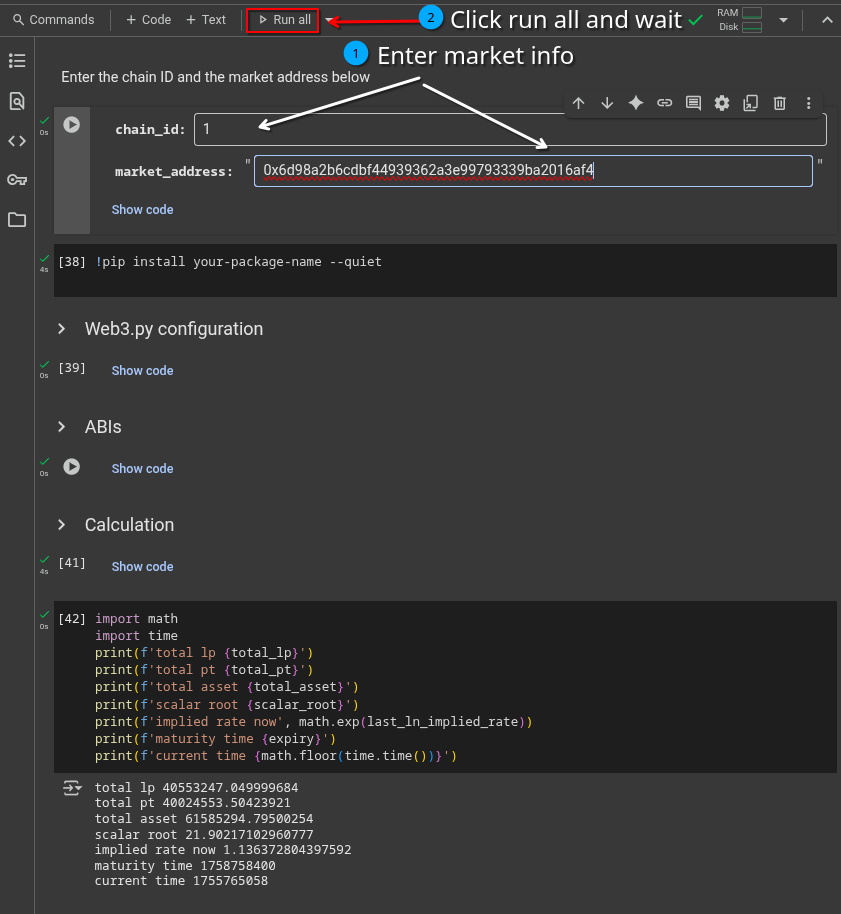 | 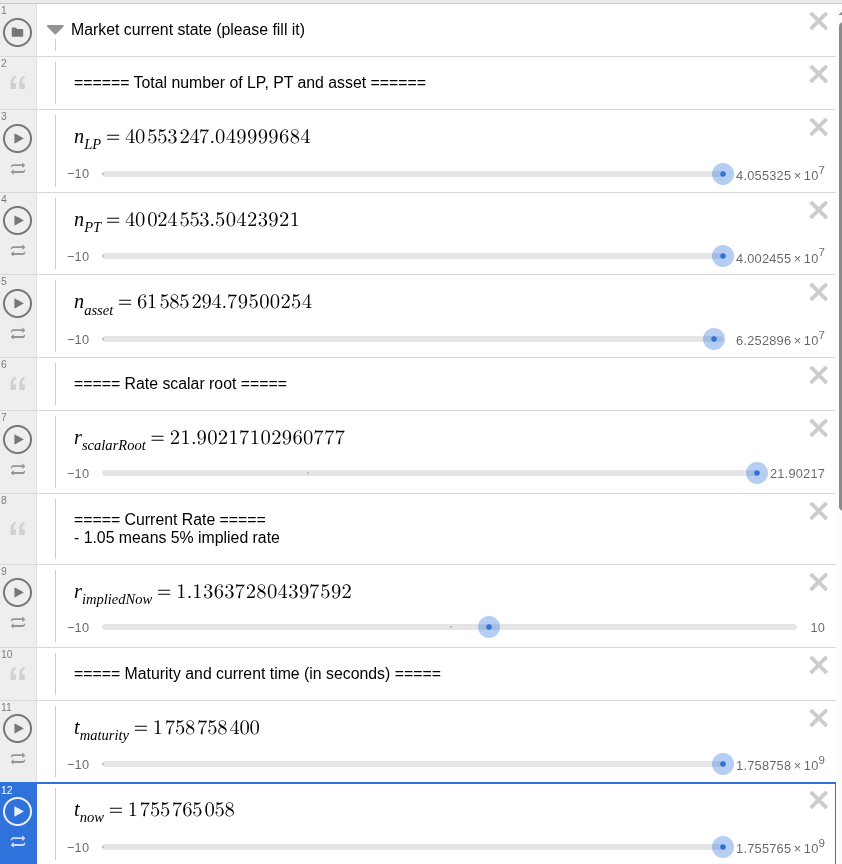 |
### Market yield range
These parameters are opinionated. Please choose a yield range that you think the market will be trading in until maturity. The lower the $\text{rateMax}$, the less underprice the oracle will be, and the more capital efficient for the users.
Pendle Market also allows trading within a pre-determined yield range. If you are not sure about the yield range, use this.
This yield range can be obtained from the Pendle DApp UI:
| Click the spec button | Getting the yield range |
|------------------------|----------------------------------|
| 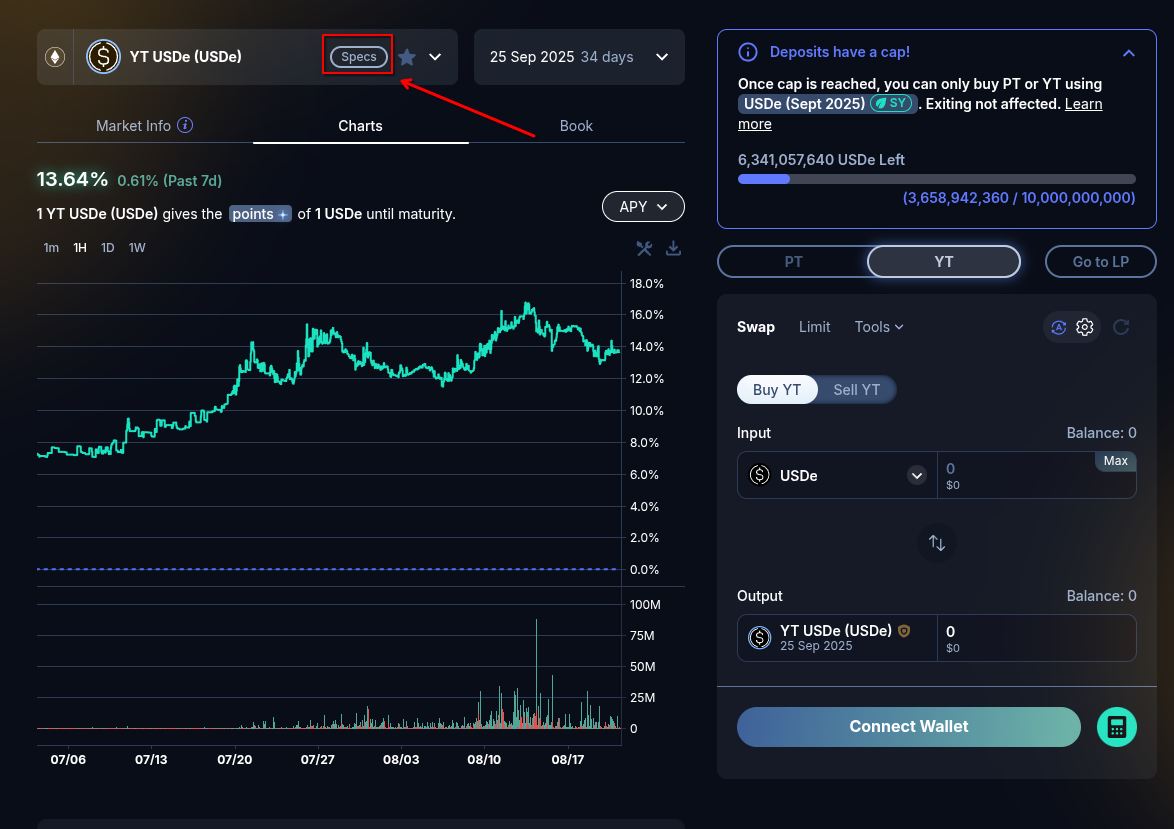 | 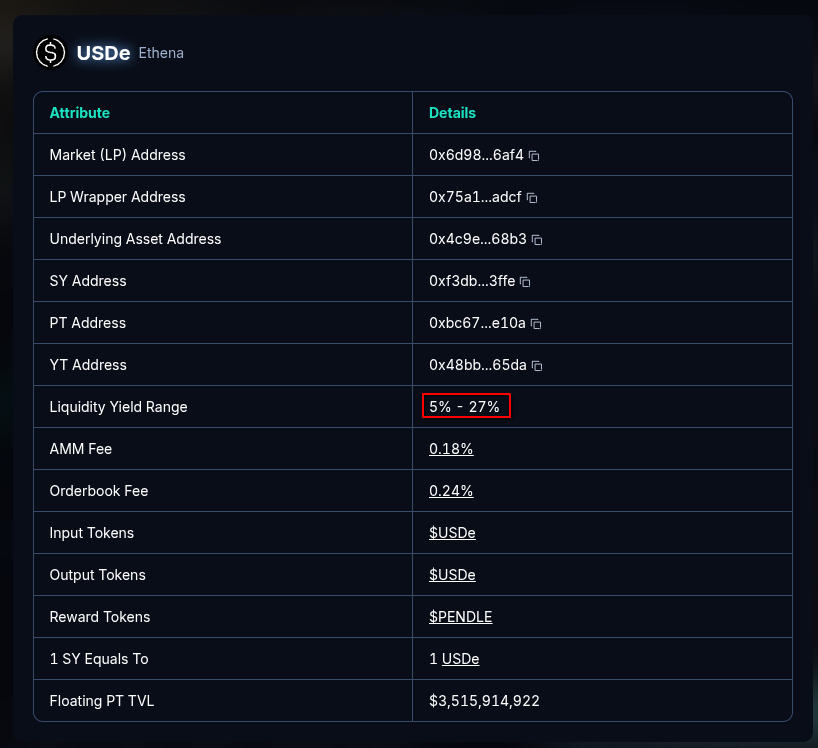 |
And filled it as the following:
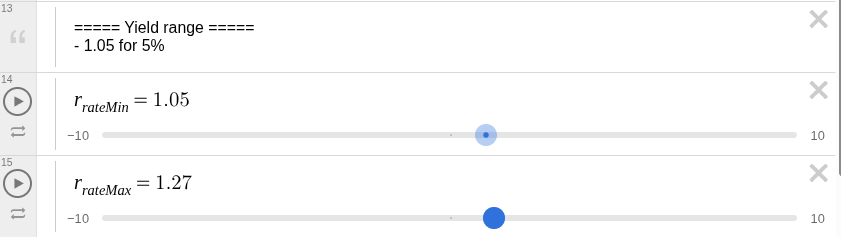
## Choosing between PT linear oracle and LP linear oracle
The Desmos graphic can help visualize both linear discount. The corresponding graphic can be toggled by clicking the corresponding folder
### Choosing the linear discount rate
In both graphic:
- **The blue** lines are the maximum and minimum price of PT/LP (the price range).
- **The orange** line is the current price of PT/LP until maturity if there is no trade occurred.
- **The red** line is the discounted price of PT/LP with your discount rate.
Change $r_{discount}$ to adjust the discounted price (the **red line**) and see its relation between the price range and the current price.
### Base price (or the matured price)
For PT, since it can be redeem to asset 1:1 at maturity, the base price of PT is 1.
For LP, the base price is calculated in the Desmos graphic. It can be found in the *LP linear discount* Desmos folder:

### Recommendation
$r_{discount}$ should be set so that the price is *sub-optimal* compare to the market price at all the time until maturity. Therefore:
- The **discounted price** line should be below the **current price**.
- The closer the **discounted price** line to the **current price**, the riskier.
- Setting $r_{discount}$ so that the **discounted price** line is **under** the **lower price** line can make sure that the oracle price is always underpriced.
### Reference
- https://forum.sky.money/t/june-26-2025-proposed-changes-to-spark-for-upcoming-spell/26663 — Spark write up on linear discount rate for PT-syrupUSDC-28Aug2025, PT-USDe-25Sept2025, LP-USDS-14Aug2025.
- https://www.desmos.com/calculator/n7wfzslz8l — Desmos graphic for single trade on Pendle Market.
[USDe 25 SEP 2025 market]: https://app.pendle.finance/trade/markets/0x6d98a2b6cdbf44939362a3e99793339ba2016af4/swap?view=yt&chain=ethereum
---
# LP Linear Discount Oracle
## Overview
Similar to [Pendle Spark Linear Discount Oracle](./LinearDiscountOracle.md), the **LPLinearDiscountOracle** provides a deterministic discount factor for Pendle Liquidity Provider (LP) tokens. This oracle is designed to help money markets and lending platforms value LP tokens that represent a share in a liquidity pool containing Pendle's LP Tokens.
The only difference between this oracle and the standard Linear Discount Oracle is that the LP version allows setting the `lpMaturedPrice` - the price of the LP token at maturity, while the convergence price of PT is always 1.0.
The contract exposes familiar read functions (`latestRoundData`, `decimals`) so money markets can plug it in like a Chainlink-compatible feed. The returned value is a **multiplier in 18 decimals**, not a USD price.
Please see the [Choosing Linear Discount Parameters](./ChoosingLinearDiscountParams.md) documentation for guidance on selecting appropriate linear discount parameters.
## Use cases
For money markets listing LPs as collateral or borrowable assets, the oracle provides a stable, predictable valuation path. Integrators read the factor, multiply it by their LP redemption preview (and then by the underlying'S USD price feed if needed). Because the factor converges linearly to `lpMaturedPrice` at expiry, LTVs and liquidation thresholds behave smoothly instead of whipsawing with AMM volatility.
## Usage
### Deployment
The oracle can be deployed using the `lpLinearDiscountOracleFactory`. The address of the factory can be found in the [Deployments on GitHub](https://github.com/pendle-finance/pendle-core-v2-public/tree/main/deployments) sections, under the `"lpLinearDiscountOracleFactory"` field. The factory has a method to help with oracle deployment:
```sol
function create(address market, uint256 basePtDiscountPerYear, uint256 lpMaturedPrice) external returns (address res);
```
### Feed retrieval
```sol
function latestRoundData()
external
view
returns (uint80 roundId, int256 answer, uint256 startedAt, uint256 updatedAt, uint80 answeredInRound)
```
Since the oracle is deterministic, except for `answer`, every other fields returned are `0`.
#### Feed properties
- **Decimals**: The oracle returns values in 18 decimals, so integrators should multiply the factor by their LP redemption preview (also in 18 decimals) to get the value.
- **Deterministic**: The oracle is deterministic, meaning the same inputs will always yield the same output. This allows for predictable valuation paths.
- **Linear Discount**: The discount factor increases linearly over time, converging to `lpMaturedPrice` at maturity.
- **No External Calls**: The oracle does not make any external calls during reads, ensuring minimal liveness or manipulation surface. It relies solely on `block.timestamp` for time calculations.
How answer is deterministically calculated
The `answer` relies on two parameters:
- `baseDiscountPerYear` - the annual discount slope, expressed in wad (1e18 = 100%/year).
- `maturity` - the LP maturity timestamp in seconds (`LP.expiry()`).
- `lpMaturedPrice` - the price of the LP token at maturity, expressed in wad (1e18 = 100%).
The `answer` at a given time `t` (in seconds) is calculated as follows:
$$
\text{answer} = \text{lpMaturedPrice} \cdot
\min\left(
10^{18},
10^{18} - \frac{(\text{maturity} - t) \cdot \text{baseDiscountPerYear}}{365 \cdot 24 \cdot 60 \cdot 60}
\right)
$$
---
# Points & Rewards Tracking
This guide covers how partner protocols can track and distribute points-based rewards (e.g., EigenLayer points, Renzo Miles, Ethena Sats) to Pendle users.
## Overview
Many Pendle pools offer additional rewards in the form of points from integrated protocols. Pendle provides standardized tools to help partners manage the complexity of tracking points across YT holders and LP positions.
## The Balance Fetcher
The recommended approach for tracking points is to use the **[`pendle-generic-balance-fetcher`](https://github.com/Pendle-Finance-Periphery/pendle-generic-balance-fetcher)** script.
### Core Functionality
The script returns a user's balance snapshot at a specific block height. The output is a mapping of `user_address => implied_yield_share`, representing each user's proportional share of the underlying asset held in the SY contract.
### What It Handles
The balance fetcher correctly accounts for all of Pendle's internal nuances:
| Factor | How it's handled |
|--------|-----------------|
| **LP Boosting** | Applies the yield boost (up to 2.5x) for eligible stakers |
| **YT Fee** | Accounts for the 5% fee applied to YT yields, allocated to the protocol |
| **Post-Expiry** | Correctly attributes points for expired but unredeemed positions |
### Partner Responsibility
The partner protocol is responsible for:
1. Running the balance fetcher script
2. Using the output to calculate the pro-rata distribution of points
3. Displaying it on their own dashboard
Pendle does **not** handle the final distribution of partner points.
## Points Calculation Logic
### YT Holders
For point calculation purposes, **1 YT is treated as equivalent to 1 unit of the underlying SY asset**, regardless of the YT's market price. It earns the same amount of points as if you were holding the full underlying asset.
A **5% fee** is applied to points earned from YT holdings. This fee is allocated to Pendle governance.
### LP Holders
For LPs, only the **SY portion** of the LP position earns points. The PT portion does not. The ratio of SY to PT within an LP position is dynamic and changes with every trade.
No points fee is applied to LP positions. However, LP point earnings are influenced by the **LP boost** mechanism (up to 2.5x).
### Calculating User Proportion (LP)
A user's proportional share of a liquidity pool is calculated using `activeBalance`:
```
User Proportion = activeBalance(user) / totalActiveSupply
```
Query these values from the LP contract:
- `LP_Contract.activeBalance(userAddress)`
- `LP_Contract.totalActiveSupply()`
### Calculating Total Point-Earning Position
To find a user's total point-earning position, sum contributions from YT and LP:
**Step 1: YT Contribution**
- Get user's YT balance (e.g., 100 YT-ezETH)
- Apply 5% fee: `100 × 0.95 = 95`
- Point-earning amount from YT = **95 ezETH**
**Step 2: LP Contribution**
- Calculate user's proportion using the `activeBalance` formula above
- Query total SY in LP: `SY_Contract.balanceOf(LP_Contract_Address)`
- `LP SY Share = User Proportion × Total SY in LP`
**Step 3: Total**
```
Total Point-Earning Position = (YT Balance × 0.95) + LP SY Share
```
This final value (in terms of the underlying asset) is used to calculate the user's point allocation.
### Multipliers
Points programs often involve multiple layers of multipliers, which are **multiplicative**:
**Example (Zircuit & Renzo Points):**
- Zircuit Base: 1x for ETH, 2x for ezETH
- Pendle Pool: 2x Zircuit multiplier, 1x Renzo multiplier
- **Effective Zircuit Points**: `(2x ETH base) × (2x Pendle) = 4x` the base ETH emission rate
- **Effective Renzo Points**: `(1x Renzo base) × (1x Pendle) = 1x` the base Renzo emission rate
## Eligible Positions
Points are allocated to positions with exposure to the underlying yield:
| Position Type | Earns Points? | Notes |
|--------------|--------------|-------|
| **YT holders** | Yes | Full share (minus 5% fee) corresponding to 1 unit of the underlying asset per YT |
| **LP holders** | Yes | Proportional to the SY portion of their LP position only |
| **PT holders** | No | PT holders forgo all variable yield and points |
## LP Boost on Points
The up-to-2.5x boost applies to points earned by the **SY portion of an LP position**. It does **not** apply to points earned by holding YT.
Boosting is a **zero-sum redistribution** of rewards within the LP pool. Boosting one user's share means other, non-boosted LPs receive a comparatively smaller share of the total points allocated to the pool's SY component.
## External Reward Distribution
### Merkl Integration
For campaigns that use [Merkl](https://merkl.angle.money/) to distribute rewards, Pendle enables users to claim directly from the Merkl UI. The SY contract can be configured to claim rewards from Merkl and distribute them to end-users.
### Direct Airdrops
Pendle can assist partners by providing necessary user balance data to facilitate direct airdrops.
---
# Deployments
:::info
While interacting with contracts, please use the ABI of implementation contracts from a block explorer or generate the ABI from the smart contract code in GitHub.
:::
## Core Contracts
Pendle's core contract addresses are organized by chain ID. You can find the latest contract addresses in the deployment files within the [Pendle contract repository](https://github.com/pendle-finance/pendle-core-v2-public).
Each chain's deployment file follows the naming pattern: `/deployments/{chainId}-core.json`
### Supported Chains
| Chain | Chain ID | Deployment File |
|-------|----------|-----------------|
| Ethereum | 1 | [`1-core.json`](https://github.com/pendle-finance/pendle-core-v2-public/blob/main/deployments/1-core.json) |
| Optimism | 10 | [`10-core.json`](https://github.com/pendle-finance/pendle-core-v2-public/blob/main/deployments/10-core.json) |
| BNB Chain | 56 | [`56-core.json`](https://github.com/pendle-finance/pendle-core-v2-public/blob/main/deployments/56-core.json) |
| Sonic | 146 | [`146-core.json`](https://github.com/pendle-finance/pendle-core-v2-public/blob/main/deployments/146-core.json) |
| HyperEVM | 999 | [`999-core.json`](https://github.com/pendle-finance/pendle-core-v2-public/blob/main/deployments/999-core.json) |
| Mantle | 5000 | [`5000-core.json`](https://github.com/pendle-finance/pendle-core-v2-public/blob/main/deployments/5000-core.json) |
| Base | 8453 | [`8453-core.json`](https://github.com/pendle-finance/pendle-core-v2-public/blob/main/deployments/8453-core.json) |
| Arbitrum | 42161 | [`42161-core.json`](https://github.com/pendle-finance/pendle-core-v2-public/blob/main/deployments/42161-core.json) |
| Berachain | 80094 | [`80094-core.json`](https://github.com/pendle-finance/pendle-core-v2-public/blob/main/deployments/80094-core.json) |
| Monad | 143 | [`143-core.json`](https://github.com/pendle-finance/pendle-core-v2-public/blob/main/deployments/143-core.json) |
| Katana | 747474 | [`747474-core.json`](https://github.com/pendle-finance/pendle-core-v2-public/blob/main/deployments/747474-core.json) |
| Ink | 57073 | [`57073-core.json`](https://github.com/pendle-finance/pendle-core-v2-public/blob/main/deployments/57073-core.json) |
To access deployment information for any chain, simply reference the deployment file corresponding to its chain ID in the repository.
## SY / Market / PT / YT Addresses
To find the relevant addresses and details of a specific market:
1. Go to the [Pendle markets page](https://app.pendle.finance/trade/markets)
2. Select the desired chain and click into an asset
3. Click into the button as shown in the image below to view all contract addresses

## Additional Resources
- [Core Contract Repository](https://github.com/pendle-finance/pendle-core-v2-public)
- [SY Contract Repository](https://github.com/pendle-finance/Pendle-SY-Public)
- All deployed Markets: [Pendle App](https://app.pendle.finance/trade/markets)
---
# Frequently Asked Questions
:::tip Looking for error solutions?
For common errors and debugging guidance, see the **[Troubleshooting Guide](./Troubleshooting.md)**.
:::
:::tip Looking for API questions?
For Hosted SDK, rate limiting, and Backend API questions, see the **[API Overview FAQ](./Backend/ApiOverview.mdx#frequently-asked-questions)**.
:::
## Contract
### How can I deploy a new SY Token on Pendle?
Pendle's smart contracts are permissionless, meaning anyone can deploy a new Standardized Yield (SY) Token without requiring approval from the Pendle team. To implement an SY Token, you must follow the Pendle SY Token standard, ensuring compatibility with the ecosystem. Detailed guidance, including contract structure and best practices, can be found in the [StandardizedYield documentation](./Contracts/StandardizedYield/StandardizedYield).
To community-list a new asset, see the [Community Listing guide](./Integration/CommunityListing) and the [SY writing guide](https://pendle.notion.site/How-to-write-a-SY-A-guide-207567a21d378069aecbf20176591d93).
### How can I generate all the params for the Router on-chain?
Please refer to the following:
- [Contract Integration Guide](./Contracts/PendleRouter/ContractIntegrationGuide) — step-by-step Solidity examples
- [Types and Utility Functions](./Contracts/PendleRouter/ApiReference/Types) — struct definitions and helper functions
- [IPAllActionTypeV3.sol](https://github.com/pendle-finance/pendle-core-v2-public/blob/main/contracts/interfaces/IPAllActionTypeV3.sol) — full interface
- [Pendle Examples](https://github.com/pendle-finance/pendle-examples-public)
### Why do quoted rates differ from actual swap amounts?
The rate functions in Pendle's quoter contract (e.g., `getPtToSyRate`, `getYtToSyRate`) provide **spot prices**, which do not account for price impact. To obtain the most accurate swap amounts, call Pendle's router functions directly or use the [Hosted SDK](./Backend/HostedSdk.mdx).
### Is the `pendleSwap` contract address immutable?
No, the contract address used for the `pendleSwap` parameter (e.g., in `swapExactTokenForPt`) is not guaranteed to be immutable and may change. Any changes will be announced publicly.
## Pricing & Data
### How can I preview the received amount of add/remove liquidity?
To preview the amount you'll receive before submitting transactions, you can use:
- Pendle API method (recommended): [Pendle Hosted SDK — Convert API](https://api-v2.pendle.finance/core/docs#/SDK/SdkController_convert)
- On-chain method: [PendleRouter Contract](https://github.com/pendle-finance/pendle-core-v2-public/blob/main/contracts/interfaces/IPActionAddRemoveLiqV3.sol). The detailed guide can be found in the [Contract Integration Guide](./Contracts/PendleRouter/ContractIntegrationGuide)
### How do I fetch the PT price?
You can get the PT (Principal Token) price via:
- Pendle API method (recommended): [Pendle price API](https://api-v2.pendle.finance/core/docs#/Assets/PricesCrossChainController_getAllAssetPricesByAddressesCrossChains)
- On-chain method: `getPtToAssetRate` of RouterStatic — see [RouterStatic](./Backend/RouterStatic)
### How can I retrieve historical PT and YT prices?
You can track historical PT/YT prices using:
- Pendle API method: [Pendle ohlcv API](https://api-v2.pendle.finance/core/docs#/Assets/PricesController_ohlcv_v4). Note that shorter timeframes (e.g., minute-by-minute updates) are not yet available.
### How can I retrieve market data such as TVL and APR?
You can obtain current market data (TVL, APY, liquidity metrics, etc.) by calling [`GET /v2/markets/all`](https://api-v2.pendle.finance/core/docs#/Markets/MarketsCrossChainController_getAllMarkets) and filtering for your desired market address.
For historical time-series data, use the [Market Historical Data API](./Backend/ApiOverview.mdx#market-data-endpoints): `GET /v3/{chainId}/markets/{address}/historical-data`.
### How can I retrieve market spot prices?
Use the [`getMarketSpotSwappingPrice`](https://api-v2.pendle.finance/core/docs#/SDK/SdkController_getMarketSpotSwappingPrice) endpoint. This is more suitable than calling the swap endpoint and offers a higher rate limit.
### How can I retrieve a list of market categories?
Use the markets API endpoints. You can fetch all markets via [`getAllMarkets`](https://api-v2.pendle.finance/core/docs#/Markets/MarketsCrossChainController_getAllMarkets) and filter by category client-side.
### How can I calculate the implied APY for a transaction?
The implied APY can be calculated using the `ptExchangeRate`. For a detailed explanation, refer to the [APY Calculation documentation](../ProtocolMechanics/PendleMarketAPYCalculation).
### What is the format for `expectedCap` and `currentCap`?
The `expectedCap` and `currentCap` values are provided in base18 format (18 decimals).
### How can I determine the number of SY tokens received from PT tokens?
Use the [Pendle Hosted SDK](./Backend/HostedSdk.mdx) to simulate the swap. This avoids the need to replicate the `swapExactPtForSy` function off-chain.
## Rewards & Interest
### How can I get up-to-date `accruedRewards` on-chain? (Applicable to SY, YT, & LP)
There are two methods:
1. **Call `redeemRewards(user)` and retrieve the output.** This method has the side effect of redeeming the user's rewards, so it might not be ideal.
2. **Call `IERC20(market).transfer(user,0)` followed by `accruedRewards`.** The transfer triggers an update of the user's rewards.
### Can the output of `getRewardTokens` change?
Yes, the output can change if the underlying protocol adds new reward tokens. However, no reward tokens will ever be removed.
### How can I read unclaimed rewards and interest for SY/YT/Market?
**On-Chain Method:**
To read for SY, please execute an `eth_call` (`callStatic` in ethers.js) to the following function of SY:
```solidity
function claimRewards(address user) external returns (uint256[] memory rewardAmounts);
```
For YT, execute the following function:
```solidity
function redeemDueInterestAndRewards(
address user,
bool redeemInterest,
bool redeemRewards
) external returns (uint256 interestOut, uint256[] memory rewardsOut);
```
For Market, execute the following function:
```solidity
function redeemRewards(address user) external returns (uint256[] memory);
```
These calls can be batched through Multicall if necessary.
### When will PENDLE incentives for a new market begin?
PENDLE incentives for a new market will begin on Thursday at 00:00 UTC (12 AM UTC), after the market has been whitelisted and added to voting.
### Where are Merkle distribution proofs located?
Merkle roots and proofs for claiming rewards are maintained in the [`pendle-finance/merkle-distributions`](https://github.com/pendle-finance/merkle-distributions) repository.
### Does Pendle provide a script for tracking user points or balances?
Yes. The [`pendle-generic-balance-fetcher`](https://github.com/Pendle-Finance-Periphery/pendle-generic-balance-fetcher/tree/main) script tracks points and balances. It supports deposits from external protocols including Morpho, Euler, and Silo.
## Token Behavior
### Why does the quantity of aTokens fluctuate?
aTokens are rebasing tokens from Aave, meaning their quantity accrues rewards in real-time. This property causes the token balance to fluctuate, even during a transfer. Consequently, if you attempt to transfer a specific amount, the actual amount received might be slightly different (e.g., 99.9999 instead of 100), which can lead to transaction failures if not accounted for.
To prevent failures, check the aToken balance immediately before each transfer or operation that relies on a precise quantity.
## Limit Orders & Routing
### How do limit orders interact with market swaps?
When a user performs a swap, the router automatically determines the optimal swap route for the best token output. This route can involve limit orders, the AMM LP, or a combination of both. Transaction emulation allows users to see the exact split between limit orders and AMM routing for any given swap in the current market environment.
### Is there an API to swap PT between different pools?
Yes, use the **Roll Over PT** API to swap PTs from one market to another. See the [Hosted SDK Documentation](./Backend/HostedSdk.mdx) for details.
### How can I determine which assets support direct PT-to-PT swaps?
Not all PT pairs are swappable. There is no static list of available pairs — call the API to check whether a specific swap is supported.
---
# Troubleshooting Guide
This guide covers common errors and issues encountered when integrating with or using the Pendle Protocol. It is organized by category to help you quickly identify and resolve problems.
## General Troubleshooting Principles
When facing unexpected behavior, start with these client-side checks:
- **Hard Refresh and Clear Cache**: A simple hard refresh can resolve transient UI glitches or data display issues. If problems persist, clear browser cache and application storage.
- **Check Wallet and Network Connection**: Verify the correct wallet is connected and set to the appropriate network. An incorrect ETH balance display is almost always a sign of a wrong wallet connection.
- **Review Browser Console Logs**: Open the developer console (F12), retry the failing operation, and look for error messages. A screenshot of the console output is extremely helpful when reporting issues.
- **Check RPC and Security Software**: Transaction signing issues (e.g., wallet pop-up not appearing) are often related to the RPC provider, not Pendle's infrastructure. Try switching to a different public RPC from [Chainlist](https://chainlist.org). VPNs, firewalls, or malware protection software can sometimes block RPC communications.
### Bug Reporting Best Practices
To facilitate a swift resolution, provide as much detail as possible:
- **Transaction Hash (Tx Hash)**: The most critical piece of information, even for failed transactions.
- **Transaction Calldata**: For pre-transaction failures or simulation issues.
- **Wallet Address**: Helps trace user-specific states (balances, rewards, voting history).
- **Simulation Links**: Generate and share simulations using tools like [Tenderly](https://tenderly.co) or [Sentio](https://sentio.xyz).
- **Operation Specifics**: The blockchain network, market/pool address, input/output tokens and amounts, and the exact error message.
## Oracle and Price Feed Issues
### `increaseCardinalityRequired=true` / Error `0x39db717e`
- **Cause**: The oracle lacks enough historical price data points (cardinality) for the requested TWAP. The `observationCardinality` on the underlying AMM pool may be at its default value of 1.
- **Solution**:
1. Call `increaseObservationCardinalityNext` on the market/oracle contract. A common required value is 1800. For some oracles, calculate as `duration / 11` (e.g., for a 900s TWAP, use `82`).
2. **Wait ~15 minutes** for the oracle to populate with sufficient data. The `increaseCardinalityRequired` flag will switch to `false` once ready.
### `OracleTargetTooOld` / `TooStalePrice()`
The last price update from the oracle is older than the maximum acceptable age. This safety mechanism prevents trading on outdated information. If an oracle provider (e.g., Pyth) is unresponsive, Pendle's functions fall back to the last known exchange rate.
### `ORACLE_NOT_FEASIBLE`
Originates from an integrated DEX, not directly from Pendle. Often occurs in a **forked network** environment where the Chainlink or Pyth oracle has not been updated and has fallen behind the forked block's timestamp.
### Incorrect Price Display
Mismatches between the UI and on-chain reality (e.g., a matured PT displaying an incorrect price, or a "100% loss" display) are often due to an external data provider (like DeBank) supplying a faulty price feed.
## Third-Party Integration Issues
### Public RPC Limitations
Public RPCs (e.g., the default MetaMask Arbitrum RPC via Ankr) are prone to issues: multicall problems, corrupted data, and strict rate limits that interfere with data-intensive tasks.
**Recommendation**: For any serious development, backfilling, or production service, use a **private, archival RPC provider** (e.g., QuickNode).
### Aggregator-Related Failures
- **Stale Routes**: A common cause for `swapExactTokenForPt` reverts — the route provided is stale or invalid by execution time.
- **Simulation Inaccuracy**: Aggregator simulations can be unreliable when the wallet lacks sufficient funds for the simulated amount. The aggregator may return a "stale" route that looks good on paper but fails in a real transaction. Accurate simulation requires both sufficient balance and token approval.
- **KyberSwap Reliability**: KyberSwap has been noted as occasionally unreliable. If transactions fail, retry with the problematic aggregator excluded from the `aggregators` parameter.
### Protocol Pauses
In the event of a security compromise on an integrated protocol (e.g., Zerolend), Pendle may pause its own contracts as a precautionary measure. Once the attack is confirmed to be isolated and that protocol has been paused, Pendle will unpause its contracts.
---
# Part 2: Boros — Interest Rate Trading (User Docs)
import Hint from '@site/src/components/Hint';
# Boros Overview
Boros is a yield-trading platform on margin by Pendle. Currently, Boros offers the trading of funding-rates from various avenues, including off-chain funding-rates from centralized exchanges. In the future, Boros will expand to support trading yields of different categories.

While capturing funding rates via cash/carry trades has been a bread-and-butter trade in both TradFi and Crypto, Boros is the first protocol in the world to specifically allow the trading of funding rate movements, and to unlock entirely new categories of yield strategies through its Yield Unit (YU) markets.
There are 3 main components within Boros:
### 1. Interest Rate Accounting
To trade a yield of a given asset, Boros has to first obtain its yield-rate via an oracle (e.g. Binance BTCUSDT funding rate, Hyperliquid HYPEUSDC funding rate, etc). This yield is referred to as the “Underlying Yield” as the number is obtained from the yield of the underlying asset.
As long as there is an oracle feed for a yield percentage, the asset can be supported on Boros.
### 2. Interest Rate Trading (YU trading)
**Boros enables the trading of interest rates by representing a floating-yield stream into YU (yield unit).** Each YU represents the yield of 1 unit of the collateral asset in the underlying yield bearing asset.
For example, in a BTCUSDT(Hyperliquid) market on Boros with BTC as collateral, each YU in this market represents the funding rate of 1 BTC in Hyperliquid.
Some use cases:
1. **Speculating on Funding Rate Direction**
A trader bullish on funding-rate can enter a long position on YU**.** This position is effectively paying the implied APR in a fixed-stream in exchange for the current funding-rate (i.e. the underlying APR of YU). If the funding-rate yield is higher than the fixed-stream payments, the trader is in profit.
2. **Hedging Funding Rate Payments**
A BTC/USDT Binance perp trader can hedge their funding-rate payments by turning it into a fixed-stream payment. To achieve that, they can enter a long position on YU-BTCUSDT(Binance). This is achieved by paying a fixed stream to receive a floating stream of the underlying BTC/USDT funding rate. **The results in the trader hedging the funding rate payment into a fixed payment until maturity.**
3. **Locking in Fixed Yield for Cash and Carry**
A trader with a cash and carry position via perps can lock-in the current rates offered on Boros by entering a short-yield position. A cash and carry position receives funding-rate yields from the perps market. The trader can receive fixed yield by paying the current floating-stream (of funding rates) in exchange for the current fixed-stream payment. The net result of the position is a fixed-yield position until maturity.
4. **Arbitraging Funding Rate Spreads Between Platforms**
Funding rates for the same asset often diverge across perp platforms. The classic approach is to short the higher-funding market, long the lower-funding one, collect the spread. Simple on paper, but operationally heavy with double the liquidation risk and no guarantee the differential holds.
Boros enhances this. By pairing each perp leg with a Boros rate swap (short YU on the high-funding leg, long YU on the low-funding leg), the trader locks in the spread as a fixed differential, with no directional exposure and no dependency on rates staying put.
### 3. Margin, Liquidations and Risk Parameters
To open a position on Boros, you have to place collaterals based on the desired asset. After which you can either open a long / short position on Boros. If your net balance falls under the maintenance margin, the position will be open for liquidation.
## Why trade Funding Rates?
Perpetual futures are among the most actively traded instruments in crypto. Yet until Boros, there was no dedicated venue to trade funding rates directly. Boros changes that with its Yield Unit (YU) markets, giving traders precise control over their funding rate exposure.
**There are three main ways to use Boros:**
- Long/short YU markets in order to express a directional view on where funding rates are headed
- Pair a YU position with an existing perp position to convert floating funding rate payments or receivables into a fixed rate
- Exploit rate differentials between exchanges by using Boros to lock in the spread as fixed yield
---
# Glossary
**YU (Yield Units)**: Each YU represents yield from 1 unit of collateral in the underlying asset. For example, in a BTCUSDT(Hyperliquid) market on Boros with BTC as collateral, each YU in this market represents the funding rate of 1 BTC in Hyperliquid.
**Collateral**: The capital backing your position. Collateral is required to open any position on Boros. Collateral is open for liquidation when your Net Balance falls below the Maintenance Margin.
**Implied APR**: The “price” of the YU in yield percentage terms, essentially the market consensus on what the average future yield of YU will be. Upon entering a position, the implied yield at that point in time becomes the fixed rate payable / receivable (long / short position).
**Mark APR (Mark Implied APR):** A simple time-weighted average (TWAP) of the last traded implied APR on the order book. Mark APR is used for unrealized PnL and liquidation calculations. This is similar to "mark price" in a perpetual exchange and is used to avoid unwanted consequences from short term price manipulations.
**Underlying APR**: The current APR of the underlying asset (i.e. the current funding rate of the underlying exchange).
**My Fixed APR:** The fixed APR of the currently open position. This is established by the weighted average of the implied APRs during entry.
**Rate Sensitivity**: How much your position gains or loses for every 1% change in APR, equivalent to 100x DV01 in TradFi interest rate swap conventions. Positions with more time to maturity carry higher Rate Sensitivity since each 1% shift represents more yield over a longer period.
`Rate Sensitivity = Notional Size (YU) * DaysToMaturity/365 * 1%`
**Daily Volatility**: The 7-day moving average of the market's Implied APR range, representing how much the rate has been swinging day-to-day (i.e. volatility) based on recent trading history.
**Long YU**: A long position on the underlying rate. Long rate positions pay a fixed APR to receive the underlying APR. The fixed APR is determined by the average implied yields of opening the position.
**Short YU**: A short position on the underlying rate. Short rate positions pay the underlying APR to receive a fixed APR. The fixed APR is determined by the average implied yields of opening the position.
**Maturity**: The end of the pool. At maturity, the position has been fully settled and reflected in your collateral.
**Liquidation Implied APR**: If the market Implied APR reaches this level, your position will be open for liquidation. This happens as implied APR movements directly affect your net balance.
**Total Position Value**: The value of the currently open position. Total position value decays linearly over time (assuming implied APY does not change) as yields are settled and realized into your collateral.
**Notional Size**: The equivalent underlying asset size that your YU position is earning yield from.
For example: if a user opens a 200-YU-ETHUSDT(Binance) position, the Notional size is 200 ETH.
**Net Balance**: Your portfolio’s total value in the position. Net Balance comprises of your collateral and unrealized PnL. Collateral value is affected at every yield settlement. Unrealized PnL is affected by the current implied APR of the market.
**Maintenance Margin**: The amount of capital required to keep your position afloat. Your position is open for liquidation when the Net Balance falls below the Maintenance Margin. Maintenance margin is set at 66% of Initial Margin.
**Initial Margin**: The margin consumed when opening a position, calculated based on notional size, time to maturity, and implied APR.
```jsx
InitialMargin=NotionalSize*YearsToMaturity*max(ImpliedAPR, MarginFloor)*IMRatio
```
**Margin Floor**: The minimal margin necessary to initiate a position when a pool nears maturity or when its Implied APR approaches 0%. This threshold prevents the required margin from falling below a certain level, safeguarding against bad debt risks due to high volatility.
**IM Ratio**: Leverage ratio for the market, the lower the number, the lower the initial margin requirement is for that market.
---
import Hint from '@site/src/components/Hint';
# Interest Rate Trading (YU Trading)
## Implied APR and Fixed APR
**Implied APR is the price of YU, denoted in percentage terms**. It can also be referred to as the market consensus of the future APR of an asset. It is used in conjunction with the underlying APR to make decisions on whether to long / short YU.
When a user opens a long / short position on YU for the first time at the current implied APR, that implied APR becomes the fixed APR payable / receivable until maturity.
Note that implied APR is the “price” of YU, which means it is directly correlated to your position value. Upon opening a position, the “value” of the position is affected by implied APR changes. In other words, if implied APR goes up, traders with a long position will see an increase in their position value and traders with a short position will see a decrease in their position value.
In other words, a high implied APR can mean that the YU is “expensive”, and a low implied APR can mean that the YU is “cheap”. For yield traders with a shorter time horizon, the concept of “buy-low-sell-high” is totally applicable here, where they can enter a long position when implied APR is low, and close the position when it goes up.
### Long YU
Pay fixed APR, receive underlying APR.
A long YU position pays a fixed APR to receive the underlying APR. Essentially, it is a long position on the underlying APR, betting that receiving underlying APR outperforms the fixed APR payables.
**Upon opening a new long position on YU, the current implied APR becomes the fixed APR payable until maturity.**
Since implied APR is the “price” of the yield rate, the current implied APR directly affects your total position value. If implied APR goes up, the total position value on a long position goes up, and vice versa (i.e. price go up, your long position value go up).
Long YU positions bet on:
1. Underlying rate > fixed rate, or
2. Implied APR going up (i.e. YU price going up)
### Short YU
Pay underlying APR, receive fixed APR.
A short YU position pays the underlying APR to receive a fixed APR. Essentially, it is a short position on the underlying APR, betting that underlying APR payable is less the fixed rate received.
**Upon opening a new short position, the current implied APR becomes the fixed APR receivable until maturity.**
Since implied APR is the “price” of the yield rate, the current implied APR directly affects your total position value. If implied APR goes up, the total position value on a short position goes down, and vice versa.
Short YU positions bet on:
1. Underlying rate < fixed rate, or
2. Implied APR going down (i.e. YU price going down)
## Opening a Position
1. To open a position on Boros, select the desired market.
2. Deposit the collateral of the desired market or zone.
3. Enter the desired size of the position (either long / short position)
4. Execute a market order or place your order on the order book.
5. Position will be opened when the order is filled.
## Closing a Position
You can close a position by clicking the “close position” button, which works by opening the opposite of the currently open position. If you have a long position open, the position will be closed by opening an equivalent short position, and vice versa.
This is because the underlying APR payment / receivables from opposite positions cancels each other out, leaving the position with an aggregate fixed APR payment / receivables. Since a fixed APR payment / receivables to maturity is deterministic, Boros can immediately settle the position into your collateral.
---
# Order Book
Orders on Boros are placed on Implied APR of the asset, which is the yield denominated price of the asset. Learn more [here](interest-rate-trading-yu-trading#implied-apr-and-fixed-apr).
## **Order types:**
* Market: Order executes immediately in order of the best prices in the order book.
* Limit: Order executes at the selected limit price or better.
Limit orders on Pendle are Good Til Cancel (GTC) orders, which means they will be available in the order book until it is filled or cancelled.
The order book will be closed at maturity and all orders will automatically be cancelled.
---
import Hint from '@site/src/components/Hint';
# Vaults
Each YU pair on Boros has a corresponding **vault**, which provides an additional source of liquidity on top of the order book. When a trader places a market order, it can be matched with either the order book or the vault—effectively making the vault a counterparty to open positions, earning fees and PENDLE incentives.
> Boros' vault mechanism is advanced and is out of scope for most users. For those curious to dive deeper, you can read our whitepaper \[here] (\).
### Risks
Boros vaults behave similarly to a **Uniswap V2 LP position** of “long YU” and “collateral”. This means vault depositors are effectively taking a **long-biased position on YU**, which benefits from high or rising implied APRs.
However, if the implied APR declines after you have deposited, your vault position may suffer **impermanent loss (IL)** —especially if it was opened at a high APR level.
Before depositing, consider the **current implied APR**. A high implied APR may result in a high historical vault performance, but could also make your entry more vulnerable to drawdowns and IL.
### Yields
Vaults generate returns through:
* **PENDLE incentives**
* **Swap fees from market order flow**
* **Favorable Implied APR movements**, which increase the value of your vault position.
Opening a Boros vault position is similar in risk profile to going **long YU**. If the implied APR drops after you enter, you may experience impermanent loss, which will be **realized when you exit** the vault.
---
# Fees
Positions on Boros can have different fees based on their behavior. Refer to the info tab of each pool for more details.

### 1. Swap Fees
Boros collects a flat fee on top of the implied APR for every swap. Swap fee will be deducted from the position’s collateral.
For example, in a market with a swap fee tier of 0.05%, the fee for opening a position equals 0.05% × YU amount × Years to Maturity. In other words, traders will pay 0.05% fee on the $ value of their position.
In this scenario, traders will profit if implied APR changes by more than 0.1% in their favor (assuming no yield settlement happens throughout the period), as traders will have to open and close the position, incurring 2x the swap fee.
### 2. Open Interest Fees
Boros collects a flat fee on the fixed APR side of every YU during settlement.
For example, positions at an 8% fixed rate with a fee tier of 0.1%:
- Long YU positions effectively pay 8.1% in fixed APR.
- Short YU positions effectively receive 7.9% in fixed APR.
### 3. Operation Fees
Boros charges a small fixed fee on your first transaction and then intermittently (approximately every \~50 transactions) thereafter. This fee, usually around \$1 during normal gas conditions, is used to cover the gas costs of executing trades from your address.
---
# Interest Rate Accounting and Settlement
Boros facilitates trading in Yield Units (YUs) of funding rates, with settlement intervals that mirror the underlying market’s schedule. For example:
* On Binance, funding rates are settled every 8 hours. Correspondingly, Binance YUs on Boros are settled on the same 8-hour schedule.
* For Hyperliquid, funding rates are settled every hour, thus Hyperliquid YUs on Boros are also settled hourly.
At each settlement period, Boros obtains the underlying APR (funding rate) via an oracle and settles it against every user’s fixed APR.
A user’s fixed APR is determined by the average implied APR upon opening a position. When the user opens a new position, the new fixed APR is the average implied APR of opening the position.
### At every settlement
Boros settles the underlying rate against every user’s fixed rate.
1. **Long YU:** the user **pays fixed APR and receives the underlying APR** (essentially betting on the underlying rate being HIGHER than the fixed payments). For example, if the user opened a long YU position at an implied APR of 8% and the underlying APR is currently 10%, they will receive rates of 2% (scaled down to the settlement period).
2. **Short YU:** the user **pays the underlying APR and receives a fixed APR** (essentially betting on the underlying rate being LOWER than the fixed payments). For example, if the user opened a short YU position at implied APR of 20% and the underlying rate is currently 25%, they will lose rates of 5% (scaled down to the settlement period).
The difference in the underlying and fixed APR is realized and will be reflected in every user’s collateral.
1. Positions that received more than they paid will see an increase in their collateral value.
2. Positions that received less than they paid will see a decline in their collateral value.
Assuming the implied APR remains the same, the position’s value declines as a portion of the position is already realized into the collateral (i.e. YU’s value declines as there are less yield remaining to settle until maturity).
The maintenance margin also declines as the position is now worth less than before the settlement (i.e. since the value of each YU is now lower, less margin is now required to maintain the same position). Maintenance margin will decline until the margin floor.
At maturity, collateral is fully freed.
---
import Hint from '@site/src/components/Hint';
# Margin and Liquidations
## Understanding Positions on Boros
**Positions on Boros are priced and monitored via Rate Sensitivity, Daily Volatility, and Margin.**
**Rate Sensitivity:** How much your position gains or loses for every 1% change in APR, equivalent to 100x DV01 in TradFi interest rate swap conventions. This is the primary way to understand your position's exposure.
```jsx
Rate Sensitivity = Notional Size (YU) * DaysToMaturity/365 * 1%
```
**Daily Volatility:** The 7-day moving average (7DMA) of the daily implied rate range, represents volatility by showing how much Implied APR swings in a day on average
> ***Rate Sensitivity x Daily Volatility = Daily P&L Range,** giving you sense of how much your position can gain or lose on any given day under normal market conditions*
**Margin:** The capital backing your position and your runway against adverse rate moves.
## Trading Example
A trader wishes to long BTCUSD-Hyperliquid rates with 59 days to maturity. Implied APR is at 1.18%, and he opens a long position of 10 YU.
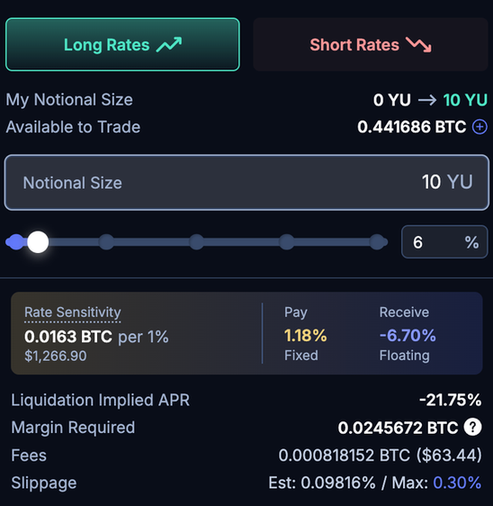
- Rate Sensitivity: 0.0163 BTC per 1% move
- Margin Requirement: 0.024 BTC
Comparing your Rate Sensitivity against Margin Requirement can provide a sense of scale on how much buffer you have before your position is at risk of liquidation.
**Volatile assets with higher volatility will require higher margin requirement for the same rate sensitivity.**
## Cross Margin
Boros allows for cross-margin with the same assets, allowing users to use the same collateral across multiple positions within the same collateral zone (e.g. Same BTC collateral utilized across all markets within the BTC zone).
Additionally, Boros also offers isolated pools, where collateral is only confined to specific markets.
The Collateral and Notional size will always be denoted in the same asset. For example, in the BTCUSDT-Binance market on Boros, each YU-BTCUSDT-Binance represents yield from funding rates of 1 BTC and the collateral required to back the position is in BTC.
**Liquidations within a collateral zone will not affect positions in other zones or isolated pools.**
## **Initial Margin**
Leverage can be set between 1 and the max leverage, which may vary by asset. The initial margin required to open a position is:
```jsx
Initial Margin = NotionalSize*YearsToMaturity*max(ImpliedAPR, MarginFloor)*IMRatio
```
The margin scales with notional size, time to maturity, and the implied APR of the position, floored at the market's Margin Floor (see below) to ensure adequate collateral even when rates are low or negative. Once consumed, the initial margin cannot be withdrawn or used to back other positions. The collateral remaining after margin consumption is your Available Margin.
Example: If you have 2000 USDT and proceed to open a 2000 USDT position, the margin consumed is 2000 USDT (i.e. fully consumed). The available margin becomes 0 USDT and the same collateral cannot be reused to open a new position.
Unrealized profits from open positions are automatically reflected as an increase in Available Margin. Conversely, unrealized losses reduce Available Margin.
## **Maintenance Margin and Liquidations**
Positions can be liquidated when the position’s Net Balance falls below the maintenance margin requirement.
### Net Balance
A position’s Net Balance comprises of:
```jsx
Net Balance = Collateral + Unrealized PnL
```
#### Collateral
Collateral value changes after every rate settlement where Boros settles every position’s fixed APR against the underlying APR. Learn more about interest rate accounting and settlement [here](../../interest-rate-accounting/interest-rate-accounting-and-settlement).
Note that the value of your collateral is only affected after every rate settlement, where a portion of the position is realized. The change in collateral is only affected by the difference between fixed vs underlying APR.
For example:
A short positions can be liquidated if the underlying rate maintains above its fixed rate in extended periods.
This is because at every settlement period, the position pays a higher underlying rate vs the fixed rate it receives, reducing its collateral. A prolonged exposure in this situation might reduce the collateral to the point where the Net Balance falls below the maintenance margin, triggering a liquidation.
#### Unrealized PnL
Unrealized PnL value is entirely dependent on the current **mark implied APR** of the asset (learn more about implied APR [here](../../interest-rate-trading/interest-rate-trading-yu-trading#implied-apr-and-fixed-apr)). In essence, unrealized PnL is affected by changes in YU value, which is derived from the mark implied APR.
For example: A long position will have a negative Unrealized PnL when mark implied APR falls. The position can be liquidated if the mark implied APR falls to the point where the Net Balance falls below the maintenance margin.
| | Underlying Rate ⬆️ | Underlying Rate ⬇️ | Mark Implied APR ⬆️ | Mark Implied APR ⬇️ |
| ------------------------------------------- | ------------------ | ------------------ | ------------------- | ------------------- |
| Long Rates (pay fixed, receive underlying) | Net Balance ⬆️ | Net Balance ⬇️ | Net Balance ⬆️ | Net Balance ⬇️ |
| Short Rates (pay underlying, receive fixed) | Net Balance ⬇️ | Net Balance ⬆️ | Net Balance ⬇️ | Net Balance ⬆️ |
Always monitor your Net Balance and Margin Ratio. Top up your collateral to increase your Net Balance when Margin Ratio gets dangerously low to avoid liquidations.
#### Mark Implied APR
The mark implied APR is a simple time-weighted average (TWAP) of the last traded implied APR on the order book.
It serves as the reference rate for Boros’ margin system, meaning your net balance is calculated based on the mark implied APR, not the last traded price. This helps prevent unnecessary liquidations caused by short-term price spikes or potential manipulation.
### Maintenance Margin
The maintenance margin is set at 66% of the initial margin upon opening a position. Positions can be liquidated when the their Net Balance falls below this maintenance margin.
```jsx
Maintenance Margin = Initial Margin * 66%
```
As yields are settled, the Rate Sensitivity of the position declines over time. **A 1% move in Implied APR produces a smaller P&L impact as maturity approaches, since the remaining yield period is shorter.** Consequently, the maintenance margin required to maintain the position declines too.
At maturity, the entire position is settled. Rate Sensitivity reaches zero (as there is no remaining yield to respond to rate movements) and maintenance margin is also zero. The realized position is reflected in the collateral.
### Margin Floor
The margin floor on Boros is the minimal Initial Margin necessary to open a position when the market is in a state where it is subject to high implied APR volatility. This threshold prevents the required margin from falling below a certain level, ensuring that all positions will be adequately backed by sufficient collateral under all circumstances, safeguarding the platform against bad debts.
There are 2 types of Margin Floors on Boros.
#### **1. Margin Floor Near Maturity**
As a position approaches maturity, its required margin decreases. This reduction is due to the periodic settlement of yields, which lowers the effective value of the position and consequently the required margin as the maturity date nears.
Without a Margin Floor, a position that is close to maturity will only be backed by a minimal amount of collateral. Given that funding rates can experience sharp fluctuations over short periods, significant rate changes could force positions to close at an implied APR below the Maintenance Margin, potentially leading to bad debts.
For example, a market with a <1 Week to Maturity> Margin Floor would mean that the margin CANNOT decay below the threshold as maturity approaches. Positions initiated during <1 week to maturity must provide a margin _equivalent_ to an order placed with 7 days remaining until maturity. The Maintenance Margin for such positions will also be derived from the Margin Floor.
The Margin Floor acts as a critical buffer that ensures that there will be sufficient collateral to withstand extreme market movements throughout maturity, protecting the platform against bad debts.
#### **2. Margin Floor for Low Implied APR**
On Boros, the required margin for opening or maintaining a position is proportional to the Implied APR. A lower Implied APR means a lower required margin.
Users have the flexibility to place limit orders at any Implied APR, including negative values or even at 0%, which can occur in funding rates.
Since Initial Margin is linearly correlated to Implied APR, an order set at 0% APR would theoretically require zero collateral. In the absence of a Margin Floor, this could allow users to place an unlimited number of YU orders at 0% APR without any collateral. Any losses from such scenarios would thus lead to bad debts for the platform.
To mitigate this risk, the Margin Floor establishes a minimum Implied APR that must be considered when calculating the required margin for a position.
For example, in a market with 8% Implied APR Margin Floor, any orders placed between the range of _-8% to 8%_ must provide a margin _equivalent_ to an order at 8% Implied APR.
Additionally, the Margin Floor also acts as a buffer that ensures there will be sufficient collateral to handle any Implied APR fluctuations throughout maturity, thereby safeguarding the platform against bad debts.
Each market will only have ONE Margin Floor value, determined by the higher of the two aforementioned types: \ or \.
### **Auto deleveraging**
Boros has an option to trigger auto-deleveraging, a critical feature designed as a vital safeguard to protect against significant bad debt risks.
The purpose of auto-deleveraging is strictly to ensure the platform stays solvent. If triggered, the users on the opposite side of the position at risk, ranked by various metrics (e.g. unrealized P&L, margin usage, among others), will be forced to close their positions (i.e. take profit). These positions are closed at the current implied APR against the liquidated user, ensuring that the platform does not accrue bad debt.
Audo-deleveraging is an important final safeguard, with the goal of ensuring that under all circumstances, the protocol and users can continue to operate with ease of mind.
You can refer to a more in-depth calculation and other preventive mechanisms on Boros over at the [next page](detailed-calculations-on-margin-and-liquidations).
---
# Detailed Calculations on Margin and Liquidations
## Initial Margin (IM)
* Overview: Initial Margin is the margin a user needs to open a new position
* Variables:
* `k``IM`: Initial Margin Factor, a setting specific to each market
* `s`: Notional Size
* `t`: Time to maturity (in years)
* `TimeFloor`: floor for time to maturity, a setting specific to each market
* `RateFloor`: floor for Mark Rate, a setting specific to each market
* Formula:
$$
IM = k_{IM} \times |s| \times max(t, TimeFloor) \times max(markRate, RateFloor)
$$
* A user is able to open a new limit order or market order, if their total Initial Margin is less than their Net Balance, or they are closing their existing position
## Maintenance Margin (MM)
* Overview: Maintenance Margin is the margin a user needs to have to maintain a position (and not be liquidated)
* Variables:
* `k``MM`: Maintenance Margin Factor, a setting specific to each market
* `s`: Notional Size
* `t`: Time to maturity (in years)
* `TimeFloor`: floor for time to maturity, a setting specific to each market
* `RateFloor`: floor for Mark Rate, a setting specific to each market
* Formula:
$$
MM = k_{MM} \times |s| \times max(t, TimeFloor) \times max(markRate, RateFloor)
$$
* To get the settings from the API:
* API: [https://api.boros.finance/core/docs#/Markets/MarketsController\_getMarketInfo](https://api.boros.finance/core/docs#/Markets/MarketsController_getMarketInfo)
* Notes on how to get settings from the API:
* TimeFloor: **`tThresh`** from the API, divided by 365\*_24\*_3600
* RateFloor:
* `1.00005^(iTickThresh*tickStep) - 1`
## Liquidation
* Overview: a user is liquidated in a collateral zone if their Net Balance goes below Maintenance Margin
* When a liquidation happens, the user’s position is closed at the mark rate, and the user loses an liquidation penalty of:
$$
LiquidationPenalty = k * maintenanceMarginOfLiquidatedPosition
$$
* Where k will start from 25% when a position just become liquidate-able and increases linearly to 50% when the position becomes more and more unhealthy (and still not liquidated)
---
# Protective mechanisms
There a few mechanisms in place to mitigate risks for the users and Boros' system.
### OI Cap
* There is a hard cap on the OI of any market
* To get the value from market API:
* OI Cap = **`hardOICap`/`1e18`**
### Closing Only Mode
* When the market dynamics becomes too extreme (for example, abnormally high price volatility or low liquidity), the Closing Only Mode will be automatically turned on
* When Closing Only Mode is on, users will only be able to close existing positions (and not open new positions)
### Max Rate Deviation
* The system disallows any market trade that happens at a rate too far away from the current mark rate.
* If a trade exceeds this limit, an error “Executed Rate Out of Range” will be displayed on the UI
* The exact requirement is as follows:
$$
|markRate - rateTraded| \leq maxRateDeviationFactor \times max(markRate, RateFloor)
$$
* `maxRateDeviationFactor` = **`maxRateDeviationFactorBase1e4` / `1e4`**
* where **`maxRateDeviationFactorBase1e4`** is from the market API
### Max Bounds on Limit Order rates
* When placing a limit order, a user can’t long at a rate too high above the mark rate, or short at a rate too low below the mark rate.
* The exact mechanics is this:
* A long order rate must not exceed _f__u_
* A short order rate must not be lower than _f__l_
$$
f^u(r_m) = \begin{cases} r_m\times upperLimitSlope & r_m \geq I_{threshold} \\ r_m + upperLimitConstant & 0 \leq r_m < I_{threshold} \\ -f^l(-r_m) & r_m < 0 \end{cases}\\ f^l(r_m) = \begin{cases} r_m\times lowerLimitSlope & r_m \geq I_{threshold} \\ r_m + lowerLimitConstant & 0 \leq r_m < I_{threshold} \\ -f^u(-r_m) & r_m < 0 \end{cases}
$$
* To get the variables from the values returned from market API:
* `upperLimitSlope` = **`loUpperSlopeBase1e4` / 1e4**
* `upperLimitConstant` = **`loUpperConstBase1e4` / 1e4**
* `lowerLimitSlope` = **`loLowerSlopeBase1e4` / 1e4**
* `lowerLimitConstant` = **`loLowerConstBase1e4` / 1e4**
---
import Hint from '@site/src/components/Hint';
# Boros Referral Program
You can access the referral page at Boros' account page: [https://boros.pendle.finance/account](https://boros.pendle.finance/account)
* Using a referral code will give you a 10% discount on swap fees.
* Referrers will receive 20% of all fees generated by the code.
## Eligibility
We encourage fresh addresses to use referral codes! Addresses with trading volume exceeding \$100,000 notional value will no longer be eligible to use a referral code.
To generate a referral code, your address must have at least **\$1,000,000 in notional trading volume**.
Upper limits for Boros referral system:
* Each address is limited to \$1,000,000,000 in notional trading volume, after which the 10% discount no longer applies.
* Each referral code lasts for 1 year since it is generated.
The Boros team reserves the right to determine the eligibility of referral codes and payouts. Cases where the team deem as suspected abuse (e.g. exclusive self-referral) will result in no payout, or cancellation of codes.
---
# Part 3: Boros — Interest Rate Swap DEX (Developer Docs)
# Boros Developer Documentation
Boros is an on-chain interest rate swap (IRS) trading platform by Pendle, deployed on Arbitrum. It enables users to take leveraged long or short positions on variable interest rates — starting with funding rates — through a hybrid central limit order book (CLOB) and AMM architecture. These docs are for developers integrating with Boros programmatically, whether through the REST API and SDK, direct smart contract calls, or both.
## Choose your path
:::tip Building a trading bot or API integration
Use the REST API and SDK via the agent-based **Send Txs Bot** architecture. Start with [Backend Integration > Overview](./Backend/0.%20overview.mdx).
:::
:::info Integrating smart contracts directly
Call Boros contracts from your own on-chain or off-chain code. Start with [Contracts > Router](./Contracts/Router.mdx).
:::
:::note Learning how the protocol works
Read the [LitePaper](./LitePaper.mdx) for a conceptual overview, or dive into [Mechanics](./Mechanics/OrderBook.mdx) for protocol-level detail.
:::
## What's in these docs
| Section | Contents |
|---|---|
| **Backend Integration** | REST API, WebSocket, agent wallet setup, stop orders (TP/SL), transaction submission via Send Txs Bot, best practices |
| **Historical Data** | Monthly NDJSON exports of trades, OHLCV candles, order book snapshots, settlement rates and market data |
| **Mechanics** | Order book matching, margin system (cross vs isolated), settlement, fees |
| **Contracts** | Router, MarketHub, Market, custom types reference, NPM package |
| **LitePaper** | User-friendly explanation of interest rate swaps with worked examples |
| **FAQ** | Common questions and troubleshooting |
## Quick resources
- [Whitepapers](https://github.com/pendle-finance/boros-core-public/tree/main/whitepapers)
- [Core Contracts Repository](https://github.com/pendle-finance/boros-core-public)
- [Audit Reports](https://github.com/pendle-finance/boros-core-public/tree/main/audits/)
- [Deployed Addresses](https://github.com/pendle-finance/boros-core-public/tree/main/deployments)
- [Historical Data Browser](https://historical-data.boros.finance)
---
# Boros Lite Paper
This document outlines how Boros works in a more high level and user-centric manner. Exact formal definitions and formulas can be found in the [whitepaper](https://github.com/pendle-finance/boros-core-public/blob/main/whitepapers/AMM.pdf).
## How does Boros work from a user perspective?
### Interest rate swap mechanics
- Users can open **interest rate swap positions** to speculate on **interest rates** of a certain asset.
- An **interest rate swap position** = user has to pay an **interest stream** and receive another **interest stream** until a **maturity**. There are only two possible scenarios:
- Receive the **floating interest**, and pay a **fixed interest**
- Receive a **fixed interest**, and pay the **floating interest**
- **floating interest** = the current interest (underlying APY in V2), **always in APR**, being determined by **an external oracle**
- What is the **fixed interest** that the user has to pay?
- It's specific to each user's position and it's basically based on demand and supply in Boros **when the user opens the position**.
- Example:
- Today, the fixed interest level (or Implied APR) being traded in Boros is 5% for ETHUSDT funding rate market.
- Alice gets an interest swap position (pay fixed, get floating) at the current 5% fixed rate ⇒ Alice can hold this position all the way to the maturity and pay 5% APR all the way, while getting the floating interest along the way.
- The next day, the fixed interest level (implied interest) being traded in Boros is 6%. However, Alice is still paying 5% in her interest rate swap position. Alice's position is already locked in at 5% fixed rate.
- However, Alice can "sell the current swap position" by essentially creating another opposite position of (pay floating, get fixed) of the same magnitude to **close** the current position. Depending on the difference between the fixed rate of the user's position and the current fixed rate being traded, the sale of the user's position can be deemed a net loss or profit.
### Interest rate swap markets
- For users to start holding and trading interest rate swaps, there has to be a market created for it.
- Each interest rate swap market has a few main attributes:
- The external oracle for floating interest rate. This defines which interest the users will be trading. For example: Binance ETHUSDT Perp Funding Rate
- The base asset (like ETH for trading Binance ETHUSDT Perp), which is used for accounting profit/loss and denominating the position sizes.
- The maturity for the interest rate swap positions
- Parameters to control the risks for the market
- Each market will have a "Mark Rate", which is the market Implied APR that will be used to value user positions' unrealized profits and loss. This Mark Rate will be a TWAP-like oracle taking from historical trades.
### Interest rate swap trading zone
- Users must deposit **collateral** in terms of base asset into a "trading zone", to open interest rate swaps.
- Each trading zone comprises of multiple interest rate swap markets of the same base asset.
- For example: an "ETH trading zone" could have the following markets:
- Binance ETHUSDT Funding Rate, 27 Dec 2024 Maturity
- Binance ETHUSDT Funding Rate, 28 March 2025 Maturity
- Deribit ETHUSDT Funding Rate, 28 March 2025 Maturity
- To open a new interest rate swap, a user must satisfy the **initial margin requirements** for the position they want to open.
- Users must maintain enough collateral to cover the **maintenance margin requirements** for their open positions, otherwise they could be liquidated.
- User's health and liquidations are trading-zone-specific.
### Orderbook for matching swaps
- Each Boros market has a native orderbook to facilitate opening swaps.
- Users can open a new swap in two ways:
- Open a limit order on the orderbook and wait for someone to take their order, creating a pair of swaps between the two users.
- Do a market order, filling existing limit orders, creating a pair of swaps between the two users.
### Important terms and mechanics, using an example
- Example market: ETHUSDT funding rates on Binance
- Maturity: in 6 months (June 2025)
- Liquidation Incentive Factor:
- Starts at 10%, linearly increases to 50% when marginRatio = 0.5
- Initial Margin Rate:
- 50% of Mark Rate, with a minimum of 5% (I_threshold = 10%)
- Maintenance Margin Rate:
- 25% of Mark Rate, with a minimum of 2.5%
- 6 months before maturity
- Alice wants to get a **swap position** with **size = 10 ETH**, **paying fixed and receiving floating (Long Rate)**
- Alice deposits 0.4 ETH collateral into the ETH trading zone.
- Current Mark Rate is 12%
- Alice is good to pay a fixed rate of 12% (and below), so she offers to pay 12% fixed rate on 10 ETH to get the floating interest stream, by placing an order in an on-chain orderbook.
- **Initial Margin Rate** is 50% \* 12% = 6%
- **Initial margin needed** for this position = 10 \* 0.5 years \* 6% = 0.3 ETH out of Alice's 0.4 ETH collateral. Alice's available initial margin left is 0.1 ETH after placing the limit order.
- Bob is another user who wants to pay the **floating rate** in exchange for a **fixed rate**. Bob is good to receive 12% fixed (and above) on 10 ETH, so he does a market order on the orderbook and fills Alice's limit order.
- Now, a pair of swaps between Alice and Bob is created and:
- Alice has
- 0.4 ETH in collateral, minus a debt of 12% \* 10 \* 0.5 = 0.6 ETH that is "realized" immediately
- = -0.2 ETH **collateral** (it's ok to have negative "collateral" because there is still the value of the floating leg)
- A **position** of **"10 ETH paying fixed 12% (already paid upfront) & receiving floating until June 2025"**
- Note that from the contract perspective, we don't track and don't care about the number 12%, because it's already paid upfront
- The **Mark rate** in the ETHUSDT Dec 2024 **interest rate swap market** is currently **12%** (it's a TWAP rate)
- Alice's **swap position** has a **"unrealized PnL"** of 12% \* 10ETH \* 0.5 years = **0.6 ETH** because the floating stream is currently valued at 12%
- Alice has 0 **realized PnL** because she has just opened the swap
- Alice has a **current** **total value** = **collateral value** + **unrealized PNL = -0.2 + 0.6 = 0.4 ETH**
- Alice's total initial margin consumed is 0.3 ETH
- Alice's total maintenance margin required is 10 \* 0.5 years \* 3% = 0.15 ETH
- (Margin rate = 25% \* 12% = 3%)
- Alice's health ratio is 0.4 / 0.15 = 2.67 (healthy)
- After 1 month, (5 **months** before maturity), the average ETH funding rate has been 10%. Now, let's say the **mark rate** is 5% (traders on Boros collectively think the average future rate is at 5%)
- At this point, Alice has
- A **swap position** of **"10 ETH, paying 12% fixed (paid upfront) & receiving floating until June 2025"** [Same]
- Alice's **swap position** has a **"unrealized PnL"** of: 5% \* (5 months / 12 months) \* 10 ETH = 0.2083 **ETH**
- Alice has **realized PnL** = 10% \* (1 months / 12 months) \* 10 ETH = +0.08333 ETH = total floating stream payments over the 1 month
- All realized PnL **gets reflected in the collateral value** immediately
- New **collateral value** = -0.2 + 0.08333 = -0.1167 ETH
- Alice has a **current total value** = **collateral value** + **unrealized PnL** = -0.1167 + 0.2083 = 0.0916 ETH
- Alice's maintenance margin required is: 10 ETH \* 5/12 years \* 2.5% = 0.1042 ETH
- Maintenance margin rate is 2.5%, since 25% of Mark rate = 25% \* 5% is below the min 2.5%
- Alice's margin ratio is **0.0916** / 0.1042 = 0.88 < 1 ⇒ unhealthy
- Charlie liquidates 100% of Alice's position (5 months before maturity)
- Before liquidation, Charlie has:
- 10 ETH collateral
- 0 position
- When liquidation happens, two steps happen:
- Step 1: A swap of 10ETH happens between Charlie and Alice at the current Mark Price (5%)
- For Charlie:
- Charlie will hold a position of "10 ETH, paying 5% (paid upfront) & receiving floating until June 2025"
- The debt of 10 \* 5% \* 5/12 = -0.2083 is realized into Charlie collateral
- Charlie's collateral is 10ETH-0.2083ETH = 9.7917 ETH now
- For Alice:
- Alice's new swap of "10 ETH, receiving 5% (paid upfront) & paying floating until June 2025" is merged with her existing position of "10 ETH, paying 12% fixed (paid upfront) & receiving floating until June 2025"
- The result of the merge is a 0 position, and getting paid upfront for the new debt of -10 \* 5% \* 5/12 = -0.2083 ETH
- Alice's collateral is now -0.1167 - (-0.2083) = 0.0916 ETH
- Step 2: A liquidation incentive is transferred from Alice's collateral to Charlie's collateral
- Since Alice's margin Ratio is 0.88, the liquidation incentive factor is 19.6% (it linearly goes up from 10% to 50% as margin ratio goes down from 1 to 0.5)
- After the liquidation, Alice's maintenance margin goes down by 0.1042 ETH
- Liquidation incentives = 19.6% \* 0.1042 = 0.0204 ETH
- As such, 0.0204 ETH is transferred from Alice's collateral to Charlie's collateral
- Final states:
- Alice:
- 0 position
- Collateral = 0.0916 - 0.0204 = 0.0712 ETH
- Charlie:
- a position of "10 ETH, paying 5% (paid upfront) & receiving floating until June 2025"
- Collateral = 9.7917 + 0.0204 = 9.8121 ETH
---
# High Level Architecture
:::tip Use the API
For most integrations, interact with Boros through the [REST API](/boros-dev/Backend/api) and [SDK](/boros-dev/Backend/overview) rather than calling contracts directly. The API handles calldata encoding, settlement, and transaction submission. The contract details below are provided as an architectural reference.
:::
## Core Contracts
```mermaid
graph TD
Router --> MarketHub
MarketHub --> Market-1
MarketHub --> Market-2
MarketHub --> Market-3
MarketHub --> ...
MarketHub --> Market-n
```
Router authenticates and forwards user operations to MarketHub.
MarketHub receives user operations from Router, forwards them to the correct market contract, settles fees/payment, and checks that accounts fulfill the margin requirements.
Market executes user operations from MarketHub, then returns payment amount and data for margin checking.
### Router
Router is the gateway to the Boros protocol. Its main functionality is authentication and authorization. Transactions can be sent to Router in two ways:
- Direct call where `msg.sender` is used as user address
- Agent call where user signs messages of desired operations
- Only available to Pendle's permissioned relayers
- Accessed through the [Boros SDK](./Backend/0.%20overview.mdx)
### MarketHub
MarketHub is the market coordinator and risk manager of Boros. MarketHub holds user deposits and keeps track of users in the system and the markets that they have entered. Users are identified by MarketAcc, a custom type made of:
- user EVM address
- subaccountID
- Every user has up to 256 subaccounts, though only subaccount 0 is available for direct calls
- tokenId
- Every collateral token has a specific ID inside Boros. A given MarketAcc can only interact with markets of that collateral token.
- marketId
- For an isolated-margin account, this is the marketId of the market that this account operates on.
- For a cross-margin account, this is a special value _CROSS_, equal to $2^{24}-1$.
An account can enter a single market, if it is isolated, or multiple markets, if it is _CROSS_. Every market represents a different interest rate swap type: different token, different maturity, different reference rate. However, every market entered by a given account must share the same collateral token.
After each user operation, MarketHub checks that accounts fulfill the [margin requirements](./Mechanics/Margin.mdx).
### Market
Boros markets are deployed as separate contracts. Markets are differentiated by their descriptors:
```
- bool isIsolatedOnly
- TokenId tokenId
- MarketId marketId
- uint32 maturity
- uint8 tickStep
- uint16 iTickThresh
- uint32 latestFTime
```
Market provides an on-chain [central limit order book](./Mechanics/OrderBook.mdx), as well as over-the-counter (OTC) trading. For each user, market keeps track of position size and list of orders. When an order is filled, or an OTC trade is made, the position size is updated accordingly, and the fixed interest is paid upfront. Variable interest payments are paid on a fixed time period; the payment amount is determined by the accrual of the variable interest since last update, which is reported on-chain via an oracle.
### AMM
Automated Market Makers (AMM) provide continuous liquidity alongside the order book. In Boros, AMMs are like normal accounts: they don't have any special permissions except that they can perform OTC trades with users when requested. Router ensures optimal liquidity routing between AMMs and order book for best swap rate.
More details about AMM can be found in the [whitepaper](https://github.com/pendle-finance/boros-core-public/blob/main/whitepapers/AMM.pdf).
## Supporting Contracts
### FIndex Oracle
Each market has an associated FIndex Oracle that provides the floating rate data used in [periodic settlement](./Mechanics/Settlement.mdx). The oracle reports the cumulative floating index and fee index, which are packed into the [`FIndex`](./Contracts/CustomTypes.mdx#findex) type. Oracle updates trigger settlement calculations for all positions in the market. The oracle address is configured per market and can be queried via [`getMarketConfig()`](./Contracts/Market.mdx#getmarketconfig).
### Deposit Box
Deposit Boxes are deterministic per-user contracts created by the `DepositBoxFactory`. They serve as intermediary wallets for receiving cross-chain deposits and performing token swaps (via external DEX routers) before depositing into Boros. Funds in Deposit Boxes are managed by Pendle's backend — users do not interact with them directly. The factory computes a deterministic address from `(root, boxId)` so senders can pre-calculate the deposit target.
### Bot Infrastructure
Pendle operates permissioned bots that perform automated risk management on behalf of the protocol. These bots can affect user positions and orders:
- **Liquidation Bot**: Liquidates accounts whose [health ratio](./Mechanics/Margin.mdx#health-ratio) drops to 1.0 or below
- **Force-Cancel Bot**: Cancels open orders for accounts approaching liquidation, or orders with rates that deviate too far from the mark rate (see [Risk Management Actions](./Mechanics/Margin.mdx#risk-management-actions))
- **CLO Bot**: Toggles markets into [Close-Only mode](./Mechanics/Margin.mdx#closing-only-mode) when open interest approaches risk limits
Users should monitor their [order status](/boros-dev/Contracts/CustomTypes#orderstatus) and account health, especially during volatile market conditions, as these bots may modify open orders or trigger liquidations.
## Token Decimals
Internally, Boros uses 18-decimals fixed point for all numerical values, including position size, payment, fees, etc.
When depositing ERC20 tokens of non-18 decimals, the amount will be scaled up. Similarly, when withdrawing, the amount will be scaled down.
Tokens with decimals greater than 18 are not supported.
---
# Central Limit Order Book
Boros implements a gas-optimized central limit order book (CLOB) specifically designed for the EVM. The order book architecture minimizes gas costs through [lazy settlement](./Settlement.mdx) and efficient data structures while maintaining the functionality expected from professional trading platforms.
## Order Book Structure
The order book consists of two independent sides:
- **Long Side (Bids)**: Orders to buy/go long on interest rates
- **Short Side (Asks)**: Orders to sell/go short on interest rates
Each side contains **65,536 discrete rate levels** (ticks) ranging from -32768 to 32767.
The tick system uses an exponential function to map discrete tick indices to interest rates. This design provides:
- **Compactness**: Entire rate range expressed with just 16 bits
- **Expressiveness**: Finer granularity near zero, coarser at extremes
- **Symmetry**: Equal precision for positive and negative rates
The tick spacing is configurable per market via the `tickStep` parameter. A larger `tickStep` creates wider rate intervals between ticks, suitable for more volatile markets.
## Tick vs Rate
**Ticks are for the order book only.** The order book uses integer tick values to represent discrete rate levels. The AMM, on the other hand, operates with continuous **rates** (not ticks). This distinction is important:
- **Order placement** requires an integer `tick` value — you cannot place orders at arbitrary rates
- **AMM implied rate** is a continuous value and does not correspond to any specific tick
- **Mid APR** is typically `(bestBid + bestAsk) / 2` or the AMM implied rate, which is a continuous value that generally cannot be expressed as an integer tick
- When converting a rate to a tick for order placement, you must **round** to the nearest valid tick — this introduces a small rounding difference
## Tick to Rate Conversion
The conversion between tick indices and interest rates follows an exponential formula:
$$
\text{rate}(\text{tick}) = \begin{cases}
1.00005^{\text{tick} \times \text{tickStep}} - 1 & \text{if tick} \geq 0 \\
-(1.00005^{-\text{tick} \times \text{tickStep}} - 1) & \text{if tick} < 0
\end{cases}
$$
The TickMath library provides conversion between tick indices and interest rates:
```text
// Convert tick to interest rate
int128 rate = TickMath.getRateAtTick(tick, tickStep);
// Formula: rate = 1.00005^(tick * tickStep) - 1 for tick >= 0
// rate = -(1.00005^(-tick * tickStep) - 1) for tick < 0
```
### Examples
```
// tickStep = 2
tick = 0 -> rate = 0% (neutral)
tick = 100 -> rate = 1.00005^200 - 1 ≈ 1.005%
tick = -100 -> rate = -(1.00005^200 - 1) ≈ -1.005%
```
## Matching Priority
Boros order book follows the standard **rate-time priority** matching:
- Orders offering better rates are matched first
- For long orders: Higher rates (willing to pay more) have priority
- For short orders: Lower rates (willing to receive less) have priority
- Within the same rate level (tick), orders are matched in the order they were placed (FIFO)
- The `orderIndex` within each tick determines the exact queue position
## Order Id
Each order in Boros has a unique order Id **within its market**. The combination of **(Market ID, Order ID)** is the globally unique identifier. Order IDs may be reused across different markets — do not use the Order ID alone as a unique key.
The order Id is a 64-bit packed value containing order metadata:
```text
OrderId structure (64 bits):
┌─────────┬──────────────┬──────────┬─────────────┬──────────────┐
│ Init(1) │ Reserved(6) │ Side(1) │ Tick(16) │ Index(40) │
└─────────┴──────────────┴──────────┴─────────────┴──────────────┘
Bit 63: Initialization marker (always 1 for valid orders)
Bits 57-62: Reserved
Bit 56: Side (0 = LONG, 1 = SHORT)
Bits 40-55: Encoded tick index
Bits 0-39: Order index within tick
```
This encoding has a nice ordering property: orders with **lower OrderId values** have **higher priority** in the order book.
### Parsing OrderId
```text
// Parsing an OrderId
(Side side, int16 tickIndex, uint40 orderIndex) = OrderIdLib.unpack(orderId);
// Quick access methods
Side side = orderId.side();
int16 tick = orderId.tickIndex();
uint40 index = orderId.orderIndex();
```
## Placing orders
### Time In Force
Time In Force (TIF) parameters control how orders behave during matching and placement. Boros supports five TIF types: GTC, IOC, FOK, ALO, and SOFT_ALO. See [Custom Types — TimeInForce](/boros-dev/Contracts/CustomTypes#timeinforce) for descriptions of each type.
### Self-trade Prevention
Boros prevents self-trading by checking if an incoming order would match against the same account's existing orders. If self-matching is detected, the transaction will revert to protect traders from unintentionally trading with themselves.
### Restrictions
**Order Size**:
- No minimum order size requirement
- No lot size restrictions - any decimal amount supported
- Orders must have non-zero size
**Order Limits**:
- Maximum open orders per account across all sides (configurable per market via `maxOpenOrders`, typically 100)
- Exceeding this limit will cause the transaction to revert
**Rate Bounds (Taker Orders) — "Executed Rate Out of Range"**:
- When an order matches and executes (taker fill), the resulting trade rate is checked against the mark rate
- If the rate deviates too much from the mark rate, the transaction reverts with **`Executed Rate Out of Range`**
- **Buy/Long orders**: Rejected if executed rate is too far above the mark rate
- **Sell/Short orders**: Rejected if executed rate is too far below the mark rate
- The acceptable deviation is governed by `maxRateDeviationFactorBase1e4` in the market config
- When placing **closing orders** (reducing position), a separate, more lenient bound `closingOrderBoundBase1e4` applies
**Limit Order Rate Bounds (Maker Orders) — "Limit Rate Out of Bounds"**:
- Limit orders placed on the book have additional rate constraints
- If a maker order's rate is too far from the mark rate, it is rejected with **`Limit Rate Out of Bounds`**
- The bounds are controlled by four parameters in the market config:
```
Upper Bound = Mark Rate × (1 + loUpperConst + loUpperSlope × Time to Maturity)
Lower Bound = Mark Rate × (1 - loLowerConst - loLowerSlope × Time to Maturity)
```
These parameters ensure limit orders remain within a reasonable range of the current mark rate, scaling with time to maturity.
:::tip Understanding the two rate errors
- **`Executed Rate Out of Range`** → applies to **taker fills** (IOC, FOK, or the matched portion of GTC). Your trade's execution rate is too far from the mark rate.
- **`Limit Rate Out of Bounds`** → applies to **maker orders** (the resting portion placed on the book). Your order's rate is too far from the mark rate to be placed.
:::
## Order Lifecycle
Beyond normal cancellation, orders can be removed by the protocol's risk management system — including force-cancellation of risky accounts' orders and purging of out-of-bound orders (which receive the [`PURGED`](/boros-dev/Contracts/CustomTypes#orderstatus) status). See [Risk Management Actions](./Margin.mdx#risk-management-actions) for details.
For order status values, see [Custom Types — OrderStatus](/boros-dev/Contracts/CustomTypes#orderstatus).
## TWAP Oracle (Mark Rate)
Boros maintains a Time-Weighted Average Price (TWAP) oracle to calculate the **mark rate** — the reference rate used for margining, liquidations, and order rate bounds. The mark rate is essentially the **TWAP of historical trades**.
Each time an order is matched against the order book, the rate of the last matched tick is incorporated into the TWAP calculation based on time elapsed.
The oracle uses a fixed-window observation approach:
```
markRate = (lastTradedRate × timeElapsed + prevOracleRate × (window - timeElapsed)) / window
```
Where:
- **`lastTradedRate`**: the rate of the most recent matched tick
- **`timeElapsed`**: seconds since the last trade
- **`prevOracleRate`**: the mark rate before the latest trade
- **`window`**: a per-market parameter controlling how quickly the mark rate responds to new trades — typically **5 minutes** (300 seconds). A smaller window makes the mark rate more reactive; a larger window smooths out short-term spikes. Query the exact value via [`getMarketConfig()`](./Market.mdx#getmarketconfig).
The mark rate is distinct from the **mid rate** (midpoint of best bid and best ask) and the **AMM implied rate**. In normal conditions, these values should be close, but they can diverge in thin markets or when the AMM operates outside its active range.
---
# Margin
Similar to other derivative exchanges, Boros supports both cross margin and isolated margin modes:
- **Cross Margin**: Enables maximum capital efficiency by sharing collateral across multiple markets within the same collateral zone. A single collateral deposit can back positions across all markets in the zone, allowing unrealized profits in one market to offset potential losses in another.
- **Isolated Margin**: Constrains collateral to a single market, providing position-level risk isolation. Liquidations in an isolated market only affect that specific position and do not impact other isolated positions or cross-margin positions.
This document covers the essential concepts of the Boros margin system. For complete specifications, please refer to the [Boros whitepaper](https://github.com/pendle-finance/boros-core-public/blob/main/whitepapers/Boros.pdf).
## Position Value and Total Value
:::info UI vs on-chain accounting
The concepts below — **Position Value**, **Total Value**, and **leverage** — are on-chain accounting primitives used by the contracts to compute margin and health. They are **not** surfaced in the Boros UI anymore.
On the UI, traders see **Rate Sensitivity** (100× DV01: `Notional Size (YU) × DaysToMaturity / 365 × 1%`) and **Daily Volatility** (7-day moving average of the market's implied APR range) instead. These are presentation-layer metrics derived from the same on-chain data, framed for traders who think in interest-rate-swap terms rather than position valuations.
When reading the rest of this page, treat Position Value / Total Value / Maintenance Margin as the **on-chain truth** the contracts operate on. For the user-facing framing, see the [Boros user docs — Margin and Liquidations](https://docs.pendle.finance/boros-docs/risk-parameters/margin-and-liquidations/).
:::
### Position Value
The position value represents the current unrealized profit or loss of an interest rate swap position:
```
Position Value = Position Size × Mark Rate × Time to Maturity
```
### Total Value
A user's total value across all positions is calculated as:
```
Total Value = Account Cash + Σ(Position Values across all markets)
```
This total value determines the user's available margin for new positions and liquidation risk.
## Initial Margin
Initial margin requirements must be satisfied when opening new positions to ensure sufficient collateral backing.
### Pre-scaling Initial Margin
The pre-scaling initial margin (PIM) for each component is calculated as:
```
Pre-scaling IM = |Size| × max(|Rate|, Rate Threshold)
```
Where `Rate Threshold` (also known as the **rate floor**) is a market parameter that sets the minimum rate used for margin calculations. This prevents artificially low margin requirements on orders placed near 0% rate.
The rate floor can be derived from the market's `imData.iTickThresh` field — convert this tick value to a rate using the standard [tick-to-rate formula](/boros-dev/Mechanics/OrderBook#tick-to-rate-conversion). If a limit order's absolute rate is less than the rate floor, the margin formula uses the rate floor instead of the order's actual rate.
### Combined Initial Margin
The system combines initial margin requirements from:
1. **Active Position**: Existing standalone position.
2. **Long Orders**: Unfilled buy orders
3. **Short Orders**: Unfilled sell orders
PIM for the active position is calculated using the mark rate. PIM for orders is calculated using order rates.
The calculation evaluates worst-case margin requirements for both long and short sides:
**Long-side Pre-scaling IM:**
- If current position is SHORT and total long order sizes ≤ |short position size|: Long PIM = 0 (orders only reduce position)
- Otherwise: Long PIM = Sum of long orders' PIM + position PIM (adjusted for direction)
**Short-side Pre-scaling IM:**
- If current position is LONG and total short order sizes ≤ |long position size|: Short PIM = 0 (orders only reduce position)
- Otherwise: Short PIM = Sum of short orders' PIM + position PIM (adjusted for direction)
**Final Pre-scaling IM** = max(Long-side PIM, Short-side PIM)
This ensures sufficient margin for the worst-case scenario where all orders on one side get filled.
#### Examples
_Note: For simplicity, these examples ignore the rate threshold parameter and use the actual rates directly._
**Example 1: Long position with additional long orders**
- Current position: LONG 1000 units at mark rate 5%
- Open orders: LONG 500 units at 4.5%
- Position PIM = 1000 × 5% = 50
- Long orders PIM = 500 × 4.5% = 22.5
- **Long-side PIM** = 50 + 22.5 = 72.5 (position and orders add up)
- **Short-side PIM** = 0 (no short orders)
- **Final PIM** = 72.5
**Example 2: Long position with small short orders (not enough to flip position)**
- Current position: LONG 1000 units at mark rate 5%
- Open orders: SHORT 600 units at 5.5%
- Position PIM = 1000 × 5% = 50
- Short orders PIM = 600 × 5.5% = 33
- **Long-side PIM** = 50 (no long orders)
- **Short-side PIM** = 0 (600 < 1000, orders only reduce position)
- **Final PIM** = 50
**Example 3: Long position with large short orders (can flip position)**
- Current position: LONG 1000 units at mark rate 5%
- Open orders: SHORT 2500 units at 6%
- Position PIM = 1000 × 5% = 50
- Short orders PIM = 2500 × 6% = 150
- **Long-side PIM** = 50 (no long orders)
- **Short-side PIM** = 150 - 50 = 100
- **Final PIM** = 100 (Short-side PIM is larger)
### Final Initial Margin
The actual initial margin requirement scales the pre-scaling amount:
```
Initial Margin = Pre-scaling IM × IM Factor × max(Time to Maturity, Time Threshold)
```
**Note:** The IM Factor (`kIM`) and MM Factor (`kMM`) are global market parameters set in `MarketConfigStruct`. In some cases, individual accounts may have personal margin factors that differ from the global values (e.g., for whitelisted market makers). The effective factor for an account can be queried via [`getMarginFactor()`](../Contracts/Market.mdx#getmarginfactor).
### Opening Position Requirements
To open new positions:
```
Total Initial Margin (all markets) ≤ User's Total Value
```
### Margin Check for Closing Orders
When initial margin requirements are not met, users can still place orders under "closing-only" conditions:
- **Position Size Reduction**: Orders must reduce absolute position size (no position flipping)
- **No Opposite Side Orders**: Cannot place orders on the opposite side of existing position
- **Rate Bounds**: Closing rate must be within reasonable bounds from mark rate
These relaxed conditions allow users to reduce risk even when under-collateralized.
## Maintenance Margin and Liquidation
### Maintenance Margin
Maintenance margin represents the minimum collateral required to keep positions open:
```
Maintenance Margin = |Position Size| × max(|Mark Rate|, Rate Threshold) × MM Factor × max(Time to Maturity, Time Threshold)
```
### Health Ratio
A user's health ratio indicates their margin safety:
```
Health Ratio = Total Value / Total Maintenance Margin
```
The system uses multiple health ratio thresholds to trigger progressive risk actions:
| Threshold | Value | Action |
|-----------|-------|--------|
| Healthy | > 1.0 | Normal operations |
| `riskyThresHR` | Approaching 1.0 | Risky orders may be force-cancelled (see [below](#risk-management-actions)) |
| Liquidation | ≤ 1.0 | Position eligible for liquidation |
| Deleverage | ≤ 0.7 | Forced deleverage as last resort |
### Liquidation Process
When a user's total value drops below maintenance margin requirements, their position becomes eligible for liquidation. Liquidation is a permissioned action carried out by Pendle to maintain protocol solvency.
**Liquidation Mechanics:**
1. Position is closed (partially or fully) at current mark rate
2. Liquidator takes over the closed position
3. Liquidation incentive is transferred from liquidated user to liquidator
**Liquidation Incentive:**
```
Liquidation Incentive = min(Incentive Factor, Health Ratio) × Change in Maintenance Margin
```
Where the **Incentive Factor** is calculated from the market's [`LiqSettings`](/boros-dev/Contracts/CustomTypes#liqsettings):
```
Incentive Factor = LiqSettings.base + LiqSettings.slope × (1 - Health Ratio)
```
A liquidation fee (`LiqSettings.feeRate`) is also charged on the liquidated position and collected by the protocol treasury.
This structure provides larger incentives as positions become more distressed, encouraging timely liquidation.
### Forced Deleverage
When insufficient liquidity exists for normal liquidation and a user's health ratio continues declining to **0.7**, the system performs forced deleverage as a last resort.
**Deleverage Process:**
1. Identifies accounts with opposite-side positions (typically the largest opposite-side exposure relative to margin)
2. Forces a swap between distressed account and counterparty at mark rate
3. Total value across accounts remains unchanged
4. Maintenance margin requirements decrease, restoring account health
**Important Notes:**
- Forced deleverage is an emergency mechanism to protect protocol solvency
- This action is not expected to occur frequently under normal market conditions
- Priority targets are accounts with the largest opposite-side exposure relative to their margin
- The mechanism is named `Deleverage` in the contracts even though Boros no longer exposes a user-facing leverage knob — see the UI-vs-on-chain note in [Position Value and Total Value](#position-value-and-total-value) above
### Risk Management Actions
In addition to liquidation and deleverage, the protocol performs automated risk management to protect system solvency:
**Force-Cancel of Risky Orders:**
When an account's health ratio falls below `riskyThresHR`, all open orders for that account may be force-cancelled across all markets. This prevents further exposure from orders that could fill and worsen the account's position.
**Out-of-Bound Order Purging:**
Orders with rates that deviate too far from the current mark rate are periodically purged. The maximum allowed deviation is controlled by the market's `maxRateDeviationFactorBase1e4` parameter. Purged orders receive the [`PURGED`](/boros-dev/Contracts/CustomTypes#orderstatus) status. This mechanism prevents stale or manipulative orders from remaining in the book.
**Health-Jump Order Cancellation:**
If a pending funding rate update would cause an account's health ratio to drop below the risky threshold, the system may proactively cancel orders that contribute to the potential health deterioration.
:::note
These actions are performed by Pendle's permissioned infrastructure. Users should monitor their order status and health ratio, especially during volatile market conditions.
:::
## Additional Restrictions
### Hard Open Interest Cap
Boros implements a hard cap on total open interest to limit system-wide risk:
```
Total Open Interest ≤ Hard OI Cap
```
When the system approaches this limit, "Closing only" mode may be activated for risk management.
### Closing Only Mode
Markets can enter [CLO (Close-Only)](/boros-dev/Contracts/CustomTypes#marketstatus) mode when open interest approaches the hard cap or during high-risk conditions. In this mode:
- Only orders that reduce position size are allowed
- New position opening is prohibited
- Certain whitelisted accounts (e.g., market makers) may be exempt from CLO restrictions via the `exemptCLOCheck` flag
The market's current status (PAUSED, CLO, or GOOD) can be queried via [`getMarketConfig()`](../Contracts/Market.mdx#getmarketconfig).
---
# Settlement
In Boros, settlement refers to the position update when a trade happens (e.g., market order placed, limit order filled) and the periodic floating payment.
### Trade Settlement
When a trade is executed (e.g., a market order fills against limit orders), traders must pay an upfront fixed cost immediately. This upfront cost represents the present value of the fixed rate component of the interest rate swap for the remaining time to maturity.
**Formula:**
$$
\text{Upfront Cost} = \text{Order Size} \times \text{Order Rate} \times \frac{\text{Time to Maturity}}{\text{YEAR}}
$$
Where:
- **Order Size**: The notional amount of the trade
- **Order Rate**: The fixed interest rate agreed upon in the trade
- **Time to Maturity**: `maturity - latestFTime` (in seconds)
- `maturity`: The market's expiration timestamp
- `latestFTime`: The timestamp of the last periodic payment
- **YEAR**: 365 days in seconds (31,536,000)
- Both `maturity` and `latestFTime` can be retrieved from `market.descriptor()`
**Example:**
For a market with 8-hour payment periods:
- If current time is 10:00 UTC
- The `latestFTime` would be 8:00 UTC (the last 8-hour boundary)
**Direction of Payment:**
- **Long positions**: Pay upfront cost to receive floating rate
- **Short positions**: Receive upfront cost to pay floating rate
### Floating Rate Settlement
Floating rate payments occur periodically (e.g., every 8 hours) to exchange the difference between fixed and floating rates. These payments are calculated based on the position size and the change in the floating index.
**Formula:**
$$
\text{Floating Payment} = \text{Signed Position Size} \times \Delta\text{Floating Index}
$$
Where:
- **Signed Position Size**: Positive for long positions, negative for short positions
- **ΔFloating Index**: The change in floating index since the last settlement
**Floating Index:**
The floating index is a cumulative value that represents the total yield earned by 1 unit of the underlying asset since inception.
**Example:**
Consider a perpetual futures funding rate scenario:
- If the funding rate on Binance for the last 8-hour epoch is 0.0001 (0.01%)
- The ΔFloating Index would be 0.0001
- A long position of 100 units would receive: `100 × 0.0001 = 0.01` units
- A short position of 100 units would receive: `-100 × 0.0001 = -0.01` units (negative payment means paying)
**Fees:**
Floating payments are subject to settlement fees. For detailed fee structure, see [Fees](./Fees.mdx).
## Algorithm
In traditional order books, when a market order matches against limit orders, all makers' positions are updated immediately. On-chain, this becomes prohibitively expensive as a single order could match against hundreds or thousands of limit orders, each requiring storage updates. Boros solves this by using a lazy settlement process that defers the position update until the next time users interact with Boros.
Since the last time a user interacted with Boros, multiple events may have occurred that affect their position:
- Limit orders could have been filled
- Floating rate settlements could have occurred
- These events can interleave in complex patterns
The settlement algorithm processes all pending events in chronological order to ensure correctness:
1. **Event Collection**: Gather all events since the user's last settlement:
- Filled limit orders (grouped by the `fTime` when they were filled)
- Floating payment settlements at each `fTime` boundary
2. **Chronological Processing**: Iterate through events by `fTime`:
```
For each fTime period:
a. Process all filled orders from that period
- Calculate and apply upfront costs
- Update position sizes
b. Process floating payment for that period
- Calculate payment based on position size at settlement time
- Apply floating index changes
c. Continue to next fTime period
```
3. **State Update**: After processing all events:
- Update user's final position size
- Update user's cash balance
- Update user's last settlement timestamp
**Example Timeline:**
```
08:00 16:00 (fTime) 18:00 (now)
|─────────────────|──────────────────────|
│ Period 1 │ Period 2 │
│ │ │
↓ 09:30 ↓ 16:00 ↓ 17:15
Fill Float pay Fill
(100 units) settlement (50 units)
```
Processing order:
1. Process fills in Period 1 (08:00–16:00): apply fill at 09:30, updating position size to 100 units
2. Process floating payment at 16:00 boundary: settle on the current position size (100 units)
3. Process fills in Period 2 (16:00–18:00): apply fill at 17:15, updating position size to 150 units
## Notes
Due to lazy settlement, on-chain state may not reflect the latest position values and balances. Query functions ending with `NoSettle` return raw, unsettled data that may be outdated.
**Getting Up-to-Date Data:**
To retrieve current, accurate position information, you must first trigger settlement:
```text
IMarketHub(marketHub).settleAllAndGet(acc, GetRequest.ZERO, MarketId.ZERO);
```
You can also use the [REST API](../Backend/3.%20api.mdx), which provides accurate, up-to-date data without requiring manual settlement triggers.
**Strategic Position Management:**
Floating payments are calculated based on your position size at the exact payment timestamp. This creates an opportunity for strategic position management:
- **Avoiding Payments**: You can close or reduce your position before the payment time to minimize floating payments
- **Payment Timing**: Payments occur at regular intervals (e.g., every 8 hours)
- **Position Size Matters**: Only the position size at the payment timestamp is used for calculation
**Settlement Timing:**
Floating rate settlements are triggered by off-chain oracle updates and occur at regular intervals:
- **Settlement frequency**: Typically every hour (but varies by market)
- **Expected settlement time**: Approximately **30 seconds after the hour** (e.g., 08:00:30 UTC)
- **Exceptional cases**: During extreme market volatility or high/low settlement values that could push users' health ratios near zero, settlements may be delayed while the system runs additional risk management operations (e.g., liquidation bots)
**Oracle Update Delays:**
In practice, floating payments don't occur at the exact period boundaries due to off-chain oracle update delays:
- **Expected Time**: Payment for 8:00:00 boundary
- **Actual Time**: Usually occurs ~30 seconds later (e.g., 8:00:30)
---
# Fees
Boros charges various fees to maintain protocol sustainability. This section outlines all fee types that users should be aware of when trading on the platform.
## Position Opening Fees
Boros charges fees when opening new positions through:
- **Taker orders**: When executing against existing orders in the order book
- **OTC swaps**: When opening direct swaps with other users (typically AMMs)
**Important**: Maker orders (limit orders placed in the order book) incur **no fees** when placed. Fees are only charged to the taker when these orders are filled.
### Fee Formula
Both taker orders and OTC swaps follow the same fee calculation:
```
Fee = |Position Size| × Fee Rate × Time to Maturity
```
Where:
- **Position Size**: The notional size of the position being opened
- **Fee Rate**: Configured per market — `takerFee` for order book trades and `otcFee` for OTC swaps (e.g., AMM interactions). Typical value: 0.05% (0.0005). Query the exact rates via [`getMarketConfig()`](../Contracts/Market.mdx#getmarketconfig) or [`getBestFeeRates()`](../Contracts/Market.mdx#getbestfeerates)
- **Time to Maturity**: The time remaining until the swap maturity, expressed in years
**Fee Discounts:** Some accounts may have personal discount rates (`takerDisc`, `otcDisc`) that reduce the effective fee. The `getBestFeeRates()` function returns the actual rate after applying any applicable discounts.
### Example
Suppose you want to open a long position by taking an order:
- Position size: 100 ETH
- Current time: January 1, 2025
- Maturity: April 1, 2025 (90 days = 0.2466 years)
- Fee rate: 0.05%
```
Fee = 100 ETH × 0.0005 × 0.2466 = 0.01233 ETH
```
The same fee calculation applies for OTC swaps of the same size and maturity.
## Settlement Fees
Boros charges settlement fees on all open positions during each periodic payment settlement.
### Fee Formula
Settlement fees are calculated as:
```
Settlement Fee = |Position Size| × Settlement Fee Rate × Settlement Period
```
Where:
- **Position Size**: The absolute value of your current position size
- **Settlement Fee Rate**: Set by the protocol (varies by market)
- **Settlement Period**: Typically 8 hours (8/8760 = 0.000913 years)
### Example
For an open position during settlement:
- Position size: 50 ETH (long)
- Settlement fee rate: 0.2% (0.002)
- Settlement period: 8 hours = 0.000913 years
```
Settlement Fee = 50 ETH × 0.002 × 0.000913 = 0.0000913 ETH
```
This fee is charged every 8 hours (or the configured settlement period) for as long as the position remains open.
## Market Entrance Fees
A one-time market entrance fee is charged when you perform your first action in any specific market.
The entrance fee is denominated in the base asset of the market:
- **BTC markets**: 0.000008 BTC (approx. $1 USD)
- **ETH markets**: 0.00027 ETH (approx. $1 USD)
You can check if you've already paid the entrance fee by calling:
```text
bool hasEntered = MarketHub.hasEnteredMarketBefore(userAccount, marketId);
```
If `hasEntered` returns `true`, you won't be charged the entrance fee again for that market.
## Liquidation Fees
When an account is liquidated, a fee is charged on the liquidated position and collected by the protocol treasury. This fee is separate from the [liquidation incentive](./Margin.mdx#liquidation-process) paid to the liquidator.
```
Liquidation Fee = |Liquidated Size| × LiqSettings.feeRate × Time to Maturity
```
The `feeRate` is part of the market's [`LiqSettings`](/boros-dev/Contracts/CustomTypes#liqsettings) configuration. It follows the same time-scaling pattern as position opening fees.
## Fee Summary
| Fee Type | When Charged | Rate Source | Discountable |
|----------|-------------|-------------|--------------|
| Taker fee | Order fills against book | `MarketConfig.takerFee` | Yes (`takerDisc`) |
| OTC fee | AMM swaps / OTC trades | `MarketConfig.otcFee` | Yes (`otcDisc`) |
| Settlement fee | Each funding period | `FIndex.feeIndex` | No |
| Market entrance fee | First action per market | `CashFeeData.marketEntranceFee` | No |
| Liquidation fee | Account liquidated | `LiqSettings.feeRate` | No |
---
# Custom Types
Boros heavily uses Solidity user-defined value types for gas optimization and type safety. These types use bit-packing to minimize storage costs and provide efficient operations on the EVM.
## Core Trading Types
### Trade
**Definition**: `type Trade is uint256`
**Bit Packing**: `signedSize(128) | signedCost(128)`
```text
// Creating trades
Trade memory trade = TradeLib.from(signedSize, signedCost);
Side side = trade.side();
int128 size = trade.signedSize();
int128 cost = trade.signedCost();
```
## Account Types
### Account
**Definition**: `type Account is bytes21`
**Bit Packing**: `address(160) | accountId(8)`
```text
// Creating accounts
Account mainAcc = AccountLib.from(userAddress, 0); // Main account
Account subAcc = AccountLib.from(userAddress, 1); // Sub-account 1
Account ammAcc = userAddress.toAMM(); // AMM account 255
// Parsing accounts
address root = account.root(); // Extract root address
uint8 accountId = account.accountId(); // Extract account ID
// Special account types
bool isMain = account.isMain(); // accountId == 0
bool isAMM = account.isAMM(); // accountId == 255
```
### MarketAcc
**Definition**: `type MarketAcc is bytes26`
**Bit Packing**: `address(160) | accountId(8) | tokenId(16) | marketId(24)`
```text
// Creating market accounts
MarketAcc crossAcc = account.toCross(tokenId); // Cross-margin
MarketAcc isolatedAcc = account.toIsolated(tokenId, marketId); // Isolated
// Parsing market accounts
address root = crossAcc.root();
Account account = crossAcc.account();
TokenId tokenId = crossAcc.tokenId();
MarketId marketId = crossAcc.marketId();
// Cross vs isolated margin
bool isCross = isolatedAcc.isCross();
MarketAcc crossAcc = isolatedAcc.toCross();
```
## Order Book Types
### OrderId
**Definition**: `type OrderId is uint64`
**Bit Packing**: `initialized(1) | reserved(6) | side(1) | encodedTick(16) | orderIndex(40)`
```text
// Creating order IDs (done internally by order book)
OrderId orderId = OrderIdLib.from(Side.LONG, tickIndex, orderIndex);
// Parsing order IDs
Side side = orderId.side();
int16 tick = orderId.tickIndex();
uint40 index = orderId.orderIndex();
// Priority comparison (lower unwrapped value = higher priority)
bool higherPriority = orderId1 < orderId2;
```
### Side
**Definition**: `enum Side { LONG, SHORT }`
```text
Side opposite = side.opposite(); // LONG ↔ SHORT
bool topDown = side.sweepTickTopDown(); // LONG: true, SHORT: false
int16 endTick = side.endTick(); // Boundary tick values
```
### TimeInForce
**Definition**: `enum TimeInForce { GTC, IOC, FOK, ALO, SOFT_ALO }`
- **GTC (Good Till Cancel)**: Standard limit order that remains on the order book until fully filled or manually canceled. With `placeSingleOrder`, a GTC order can match against existing order book and AMM liquidity; any unfilled remainder stays on the book as a maker order. With `bulkOrders`, GTC orders are placed directly on the book without AMM matching.
- **IOC (Immediate or Cancel)**: Executes against available liquidity (order book + AMM) immediately, cancels any unfilled portion. **Best for taker orders** — guarantees no residual maker orders remain on the book.
- **FOK (Fill or Kill)**: Must fill entire order size immediately (from order book + AMM) or the transaction reverts. Use when partial fills are unacceptable.
- **ALO (Add Liquidity Only)**: Also known as **Post-Only**. Ensures the order is placed as a maker order only — the transaction reverts if it would immediately match against existing orders or the AMM. Ideal for market makers who want to guarantee maker status.
- **SOFT_ALO**: Similar to ALO (Post-Only), but instead of reverting, it silently skips any portion that would match and places the rest on the book. Useful for market makers who prefer no-revert behavior.
### OrderStatus
**Definition**: `enum OrderStatus { NOT_EXIST, OPEN, PENDING_SETTLE, PURGED }`
- **NOT_EXIST**: Order has never been placed or has been cancelled
- **OPEN**: Active order in the order book, available for matching against incoming orders
- **PENDING_SETTLE**: Order has been filled
- **PURGED**: Order was purged because rate is [out of bound](../Mechanics/OrderBook.mdx#restrictions)
## Market Types
### MarketStatus
**Definition**: `enum MarketStatus { PAUSED, CLO, GOOD }`
- **PAUSED (0)**: Market is fully paused — no trading, no order placement, no cancellation
- **CLO (1)**: Close-Only mode — only orders that reduce existing position size are allowed. New position opening is prohibited. Activated when open interest approaches risk limits
- **GOOD (2)**: Normal operating mode — all trading operations are available
Markets transition between states based on risk conditions (e.g., open interest approaching caps). Query the current status via [`getMarketConfig()`](./Market.mdx#getmarketconfig).
### LiqSettings
**Definition**: `struct LiqSettings { uint64 base, uint64 slope, uint64 feeRate }`
Parameters governing [liquidation incentives](../Mechanics/Margin.mdx#liquidation-process):
- **base**: Base incentive factor for liquidators
- **slope**: Scaling factor that increases incentive as health ratio decreases
- **feeRate**: Fee rate charged on liquidated positions (goes to protocol treasury)
See [Margin — Liquidation Process](../Mechanics/Margin.mdx#liquidation-process) for the incentive formula.
### TokenId
**Definition**: `type TokenId is uint16`
Unique identifier for collateral tokens supported by the protocol.
### MarketId
**Definition**: `type MarketId is uint24`
**Special Value**: The value `type(uint24).max` (16,777,215) is reserved as `MarketIdLib.CROSS` to indicate cross-margin mode, where collateral is shared across all markets within the same collateral zone.
```text
// Cross-margin constant
MarketId crossMargin = MarketIdLib.CROSS; // type(uint24).max
// Regular market IDs for isolated margin
MarketId market1 = MarketId.wrap(1); // Isolated margin for market 1
MarketId market2 = MarketId.wrap(2); // Isolated margin for market 2
// Checking margin mode
bool isCross = marketId.isCross(); // true if marketId == CROSS
```
### AMMId
**Definition**: `type AMMId is uint24`
## Advanced Types
### FIndex
**Definition**: `type FIndex is bytes26`
**Bit Packing**: `fTime(32) | floatingIndex(112) | feeIndex(64)`
```text
FIndex fIndex = FIndexLib.from(fTime, floatingIndex, feeIndex);
// Parsing components
uint32 fTime = fIndex.fTime(); // Funding time
int112 floatingIndex = fIndex.floatingIndex(); // Floating rate index
uint64 feeIndex = fIndex.feeIndex(); // Fee accumulator
// Comparison and checks
bool isZero = fIndex.isZero();
bool same = fIndex1 == fIndex2;
```
### PayFee
**Definition**: `type PayFee is uint256`
**Bit Packing**: `payment(128) | fees(128)`
Compact representation of a cash payment paired with its associated fees. Used throughout the settlement and liquidation system to bundle payment amounts with their fee components.
```text
PayFee result = PayFeeLib.from(payment, fees);
(int128 payment, uint128 fees) = result.unpack();
int256 netAmount = result.total(); // payment - fees
```
### VMResult
**Definition**: `type VMResult is uint256`
**Bit Packing**: `value(128) | margin(128)`
Compact representation of a position's value paired with its margin requirement. Used by `settleAllAndGet()` to return position valuation and margin data in a single value.
```text
VMResult result = VMResultLib.from(positionValue, marginRequired);
(int128 value, uint128 margin) = result.unpack();
```
---
# Router Integration Guide
:::caution Prefer the API over direct contract calls
Interacting with Boros contracts directly is **not recommended** for most use cases. The [REST API](/boros-dev/Backend/api) and [SDK](/boros-dev/Backend/overview) handle authentication, calldata encoding, and transaction submission for you. Direct contract interaction is error-prone and may break if contract addresses or ABIs change. The information below is provided as a reference for advanced integrators only.
:::
The Router contract serves as the main entry point for all user interactions with Boros.
Router follows a modular architecture:
- **AuthModule**: agent authentication and delegated trading (irrelevant for external parties)
- **AMMModule**: AMM-specific operations (add/remove liquidity, swaps)
- **TradeModule**: core trading operations (enter/exit markets, place/cancel orders, cash transfer)
- **ConditionalModule**: conditional order execution (used by stop-order system)
- **DepositModule**: deposit box operations (managed by Pendle backend)
- **MiscModule**: utility functions (simulation, batch operations)
## Account Authorization
Currently, you can only operate on the **main account (subaccount 0)**. Support for other subaccounts may be added in future versions.
Most Router functions require two key parameters:
- **`bool cross`**: Specifies margin mode (true = cross-margin, false = isolated-margin)
- **`MarketId marketId`**: The market identifier
These parameters construct the `MarketAcc` (Market Account) identifier:
```text
// Cross-margin account (can trade multiple markets)
bool cross = true;
MarketId marketId = MarketIdLib.CROSS; // Special cross-margin value
// Isolated-margin account (single market)
bool cross = false;
MarketId marketId = MarketId.wrap(12345); // Specific market ID
```
## Vault Operations
Vault operations manage the underlying collateral tokens.
### Deposit cash
```text
router.vaultDeposit(
0, // accountId (0 = main account)
tokenId, // TokenId of collateral token
marketId, // marketId (2^24-1 for cross account)
1 ether // Raw token amount
);
```
### Withdraw cash
Withdrawals follow a two-step process: request → cooldown period → finalize.
**Checking Withdrawal Status**: You can monitor your withdrawal request status and cooldown period through MarketHub's [getUserWithdrawalStatus](./MarketHub.mdx#getuserwithdrawalstatus) function. This returns detailed information including the pending amount and exact timestamp when withdrawal becomes available.
```text
// Step 1: Request withdrawal
router.requestVaultWithdrawal(tokenId, 1 ether);
// Step 2: After cooldown period, finalize withdrawal on MarketHub
IMarketHub(marketHub).finalizeVaultWithdrawal(
address(this), // root address
tokenId // TokenId of collateral token
);
// Can cancel pending withdrawal
router.cancelVaultWithdrawal(tokenId);
```
### Cash Transfer
Transfer cash between cross-margin and isolated-margin accounts using the same collateral token.
```text
// Transfer from cross-margin to isolated-margin account
CashTransferReq memory req = CashTransferReq({
marketId: marketId, // Target isolated market
signedAmount: 1000e18 // Positive = from cross to isolated
});
router.cashTransfer(req);
// Transfer from isolated-margin back to cross-margin account
req.signedAmount = -500e18; // Negative = from isolated to cross
router.cashTransfer(req);
```
### Subaccount Transfer
Transfer cash between subaccounts under the same root. This is distinct from cross/isolated cash transfer — it moves funds between different subaccount IDs (e.g., from subaccount 0 to subaccount 1).
```text
router.subaccountTransfer(
1, // target accountId
tokenId, // TokenId of collateral token
marketId, // marketId (CROSS for cross-margin)
500e18, // amount to transfer
true // isDeposit: true = transfer TO target, false = transfer FROM target
);
```
:::note
Currently only subaccount 0 is available for external users. Subaccount transfers are primarily used internally.
:::
## Market Entry and Exit
### Enter Markets
Users must enter markets before trading.
```text
MarketId[] memory marketIds = new MarketId[](2);
marketIds[0] = marketId0;
marketIds[1] = marketId1;
// Enter multiple markets
EnterExitMarketsReq memory req = EnterExitMarketsReq({
cross: true,
isEnter: true,
marketIds: marketIds
});
router.enterExitMarkets(req);
```
**Market Entry Limits**: Each market account (`marketAcc`) can enter a maximum of **10 markets** simultaneously. This limit is per combination of `(address, accountId, tokenId)` — i.e., per collateral type. Exceeding this limit will cause transactions to revert. You must **exit expired or matured markets** to free up slots before entering new ones.
**Market Entrance Fees**: A one-time entrance fee is charged when you first interact with any market. See [Fees — Market Entrance Fees](/boros-dev/Mechanics/Fees#market-entrance-fees) for amounts.
**Minimum Cash Requirements**: You must maintain minimum cash balances in your account to participate in markets. Check the [specific requirements](./MarketHub.mdx#getcashfeedata) for cross vs isolated margin modes.
### Exit Markets
**Exit Requirements**: To exit a market, you must:
- Close all positions (zero position size)
- Cancel all open orders
- Have no pending settlements
**Market Maturity**: When markets reach maturity, you should exit them to free up market slots.
```text
MarketId[] memory marketIds = new MarketId[](2);
marketIds[0] = marketId0;
marketIds[1] = marketId1;
// Exit multiple markets
EnterExitMarketsReq memory req = EnterExitMarketsReq({
cross: true,
isEnter: false,
marketIds: marketIds
});
router.enterExitMarkets(req);
```
## Order Book Trading
### Place Single Order
**Compound Function**: `placeSingleOrder` is a compound function that can:
- Automatically enter markets if `enterMarket` is true
- Cancel existing orders via `idToStrictCancel`
- Place the new order
- Transfer cash for isolated margin positions
- Automatically exit markets if `exitMarket` is true
This reduces the number of transactions needed for complex operations.
```text
// Basic limit order
SingleOrderReq memory req = SingleOrderReq({
order: OrderReq({
cross: true, // Cross-margin
marketId: marketId,
ammId: AMMIdLib.ZERO, // Order book only (not AMM)
side: Side.LONG, // Buy interest rate swap
tif: TimeInForce.GTC, // Good till cancelled
size: 1000e18, // Position size
tick: 125 // Price tick (≈5% rate)
}),
enterMarket: false, // Don't auto-enter market
idToStrictCancel: OrderIdLib.ZERO, // No order to cancel
exitMarket: false, // Don't auto-exit
isolated_cashIn: 0, // For isolated margin only
isolated_cashTransferAll: false,
desiredMatchRate: 0 // Accept any match rate
});
router.placeSingleOrder(req);
```
### Bulk Orders
:::caution bulkOrders does NOT match with the AMM
Orders placed via `bulkOrders` are placed directly into the order book and **cannot match with AMM liquidity**. If you need to take liquidity from both the order book and the AMM (e.g., for taker orders), use [`placeSingleOrder`](#place-single-order) instead. For taker-only execution without any residual maker orders, set `tif` to `IOC` (Immediate or Cancel) or `FOK` (Fill or Kill).
:::
**Optimal for Market Makers**: `bulkOrders` is designed for professional market makers and offers:
- Place multiple orders in a single transaction
- Operate across multiple markets simultaneously
- Cancel existing orders before placing new ones
- Significant gas savings compared to individual order transactions
**Cancel Parameters**:
- `isAll: true` - Cancel all existing orders in the market before placing new orders
- `isAll: false` - Cancel only the specific order IDs listed in the `ids` array
- `isStrict: true` - Transaction reverts if any specified order ID doesn't exist
- `isStrict: false` - Silently skip non-existent order IDs without reverting
```text
// Place multiple orders across different markets
BulkOrder[] memory bulks = new BulkOrder[](2);
uint256[] memory sizes0 = new uint256[](2);
sizes0[0] = 500e18;
sizes0[1] = 300e18;
int16[] memory limitTicks0 = new int16[](2);
limitTicks0[0] = 120;
limitTicks0[1] = 125;
bulks[0] = BulkOrder({
marketId: marketId1,
orders: LongShort({
tif: TimeInForce.GTC,
side: Side.LONG,
sizes: sizes0,
limitTicks: limitTicks0
}),
cancelData: CancelData({
ids: new OrderId[](0),
isAll: false,
isStrict: false
})
});
uint256[] memory sizes1 = new uint256[](1);
sizes1[0] = 1900e18;
int16[] memory limitTicks1 = new int16[](1);
limitTicks1[0] = 140;
bulks[1] = BulkOrder({
marketId: marketId2,
orders: LongShort({
tif: TimeInForce.GTC,
side: Side.SHORT,
sizes: sizes1,
limitTicks: limitTicks1
}),
cancelData: CancelData({
ids: new OrderId[](0),
isAll: false,
isStrict: false
})
});
int128[] memory desiredMatchRates = new int128[](2);
desiredMatchRates[0] = 0;
desiredMatchRates[1] = 0;
BulkOrdersReq memory req = BulkOrdersReq({
cross: true,
bulks: bulks,
desiredMatchRates: desiredMatchRates
});
BulkOrderResult[] memory results = router.bulkOrders(req);
```
### Cancel Orders
```text
OrderId[] memory orderIds = new OrderId[](2);
orderIds[0] = orderId1;
orderIds[1] = orderId2;
// Cancel specific orders
BulkCancels memory cancels = BulkCancels({
cross: true,
marketId: marketId,
cancelAll: false,
orderIds: orderIds
});
router.bulkCancels(cancels);
// Cancel all orders in a market
cancels.cancelAll = true;
cancels.orderIds = new OrderId[](0);
router.bulkCancels(cancels);
```
## AMM
### Add Liquidity Dual
Adding liquidity requires providing both cash and position sizes in proportion to the AMM's current state. The AMM automatically calculates the required ratio based on its current cash-to-position balance.
```text
AddLiquidityDualToAmmReq memory req = AddLiquidityDualToAmmReq({
cross: true,
ammId: ammId,
maxCashIn: 10000e18,
exactSizeIn: 1000e18,
minLpOut: 950e18
});
(uint256 lpOut, int256 cashIn, uint256 fee) = router.addLiquidityDualToAmm(req);
```
### Add Liquidity Single Cash
This function simplifies liquidity provision by:
1. Using part of your cash to trade for the required position size
2. Adding the remaining cash + acquired position as dual liquidity
```text
AddLiquiditySingleCashToAmmReq memory req = AddLiquiditySingleCashToAmmReq({
cross: true,
ammId: ammId,
enterMarket: true,
netCashIn: 5000e18,
minLpOut: 450e18
});
(uint256 lpOut, int256 cashUsed, uint256 fee, int256 swapSize) =
router.addLiquiditySingleCashToAmm(req);
```
### Remove Liquidity Dual
Removes liquidity and receives both cash and position sizes proportionally. You specify the LP tokens to burn and receive the underlying assets based on the AMM's current composition.
```text
// Remove liquidity and receive both cash and size
RemoveLiquidityDualFromAmmReq memory req = RemoveLiquidityDualFromAmmReq({
cross: true,
ammId: ammId,
lpToRemove: 1000e18,
minCashOut: 4500e18,
minSizeOut: -1200e18,
maxSizeOut: -800e18
});
(int256 cashOut, int256 sizeOut, uint256 fee) = router.removeLiquidityDualFromAmm(req);
```
### Remove Liquidity Single Cash
Removes liquidity and converts everything to cash by:
1. Withdrawing proportional cash and position sizes
2. Trading the position sizes back to cash
3. Returning the total cash amount to you
```text
RemoveLiquiditySingleCashFromAmmReq memory req = RemoveLiquiditySingleCashFromAmmReq({
cross: true,
ammId: ammId,
lpToRemove: 500e18,
minCashOut: 4800e18
});
(int256 cashOut, uint256 fee, int256 swapSize) =
router.removeLiquiditySingleCashFromAmm(req);
```
## Simulation
The MiscModule provides simulation capabilities.
```text
// Simulate multiple operations
SimulateData[] memory simulations = new SimulateData[](2);
simulations[0] = SimulateData({
account: mainAccount,
target: address(router),
data: abi.encodeCall(ITradeModule.placeSingleOrder, orderRequest)
});
simulations[1] = SimulateData({
account: mainAccount,
target: address(router),
data: abi.encodeCall(IAMMModule.swapWithAmm, swapRequest)
});
// Get simulation results without changing state
(bytes[] memory results, uint256[] memory gasUsed) = router.batchSimulate(simulations);
```
## Conditional Orders
The ConditionalModule enables orders with off-chain trigger conditions. This is the on-chain mechanism underlying the [Stop Order](../Backend/6.%20stop-orders.mdx) system.
**How it works:**
1. The user (agent) signs a `ConditionalOrder` specifying the trade parameters and a hashed off-chain condition
2. When the condition is met (e.g., market rate crosses a threshold), a permissioned validator signs an execution message
3. The validator submits both signatures to `executeConditionalOrder()`, which executes the trade on-chain
```text
struct ConditionalOrder {
Account account; // The trading account
bool cross; // Cross or isolated margin
MarketId marketId; // Target market
Side side; // LONG or SHORT
TimeInForce tif; // Order type (GTC, IOC, etc.)
uint256 size; // Order size
int16 tick; // Price tick
bool reduceOnly; // Only reduce existing position
uint256 salt; // Unique salt for replay protection
uint64 expiry; // Order expiration timestamp
bytes32 hashedOffchainCondition; // Hash of the trigger condition
}
```
:::note
Conditional orders are not placed directly by users. They are managed through the [Stop Order Service](../Backend/6.%20stop-orders.mdx) API, which handles the signing, condition monitoring, and execution flow.
:::
---
# Market View Functions
:::caution Prefer the API over direct contract calls
The [REST API](/boros-dev/Backend/api) provides all market data (positions, order books, margins) with up-to-date settlement applied. Direct contract calls return unsettled data and require manual settlement triggers. Use the API unless you have a specific need for on-chain reads.
:::
The Market contract provides comprehensive view functions for querying market state, user positions, order book data, and risk parameters.
## Market Information
### `descriptor()`
```text
(
bool isIsolatedOnly, // True if market only supports isolated margin
TokenId tokenId, // Underlying collateral token ID
MarketId marketId, // Unique market identifier
uint32 maturity, // Maturity timestamp
uint8 tickStep, // Tick step for calculating tick rate
uint16 iTickThresh, // Tick threshold for margin calculation
uint32 latestFTime // Latest fTime
) = market.descriptor();
```
The rate threshold for margin calculations can be derived from `tickStep` and `iTickThresh`:
```text
int256 rateThreshold = TickMath.getRateAtTick(iTickThresh, tickStep);
```
### `name()` and `symbol()`
```text
string memory marketName = market.name(); // e.g., "Binance ETHUSDT 26 Sep 2025"
string memory marketSymbol = market.symbol(); // e.g., "BINANCE-ETHUSDT-26SEP2025"
```
### `getOI()`
Returns the total open interest across both long and short positions. Note that this represents the sum of absolute position sizes from both sides, which differs from conventional open interest calculations that typically report only one side.
```text
uint256 openInterest = market.getOI();
console.log("Total open interest: %s", openInterest);
```
### `getMarketConfig()`
Returns the complete market configuration parameters:
```text
struct MarketConfigStruct {
uint16 maxOpenOrders; // Maximum orders per account
address markRateOracle; // Oracle for mark rate calculation
address fIndexOracle; // Oracle for floating index updates
uint128 hardOICap; // Hard open interest cap
uint64 takerFee; // Taker fee rate
uint64 otcFee; // OTC swap fee rate
LiqSettings liqSettings; // Liquidation incentive parameters
uint64 kIM; // Initial margin factor
uint64 kMM; // Maintenance margin factor
uint32 tThresh; // Time threshold for margin calculations
uint16 maxRateDeviationFactorBase1e4; // Max rate deviation from mark rate
uint16 closingOrderBoundBase1e4; // Rate bounds for closing orders
int16 loUpperConstBase1e4; // Limit order upper constant
int16 loUpperSlopeBase1e4; // Limit order upper slope
int16 loLowerConstBase1e4; // Limit order lower constant
int16 loLowerSlopeBase1e4; // Limit order lower slope
MarketStatus status; // Market status (PAUSED/CLO/GOOD)
bool useImpliedAsMarkRate; // Whether to use implied rate as mark rate
}
MarketConfigStruct memory config = market.getMarketConfig();
console.log("Max open orders: %s", config.maxOpenOrders);
console.log("Taker fee: %s bps", config.takerFee);
```
## Order Book
### `getNextNTicks()`
```text
// Get best 10 LONG ticks
(int16[] memory ticks, uint256[] memory sizes) = market.getNextNTicks(
Side.LONG,
Side.LONG.tickToGetFirstAvail(),
10
);
// Get liquidity after specific tick
int16 bestAskTick = 125;
(int16[] memory nextTicks, uint256[] memory nextSizes) = market.getNextNTicks(
Side.SHORT,
bestAskTick, // Start after this tick
5
);
```
### `getAllOpenOrders()`
Returns all open orders for a user account. Each order contains:
```text
struct Order {
OrderStatus status; // NOT_EXIST, OPEN, PENDING_SETTLE, PURGED
OrderId id; // Unique 64-bit identifier encoding side, tick, and index
MarketAcc maker; // Account that placed the order
uint256 size; // Order size (18 decimals)
int256 rate; // Order rate derived from tick index
}
```
```text
MarketAcc userAccount = AccountLib.toMainCross(userAddress, tokenId);
Order[] memory orders = market.getAllOpenOrders(userAccount);
for (uint i = 0; i < orders.length; i++) {
Order memory order = orders[i];
console.log("Order ID: %s", OrderId.unwrap(order.id));
console.log("Size: %s", order.size);
console.log("Rate: %s", order.rate);
console.log("Status: %s", uint(order.status));
}
```
### `getOrder()`
```text
OrderId orderId = OrderIdLib.from(Side.LONG, 125, 1000);
Order memory order = market.getOrder(orderId);
```
**Caveats:**
- For an order that is **not fully filled**, `size` returns the **remaining unfilled size**, not the original order size.
- If an order is partially filled (possible multiple times) before being fully filled, `size` returns the remaining order size right before the order gets fully filled, excluding previous partial fills.
- Cancelled orders show `status = NOT_EXIST` and `size = 0`.
## Position and Risk
Functions ending with `NoSettle` return potentially outdated data without triggering settlement. Due to Boros's lazy settlement system, on-chain state may not reflect the latest position values until the next user interaction.
**Important:** For accurate, up-to-date position data, first trigger [settlement](../Mechanics/Settlement.mdx):
```text
IMarketHub(marketHub).settleAllAndGet(userAccount, GetRequest.ZERO, MarketId.ZERO);
```
### `getSignedSizeNoSettle()`
```text
MarketAcc userAccount = AccountLib.toCross(mainAccount, tokenId);
int256 position = market.getSignedSizeNoSettle(userAccount);
```
### `calcPositionValueNoSettle()`
```text
int256 positionValue = market.calcPositionValueNoSettle(userAccount);
```
:::note
`positionValue` is the on-chain accounting primitive used for margin and health-ratio math (`Position Size × Mark Rate × Time to Maturity`). It is **not** surfaced in the Boros UI — traders see Rate Sensitivity and Daily Volatility instead. See [Mechanics — Margin](../Mechanics/Margin.mdx#position-value-and-total-value) for the UI-vs-on-chain explainer.
:::
### `calcMarginNoSettle()`
```text
// Calculate initial margin requirement
uint256 initialMargin = market.calcMarginNoSettle(userAccount, MarginType.IM);
// Calculate maintenance margin requirement
uint256 maintenanceMargin = market.calcMarginNoSettle(userAccount, MarginType.MM);
```
### `getMarginFactor()`
```text
(uint64 kIM, uint64 kMM) = market.getMarginFactor(userAccount);
```
### `getPendingSizes()`
```text
(uint256 pendingLong, uint256 pendingShort) = market.getPendingSizes(userAccount);
console.log("Pending long orders: %s", pendingLong);
console.log("Pending short orders: %s", pendingShort);
```
## Funding and Settlement Tracking
### `getLatestFIndex()`
```text
FIndex latestIndex = market.getLatestFIndex();
uint32 fTime = latestIndex.fTime();
int112 floatingIndex = latestIndex.floatingIndex();
uint64 feeIndex = latestIndex.feeIndex();
```
## Rate Information
### `getImpliedRate()`
```text
(
int128 lastTradedRate, // Last trade execution rate
int128 oracleRate, // TWAP rate
uint32 lastTradedTime, // Timestamp of last trade
uint32 observationWindow // Rate observation window
) = market.getImpliedRate();
```
### `getMarkRateView()`
Returns the current mark rate used for margin calculations and position valuation. This is the oracle-based TWAP rate from the order book's rate observations.
```text
int256 markRate = market.getMarkRateView();
```
## Fees
### `getBestFeeRates()`
```text
MarketAcc user = AccountLib.toMainCross(userAddress, tokenId);
MarketAcc counterparty = AccountLib.toMainCross(counterpartyAddress, tokenId);
(uint64 takerFee, uint64 otcFee) = market.getBestFeeRates(user, counterparty);
```
---
# MarketHub View Functions
:::caution Prefer the API over direct contract calls
The [REST API](/boros-dev/Backend/api) exposes the same data (balances, withdrawals, entered markets) with proper settlement handling. Direct contract calls return unsettled data. Use the API unless you have a specific need for on-chain reads.
:::
### `getEnteredMarkets()`
```text
MarketAcc userAccount = AccountLib.toMainCross(userAddress, tokenId);
MarketId[] memory markets = marketHub.getEnteredMarkets(userAccount);
```
### `hasEnteredMarketBefore()`
Returns whether the account has entered the specified market before. This is used to determine if the account needs to pay a market entrance fee. When entering a market for the first time, users pay a one-time entrance fee that goes to the protocol treasury. Subsequent entries to the same market don't incur this fee.
```text
MarketAcc userAccount = AccountLib.toCross(userAddress, tokenId);
MarketId marketId = MarketId.wrap(2);
bool hasEnteredBefore = marketHub.hasEnteredMarketBefore(userAccount, marketId);
```
### `tokenIdToAddress()`
```text
TokenId btcTokenId = TokenId.wrap(1);
address btcAddress = marketHub.tokenIdToAddress(btcTokenId);
```
### `marketIdToAddress()`
```text
MarketId btcMarketId = MarketId.wrap(456);
address btcMarketAddress = marketHub.marketIdToAddress(btcMarketId);
```
### `tokenData()`
Returns the token configuration data for the specified token ID. The `TokenData` struct contains:
- `token`: The ERC20 token contract address
- `scalingFactor`: Used to normalize token decimals to 18-decimal precision for internal calculations. Calculated as `10^(18 - tokenDecimals)` during token registration
```text
TokenId btcTokenId = TokenId.wrap(1);
TokenData memory data = marketHub.tokenData(btcTokenId);
```
## Cash and Balance Functions
### `accCash()`
Returns the account's cash balance in scaled units. The cash balance can be negative, which represents upfront borrowing (borrowed funds that need to be repaid).
**Important caveats:**
- Similar to `NoSettle` functions in Market contracts, this returns unsettled data that may be outdated
- Due to Boros's [lazy settlement](../Mechanics/Settlement.mdx) mechanism, positions and cash balances are only updated when users interact with the protocol
- To get up-to-date cash balance, you must settle first using `settleAllAndGet()` or trigger settlement through other interactions
```text
// Check cross-margin cash balance
MarketAcc crossAccount = AccountLib.toMainCross(userAddress, tokenId);
int256 crossCash = marketHub.accCash(crossAccount);
```
### `getCashFeeData()`
Returns fee configuration and treasury data for the specified token.
```text
TokenId tokenId = TokenId.wrap(1);
CashFeeData memory feeData = marketHub.getCashFeeData(tokenId);
uint128 treasuryCash = feeData.treasuryCash; // Protocol treasury balance
uint128 entranceFee = feeData.marketEntranceFee; // Fee to enter markets
uint128 minCashCross = feeData.minCashCross; // Min cash for cross-margin
uint128 minCashIsolated = feeData.minCashIsolated; // Min cash for isolated
```
### `getUserWithdrawalStatus()`
Returns the user's pending withdrawal status.
**Important caveats:**
- The `amount` field (`unscaled`) is in the token's native decimal precision, not Boros's internal 18-decimal scaling
- To finalize the withdrawal, the condition `start + cooldown <= block.timestamp` must be satisfied
- Cash is deducted immediately when withdrawal is requested, but tokens are only transferred after the cooldown period
```text
address userAddress = 0x123...;
TokenId tokenId = TokenId.wrap(1);
Withdrawal memory withdrawal = marketHub.getUserWithdrawalStatus(userAddress, tokenId);
uint32 startTime = withdrawal.start; // Withdrawal request timestamp
uint224 amount = withdrawal.unscaled; // Unscaled withdrawal amount
if (amount) {
uint32 cooldown = marketHub.getPersonalCooldown(userAddress);
uint32 finalizationTime = startTime + cooldown;
if (block.timestamp >= finalizationTime) {
console.log("Withdrawal ready for finalization");
console.log("Amount: %s", amount);
} else {
uint32 remaining = finalizationTime - uint32(block.timestamp);
console.log("Withdrawal pending, %s seconds remaining", remaining);
}
} else {
console.log("No pending withdrawal");
}
```
### `settleAllAndGet()`
```text
MarketAcc userAccount = AccountLib.toMainCross(userAddress, tokenId);
MarketId marketId = MarketId.wrap(123);
// Get all settlement data and margin requirements
(
int256 totalCash,
VMResult totalMarginData,
) = marketHub.settleAllAndGet(userAccount, GetRequest.MM, MarketIdLib.ZERO);
// Parse margin data
(int256 totalPositionValue, uint256 totalMaintenanceMargin) = totalMarginData.unpack();
console.log("Total value: %s", totalCash + totalPositionValue);
console.log("Total Maintenance Margin: %s", totalMaintenanceMargin);
// Calculate health ratio
int256 healthRatio = (totalCash + totalPositionValue) * 1e18 / int256(totalMaintenanceMargin);
console.log("Health ratio: %s", healthRatio);
```
### `simulateTransfer()`
Used for off-chain simulation only. This function allows simulating cash transfers to test scenarios like margin requirements or health ratios without affecting the actual blockchain state.
**Requirement:** This function can only be executed when faking `tx.origin = address(0)` (using `eth_call` state overrides).
```text
MarketAcc fromAccount = AccountLib.toMainCross(userAddress, tokenId);
int256 transferAmount = 1 ether;
marketHub.simulateTransfer(fromAccount, transferAmount);
```
---
# Backend Integration
Backend integration means interacting with Boros through its REST API and TypeScript SDK rather than calling contracts directly. This is the recommended path for most integrators: the API handles calldata generation, signature encoding, and on-chain submission, so you can build trading workflows without managing ABI encoding or gas mechanics yourself.
## Request Flow
Boros uses a two-track signing model. Sensitive account actions are signed by the root wallet and sent directly to the blockchain. Non-sensitive trading actions are signed by an agent wallet and routed through the Send Txs Bot, which manages gas, nonce, and submission.
```
Root wallet ──[sensitive: deposit / withdraw / approve-agent]──▶ Blockchain (direct)
Agent wallet ──[non-sensitive: place / cancel / transfer]──────▶ Send Txs Bot ──▶ Blockchain
```
The Send Txs Bot charges gas from the user's on-chain gas balance in USD at the actual Arbitrum cost, with no markup.
## What's in This Section
| Page | Contents |
|---|---|
| [Glossary](./1.%20glossary.mdx) | Key terms and type definitions used throughout the API |
| [Agent](./2.%20agent.mdx) | Setting up and managing agent wallets |
| [API](./3.%20api.mdx) | Full REST endpoint reference and integration workflows |
| [WebSocket](./4.%20websocket.mdx) | Real-time market and account data streaming |
| [Best Practices](./5.%20best-practices.mdx) | Patterns for gas efficiency, error handling, and market management |
| [Stop Orders](./6.%20stop-orders.mdx) | Conditional take-profit and stop-loss order management |
---
# Glossary
Quick reference for key terms used in the Boros API. For portfolio concepts (Rate Sensitivity, Daily Volatility, margin, PnL, liquidation), see the [Boros User Glossary](https://docs.pendle.finance/boros-docs/about-boros/glossary).
## Trading Concepts
| Term | Description | Where it appears |
|------|-------------|-----------------|
| **Order Book** | Primary liquidity source with Long/Short sides organized by price ticks. See [Order Book Mechanics](/boros-dev/Mechanics/OrderBook) for matching rules and constraints. | `GET /markets/order-books`, `GET /v2/markets/order-books` |
| **Order** | Trade instruction with `orderId`, `tick` (price level), `side`, `size` (18 decimals), and `tif` (time-in-force). Orders can be placed individually or in bulk. | `POST /calldata/place-orders`, `GET /accounts/limit-orders` |
| **Tick** | Integer price level representing an interest rate. Formula: `rate = 1.00005^(tick × tickStep) - 1`. Higher tick = higher rate. The tick step is market-specific and controls rate granularity. Use SDK helpers to convert between human-readable APR and tick values. | All order-related endpoints, `GET /stop-order/v1/orders/tpsl/prepare` |
| **Slippage** | Max acceptable price impact as a percentage (market orders only). Protects against unfavorable fills when the order book is thin. | `GET /simulations/place-order` |
| **AMM** | Automated market maker providing continuous liquidity alongside the order book. The Router routes between AMM and order book for optimal execution. AMM liquidity can be optionally included in order book queries. | `GET /v2/markets/order-books`, AMM simulation/calldata endpoints |
| **OTC Trade** | Direct swap between two accounts bypassing the order book, typically routed through the AMM. Has a separate fee rate (`otcFee`). See [Fees](/boros-dev/Mechanics/Fees). | AMM swap/liquidity endpoints |
| **Mark Rate** | TWAP of historical order book trades, used as the reference rate for margin, liquidation, and order rate bounds. Distinct from mid rate and AMM implied rate. See [TWAP Oracle](/boros-dev/Mechanics/OrderBook#twap-oracle-mark-rate). | `GET /markets/{marketId}` (in market state) |
| **Mid Rate (midApr)** | Midpoint of the best bid and best ask rates: `(bestBid + bestAsk) / 2`. When the AMM provides the tightest spread, this may equal the AMM implied rate. Can diverge from the mark rate in thin markets. | `GET /markets/{marketId}` |
| **AMM Implied Rate** | The current rate implied by the AMM's internal state. Represents the rate at which the AMM would trade. Should normally be near the order book's best bid/ask. The AMM has a min/max APR range — outside this range, it stops serving trades. | `GET /markets/{marketId}` |
| **Implied Rate** | Current interest rate implied by order book trading, consisting of the last traded rate and a TWAP component. | `GET /markets/{marketId}` |
| **Rate Floor** | Minimum absolute rate used in margin calculations (derived from `market.imData.iTickThresh`). If an order's rate is below the rate floor, the floor value is used for margin instead. See [Margin — Pre-scaling IM](/boros-dev/Mechanics/Margin#pre-scaling-initial-margin). | Market config |
| **Settlement** | Periodic floating rate payment exchange (typically every 8 hours) using [lazy settlement](../Mechanics/Settlement.mdx). See [Settlement Mechanics](/boros-dev/Mechanics/Settlement). | `GET /accounts/settlements`, `POST /funding-rate/settlement-summary` |
| **Conditional Order** | On-chain order with an off-chain trigger condition, executed by a permissioned validator when conditions are met. Stop orders are built on this. See [Conditional Orders](/boros-dev/Contracts/Router#conditional-orders). | Stop Order Service endpoints |
| **Stop Order** | Conditional off-chain order (take-profit or stop-loss) that triggers when market APR crosses a threshold. Managed by the Stop Order Service. See [Stop Orders](./6.%20stop-orders.mdx). | `GET /stop-order/v1/orders/tpsl/prepare`, `POST /stop-order/v2/orders/place` |
## Enums
### Side
| Value | Name | Description |
|-------|------|-------------|
| `0` | `LONG` | Betting on rate increase (pay fixed, receive floating) |
| `1` | `SHORT` | Betting on rate decrease (receive fixed, pay floating) |
### Time In Force (TIF)
| Value | Name | Best for | Description |
|-------|------|----------|-------------|
| `0` | `GOOD_TIL_CANCELLED` | Limit orders | Remains on book until filled or canceled |
| `1` | `IMMEDIATE_OR_CANCEL` | Market orders | Fills against available liquidity, cancels remainder |
| `2` | `FILL_OR_KILL` | All-or-nothing | Must fill entire size immediately or reverts |
| `3` | `ALO` | Market making | Post-only (Add Liquidity Only); reverts if it would match existing orders. Guarantees maker-only status. |
| `4` | `SOFT_ALO` | Market making | Post-only (soft); skips matching without reverting. Preferred over ALO for no-revert behavior. |
### Market Status
`PAUSED (0)` · `CLO (1)` · `GOOD (2)` — See [Custom Types](/boros-dev/Contracts/CustomTypes#marketstatus) for descriptions and state transitions.
### Stop Order Type
| Value | Name | Description |
|-------|------|-------------|
| `2` | `TAKE_PROFIT_MARKET` | Triggers when market moves in your favor |
| `3` | `STOP_LOSS_MARKET` | Triggers when market moves against you |
## Additional Resources
- [Boros User Glossary](https://pendle.gitbook.io/boros/boros-docs/about-boros/glossary) — Portfolio and general trading terms
- [OrderBook Mechanics](/boros-dev/Mechanics/OrderBook) — How the order book works
- [Margin Mechanics](/boros-dev/Mechanics/Margin) — Initial/maintenance margin and liquidation
- [Settlement Mechanics](/boros-dev/Mechanics/Settlement) — Funding rate payments
- [Fee Structure](/boros-dev/Mechanics/Fees) — Position opening, settlement, and entrance fees
- [Custom Types](/boros-dev/Contracts/CustomTypes) — Contract type definitions
- [API Reference](./3.%20api.mdx) — All API endpoints and integration workflows
---
# Agent Trading
## Overview
An **agent** is an EVM address authorized to execute trading operations on behalf of your root account. Agents enable automated trading and simplified transaction management without requiring your root account to sign every transaction.
**Benefits:**
- Execute trades without signing each transaction with your root account
- Enable automated trading strategies
- Simplified transaction flow for high-frequency operations
- Enhanced security by limiting exposure of your root private key
## How Agents Work
Agents use a delegated signing mechanism where your root account authorizes a specific agent address to perform actions on your behalf. Once approved, the agent can sign transactions for operations like placing orders, canceling orders, and other trading activities.
## Setting Up an Agent
### Step 1: Generate an Agent
Create a new EVM address (private/public key pair) that will serve as your agent. This can be done using standard Ethereum wallet libraries.
**Example:** https://github.com/pendle-finance/boros-api-examples/blob/main/examples/01-agent.ts
### Step 2: Approve the Agent
Sign an approval payload with your root account to authorize the agent.
1. Generate the approval payload
2. Sign the payload using your root account's private key
3. Submit the signed approval to the Boros backend
Example can be found in https://github.com/pendle-finance/boros-api-examples/blob/main/examples/01-agent.ts
### Step 3: Confirmation
Once the approval transaction is processed, the agent is authorized to act on behalf of your account. You can now use the agent's signature for trading operations without requiring your root signature.
**API Reference:** Check agent expiry and status: https://api.boros.finance/open-api/docs#tag/agents/get/v1/agents/expiry-time
## Trading with an Agent
Once your agent is approved, follow this workflow for executing trades:
### Workflow
1. **Generate Calldata**
- Call the Boros API to generate transaction calldata, or
- Generate calldata manually using the SDK
2. **Sign with Agent**
- Use your agent's private key to sign the calldata payload
3. **Submit Transaction**
- Send the signed calldata to the Boros backend
- The backend submits the transaction on-chain on your behalf
**Example:** https://github.com/pendle-finance/boros-api-examples
## Gas Fees
The Boros backend submits transactions to the blockchain on your behalf. Gas fees are charged for each on-chain action.
**Important Points:**
- Gas fees are denominated in USD based on the current ETH price
- Fees reflect the actual cost charged by the Arbitrum network
- **No additional markup** - you pay only the network transaction fee
- Fees are deducted from your account balance automatically
### Managing Gas Balance
You need to maintain sufficient balance to cover gas fees for your transactions.
#### Option 1: Pay via Agent Flow
Use the agent signing mechanism to deposit funds into your gas treasury.
**Example:** https://github.com/pendle-finance/boros-api-examples/blob/main/examples/12-top-up-gas-account.ts
#### Option 2: Web Interface
Use the Boros web interface for a simple deposit flow. You can go to https://boros.pendle.finance/account and click on the Gas balance button
**UI Link:** [Boros App](https://boros.pendle.finance)
## Security Considerations
**Best Practices:**
- Store agent private keys securely, separate from your root key
- Monitor agent activity regularly
- Set appropriate expiry times for agent approvals
- Revoke agent access if compromised
- Never share agent private keys
**Agent Limitations:**
- Agents can only perform authorized trading operations
- Agents cannot withdraw funds — only the root account can initiate withdrawals
- Agent approvals can be revoked at any time by the root account
---
# Boros Open API
This guide walks you through integrating with the Boros trading platform via the REST API. For exact request/response schemas and parameter details, see the [interactive API docs](https://api.boros.finance/open-api/docs).
For key concepts and terminology, see the [Glossary](./1.%20glossary.mdx).
**Example Repository:** [https://github.com/pendle-finance/boros-api-examples](https://github.com/pendle-finance/boros-api-examples)
## API Services
### Open API (Primary)
The main API for querying data and generating transaction calldata.
**Interactive docs:** [https://api.boros.finance/open-api/docs](https://api.boros.finance/open-api/docs)
### Send Txs Bot (Transaction Submission)
Receives signed calldata from agents and broadcasts transactions on-chain. You never call smart contracts directly — the bot submits them on your behalf and charges gas fees from your gas balance.
**Interactive docs:** [https://api.boros.finance/send-txs-bot/docs](https://api.boros.finance/send-txs-bot/docs)
### Stop Order Service
Manages conditional stop orders (take-profit / stop-loss). These orders live off-chain and are triggered automatically when the market APR crosses a threshold. See [Stop Orders](#stop-orders-tpsl) below for details.
**Interactive docs:** [https://api.boros.finance/stop-order/docs](https://api.boros.finance/stop-order/docs)
## Sensitive vs Non-Sensitive Actions
Understanding this distinction is critical for integration:
| Type | Signed by | Submitted via | Examples |
|------|-----------|---------------|----------|
| **Sensitive** | Root wallet | Direct to blockchain | Deposit, withdraw, approve/revoke agent |
| **Non-sensitive** | Agent key | Send Txs Bot | Place orders, cancel orders, cash transfer, enter/exit markets |
Sensitive actions require the root wallet's private key and are submitted as regular Ethereum transactions. Non-sensitive actions are signed by the agent and submitted through the Send Txs Bot service, which handles gas and on-chain submission.
## Error Handling
The Open API returns errors in a structured format:
```json
{
"errorCode": "INVALID_MARKET_ID",
"message": "Market with ID 999 not found",
"data": {}
}
```
The `errorCode` field is a machine-readable string you can use for programmatic error handling. Common error codes include validation errors (invalid parameters), state errors (insufficient margin), and not-found errors.
The Send Txs Bot and Stop Order services use the legacy format:
```json
{
"statusCode": 400,
"message": "Invalid signature"
}
```
See [Best Practices](./5.%20best-practices.mdx) for error handling recommendations.
## Code Examples
For complete working examples covering the full integration lifecycle, see:
**[https://github.com/pendle-finance/boros-api-examples](https://github.com/pendle-finance/boros-api-examples)**
Key examples:
- `01-agent.ts` — Agent setup and approval
- `02-deposit.ts` to `04-withdraw.ts` — Fund management
- `05-place-order.ts` to `08-cancel-order.ts` — Order lifecycle
- `11-bulk-place-orders.ts` — Bulk order placement
- `12-top-up-gas-account.ts` — Gas management
- `13-top-up-isolated-account.ts` — Isolated margin funding
---
# Boros WebSocket
This guide explains how to directly connect to Boros's WebSocket service using Socket.IO client.
## Basic Usage
Here's a complete example of how to connect to and use the WebSocket:
```text
import { io } from 'socket.io-client';
// Initialize the socket connection
const socket = io('wss://api.boros.finance/pendle-dapp-v3', {
path: '/socket/socket.io',
reconnectionAttempts: 5,
transports: ['websocket']
});
```
## Connection Events
### Handling Connection
```text
socket.on('connect', () => {
console.log('Connected to WebSocket server');
});
socket.on('disconnect', () => {
console.log('Disconnected from WebSocket server');
});
socket.on('connect_error', (error) => {
console.error('Connection error:', error);
});
```
## Subscribing to Channels
To receive updates, you need to:
1. Subscribe to a channel
2. Listen for updates on that channel
```text
// Subscribe to a channel
socket.emit('subscribe', 'statistics:MARKET_ID');
// Listen for updates
socket.on('statistics:MARKET_ID:update', (data) => {
console.log('Received market statistics update:', data);
});
```
## Cleanup
Always clean up your WebSocket connections when they're no longer needed:
```text
function cleanup() {
// Unsubscribe from channels
socket.emit('unsubscribe', 'statistics:MARKET_ID');
// Remove listeners
socket.off('statistics:MARKET_ID:update');
// Disconnect
socket.disconnect();
}
```
## Channel Types
### Market Channels
| Channel | Event | Description |
|---------|-------|-------------|
| `orderbook:MARKET_ID:TICK_SIZE` | `orderbook:MARKET_ID:TICK_SIZE:update` | Orderbook updates. Accepted TICK_SIZE: `0.1`, `0.01`, `0.001`, `0.0001`, `0.00001` |
| `market-trade:MARKET_ID` | `market-trade:MARKET_ID:update` | Individual trade executions with `rate`, `size`, `blockTimestamp`, `txHash` |
| `statistics:MARKET_ID` | `statistics:MARKET_ID:update` | Market statistics: `markApr`, `midApr`, `lastTradedApr`, `floatingApr`, `volume24h`, `notionalOI`, `nextSettlementTime`, `longYieldApr` |
| `market-data:MARKET_ID` | `market-data-update` | Real-time market data from on-chain events. See [Market Data Events](#market-data-events) below. |
### Account Channels
| Channel | Event | Description |
|---------|-------|-------------|
| `account:ACCOUNT` | `account:ACCOUNT:update` | Legacy notification — tells you *something* changed (type: `Position`, `LimitOrder`, or `Collateral`). Requires REST API refetch. |
| `account-updates:ROOT_ADDRESS` | `position-update` | Detailed position changes with pre/post state. See [Account Update Events](#account-update-events). |
| `account-updates:ROOT_ADDRESS` | `order-update` | Detailed order state changes (placed, filled, cancelled, purged). |
| `account-updates:ROOT_ADDRESS` | `settlement-update` | Detailed settlement data (yield paid/received, APR rates, fees). |
Replace `MARKET_ID` with your market identifier. For `ACCOUNT`, use `AccountLib.pack(address, accountId)`. For `ROOT_ADDRESS`, use your lowercased wallet address (e.g., `0xdac17...`).
:::tip Prefer `account-updates` over `account`
The legacy `account:ACCOUNT` channel only tells you *that* something changed — you still need to call the REST API to find out *what*. The new `account-updates:ROOT_ADDRESS` channel includes full event details in the payload, eliminating the need for follow-up API calls.
:::
## Best Practices
1. **Connection Management**
- Always handle connection errors
- Implement reconnection logic if needed
- Clean up connections when no longer needed
2. **Event Handling**
- Subscribe to channels after connection is established
- Remove listeners before disconnecting
- Handle potential errors in data processing
3. **Resource Management**
- Unsubscribe from channels you no longer need
- Don't create multiple connections unnecessarily
- Clean up resources when your application closes
## Example Implementation
Here's a complete example putting it all together:
```text
import { io } from 'socket.io-client';
class PendleWebSocket {
private socket: any;
constructor() {
this.socket = io('wss://api.boros.finance/pendle-dapp-v3', {
path: '/socket/socket.io',
reconnectionAttempts: 5,
transports: ['websocket']
});
this.setupEventHandlers();
}
private setupEventHandlers() {
this.socket.on('connect', () => {
console.log('Connected to WebSocket server');
});
this.socket.on('disconnect', () => {
console.log('Disconnected from WebSocket server');
});
this.socket.on('connect_error', (error) => {
console.error('Connection error:', error);
});
}
public subscribeToMarket(marketId: string) {
const channel = `statistics:${marketId}`;
this.socket.emit('subscribe', channel);
this.socket.on(`${channel}:update`, (data) => {
console.log(`Received update for ${marketId}:`, data);
});
}
public unsubscribeFromMarket(marketId: string) {
const channel = `statistics:${marketId}`;
this.socket.emit('unsubscribe', channel);
this.socket.off(`${channel}:update`);
}
public disconnect() {
this.socket.disconnect();
}
}
// Usage example:
const ws = new PendleWebSocket();
ws.subscribeToMarket('YOUR_MARKET_ID');
// Clean up when done
// ws.unsubscribeFromMarket('YOUR_MARKET_ID');
// ws.disconnect();
```
## Account Change Tracking
You can subscribe to your account channel to receive notifications when your account state changes (e.g., order fills, position updates, balance changes).
### Subscribing to Account Updates
The account channel format is `account:ACCOUNT`, where `ACCOUNT` is your wallet address (lowercased) concatenated with your account ID.
For example, if your wallet address is `0xdAC17F958D2ee523a2206206994597C13D831ec7` and your account ID is `0` (the default account ID in Boros), the channel would be:
```
account:0xdac17f958d2ee523a2206206994597c13d831ec700
```
You can use `AccountLib.pack()` from `@pendle/sdk-boros` to construct this:
```typescript
import { AccountLib } from '@pendle/sdk-boros';
const account = AccountLib.pack('0xdAC17F958D2ee523a2206206994597C13D831ec7', 0);
// account = '0xdac17f958d2ee523a2206206994597c13d831ec700'
```
```typescript
// Subscribe to account updates
// Format: account:ACCOUNT
const channel = `account:${AccountLib.pack(walletAddress, accountId)}`;
socket.emit('subscribe', channel);
// Listen for account update events
socket.on(`${channel}:update`, (data) => {
console.log('Account updated:', data);
// Refetch the latest account data via API
refreshAccountData();
});
```
### Recommended Pattern
When you receive an account update event, **refetch the relevant API endpoints** to get the complete updated state:
```typescript
import axios from "axios";
import { MarketAccLib, CROSS_MARKET_ID } from "@pendle/sdk-boros";
async function refreshAccountData() {
const marketAcc = MarketAccLib.pack(walletAddress, accountId, tokenId, CROSS_MARKET_ID);
// Refetch account info
const { data: accountInfo } = await axios.post(
`${API_BASE_URL}/open-api/v1/accounts/market-acc-infos`,
{ marketAccs: [marketAcc] }
);
// Refetch active orders
const { data: orders } = await axios.get(
`${API_BASE_URL}/open-api/v1/accounts/limit-orders`,
{
params: {
userAddress: walletAddress,
accountId: accountId,
isActive: true,
},
}
);
// Update your local state
updateLocalState(accountInfo, orders);
}
```
## Market Data Events
Subscribe to `market-data:MARKET_ID` to receive real-time market data derived from on-chain events. The event name is `market-data-update`.
**Payload fields:**
| Field | Type | Description |
|-------|------|-------------|
| `mId` | number | Market ID |
| `bn` | number | Block number of the on-chain event |
| `bt` | number | Block timestamp (unix) |
| `oi` | number | Notional open interest |
| `mid` | number | Mid APR (from implied rate, AMM rate, or bid/ask average) |
| `mk` | number | Mark APR (from contract) |
| `lt` | number | Last traded APR |
| `nst` | number | Next settlement time (unix) |
| `bb` | number? | Best bid APR (undefined if no bids) |
| `ba` | number? | Best ask APR (undefined if no asks) |
| `ai` | number? | AMM implied APR (undefined if no AMM) |
```typescript
socket.emit('subscribe', `market-data:${marketId}`);
socket.on('market-data-update', (data) => {
console.log(`Market ${data.mId}: mark=${data.mk}, mid=${data.mid}, OI=${data.oi}`);
});
```
## Account Update Events
Subscribe to `account-updates:ROOT_ADDRESS` (lowercased wallet address) to receive detailed, structured events when your positions, orders, or settlements change.
Unlike the legacy `account:ACCOUNT` channel which only notifies you that *something* changed, these events include the full details — no REST API refetch needed.
### Position Update (`position-update`)
Emitted when a position size or rate changes (trade fill, liquidation).
| Field | Type | Description |
|-------|------|-------------|
| `ei` | number | Event index (on-chain sequence number) |
| `bn` | number | Block number |
| `bt` | number | Block timestamp (unix) |
| `tx` | Hex | Transaction hash |
| `mId` | number | Market ID |
| `ma` | MarketAcc | Packed market account |
| `prf` | string | Previous fixed rate (FixedX18 raw) |
| `prs` | string | Previous position size (FixedX18 raw) |
| `ptf` | string | Post-trade fixed rate (FixedX18 raw) |
| `pts` | string | Post-trade position size (FixedX18 raw) |
### Order Update (`order-update`)
Emitted when an order is placed, partially filled, fully filled, cancelled, or purged.
| Field | Type | Description |
|-------|------|-------------|
| `ei` | number | Event index |
| `bn` | number | Block number |
| `bt` | number | Block timestamp (unix) |
| `tx` | Hex | Transaction hash |
| `mId` | number | Market ID |
| `oId` | string | Order ID |
| `sd` | Side | `0` = Long, `1` = Short |
| `ps` | string | Original placed size (FixedX18 raw) |
| `us` | string | Remaining unfilled size (FixedX18 raw) |
| `tk` | number | Tick (price level) |
| `ot` | OrderType | Order type: `0` = Limit, `1` = Market, `2` = TakeProfitMarket, `3` = StopLossMarket |
| `os` | LimitOrderStatus | Order status: `0` = Filling (unfilled/partially filled), `1` = Cancelled, `2` = FullyFilled, `3` = Expired (market matured), `4` = Purged |
| `efs` | string? | Size filled by this specific event (undefined if no fill) |
### Settlement Update (`settlement-update`)
Emitted when a funding rate settlement is processed for a position. Only emitted for positions with non-zero size.
:::caution Limited Availability
`settlement-update` events are currently only emitted for a few active market makers, not for all users. General user support will be added in the future. For now, use `GET /accounts/settlements` or the legacy `account:ACCOUNT` channel to track settlements.
:::
| Field | Type | Description |
|-------|------|-------------|
| `ei` | number | Event index |
| `bn` | number | Block number |
| `bt` | number | Block timestamp (unix) |
| `tx` | Hex | Transaction hash |
| `ma` | MarketAcc | Packed market account |
| `mId` | number | Market ID |
| `ps` | string | Position size (negative = short) |
| `yp` | string | Yield paid |
| `yr` | string | Yield received |
| `pa` | number | Annualized fixed rate paid |
| `ra` | number | Annualized floating rate received |
| `fee` | string | Settlement fee |
### Example: Subscribing to Account Updates
```typescript
const root = walletAddress.toLowerCase();
socket.emit('subscribe', `account-updates:${root}`);
socket.on('position-update', (data) => {
console.log(`Position changed on market ${data.mId}:`);
console.log(` Size: ${data.prs} → ${data.pts}`);
console.log(` Rate: ${data.prf} → ${data.ptf}`);
console.log(` Tx: ${data.tx}`);
});
socket.on('order-update', (data) => {
console.log(`Order ${data.oId} on market ${data.mId}: status=${data.os}`);
if (data.efs) console.log(` Filled: ${data.efs}`);
});
socket.on('settlement-update', (data) => {
console.log(`Settlement on market ${data.mId}: paid=${data.yp}, received=${data.yr}`);
});
```
:::note All numeric values use FixedX18 raw format
Position sizes, rates, yields, and fees are returned as FixedX18 raw string values (18-decimal fixed-point). Use `FixedX18.fromBigIntString(value).toNumber()` from `@pendle/boros-offchain-math` to convert to human-readable numbers.
:::
### Complete Account Tracking Example
```typescript
import { io } from 'socket.io-client';
import axios from 'axios';
import { AccountLib } from '@pendle/sdk-boros';
class AccountTracker {
private socket: any;
private walletAddress: string;
private accountId: number;
constructor(walletAddress: string, accountId: number = 0) {
this.walletAddress = walletAddress.toLowerCase();
this.accountId = accountId;
this.socket = io('wss://api.boros.finance/pendle-dapp-v3', {
path: '/socket/socket.io',
reconnectionAttempts: 5,
transports: ['websocket'],
});
this.setupConnection();
}
private setupConnection() {
this.socket.on('connect', () => {
console.log('Connected - subscribing to account updates');
this.subscribeToAccount();
});
this.socket.on('disconnect', () => {
console.log('Disconnected from WebSocket');
});
}
private subscribeToAccount() {
const channel = `account:${AccountLib.pack(this.walletAddress as `0x${string}`, this.accountId)}`;
this.socket.emit('subscribe', channel);
console.log('Subscribed to account:', channel);
this.socket.on(`${channel}:update`, async (data: any) => {
console.log('Account change detected:', data);
// Fetch updated data from API
await this.refreshAccountData();
});
}
private async refreshAccountData() {
try {
// Fetch latest account state
const { data } = await axios.post('https://api.boros.finance/open-api/v1/accounts/market-acc-infos', {
marketAccs: [
/* your marketAcc */
],
});
console.log('Updated account data:', data);
// Process updated data...
} catch (error) {
console.error('Failed to refresh account data:', error);
}
}
public disconnect() {
const channel = `account:${AccountLib.pack(this.walletAddress as `0x${string}`, this.accountId)}`;
this.socket.emit('unsubscribe', channel);
this.socket.off(`${channel}:update`);
this.socket.disconnect();
}
}
// Usage
const tracker = new AccountTracker('0xdAC17F958D2ee523a2206206994597C13D831ec7', 0);
// Clean up when done
// tracker.disconnect();
```
---
# Boros API Best Practices
This guide provides recommendations and common patterns for integrating with the Boros API efficiently.
## Transaction Submission
### `direct-call` vs `bulk-direct-call`
The Send Txs Bot provides two submission endpoints:
| Endpoint | Use case |
|----------|----------|
| `POST /v2/agent/direct-call` | Submit a **single** calldata |
| `POST /v2/agent/bulk-direct-call` | Submit **one or more** calldatas with sequential execution |
:::info v2 vs v3 Send Txs Bot
Both v2 and v3 expose `bulk-direct-call`, but they have **different request schemas**:
- **v2** (`BulkAgentExecuteDto`) — no session required. Use this for **programmatic / API integrations**.
- **v3** (`BulkAgentExecuteV2Dto`) — requires a mandatory `agentSession` field (HTTP-only cookie / CSRF token). Use this for **browser-based UIs** only.
Unless you are building a browser UI with session management, always use **v2**.
:::
**When to use `bulk-direct-call`:** The calldata generation endpoints (e.g., `POST /calldata/place-orders`) may return **multiple calldatas** in the `calldatas` array — for example, `[exit-market, place-order]` when `autoExitMarket=true`. You **must** submit all calldatas together using `bulk-direct-call` to ensure correct execution order.
:::caution Common pitfall
If you use `direct-call` with only the first element of a multi-calldata response, only the exit-market transaction executes — your order will not be placed. Always check the length of the `calldatas` array and use `bulk-direct-call` when there are multiple entries.
:::
### `autoExitMarket` Parameter
When calling `POST /calldata/place-orders`, the `autoExitMarket` parameter (default: `true`) controls whether the API automatically generates an exit-market calldata for expired/unused markets:
- `autoExitMarket=true` → API may return 1 or 2 calldatas: `[exit-market (optional), place-order]`. The last element is always the place-order calldata.
- `autoExitMarket=false` → API always returns exactly 1 calldata (place-order only). Use this if you manage market entry/exit yourself.
### `skipReceipt` Parameter
Controls whether the Send Txs Bot waits for block confirmation:
- `skipReceipt=false` (default): Waits for the transaction to be included in a block, then returns `status` and `error` fields. Higher latency but gives immediate confirmation.
- `skipReceipt=true`: Returns the `txHash` immediately after broadcasting. Lower latency but you must track the transaction status yourself.
## Gas Usage and Estimation
### Monitor Gas Balance
Boros uses a gas account system for executing agent-signed transactions. Always monitor your gas balance to avoid failed transactions.
**Key endpoints:**
- `GET /accounts/gas-balance` — Check current balance
- `GET /accounts/gas-consumption-history` — Review usage patterns
- `GET /calldata/vault-pay-treasury` — Top up gas balance (sensitive, root-signed)
### Arbitrum Gas Spikes
Arbitrum gas prices can spike significantly during high network activity. Consider:
1. **Monitor gas prices** before submitting transactions
2. **Maintain buffer** in your gas account for unexpected spikes
3. **Check gas consumption history** to understand your usage patterns
**Example:** [Top Up Gas Account](https://github.com/pendle-finance/boros-api-examples/blob/main/examples/12-top-up-gas-account.ts)
## Simulation Before Execution
Always use the simulation endpoints before executing trades, especially for:
- **Large orders** — preview margin impact and fees
- **Close positions** — verify the counter-order parameters
- **Deposits/withdrawals** — check that the operation won't cause under-margining
Simulations are free (no gas) and return the projected account state. The key simulation endpoints:
| Endpoint | Use case |
|----------|----------|
| `GET /simulations/place-order` | Preview order placement |
| `GET /simulations/close-active-position` | Preview closing a position |
| `GET /simulations/deposit` | Preview deposit effect |
| `GET /simulations/withdraw` | Preview withdrawal effect |
| `GET /simulations/cash-transfer` | Preview cross ↔ isolated transfer |
## Market Maker Order Flow
The calldata endpoints (e.g., `POST /calldata/place-orders`) return a list of calldatas. You sign each calldata with your agent key, then send them to `POST /send-txs-bot/v2/agent/bulk-direct-call`.
When submitting, set the `requireSuccess` parameter to control atomicity:
- **`requireSuccess=true`** — All calldatas are placed atomically (all succeed or all revert).
- **`requireSuccess=false`** — Each calldata is placed independently; some may succeed while others fail.
### Full Flow
```text
┌──────────────────────────────────────────────────────────────────────┐
│ 1. POST /calldata/place-orders → calldatas[] │
│ 2. Sign each calldata with agent key │
│ 3. POST /send-txs-bot/v2/agent/bulk-direct-call │
│ with requireSuccess=true or false → tx results │
└──────────────────────────────────────────────────────────────────────┘
```
### `requireSuccess` Parameter (Send Txs Bot)
The `requireSuccess` parameter on `bulk-direct-call` controls whether the calldatas execute atomically:
| Value | Behavior | Use case |
|-------|----------|----------|
| `true` (default) | All calldatas succeed together or all revert | Place multiple orders atomically |
| `false` | Each calldata executes independently; some may succeed while others fail | Placing multiple independent orders (e.g., market making quotes on both sides) |
:::tip When to use `requireSuccess=false`
If you are a market maker placing multiple orders across different markets or at different price levels, use `requireSuccess=false`. This way, if one order fails (e.g., due to insufficient margin for that specific order), the remaining orders can still be placed successfully.
:::
## Summary
| Best Practice | Why |
|---------------|-----|
| Use bulk orders for multiple operations | Lower gas, atomic execution |
| Use `bulk-direct-call` for multi-calldata responses | Ensures all calldatas (exit-market + place-order) are submitted |
| Use `requireSuccess=false` for independent orders | Lets each order succeed/fail independently (market making) |
| Set `autoExitMarket=false` if managing markets yourself | Avoids unexpected multi-calldata responses |
| Exit unused/expired markets (max 10 per account) | Reduce gas overhead, free up slots |
| Use `GET /open-api/v1/markets/{marketId}` for real-time rates | Guaranteed real-time midApr, markApr, bestBid, bestAsk |
| Use correct `marketAcc` for isolated-only markets | Required for trading isolated-only markets |
| Monitor gas balance | Avoid failed transactions |
| Simulate before executing | Preview margin impact and catch errors |
| Use WebSocket for real-time data | Lower latency, less overhead than polling |
| Handle errors by format (Open API vs legacy) | Different services use different formats |
| Never expose root key; use agents | Security best practice |
For complete working examples, visit: [https://github.com/pendle-finance/boros-api-examples](https://github.com/pendle-finance/boros-api-examples)
---
# Stop Orders (TP/SL)
## Overview
Stop orders are **conditional orders** that automatically execute when the market APR crosses a specified threshold. They allow you to set up take-profit (TP) and stop-loss (SL) levels for your positions without needing to monitor the market continuously.
Unlike regular limit orders that live on-chain in the order book, stop orders are managed **off-chain** by the Stop Order Service. When the trigger condition is met, the service generates and submits the trade on your behalf through the agent system.
## How Stop Orders Work
```text
┌─────────────────────────────────────────────────────────────┐
│ 1. You have an open position on a market │
│ 2. You set a stop order: "if APR reaches X, close/reduce" │
│ 3. The Stop Order Service monitors the market APR │
│ 4. When APR crosses your threshold → order is triggered │
│ 5. The service executes a market order to close/reduce │
└─────────────────────────────────────────────────────────────┘
```
## Order Types
| Type | Value | Description |
|------|-------|-------------|
| **Take Profit (Market)** | `2` | Triggers when the market moves in your favor. Closes at market price to lock in profit. |
| **Stop Loss (Market)** | `3` | Triggers when the market moves against you. Closes at market price to limit losses. |
Both types execute as **market orders** (IOC — Immediate or Cancel) when triggered, filling against available liquidity in the order book.
## Trigger Logic
The trigger condition depends on the combination of your position side and the order type:
| Position | Order Type | Triggers when APR... |
|----------|------------|---------------------|
| Long | Take Profit | rises above the threshold |
| Long | Stop Loss | falls below the threshold |
| Short | Take Profit | falls below the threshold |
| Short | Stop Loss | rises above the threshold |
The trigger APR is specified as a **tick** value. See the [Glossary](./1.%20glossary.mdx) for how ticks map to interest rates.
## Integration Guide
### Step 1: Prepare the Stop Order
Call the prepare endpoint to generate the order parameters including the calldata that will be executed when the order triggers:
```typescript
const { data: prepareResult } = await axios.get(
`${BASE_URL}/stop-order/v1/orders/tpsl/prepare`,
{
params: {
userAddress: '0xYourAddress',
accountId: 0,
marketId: 1,
side: 0, // 0 = Long, 1 = Short
stopAprOrderType: 3, // 2 = Take Profit, 3 = Stop Loss
tick: -500, // trigger APR as tick value
size: '1000000000000000000000', // size in 18 decimals
}
}
);
```
The response includes a `calldatas` array — the pre-built transaction data that the service will submit when the stop order triggers.
### Step 2: Place the Stop Order
Sign and submit the stop order. The placement requires an agent signature to authorize the service to execute on your behalf:
```typescript
const { data: placeResult } = await axios.post(
`${BASE_URL}/stop-order/v2/orders/place`,
{
userAddress: '0xYourAddress',
accountId: 0,
tokenId: 0,
marketId: 1,
side: 0,
stopAprOrderType: 3,
tick: -500,
size: '1000000000000000000000',
timeInForce: 1, // IOC for market execution
calldatas: prepareResult.calldatas,
// ... agent signature fields
}
);
```
The response confirms placement with the order details and a `stopOrderRequestId`.
### Step 3: Monitor or Cancel
To cancel a pending stop order:
```typescript
const { data: cancelResult } = await axios.delete(
`${BASE_URL}/stop-order/v3/orders/cancel`,
{
data: {
orderIds: ['order-id-1', 'order-id-2'],
// ... agent signature fields
}
}
);
```
## Important Notes
- **Off-chain execution**: Stop orders are not on-chain limit orders. They are monitored and triggered by the Stop Order Service.
- **Market orders**: When triggered, stop orders execute as market orders (IOC). In low-liquidity conditions, the order may partially fill or not fill at all.
- **Agent required**: Stop orders use the agent authorization system. Your agent must be approved before placing stop orders.
- **Size in 18 decimals**: Position sizes are always specified in 18-decimal fixed-point format, regardless of the underlying token's native decimals.
- **Tick precision**: The trigger APR is specified as a tick value. Use SDK helpers (`estimateTickForRate`, `getRateAtTick`) to convert between human-readable APR and tick values.
## API Reference
For exact request/response schemas, see the interactive docs:
**[https://api.boros.finance/stop-order/docs](https://api.boros.finance/stop-order/docs)**
| Endpoint | Method | Description |
|----------|--------|-------------|
| `/v1/orders/tpsl/prepare` | GET | Generate stop order parameters and calldata |
| `/v2/orders/place` | POST | Place a signed stop order |
| `/v3/orders/cancel` | DELETE | Cancel one or more stop orders |
---
# Historical Data
Historical market data exports for [Pendle Boros](https://boros.pendle.finance) on Arbitrum.
All data is stored as **NDJSON** (newline-delimited JSON) compressed with **ZIP**. Each file covers one calendar month per market.
**Browse data:** https://historical-data.boros.finance
## Directory Structure
```
market-data/{market}/ Hourly market snapshots
settlement/{market}/ On-chain settlement rate updates
underlying-apr/ Historical underlying funding rates
market-trades/{market}/ Individual trades
ohlcv/{timeframe}/{market}/ OHLCV candles (5m, 1h, 1d)
order-book/{market}/raw/ Raw order book snapshots
order-book/{market}/combined_{tickSize}/ Order book aggregated by tick size
```
**Market naming:** `{ID}-{EXCHANGE}-{PAIR}-{EXPIRY}` (e.g. `2-BINANCE-BTCUSDT-26SEP2025`)
**File naming:** `YYYY-MM.ndjson.zip` (e.g. `2025-08.ndjson.zip`)
## How to Decompress
Files are compressed with ZIP. Decompress with any standard unzip tool:
```bash
# Decompress a single file
unzip 2025-08.ndjson.zip
# Decompress all files in place
find . -name '*.ndjson.zip' -exec sh -c 'unzip -o -q "$1" -d "$(dirname "$1")"' _ {} \;
```
## How to Read the Data
Each `.ndjson` file contains one JSON object per line. You can parse it with standard tools:
```bash
# Preview first 3 lines (pretty-printed)
unzip -p 2025-08.ndjson.zip | head -3 | jq .
# Count records
unzip -p 2025-08.ndjson.zip | wc -l
# Filter by timestamp range
unzip -p 2025-08.ndjson.zip | jq -c 'select(.timestamp >= 1754006400 and .timestamp < 1754092800)'
```
### Python
```python
import json
import zipfile
# Read compressed file directly
with zipfile.ZipFile('2025-08.ndjson.zip') as zf:
with zf.open(zf.namelist()[0]) as f:
records = [json.loads(line) for line in f]
```
### JavaScript / TypeScript
```typescript
import { execSync } from 'child_process';
const output = execSync('unzip -p 2025-08.ndjson.zip', { encoding: 'utf-8' });
const records = output.trim().split('\n').map(line => JSON.parse(line));
```
## Data Schemas
### Market Data (`market-data/`)
Hourly snapshots of market state.
| Field | Type | Description |
|-------|------|-------------|
| `timestamp` | number | Unix timestamp |
| `datetime` | string | ISO 8601 datetime |
| `blockNumber` | number | Arbitrum block number |
| `midApr` | number | Mid APR (average of best bid and best ask) |
| `bestBid` | number \| null | Best bid rate (highest long order) |
| `bestAsk` | number \| null | Best ask rate (lowest short order) |
| `ammImpliedApr` | number \| null | AMM implied APR |
| `markApr` | number | Mark APR (on-chain mark rate) |
| `notionalOI` | number \| null | Notional open interest |
| `lastTradedApr` | number \| null | Rate of the most recent trade |
| `latestSettlementApr` | number \| null | Latest on-chain settlement APR (0 from market creation until first settlement) |
```json
{"timestamp":1754006400,"datetime":"2025-08-01T00:00:00.000Z","blockNumber":363657956,"midApr":0.07625,"bestBid":0.07605,"bestAsk":0.07637,"ammImpliedApr":0.07625,"markApr":0.07615,"notionalOI":51,"lastTradedApr":0.07615,"latestSettlementApr":0.07}
```
### Settlement Data (`settlement/`)
On-chain settlement rate updates (FIndexUpdated events). Settlement APR is 0% from market creation until the first settlement event.
| Field | Type | Description |
|-------|------|-------------|
| `timestamp` | number | Unix timestamp of the block |
| `datetime` | string | ISO 8601 datetime |
| `blockNumber` | number | Arbitrum block number |
| `settlementApr` | number | Annualized settlement rate (0 until first settlement) |
| `txHash` | string | Transaction hash |
```json
{"timestamp":1767211230,"datetime":"2025-12-31T20:00:30.000Z","blockNumber":416536437,"settlementApr":0.0990756,"txHash":"0x193c...2370"}
```
### Underlying Funding Rate (`underlying-apr/`)
Historical underlying funding rates sourced from exchanges. One file per exchange-asset pair (e.g. `Binance-BTC.ndjson.zip`).
| Field | Type | Description |
|-------|------|-------------|
| `timestamp` | number | Unix timestamp (funding rate start time) |
| `datetime` | string | ISO 8601 datetime |
| `annualizedFundingRate` | number | Annualized funding rate |
```json
{"timestamp":1754006400,"datetime":"2025-08-01T00:00:00.000Z","annualizedFundingRate":0.05234}
```
:::note
This data is carefully monitored to match the funding rates reported by each exchange. In rare cases, exchange API instability may cause minor discrepancies.
:::
### Trades (`market-trades/`)
Individual trade events.
| Field | Type | Description |
|-------|------|-------------|
| `eventIndex` | number | On-chain event index |
| `blockTimestamp` | number | Unix timestamp of the block |
| `datetime` | string | ISO 8601 datetime |
| `rate` | number | Trade rate (implied APR) |
| `side` | string | Taker side: `"long"` or `"short"` |
| `size` | number | Absolute trade size |
| `txHash` | string | Transaction hash |
```json
{"eventIndex":363716829000015,"blockTimestamp":1754021093,"datetime":"2025-08-01T04:04:53.000Z","rate":0.07332,"side":"short","size":0.005,"txHash":"0x2578..."}
```
### OHLCV Candles (`ohlcv/`)
Available in three timeframes: `5m`, `1h`, `1d`.
| Field | Type | Description |
|-------|------|-------------|
| `periodStartTimestamp` | number | Unix timestamp of candle start |
| `datetime` | string | ISO 8601 datetime |
| `open` | number | Opening rate (implied APR) |
| `high` | number | Highest rate in the period |
| `low` | number | Lowest rate in the period |
| `close` | number | Closing rate |
| `volume` | number | Total absolute trade size |
```json
{"periodStartTimestamp":1754020800,"datetime":"2025-08-01T04:00:00.000Z","open":0.07332,"high":0.07332,"low":0.07332,"close":0.07332,"volume":0.005}
```
### Order Book — Raw (`order-book/{market}/raw/`)
Full order book snapshots with individual tick entries.
| Field | Type | Description |
|-------|------|-------------|
| `blockNumber` | number | Arbitrum block number |
| `blockTimestamp` | number | Unix timestamp |
| `datetime` | string | ISO 8601 datetime |
| `long` | object[] | Bid side entries (sorted by rate descending) |
| `short` | object[] | Ask side entries (sorted by rate ascending) |
Each entry in `long` / `short`:
| Field | Type | Description |
|-------|------|-------------|
| `rate` | number | Implied APR at this tick |
| `tick` | number | On-chain tick index |
| `size` | number | Notional size at this tick |
### Order Book — Combined (`order-book/{market}/combined_{tickSize}/`)
Order book merged with AMM liquidity, aggregated by tick size. Available tick sizes: `0.00001`, `0.0001`, `0.001`, `0.01`, `0.1`.
| Field | Type | Description |
|-------|------|-------------|
| `timestamp` | number | Unix timestamp |
| `datetime` | string | ISO 8601 datetime |
| `blockNumber` | number | Arbitrum block number |
| `long` | object[] | Bid side entries, grouped by tick size |
| `short` | object[] | Ask side entries, grouped by tick size |
Each entry in `long` / `short`:
| Field | Type | Description |
|-------|------|-------------|
| `rate` | number | Implied APR (tick index x tick size) |
| `size` | number | Aggregated notional size at this level |
## Notes
- All rates are expressed as **implied APR** (annualized percentage rate as a decimal, e.g. `0.07` = 7%)
- All timestamps are **Unix seconds** (UTC)
- Data is exported monthly and only includes **fully completed periods** (e.g. an incomplete 1h candle at the time of export is excluded)
- Data is updated every 2–3 days
---
# Frequently Asked Questions
## Getting Started
### What do I need to start trading on Boros programmatically?
You need three things:
1. **A root wallet** — an Ethereum address on Arbitrum with funds for collateral deposits
2. **An agent wallet** — a separate key pair authorized to trade on your behalf (so you don't expose your root key)
3. **Gas balance** — topped up via the agent flow or the Boros web UI, used to pay for on-chain transaction fees
See the [Backend Integration Overview](./Backend/0.%20overview.mdx) and [Agent Trading](./Backend/2.%20agent.mdx) for the full setup guide.
### What's the difference between root wallet and agent wallet?
Your **root wallet** is your primary identity. It signs sensitive actions: deposits, withdrawals, and agent approvals. These go directly to the blockchain.
Your **agent wallet** is a delegated signer for day-to-day trading. It signs non-sensitive actions: placing orders, canceling orders, cash transfers. These go through the Send Txs Bot service. The agent **cannot withdraw funds** — only the root can.
### Which chain is Boros on?
Boros is deployed on **Arbitrum**. All on-chain transactions (deposits, withdrawals, agent approvals) are Arbitrum transactions.
## Trading
### How do I place an order?
1. Generate calldata: `POST /open-api/v1/calldata/place-orders`
2. Sign the calldata with your agent key
3. Submit: `POST /send-txs-bot/v3/agent/bulk-direct-call`
See the [API integration workflow](./Backend/3.%20api.mdx#2-placing-a-trade-agent-flow) for the complete flow.
### What's the difference between single orders and bulk orders?
**Single orders** (`placeSingleOrder` on-chain) can match with both the **AMM and the order book** for potentially better execution. They support all TIF types. Use single orders when you want to take liquidity from both venues.
**Bulk orders** are batched into one transaction — lower gas, atomic execution, but they go directly to the order book and do **not** match with the AMM. Ideal for market makers placing or adjusting multiple orders at once.
**Key difference:** If you place a GTC order via `bulkOrders` at a rate that crosses the AMM's implied rate, the order will **not** match the AMM — it will be placed on the book as a maker order. To take AMM liquidity, use `placeSingleOrder` instead.
See [Best Practices](./Backend/5.%20best-practices.mdx#bulk-order-placement).
### How do I ensure my order is taker-only (no residual maker order)?
Use `IOC` (Immediate or Cancel) or `FOK` (Fill or Kill) as the time-in-force:
- **IOC**: Fills as much as possible against order book + AMM, cancels the rest. You may get a partial fill.
- **FOK**: Must fill the entire order size, otherwise the transaction reverts. All-or-nothing.
Both guarantee no residual maker orders are left on the book. These must be placed via `placeSingleOrder` (not `bulkOrders`) to access AMM liquidity.
### What is a tick? How do I convert APR to tick?
A tick is an integer representing an interest rate level on the order book. The conversion formula is:
```
rate = 1.00005^(tick × tickStep) - 1
```
Where `tickStep` is a market-specific parameter. Use the SDK:
```typescript
import { estimateTickForRate, getRateAtTick } from "@pendle/sdk-boros";
import { FixedX18 } from "@pendle/boros-offchain-math";
const tick = estimateTickForRate(FixedX18.fromNumber(0.05), tickStep, false); // 5% APR → tick
const rate = getRateAtTick(tick, tickStep); // tick → rate
```
### How do stop orders (TP/SL) work?
Stop orders are off-chain conditional orders monitored by the Stop Order Service. When the market APR crosses your specified threshold, the service automatically submits a market order on your behalf. See [Stop Orders](./Backend/6.%20stop-orders.mdx) for the full guide.
### Can I close a position partially?
Yes. Use the `place-orders` calldata endpoint to place a counter-order (opposite side) with a smaller size than your current position. For a full close, use the `simulations/close-active-position` endpoint to get the exact parameters.
### Are order IDs globally unique?
No. Order IDs are unique **per market**, not globally. The combination of **(Market ID, Order ID)** is the globally unique identifier. If you track orders across multiple markets, always use both fields as the key.
### What is `direct-call` vs `bulk-direct-call`?
- **`direct-call`**: Submits a single calldata. Use when the calldata API returns exactly one entry.
- **`bulk-direct-call`**: Submits one or more calldatas with guaranteed sequential execution (based on nonce). **You must use this** when the calldata API returns multiple entries (e.g., `[exit-market, place-order]` when `autoExitMarket=true`).
If you use `direct-call` with only the first element of a multi-calldata response, only the first operation executes (e.g., only the exit-market happens, and your order is never placed).
### What does `autoExitMarket` do?
When set to `true` (default) in the place-orders calldata API, the system automatically exits expired/unused markets to free up slots (max 10 per account). This may add an extra calldata to the response array. Set `autoExitMarket=false` if you manage market entry/exit yourself.
### What is the "Limit Rate Out of Bounds" error?
This means your **maker order** rate is too far from the current mark rate. The market has bounds on how far limit orders can deviate from the mark rate. This is different from "Executed Rate Out of Range", which applies to **taker fills** (the execution rate deviating from the mark rate). See [Order Book — Rate Bounds](/boros-dev/Mechanics/OrderBook#restrictions).
### What is the rate floor?
A minimum absolute rate used in margin calculations, derived from `market.imData.iTickThresh`. Orders with rates below the floor use the floor value for margin instead, preventing unrealistically low margin requirements near 0%. See [Margin — Pre-scaling IM](/boros-dev/Mechanics/Margin#pre-scaling-initial-margin).
## Gas & Fees
### What fees does Boros charge?
1. **Position opening fees** (taker only): `size × 0.05% × time to maturity`. Makers pay zero fees.
2. **Settlement fees**: Charged every 8 hours on open positions.
3. **Market entrance fee**: One-time fee when first entering a market, denominated in the market's base asset. See [Fee Structure](./Mechanics/Fees.mdx#market-entrance-fees) for exact amounts.
4. **Gas fees**: Actual Arbitrum gas cost for agent-submitted transactions (no markup).
See [Fee Structure](./Mechanics/Fees.mdx) for detailed formulas.
### How does the gas balance work?
When the Send Txs Bot submits transactions on your behalf, gas is paid from your gas balance (denominated in USD). You're charged the actual Arbitrum gas cost with no markup. Top up via the agent flow (`/calldata/vault-pay-treasury`) or the [Boros web UI](https://boros.pendle.finance/account).
### What happens if my gas balance runs out?
Your agent-submitted transactions will fail. You can still perform root-signed actions (deposit, withdraw) since those are submitted directly to the blockchain. Top up your gas balance to resume agent trading.
## Troubleshooting
### My transaction failed with "insufficient margin"
Your account doesn't have enough collateral to satisfy the initial margin requirement for the new position. Either:
- Deposit more collateral
- Reduce the position size
- Close existing positions to free up margin
Use `GET /simulations/place-order` to preview margin requirements before placing.
### I'm getting "agent expired" errors
Agent approvals have an expiry time. Check it with `GET /agents/expiry-time` and re-approve if needed using `GET /calldata/approve-agent`. Don't assume a fixed expiry duration — always query the endpoint to get the actual expiry timestamp.
### Why hasn't my position been settled yet?
Floating rate settlements are triggered by off-chain oracle updates and typically land **~30 seconds after the hour** (e.g., 08:00:30 UTC rather than exactly 08:00:00). During periods of extreme volatility or when a settlement value would push accounts near liquidation, the system may delay settlement further while risk management operations (liquidation bots, force-cancel bots) run first.
If your position hasn't settled after a few minutes past the expected boundary, this is normal. See [Settlement — Timing](./Mechanics/Settlement.mdx#notes) for full details.
### I'm getting `MMIsolatedMarketDenied()` on an isolated-only market
You're using a cross-margin `marketAcc` on a market that only supports isolated margin. Use `MarketAccLib.pack(address, accountId, tokenId, marketId)` with the **specific market ID** instead of `CROSS_MARKET_ID`. You also need to deposit collateral to the isolated account specifically. See [Best Practices — Isolated-Only Markets](./Backend/5.%20best-practices.mdx#isolated-only-markets).
---
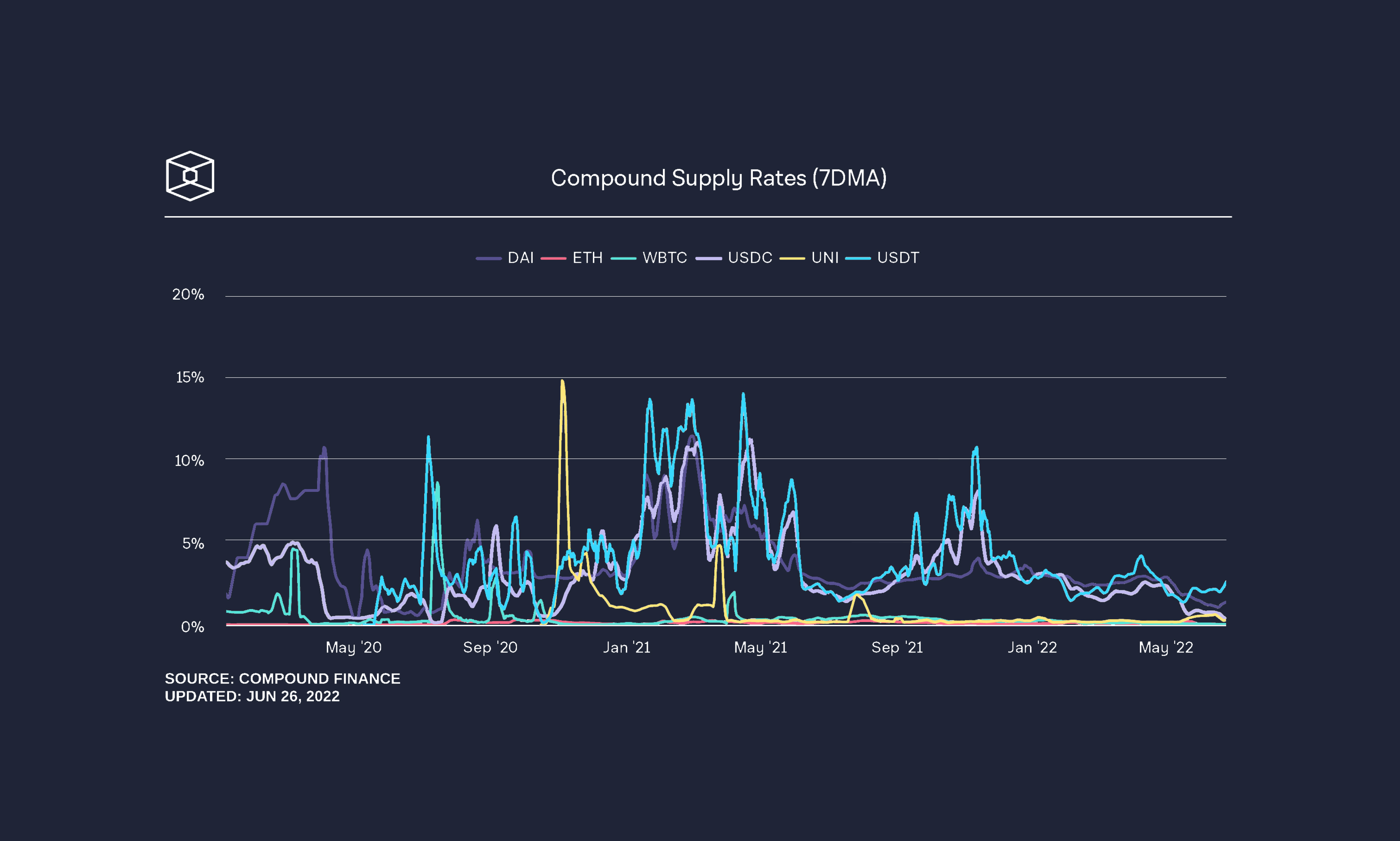
.png)
.png)
.png)